Preparing your learning space...
13% through Security for FDEs tutorials
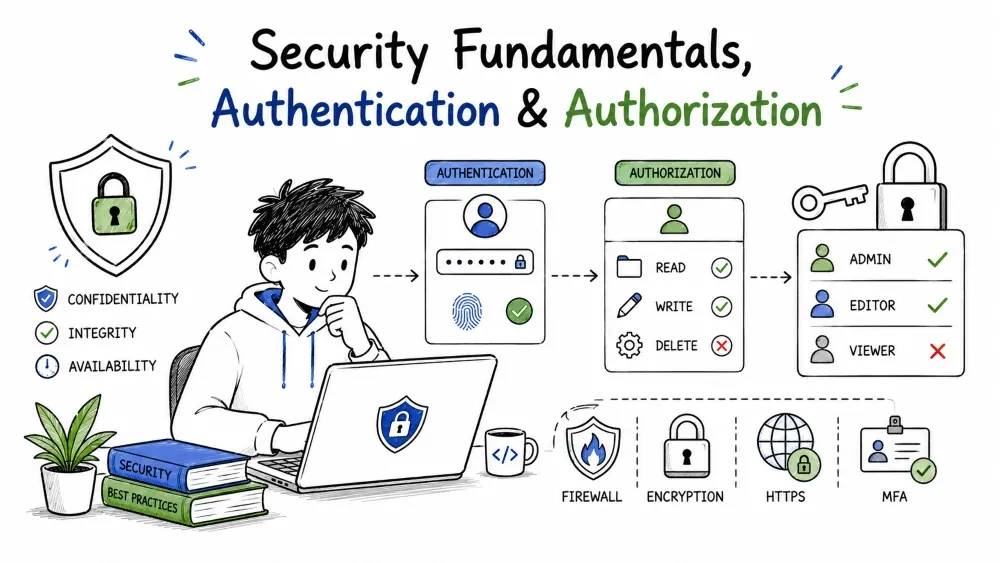
Security is the art of making sure the right people get the right access to the right data — and that everyone else is kept out. This tutorial lays the foundation every Forward Deployed Engineer needs before touching a line of secure code: the core security model, the threat mindset, and the single most-confused distinction in the field — authenticating who you are versus authorizing what you may do.
At its simplest, security is a gate: let the right people reach the right data, and stop everyone else. Every control you'll learn in this series — encryption, validation, secrets, OAuth — is one concrete way of enforcing that gate. When you design a feature, ask "who should be able to do this, and how do I stop everyone else?" before you write any logic.
Why it is useful: many customer bugs you'll debug turn out to be a security hole — a request that should have been rejected was allowed through. Thinking in gates up front means fewer holes to patch later.
Nearly all security controls exist to protect three things, remembered as CIA:
| Pillar | What it protects | One example |
|---|---|---|
| Confidentiality | Only authorized people see the data | encryption, HTTPS, access controls |
| Integrity | Data isn't secretly changed | hashing, signatures, parameterized queries |
| Availability | The system stays up | backups, rate limiting, monitoring |
When you read "we got hacked," the damage is almost always a break of one or more of these: data leaked (confidentiality), records altered (integrity), or a service down because it was overwhelmed (availability).
Not all data needs the same protection. As an FDE building into customers' systems, you handle sensitive data — customer PII, medical/HR records, financial data — far more often than a typical engineer. Before you wire up a new data source, ask: is this personal, financial, health-related, or credential data? The answer tells you where to concentrate security effort.
Why it is useful: one leak of a customer's HR file destroys trust no feature can restore. Knowing what counts as sensitive is the first step to protecting it.
A threat model is a list of the real ways someone could harm your feature. Instead of discussing abstract "hacking," walk your actual flow and note what an attacker could touch. A simple invoice flow:
Customer submits order → create order in CRM → email invoice
  Data touched: name, email, order total
  Who may reach it: customer, your backend, the CRM
Working through the steps makes the seams obvious: the email step can be phished, the CRM API can be attacked via auth, the order input can be fed malformed data. Each step and arrow is a potential attack surface.
A trust boundary is a line between "things I control" and "things I don't." The classic FDE example: the public internet is hostile and sits outside; your backend sits inside. Every input that crosses the boundary — a request, an upload, a webhook payload — is untrusted until proven safe:
[ Attacker ] ---- request with malicious input ----→ [ Your API ] ---- DB
That request is exactly where validation must happen, because once it arrives, your code tends to trust a string from the public internet by default. Defend at the boundary.
Best Practice: treat every byte that enters your system at a boundary as hostile until explicitly confirmed good.
Give any code, user, or service the minimum access it needs — nothing more. A database user that reads one table shouldn't have admin rights; an API role that reads contacts shouldn't be able to delete them.
These two words are constantly confused, and getting them straight is the most important idea in this tutorial:
Authentication happens first, authorization after — you can't decide what someone may do until you know who they are. But they are not the same check. A system that trusts "you told me your name, so you're in" without verifying it has a gate with no door.
Authentication answers one question with evidence: prove you are who you claim. The common proofs fall into three categories, sometimes called something you know, have, or are:
| Factor | Example | Strength |
|---|---|---|
| Something you know | password, PIN | weak on its own |
| Something you have | phone, hardware key | medium |
| Something you are | fingerprint, face | medium |
Combine two of these (multi-factor) and an account resists even a stolen password.
Code example — a function that only authenticates, no authorization yet:
import hashlib

# in reality the salt and hash live in your database, not in code
STORED = {"alice": {"salt": "s3cr3t", "hash": "9f8a..."}}

def authenticate(username, password):
    rec = STORED.get(username)
    if not rec:
        return None                                # user unknown
    hashed = hashlib.sha256((rec["salt"] + password).encode()).hexdigest()
    return username if hashed == rec["hash"] else None
Explanation: this function answers "who are you?". It checks the password against a stored hash and returns the username when correct, or None when not. It never answers "what may you do?" — that's the next section.
Authorization answers "what may this identity do?" and is enforced after authentication decides who you are. It's a permission check, not an identity check. The classic building blocks are roles and per-resource ownership.
No FDE security lesson is complete without this rule: when serving a resource, make sure the requester is allowed to touch that exact resource — not just that they're logged in. The failure to do this is called IDOR (Insecure Direct Object Reference) and is one of the most common data leaks:
def get_invoice(requesting_user, invoice_id, OWNERS):
    allowed = OWNERS.get(invoice_id, set())       # who may see this invoice?
    if requesting_user not in allowed:
        raise PermissionError("not permitted")
    return fetch_invoice(invoice_id)
Explanation: both requesting_user and invoice_id come from the request. If the code checked only that the user was logged in (not that they own this invoice), any authenticated user could pass someone else's invoice_id and read it. Checking ownership is the authorization gate.
A real request runs them in sequence — prove identity, then check permission, then check ownership:
def handle_invoice(user, token, invoice_id, roles, privileges):
    if authenticate(user, token) is None:         # 1. who are they?
        return 401                              # not authenticated
    if "finance" not in roles.get(user, []):    # 2. may this role act?
        return 403                              # authenticated but denied
    if user not in privileges.get(invoice_id, set()):  # 3. is it theirs?
        return 403                              # authenticated but wrong owner
    return 200, fetch_invoice(invoice_id)       # 4. grant access
Explanation: the request first proves identity, then checks the role, then checks ownership of the exact resource. Skipping step 3 — the ownership check — is how a "logged in" leak across customers happens. Each step returns a different status code so debugging the cause is easy: 401 says identity, 403 says permission.
401/403 so an attacker can't learn whether an email exists (an "account-enumeration" leak).Save your progress and earn XP for completing tutorials.
4 questions · Pass with 70%+
1Authentication answers which question?
2A "logged-in" user reads another customer's invoice by passing their id. Which control was missing?
3Changing a password field's trailing spaces is blocked by which CIA pillar?
4Least privilege means…
Technology
Forward Deployed Engineer
Lesson group
Security for FDEs
Progress
13% complete

