Preparing your learning space...
100% through Triggers tutorials
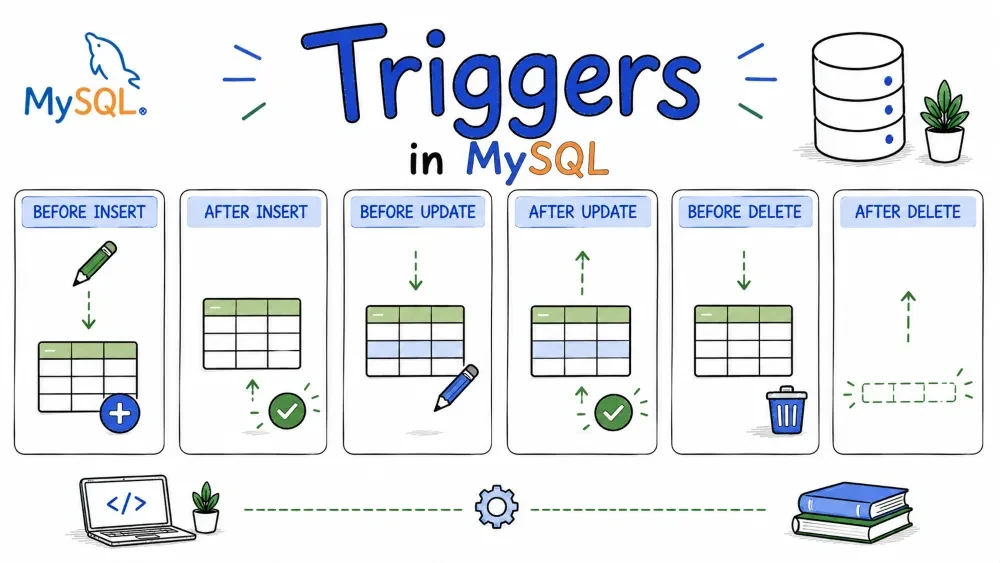
A trigger is a block of SQL that runs automatically when something happens to a table — an insert, update, or delete. It lets you put business logic directly inside the database so you don't have to rely on your application code to do it.
CREATE TRIGGER trigger_name
    {BEFORE | AFTER} {INSERT | UPDATE | DELETE}
    ON table_name
    FOR EACH ROW
BEGIN
    -- your logic here
END;
A few things specific to MySQL:
FOR EACH ROW is supported. MySQL doesn't have FOR EACH STATEMENT like PostgreSQL does.log_changes on two different tables in the same database.OLD is always read-only. You can look at it, but you can never change it.NEW can be modified — but only inside BEFORE triggers. In AFTER triggers it's read-only.TRIGGER privilege to create or drop triggers.This is one of those small things that trips everyone up when they start writing triggers in MySQL.
MySQL uses ; to mark the end of a statement. But your trigger body might have multiple statements, each ending with ;. So MySQL sees the first semicolon inside your trigger and thinks "okay, CREATE TRIGGER is done" — and throws an error.
The fix is simple. Tell MySQL to temporarily use a different delimiter.
DELIMITER $$

CREATE TRIGGER trigger_name
    BEFORE INSERT ON table_name
    FOR EACH ROW
BEGIN
    -- statement one;
    -- statement two;
END$$

DELIMITER ;
Notice END$$ instead of END;. Once the trigger is created, you switch the delimiter back to ;.
You'll forget to do this at least once. It happens to everyone.
If you're using MySQL Workbench or TablePlus, their trigger editors handle this for you. But if you're writing raw SQL in the CLI, you need DELIMITER.
Runs right before a new row gets inserted. You can still modify the data at this point — clean it up, add default values, whatever you need.
DELIMITER $$

CREATE TRIGGER before_insert_user
    BEFORE INSERT ON users
    FOR EACH ROW
BEGIN
    -- Auto-set created_at if it's missing
    IF NEW.created_at IS NULL THEN
        SET NEW.created_at = NOW();
    END IF;

    -- Make sure email is lowercase so you don't get duplicates later
    SET NEW.email = LOWER(NEW.email);
END$$

DELIMITER ;
Two things happening here. First, if nobody set created_at, fill it with the current timestamp. Second, force the email to lowercase so "John@Example.com" and "john@example.com" don't end up as two separate records.
Runs after the new row is already in the table. At this point NEW is read-only — you can't change the data anymore, but you can still read it.
Use this for logging or updating other tables based on what was just inserted.
DELIMITER $$

CREATE TRIGGER after_insert_user
    AFTER INSERT ON users
    FOR EACH ROW
BEGIN
    INSERT INTO audit_log (action, table_name, record_id, timestamp)
    VALUES ('INSERT', 'users', NEW.id, NOW());
END$$

DELIMITER ;
Every time a new user is created, a log entry shows up automatically. No extra code needed in the application.
Runs before a row gets updated. You have both OLD (the current values) and NEW (the values about to be saved). You can modify NEW here, or cancel the update entirely.
DELIMITER $$

CREATE TRIGGER before_update_user
    BEFORE UPDATE ON users
    FOR EACH ROW
BEGIN
    -- Track when this row was last changed
    SET NEW.modified_at = NOW();

    -- Don't allow empty emails
    IF NEW.email = '' THEN
        SIGNAL SQLSTATE '45000'
            SET MESSAGE_TEXT = 'Email cannot be empty';
    END IF;
END$$

DELIMITER ;
SIGNAL SQLSTATE '45000' is how MySQL throws an error. It stops the current operation and shows your message. Other databases have their own ways of doing this.
Runs after the row has been updated. NEW and OLD are both available here, and both are read-only.
The main use case is logging — you can compare what changed and record it.
DELIMITER $$

CREATE TRIGGER after_update_user
    AFTER UPDATE ON users
    FOR EACH ROW
BEGIN
    INSERT INTO audit_log (action, table_name, record_id, old_value, new_value, timestamp)
    VALUES ('UPDATE', 'users', NEW.id,
            CONCAT('email was: ', OLD.email),
            CONCAT('email now: ', NEW.email),
            NOW());
END$$

DELIMITER ;
OLD has the values before the update. NEW has the values after.
Runs before a row gets deleted. You still have access to all the data in that row through OLD. You can either save it somewhere or stop the deletion.
DELIMITER $$

CREATE TRIGGER before_delete_user
    BEFORE DELETE ON users
    FOR EACH ROW
BEGIN
    -- Don't let anyone delete admin accounts
    IF OLD.role = 'admin' THEN
        SIGNAL SQLSTATE '45000'
            SET MESSAGE_TEXT = 'Cannot delete admin users';
    END IF;

    -- Back up the data before it's gone
    INSERT INTO users_deleted (id, name, email, deleted_at)
    VALUES (OLD.id, OLD.name, OLD.email, NOW());
END$$

DELIMITER ;
Two things: if someone tries to delete an admin, block it with an error. Otherwise, save a copy before deleting.
Runs after the row is gone. OLD still has the deleted row's data — this is the last time you can read it.
Good for cleaning up related records or logging the deletion.
DELIMITER $$

CREATE TRIGGER after_delete_user
    AFTER DELETE ON users
    FOR EACH ROW
BEGIN
    -- Clean up their sessions
    DELETE FROM user_sessions WHERE user_id = OLD.id;

    -- Log it
    INSERT INTO audit_log (action, table_name, record_id, timestamp)
    VALUES ('DELETE', 'users', OLD.id, NOW());
END$$

DELIMITER ;
Once this trigger finishes, that OLD data is gone for good.
List all triggers:
SHOW TRIGGERS;
For a specific table:
SHOW TRIGGERS WHERE `Table` = 'users';
Query trigger metadata for more control:
SELECT TRIGGER_NAME, EVENT_MANIPULATION, ACTION_TIMING, STATUS
FROM information_schema.TRIGGERS
WHERE TRIGGER_SCHEMA = 'your_database_name';
Remove a trigger:
DROP TRIGGER IF EXISTS schema_name.before_insert_user;
If you leave out the schema name, it drops from the current database.
Things to watch out for:
FOLLOWS or PRECEDES to control execution order:
CREATE TRIGGER trigger_a
    BEFORE INSERT ON users
    FOR EACH ROW
FOLLOWS before_insert_user
BEGIN
    -- this runs after before_insert_user
END;
max_sp_recursion_depth, but it's not fun to debug.SIGNAL, the whole transaction rolls back.This sets up automatic logging for a products table. Works in MySQL 8.0+ (uses JSON_OBJECT).
-- Create the tables first
CREATE TABLE products (
    id INT AUTO_INCREMENT PRIMARY KEY,
    name VARCHAR(100),
    price DECIMAL(10,2),
    stock INT,
    updated_at TIMESTAMP
);

CREATE TABLE product_audit (
    id INT AUTO_INCREMENT PRIMARY KEY,
    action VARCHAR(10),
    product_id INT,
    old_data JSON,
    new_data JSON,
    changed_at TIMESTAMP DEFAULT CURRENT_TIMESTAMP
);

-- Now the triggers
DELIMITER $$

-- Set timestamp when a product is created
CREATE TRIGGER bi_products
    BEFORE INSERT ON products
    FOR EACH ROW
BEGIN
    SET NEW.updated_at = NOW();
END$$

-- Log new products
CREATE TRIGGER ai_products
    AFTER INSERT ON products
    FOR EACH ROW
BEGIN
    INSERT INTO product_audit (action, product_id, new_data)
    VALUES ('INSERT', NEW.id,
            JSON_OBJECT('name', NEW.name, 'price', NEW.price, 'stock', NEW.stock));
END$$

-- Update timestamp and prevent negative stock
CREATE TRIGGER bu_products
    BEFORE UPDATE ON products
    FOR EACH ROW
BEGIN
    SET NEW.updated_at = NOW();
    IF NEW.stock < 0 THEN
        SIGNAL SQLSTATE '45000'
            SET MESSAGE_TEXT = 'Stock cannot be negative';
    END IF;
END$$

-- Log what changed during an update
CREATE TRIGGER au_products
    AFTER UPDATE ON products
    FOR EACH ROW
BEGIN
    INSERT INTO product_audit (action, product_id, old_data, new_data)
    VALUES ('UPDATE', NEW.id,
            JSON_OBJECT('name', OLD.name, 'price', OLD.price, 'stock', OLD.stock),
            JSON_OBJECT('name', NEW.name, 'price', NEW.price, 'stock', NEW.stock));
END$$

-- Save product data before deletion
CREATE TRIGGER bd_products
    BEFORE DELETE ON products
    FOR EACH ROW
BEGIN
    INSERT INTO product_audit (action, product_id, old_data)
    VALUES ('DELETE', OLD.id,
            JSON_OBJECT('name', OLD.name, 'price', OLD.price, 'stock', OLD.stock));
END$$

DELIMITER ;
That's it. Every change to products now goes into product_audit automatically. Your application doesn't need to know about it.
Save your progress and earn XP for completing tutorials.
Keep learning
Technology
MySQL
Lesson group
Triggers
Progress
100% complete

