Preparing your learning space...
100% through Database Design tutorials
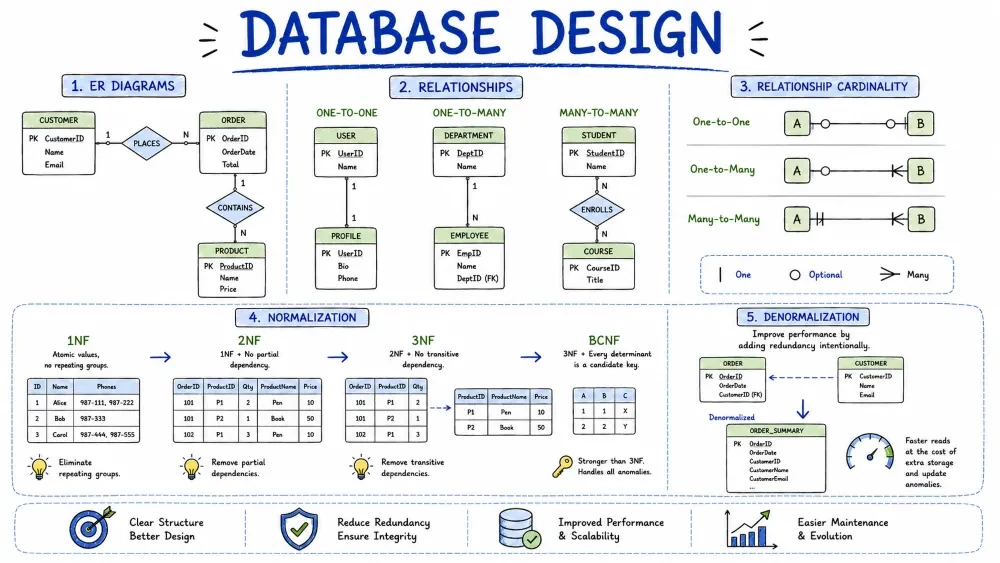
Database design is the step before writing CREATE TABLE statements. You decide what tables exist, how they connect, and where each piece of data lives. This tutorial covers planning with ER diagrams, the three relationship types and how to build them, normalization to remove duplication, and when to break the rules with denormalization.
All examples assume MySQL 8. You should already be comfortable with primary keys, foreign keys, and joins (see the Keys and Constraints tutorials).
An Entity-Relationship (ER) diagram is a drawing of your data before it exists as tables. Entities are the things you store data about, attributes are their properties, and the lines between them are relationships.
customers).name, email).Drawing this first is cheap. A mistake in a diagram takes seconds to fix; the same mistake in real tables means ALTER TABLE commands or a rebuild. For an online shop it might look like this:
erDiagram
    CUSTOMER ||--o{ ORDER : places
    ORDER ||--|{ ORDER_ITEM : contains
    PRODUCT ||--o{ ORDER_ITEM : includes
    CUSTOMER ||--o| USER_PROFILE : has
Read the symbols in the middle:
|| — exactly oneo{ — zero or more|{ — one or moreo| — zero or oneSo CUSTOMER ||--o{ ORDER reads "one customer places zero or more orders". Those three shapes — one, many, and many-to-many — are exactly the relationship types covered next.
There is no RELATIONSHIP keyword in MySQL. You build a relationship by pointing one table's column at another table's primary key — a foreign key. Which table gets the foreign key depends on the type of relationship.
Each row in table A matches at most one row in table B, and vice versa. One-to-one relationships are rare because you can usually just put the columns in the same table. You split a table when some columns are rarely used, hold sensitive data, or are large.
Implementation: give the child table the parent's primary key as its own primary key and foreign key.
CREATE TABLE customers (
  id INT PRIMARY KEY AUTO_INCREMENT,
  email VARCHAR(100) NOT NULL
);

CREATE TABLE user_profiles (
  customer_id INT PRIMARY KEY,           -- same value as customers.id
  avatar_url VARCHAR(255),
  bio TEXT,
  CONSTRAINT fk_profile_customer FOREIGN KEY (customer_id) REFERENCES customers(id)
);
customer_id is the primary key of user_profiles, so each customer can have at most one profile.
As an ER diagram:
erDiagram
    CUSTOMERS ||--o| USER_PROFILES : has

    CUSTOMERS {
        int id PK
        varchar email
    }
    USER_PROFILES {
        int customer_id PK, FK
        varchar avatar_url
        text bio
    }
customer_id carries both the PK and FK markers — the same value links the two rows in both directions.
The most common relationship. One row in table A matches many rows in table B, but each row in B belongs to exactly one row in A. A customer has many orders; each order belongs to one customer.
Implementation: add a foreign key column to the "many" side (the child table).
CREATE TABLE customers (
  id INT PRIMARY KEY AUTO_INCREMENT,
  name VARCHAR(100) NOT NULL
);

CREATE TABLE orders (
  id INT PRIMARY KEY AUTO_INCREMENT,
  customer_id INT NOT NULL,
  order_date DATE DEFAULT (CURRENT_DATE),
  CONSTRAINT fk_order_customer FOREIGN KEY (customer_id) REFERENCES customers(id)
);
The foreign key on orders.customer_id is what makes this a one-to-many. Nothing stops you from inserting many orders with the same customer_id, and the constraint guarantees the customer exists.
As an ER diagram:
erDiagram
    CUSTOMERS ||--o{ ORDERS : places

    CUSTOMERS {
        int id PK
        varchar name
    }
    ORDERS {
        int id PK
        int customer_id FK
        date order_date
    }
Rows on both sides match many rows on the other side. An order contains many products, and a product appears in many orders. A single foreign key column can't express this.
Implementation: create a junction table holding both foreign keys. Its primary key is usually the two foreign key columns combined, which also prevents duplicate rows.
CREATE TABLE products (
  id INT PRIMARY KEY AUTO_INCREMENT,
  name VARCHAR(100) NOT NULL,
  price DECIMAL(10,2) NOT NULL
);

CREATE TABLE order_items (
  order_id INT,
  product_id INT,
  quantity INT NOT NULL DEFAULT 1,
  PRIMARY KEY (order_id, product_id),
  CONSTRAINT fk_item_order FOREIGN KEY (order_id) REFERENCES orders(id),
  CONSTRAINT fk_item_product FOREIGN KEY (product_id) REFERENCES products(id)
);
The junction table can carry extra columns about the relationship itself, like quantity here. To read a many-to-many back out you join through it:
SELECT o.id, p.name, oi.quantity
FROM orders o
JOIN order_items oi ON oi.order_id = o.id
JOIN products p ON p.id = oi.product_id
WHERE o.id = 3;
As an ER diagram, the junction table sits in the middle and is related to both sides:
erDiagram
    ORDERS ||--o{ ORDER_ITEMS : contains
    PRODUCTS ||--o{ ORDER_ITEMS : includes

    ORDERS {
        int id PK
        int customer_id FK
        date order_date
    }
    ORDER_ITEMS {
        int order_id PK, FK
        int product_id PK, FK
        int quantity
    }
    PRODUCTS {
        int id PK
        varchar name
        decimal price
    }
Normalization is the process of removing duplicated data so each fact is stored in exactly one place. Less duplication means you update one row instead of fifty, and you can't get rows out of sync with each other.
The normal forms are a ladder: to reach 2NF you must already be in 1NF, and so on. Most real schemas stop at 3NF. To see why, start with a badly designed table:
CREATE TABLE orders_raw (
  order_id INT,
  customer VARCHAR(100),
  product VARCHAR(100),
  price DECIMAL(10,2),
  quantity INT
);
Three rules:
"t-shirt, cap".product_1, product_2, product_3.This table violates 1NF in two ways. One row lists several products in a single cell, and order_id alone isn't a unique key:
order_id  customer  products
1         Ada       t-shirt, cap
2         Grace     mug
As a diagram, the products column is a single cell holding a list, and there is no primary key:
erDiagram
    %% products holds "t-shirt, cap" in one cell; no primary key
    ORDERS_RAW {
        int order_id
        varchar customer
        varchar products
    }
Fix it by putting one product per row and adding a composite primary key:
CREATE TABLE orders_raw (
  order_id INT,
  customer VARCHAR(100),
  product VARCHAR(100),
  price DECIMAL(10,2),
  quantity INT,
  PRIMARY KEY (order_id, product)
);

INSERT INTO orders_raw VALUES
(1, 'Ada',   't-shirt', 15.00, 1),
(1, 'Ada',   'cap',      8.00, 1),
(2, 'Grace', 'mug',      6.50, 1);
Now every cell is atomic and every row is unique. The key is composite, which sets up the next form:
erDiagram
    ORDERS_RAW {
        int order_id PK
        varchar customer
        varchar product PK
        decimal price
        int quantity
    }
A table is in 2NF if it is in 1NF and every non-key column depends on the whole primary key — not just part of it. This only matters when your key is composite.
In orders_raw the key is (order_id, product), but customer depends only on order_id. That is a partial dependency: change Ada's name and you must update every row where she appears.
erDiagram
    %% customer depends only on order_id, not the whole key
    ORDERS_RAW {
        int order_id PK
        varchar customer
        varchar product PK
        decimal price
        int quantity
    }
Fix: move the partially-dependent columns into their own tables.
CREATE TABLE customers (
  id INT PRIMARY KEY AUTO_INCREMENT,
  name VARCHAR(100) NOT NULL
);

CREATE TABLE orders (
  id INT PRIMARY KEY AUTO_INCREMENT,
  customer_id INT NOT NULL,
  CONSTRAINT fk_order_customer FOREIGN KEY (customer_id) REFERENCES customers(id)
);

CREATE TABLE order_items (
  order_id INT,
  product VARCHAR(100),
  price DECIMAL(10,2),       -- price at the time of the order
  quantity INT NOT NULL,
  PRIMARY KEY (order_id, product)
);
Each column now depends on the entire key: price and quantity describe an item in an order, and customer_id describes the order. A customer's name is stored once.
erDiagram
    CUSTOMERS ||--o{ ORDERS : has
    ORDERS ||--o{ ORDER_ITEMS : contains

    CUSTOMERS {
        int id PK
        varchar name
    }
    ORDERS {
        int id PK
        int customer_id FK
    }
    ORDER_ITEMS {
        int order_id PK, FK
        varchar product PK
        decimal price
        int quantity
    }
A table is in 3NF if it is in 2NF and no non-key column depends on another non-key column. This is called a transitive dependency, because the value travels through a middleman.
Add a zip and city column to customers and the problem appears:
id → zip (the key determines the zip code)zip → city (the zip code determines the city)city doesn't depend on the key at all — it depends on zip. If the ZIP code for a town changes, you update many rows, and a typo can make the same city spell different ways.
erDiagram
    %% city depends on zip, not on the primary key
    CUSTOMERS {
        int id PK
        varchar name
        varchar zip
        varchar city
    }
Fix: move the middleman into its own table and reference it.
CREATE TABLE zipcodes (
  zip VARCHAR(10) PRIMARY KEY,
  city VARCHAR(50) NOT NULL
);

CREATE TABLE customers (
  id INT PRIMARY KEY AUTO_INCREMENT,
  name VARCHAR(100) NOT NULL,
  zip VARCHAR(10),
  CONSTRAINT fk_customer_zip FOREIGN KEY (zip) REFERENCES zipcodes(zip)
);
The city is now stored once per zip code instead of once per customer.
erDiagram
    ZIPCODES ||--o{ CUSTOMERS : has

    ZIPCODES {
        varchar zip PK
        varchar city
    }
    CUSTOMERS {
        int id PK
        varchar name
        varchar zip FK
    }
BCNF is a stricter version of 3NF: for every dependency, the left side must be a full key. It catches a rare case where 3NF still allows a non-key column to determine part of the key. In practice few designs hit this, but it's worth recognizing.
Example: a table assigning a mentor to each course in a term.
(course, term) → mentor.mentor → course.The candidate keys are (course, term) and (mentor, term), so both course and mentor are part of some key. That satisfies 3NF. But mentor determines course while mentor alone is not a key, so BCNF is violated.
erDiagram
    %% mentor -> course, yet mentor alone is not a key
    ASSIGNMENTS {
        varchar mentor PK
        varchar term PK
        varchar course
    }
Fix: split into two tables.
CREATE TABLE courses (
  mentor VARCHAR(50) PRIMARY KEY,
  course VARCHAR(50) NOT NULL
);

CREATE TABLE assignments (
  mentor VARCHAR(50),
  term VARCHAR(20) NOT NULL,
  PRIMARY KEY (mentor, term),
  CONSTRAINT fk_assignment_mentor FOREIGN KEY (mentor) REFERENCES courses(mentor)
);
Now every dependency's left side is a key. The practical lesson: after 3NF, if you still see a column determining another column that isn't the primary key, keep splitting.
erDiagram
    COURSES ||--o{ ASSIGNMENTS : has

    COURSES {
        varchar mentor PK
        varchar course
    }
    ASSIGNMENTS {
        varchar mentor PK, FK
        varchar term PK
    }
Denormalization is deliberately adding duplication back to make reads faster. Normalization spreads data across tables, and every spread adds a join. On a big table, joining four tables on every query is expensive.
When to use it:
The classic example: an orders.total column that normally would be computed by summing order_items.
ALTER TABLE orders ADD COLUMN total DECIMAL(12,2) DEFAULT 0;

-- Recompute it for every order
UPDATE orders o
SET o.total = (
  SELECT SUM(oi.quantity * oi.price)
  FROM order_items oi
  WHERE oi.order_id = o.id
);
Now a report reads orders.total directly instead of summing thousands of item rows. The risk is that the copy goes stale: if anyone edits order_items without recomputing total, the numbers lie. The usual mitigations are a trigger that refreshes total on every item change, or a nightly batch job.
flowchart LR
    OI["order_items rows"] -->|"SUM(quantity * price)"| T["orders.total"]
orders.total is a copy of a value that could be derived from order_items — that copy is the denormalization.
The rule of thumb: start with a normalized design, and denormalize only after you measure a real slow query — never pre-emptively.
Here is the shop built up through this tutorial as one schema. It uses every idea covered: composite keys, a junction table, a 1:1 profile table, a snapshot price, and one deliberately denormalized column (orders.total).
As an ER diagram, the whole design looks like this:
erDiagram
    ZIPCODES ||--o{ CUSTOMERS : has
    CUSTOMERS ||--o| USER_PROFILES : has
    CUSTOMERS ||--o{ ORDERS : places
    ORDERS ||--o{ ORDER_ITEMS : contains
    PRODUCTS ||--o{ ORDER_ITEMS : includes

    ZIPCODES {
        varchar zip PK
        varchar city
    }
    CUSTOMERS {
        int id PK
        varchar name
        varchar email
        varchar zip FK
    }
    USER_PROFILES {
        int customer_id PK, FK
        varchar avatar_url
        text bio
    }
    ORDERS {
        int id PK
        int customer_id FK
        date order_date
        decimal total
    }
    PRODUCTS {
        int id PK
        varchar name
        decimal price
    }
    ORDER_ITEMS {
        int order_id PK, FK
        int product_id PK, FK
        int quantity
        decimal price
    }
And here is the same design in SQL:
CREATE TABLE zipcodes (
  zip VARCHAR(10) PRIMARY KEY,
  city VARCHAR(50) NOT NULL
);

CREATE TABLE customers (
  id INT PRIMARY KEY AUTO_INCREMENT,
  name VARCHAR(100) NOT NULL,
  email VARCHAR(100) UNIQUE,
  zip VARCHAR(10),
  CONSTRAINT fk_customer_zip FOREIGN KEY (zip) REFERENCES zipcodes(zip)
);

CREATE TABLE user_profiles (
  customer_id INT PRIMARY KEY,          -- 1:1 with customers
  avatar_url VARCHAR(255),
  bio TEXT,
  CONSTRAINT fk_profile_customer FOREIGN KEY (customer_id) REFERENCES customers(id)
);

CREATE TABLE orders (
  id INT PRIMARY KEY AUTO_INCREMENT,
  customer_id INT NOT NULL,             -- 1:M with customers
  order_date DATE DEFAULT (CURRENT_DATE),
  total DECIMAL(12,2) DEFAULT 0,        -- denormalized, refreshed by a trigger
  CONSTRAINT fk_order_customer FOREIGN KEY (customer_id) REFERENCES customers(id)
);

CREATE TABLE products (
  id INT PRIMARY KEY AUTO_INCREMENT,
  name VARCHAR(100) NOT NULL,
  price DECIMAL(10,2) NOT NULL
);

CREATE TABLE order_items (
  order_id INT,                         -- M:N between orders and products
  product_id INT,
  quantity INT NOT NULL DEFAULT 1,
  price DECIMAL(10,2) NOT NULL,         -- price snapshot from the order date
  PRIMARY KEY (order_id, product_id),
  CONSTRAINT fk_item_order FOREIGN KEY (order_id) REFERENCES orders(id),
  CONSTRAINT fk_item_product FOREIGN KEY (product_id) REFERENCES products(id)
);
The relationships this schema expresses: customers to orders is one-to-many, orders to products is many-to-many through order_items, and customers to user_profiles is one-to-one.
Save your progress and earn XP for completing tutorials.
Keep learning
Technology
MySQL
Lesson group
Database Design
Progress
100% complete

