Preparing your learning space...
100% through Filtering Data tutorials
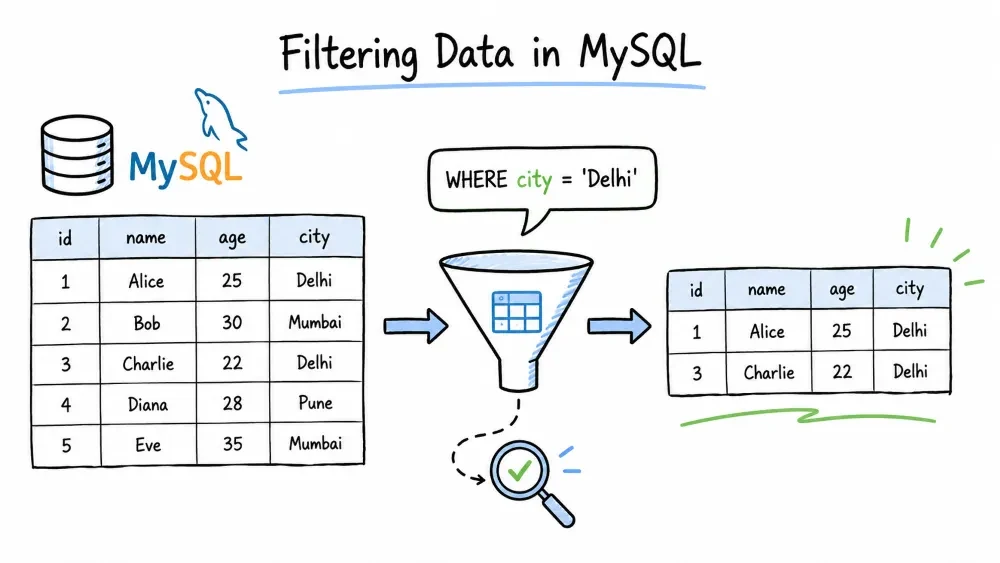
Learn how to retrieve only the data you need using SQL filtering techniques — from basic conditions to advanced pattern matching and subquery filters.
The WHERE clause filters rows before they are returned. Only rows that satisfy the condition are included in the result.
Syntax
SELECT column1, column2
FROM table_name
WHERE condition;
Example
SELECT *
FROM employees
WHERE department = 'Engineering';
Returns only employees in the Engineering department.
Comparison operators let you compare a column value against a specific value or expression.
| Operator | Meaning |
|---|---|
= | Equal to |
<> or != | Not equal to |
> | Greater than |
< | Less than |
>= | Greater than or equal to |
<= | Less than or equal to |
<=> | NULL-safe equal (returns TRUE even if both operands are NULL) |
Example
SELECT name, salary
FROM employees
WHERE salary > 75000;
Returns employees earning more than 75,000.
Example — combined in a query
SELECT product_name, price, stock
FROM products
WHERE price <= 20.00;
Combine multiple conditions in a single WHERE clause.
AND — all conditions must be trueOR — at least one condition must be trueNOT — negates a conditionExample — AND
SELECT *
FROM employees
WHERE department = 'Engineering'
  AND salary > 80000;
Engineering staff earning above 80,000.
Example — OR
SELECT *
FROM employees
WHERE department = 'Engineering'
   OR department = 'Sales';
Employees who work in Engineering or Sales.
Example — NOT
SELECT *
FROM products
WHERE NOT category = 'Electronics';
All products except those in Electronics.
Operator Precedence
NOT > AND > OR. Use parentheses to make order explicit.
SELECT *
FROM employees
WHERE (department = 'Engineering' OR department = 'Sales')
  AND salary > 70000;
BETWEEN checks whether a value falls within a range (inclusive of both boundaries).
SELECT *
FROM orders
WHERE order_date BETWEEN '2024-01-01' AND '2024-12-31';
Orders placed in the year 2024.
This is shorthand for:
SELECT *
FROM orders
WHERE order_date >= '2024-01-01' AND order_date <= '2024-12-31';
Example — numbers
SELECT name, price
FROM products
WHERE price BETWEEN 10 AND 50;
Works with dates, numbers, and even text (alphabetical range).
IN checks if a value matches any value in a list. Cleaner than writing multiple OR conditions.
SELECT name, department
FROM employees
WHERE department IN ('Engineering', 'Sales', 'Marketing');
Equivalent to:
WHERE department = 'Engineering'
   OR department = 'Sales'
   OR department = 'Marketing';
NOT IN
SELECT name, department
FROM employees
WHERE department NOT IN ('HR', 'Finance');
Employees who are not in HR or Finance.
The list can contain numbers, strings, or even dates. Keep in mind that NOT IN can behave unexpectedly if the list contains NULL — the entire condition becomes unknown (no rows returned).
LIKE is used for pattern matching on text. It works with two wildcards:
% — matches any sequence of characters (zero or more)_ — matches exactly one character| Pattern | Matches |
|---|---|
'J%' | Starts with J |
'%son' | Ends with "son" |
'%am%' | Contains "am" anywhere |
'J_hn' | J, any one char, hn (John, Jahn) |
'_at%' | Any char + "at" at start |
Examples
-- Names that start with J
SELECT name FROM employees WHERE name LIKE 'J%';

-- Names that end with "son"
SELECT name FROM employees WHERE name LIKE '%son';

-- Names containing "am"
SELECT name FROM employees WHERE name LIKE '%am%';

-- Emails from gmail
SELECT email FROM users WHERE email LIKE '%@gmail.com';

-- Four-letter names starting with J
SELECT name FROM employees WHERE name LIKE 'J___';
LIKE is case-insensitive by default in MySQL (depends on the column's collation, but the default utf8mb4_general_ci is case-insensitive).
REGEXP (alias RLIKE) gives you regular expression pattern matching — far more powerful than LIKE when you need complex patterns.
SELECT name
FROM employees
WHERE name REGEXP '^J.*n$';
Names starting with J and ending with n.
| Pattern | Meaning |
|---|---|
^ | Start of string |
$ | End of string |
[abc] | Any single char in the set |
[a-z] | Any char in the range |
[^abc] | Any char NOT in the set |
.* | Zero or more of any character |
| ` | ` |
Examples
-- Starts with J or M
SELECT name FROM employees WHERE name REGEXP '^[JM]';

-- Contains a digit
SELECT name FROM users WHERE username REGEXP '[0-9]';

-- Ends with .com or .org
SELECT email FROM users WHERE email REGEXP '\\.(com|org)$';

-- Names that are exactly 5 letters
SELECT name FROM employees WHERE name REGEXP '^[a-zA-Z]{5}$';
MySQL 8.0+ uses the ICU regular expression engine (full Unicode support). Older versions used Henry Spencer's regex — mostly compatible, but ICU supports more advanced features like lookahead and named groups.
NULL means no value — not zero, not an empty string, nothing. You cannot compare NULL with = or <>. Use IS NULL / IS NOT NULL instead.
-- Find rows with missing values
SELECT *
FROM employees
WHERE department IS NULL;

-- Find rows that have a value
SELECT *
FROM employees
WHERE department IS NOT NULL;
Example — common use case
SELECT name, email
FROM users
WHERE email IS NOT NULL;
Returns only users who provided an email address.
A common mistake
-- Wrong: will NOT work
SELECT * FROM employees WHERE department = NULL;

-- Correct
SELECT * FROM employees WHERE department IS NULL;
NULL is not equal to anything, not even another NULL. NULL = NULL evaluates to UNKNOWN, not TRUE.
EXISTS checks whether a subquery returns any rows. It returns TRUE if the subquery has at least one row.
Useful when you need to filter based on data in another table.
SELECT name
FROM employees e
WHERE EXISTS (
    SELECT 1
    FROM orders o
    WHERE o.employee_id = e.id
);
Employees who have placed at least one order.
The subquery can return anything — SELECT 1, SELECT *, it doesn't matter. EXISTS only cares about the presence of rows.
NOT EXISTS — the opposite
SELECT name
FROM employees e
WHERE NOT EXISTS (
    SELECT 1
    FROM orders o
    WHERE o.employee_id = e.id
);
Employees who have never placed an order.
Performance tip: EXISTS is often faster than IN when the subquery is large, because MySQL stops scanning as soon as it finds the first match. MySQL also optimizes EXISTS by performing a semi-join internally in many cases.
ANY and ALL compare a value against a list of values returned by a subquery.
ANY — true if the comparison is true for at least one value in the listALL — true if the comparison is true for every value in the listThey work with comparison operators: =, >, <, >=, <=, <>.
ANY
SELECT name, salary
FROM employees
WHERE salary > ANY (
    SELECT salary
    FROM employees
    WHERE department = 'Sales'
);
Employees who earn more than at least one person in Sales.
> ANY(...) means "greater than the minimum of the list."
ALL
SELECT name, salary
FROM employees
WHERE salary > ALL (
    SELECT salary
    FROM employees
    WHERE department = 'Sales'
);
Employees who earn more than everyone in Sales.
> ALL(...) means "greater than the maximum of the list."
Common equivalent patterns
-- These are equivalent:
WHERE salary > ANY (SELECT salary FROM ...)   -- same as: salary > MIN(...)
WHERE salary > ALL (SELECT salary FROM ...)   -- same as: salary > MAX(...)
WHERE salary = ANY (SELECT salary FROM ...)   -- same as: salary IN (...)
Example — NOT IN vs <> ALL
-- These are equivalent:
WHERE department <> ALL (SELECT department FROM ...)
WHERE department NOT IN (SELECT department FROM ...)
Save your progress and earn XP for completing tutorials.
Keep learning
Technology
MySQL
Lesson group
Filtering Data
Progress
100% complete

