Preparing your learning space...
100% through GROUP BY & HAVING tutorials
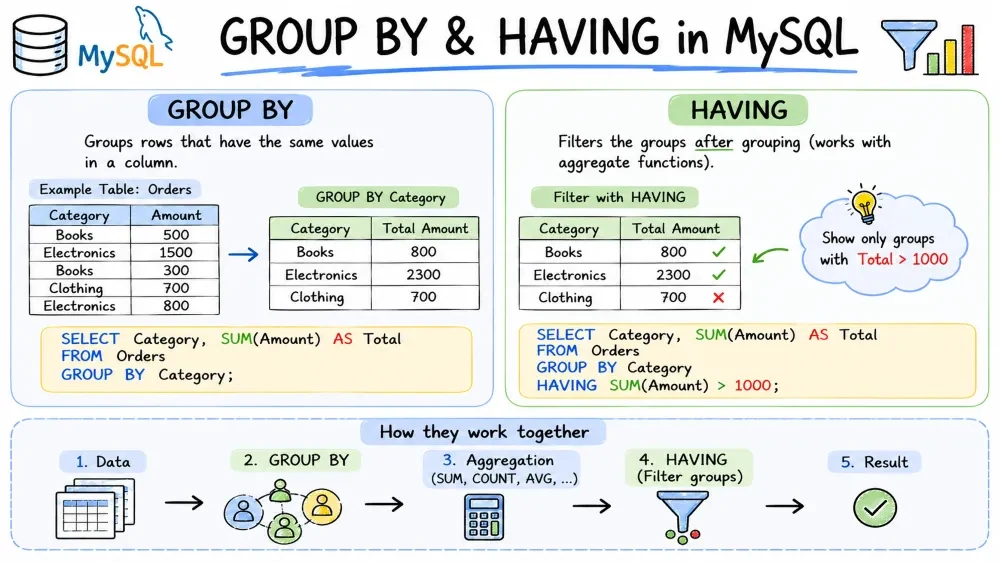
Real-world data is messy. You rarely need every raw row — you need summaries: total sales per month, number of users per country, average score per team. GROUP BY is how you ask those questions in MySQL. HAVING is how you filter the answers.
GROUP BY collapses rows that share the same value in one or more columns and lets you run aggregate functions (COUNT, SUM, AVG, MAX, MIN) on each group.
Without GROUP BY, an aggregate eats the whole table:
SELECT COUNT(*) FROM payments;
-- 1 row: total count of all payments
With GROUP BY, you get one result row per group:
SELECT status, COUNT(*) AS count
FROM payments
GROUP BY status;
| status | count |
|---|---|
| paid | 142 |
| pending | 37 |
| failed | 8 |
Syntax rules in MySQL:
SELECT must either appear in GROUP BY or be wrapped in an aggregate function.WHERE runs before grouping — it filters rows, not groups.-- Correct: status is grouped, amount is aggregated
SELECT status, SUM(amount) AS total
FROM payments
WHERE date > '2025-01-01'
GROUP BY status;
-- Wrong: amount is not aggregated and not in GROUP BY
SELECT status, amount FROM payments GROUP BY status;
MySQL is stricter than other databases depending on its sql_mode. When ONLY_FULL_GROUP_BY is enabled (it is by default in MySQL 5.7.5+), MySQL rejects any query with non-aggregated columns that aren't in GROUP BY.
-- Rejected under ONLY_FULL_GROUP_BY
SELECT status, amount FROM payments GROUP BY status;
-- ERROR 1055: Expression #2 is not in GROUP BY clause
If ONLY_FULL_GROUP_BY is disabled (older setups or relaxed config), MySQL picks an arbitrary value from the group — don't rely on this behavior. It's unpredictable and leads to bugs.
Check your current mode:
SELECT @@sql_mode;
Disable it only if you know what you're doing — and prefer to fix the query instead.
HAVING filters groups after GROUP BY runs. It does the same job as WHERE, but WHERE can't see aggregate results because it runs before grouping.
-- Find statuses with more than 50 payments
SELECT status, COUNT(*) AS count
FROM payments
GROUP BY status
HAVING COUNT(*) > 50;
| status | count |
|---|---|
| paid | 142 |
WHERE vs HAVING — when to use which:
| WHERE | HAVING |
|---|---|
| Filters rows before grouping | Filters groups after aggregation |
| Can't use aggregate functions | Can use aggregate functions (SUM, COUNT, etc.) |
| Runs first (less data to group) | Runs last |
You often use both in the same query:
SELECT status, SUM(amount) AS total
FROM payments
WHERE date > '2025-01-01'        -- rows: only this year's payments
GROUP BY status
HAVING SUM(amount) > 1000;       -- groups: only statuses over $1000
MySQL note: In HAVING, you can refer to a column alias from SELECT. This isn't standard SQL but MySQL allows it:
SELECT status, COUNT(*) AS cnt
FROM payments
GROUP BY status
HAVING cnt > 50;                 -- alias works here in MySQL
Grouping by more than one column creates nested groups — one row per unique combination.
SELECT city, status, COUNT(*) AS count
FROM payments
GROUP BY city, status
ORDER BY city, status;
| city | status | count |
|---|---|---|
| Berlin | failed | 2 |
| Berlin | paid | 45 |
| Berlin | pending | 10 |
| London | failed | 6 |
| London | paid | 97 |
| London | pending | 27 |
The column order in GROUP BY doesn't change the result, but it affects the hierarchy when used with ROLLUP. The order in ORDER BY is what controls sort order.
ROLLUP is a shortcut that adds subtotal and grand total rows to a GROUP BY result. It's part of the GROUP BY clause — no subqueries needed.
MySQL supports two syntaxes — modern GROUP BY ROLLUP (...) and the older WITH ROLLUP:
-- Modern syntax
SELECT city, status, SUM(amount) AS total
FROM payments
GROUP BY ROLLUP (city, status);

-- Equivalent older syntax (still works in MySQL)
SELECT city, status, SUM(amount) AS total
FROM payments
GROUP BY city, status WITH ROLLUP;
The output includes:
(city, status) combination (the normal detail).city (where status is NULL).city and status are NULL).| city | status | total |
|---|---|---|
| Berlin | paid | 4500 |
| Berlin | pending | 1200 |
| Berlin | failed | 300 |
| Berlin | NULL | 6000 |
| London | paid | 9800 |
| London | pending | 2300 |
| London | failed | 800 |
| London | NULL | 12900 |
| NULL | NULL | 18900 |
The NULLs in subtotal and total rows mark "all values in this column." If a real column contains NULLs, those are grouped normally — ROLLUP's extra rows won't collide because they set every rolled-up column to NULL at once.
Use COALESCE or IFNULL (MySQL shortcut) to make the output cleaner:
SELECT
  IFNULL(city, 'All cities') AS city,
  IFNULL(status, 'All statuses') AS status,
  SUM(amount) AS total
FROM payments
GROUP BY city, status WITH ROLLUP;
How the rollup hierarchy works:
ROLLUP (a, b, c) generates groups for (a, b, c), then (a, b), then (a), then () — the grand total. The hierarchy goes left to right, dropping one column at a time.
MySQL limitation: GROUP BY ROLLUP doesn't work with ORDER BY in MySQL — the sort is applied after rollup and may mix up subtotal positions. If you need a specific order, sort the result in your application code instead.
Save your progress and earn XP for completing tutorials.
Keep learning
Technology
MySQL
Lesson group
GROUP BY & HAVING
Progress
100% complete

