Preparing your learning space...
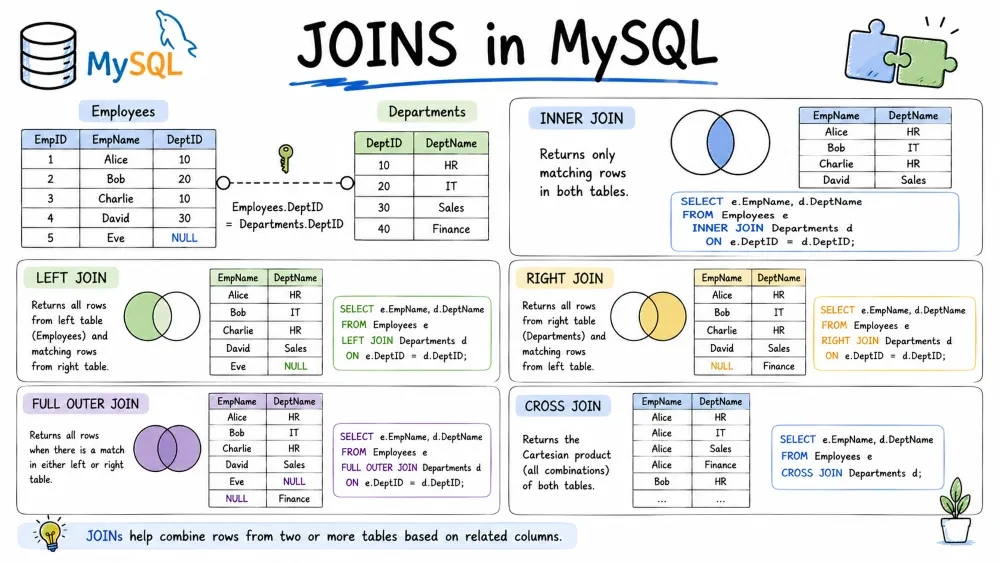
Relational databases store data across multiple tables. Joins let you bring that data back together when you query it. This tutorial covers every type of join, when to use each, and how to write them efficiently.
In a normalized database, related data lives in separate tables. Customers are in one table, orders in another. To see a customer's name next to their order, you need a join — it matches rows from two tables based on a related column (usually a foreign key).
All examples in this tutorial use these two tables:
customers
| id | name | city |
|---|---|---|
| 1 | Alice | New York |
| 2 | Bob | London |
| 3 | Charlie | Paris |
| 4 | Diana | Berlin |
orders
| id | customer_id | product | amount |
|---|---|---|---|
| 101 | 1 | Laptop | 1200 |
| 102 | 1 | Mouse | 25 |
| 103 | 2 | Keyboard | 80 |
| 104 | 4 | Monitor | 300 |
| 105 | 4 | USB Hub | 40 |
Notice:
Returns only rows where there is a match in both tables. If a row in either table has no match, it is excluded.
Use this when you only want records that exist on both sides — e.g., "show me customers who have placed orders and the orders they placed."
SELECT columns
FROM table_a
INNER JOIN table_b
ON table_a.common_column = table_b.common_column;
INNER JOIN and JOIN mean the same thing. JOIN defaults to INNER JOIN.
SELECT customers.name, orders.product, orders.amount
FROM customers
INNER JOIN orders ON customers.id = orders.customer_id;
Result:
| name | product | amount |
|---|---|---|
| Alice | Laptop | 1200 |
| Alice | Mouse | 25 |
| Bob | Keyboard | 80 |
| Diana | Monitor | 300 |
| Diana | USB Hub | 40 |
Charlie has no orders → no row in the result. An order with no matching customer → also excluded (there are none in our data).
Returns all rows from the left table, and matching rows from the right table. If there is no match in the right table, the result contains NULL for right-side columns.
Use this when you want everything from the primary table, optionally showing related data — e.g., "list all customers and their orders, even if they haven't ordered anything."
SELECT columns
FROM table_a
LEFT JOIN table_b
ON table_a.common_column = table_b.common_column;
LEFT JOIN and LEFT OUTER JOIN mean the same thing.
SELECT customers.name, orders.product, orders.amount
FROM customers
LEFT JOIN orders ON customers.id = orders.customer_id;
Result:
| name | product | amount |
|---|---|---|
| Alice | Laptop | 1200 |
| Alice | Mouse | 25 |
| Bob | Keyboard | 80 |
| Charlie | NULL | NULL |
| Diana | Monitor | 300 |
| Diana | USB Hub | 40 |
Charlie appears with NULL values because he has no matching orders.
LEFT JOIN makes it easy to find rows in one table that have no match in another.
SELECT customers.name
FROM customers
LEFT JOIN orders ON customers.id = orders.customer_id
WHERE orders.id IS NULL;
Result:
| name |
|---|
| Charlie |
This finds customers who have never placed an order: LEFT JOIN + WHERE right_table.key IS NULL.
Returns all rows from the right table, and matching rows from the left table. It is the mirror of LEFT JOIN.
In practice, RIGHT JOIN is rarely used. Most developers prefer LEFT JOIN because it reads more naturally — you read top-to-bottom, left-to-right. You can always rewrite a RIGHT JOIN as a LEFT JOIN by swapping the table order.
SELECT columns
FROM table_a
RIGHT JOIN table_b
ON table_a.common_column = table_b.common_column;
SELECT customers.name, orders.product, orders.amount
FROM customers
RIGHT JOIN orders ON customers.id = orders.customer_id;
Result:
| name | product | amount |
|---|---|---|
| Alice | Laptop | 1200 |
| Alice | Mouse | 25 |
| Bob | Keyboard | 80 |
| Diana | Monitor | 300 |
| Diana | USB Hub | 40 |
Same result as the INNER JOIN earlier — because every order has a matching customer. RIGHT JOIN only becomes different from INNER JOIN when the right table contains rows with no match in the left.
-- These two queries produce the same result:
SELECT * FROM orders
RIGHT JOIN customers ON orders.customer_id = customers.id;

SELECT * FROM customers
LEFT JOIN orders ON customers.id = orders.customer_id;
Recommendation: always use LEFT JOIN. It's more readable and less likely to confuse someone reading your code later.
Returns all rows from both tables, matched where possible. Rows without a match on either side get NULL values for the missing side.
Not all database systems support FULL OUTER JOIN (MySQL, for example, does not). In those systems, you simulate it with UNION.
Use this when you need the complete picture from both tables, regardless of matches.
SELECT columns
FROM table_a
FULL OUTER JOIN table_b
ON table_a.common_column = table_b.common_column;
SELECT customers.name, orders.product, orders.amount
FROM customers
FULL OUTER JOIN orders ON customers.id = orders.customer_id;
Result:
| name | product | amount |
|---|---|---|
| Alice | Laptop | 1200 |
| Alice | Mouse | 25 |
| Bob | Keyboard | 80 |
| Charlie | NULL | NULL |
| Diana | Monitor | 300 |
| Diana | USB Hub | 40 |
This result happens to look the same as LEFT JOIN because every order has a customer. It would differ if there were orphaned orders (orders with customer_id pointing to a non-existent customer).
SELECT customers.name, orders.product, orders.amount
FROM customers
LEFT JOIN orders ON customers.id = orders.customer_id
UNION
SELECT customers.name, orders.product, orders.amount
FROM customers
RIGHT JOIN orders ON customers.id = orders.customer_id;
Returns the Cartesian product — every row from table A paired with every row from table B. No ON clause needed.
If table A has 100 rows and table B has 50 rows, the result has 5,000 rows. Use this carefully.
Useful for generating combinations: size × color, product × warehouse, date × shift.
SELECT columns
FROM table_a
CROSS JOIN table_b;
SELECT customers.name AS customer, orders.product
FROM customers
CROSS JOIN orders;
Result (truncated — 4 customers × 5 orders = 20 rows):
| customer | product |
|---|---|
| Alice | Laptop |
| Alice | Mouse |
| Alice | Keyboard |
| Alice | Monitor |
| Alice | USB Hub |
| Bob | Laptop |
| Bob | Mouse |
| Bob | Keyboard |
| Bob | Monitor |
| Bob | USB Hub |
| ... | ... |
Every customer is paired with every product — even if they never ordered it. This is different from INNER JOIN, which only pairs customers with products they actually ordered.
SELECT customers.name, orders.product
FROM customers, orders; -- comma = CROSS JOIN
This old-style syntax works but is easy to confuse with INNER JOIN when a WHERE clause is added. Explicit CROSS JOIN is clearer.
A join where a table is joined with itself. You must use table aliases to avoid ambiguity.
Use this when a table contains a reference to another row in the same table — e.g., employees with a manager_id that points to another employee, categories with a parent_id, or threaded comments.
| id | name | manager_id |
|---|---|---|
| 1 | Carol | NULL |
| 2 | Dave | 1 |
| 3 | Eve | 1 |
| 4 | Frank | 2 |
Carol (id=1) is the CEO. Dave and Eve report to Carol. Frank reports to Dave.
SELECT e.name AS employee, m.name AS manager
FROM employees e
INNER JOIN employees m ON e.manager_id = m.id;
Result:
| employee | manager |
|---|---|
| Dave | Carol |
| Eve | Carol |
| Frank | Dave |
The same table appears twice: once as e (employees) and once as m (managers). The join condition e.manager_id = m.id links each employee to their manager's row.
Use LEFT JOIN so Carol (who has no manager) still appears.
SELECT e.name AS employee, m.name AS manager
FROM employees e
LEFT JOIN employees m ON e.manager_id = m.id;
Result:
| employee | manager |
|---|---|
| Carol | NULL |
| Dave | Carol |
| Eve | Carol |
| Frank | Dave |
You are not limited to two tables. You can chain joins to pull data from three, four, or more tables in a single query.
Each new join uses the result of the previous join as its left side. The most common pattern is a star join: one central fact table (e.g., orders) joined to multiple dimension tables (e.g., customers, products).
We add a products table to our existing schema:
products
| id | name | category | price |
|---|---|---|---|
| 1 | Laptop | Electronics | 1200 |
| 2 | Mouse | Accessories | 25 |
| 3 | Keyboard | Accessories | 80 |
| 4 | Monitor | Electronics | 300 |
| 5 | USB Hub | Accessories | 40 |
And update orders to use product_id instead of a product name:
| id | customer_id | product_id | quantity |
|---|---|---|---|
| 101 | 1 | 1 | 1 |
| 102 | 1 | 2 | 2 |
| 103 | 2 | 3 | 1 |
| 104 | 4 | 4 | 2 |
| 105 | 4 | 5 | 1 |
Get order details with customer name and product category.
SELECT
    customers.name AS customer,
    products.name AS product,
    products.category,
    orders.quantity
FROM orders
INNER JOIN customers ON orders.customer_id = customers.id
INNER JOIN products ON orders.product_id = products.id;
Result:
| customer | product | category | quantity |
|---|---|---|---|
| Alice | Laptop | Electronics | 1 |
| Alice | Mouse | Accessories | 2 |
| Bob | Keyboard | Accessories | 1 |
| Diana | Monitor | Electronics | 2 |
| Diana | USB Hub | Accessories | 1 |
The query starts with orders, adds customers via customer_id, then adds products via product_id.
If you had a separate categories table, the chain gets longer:
SELECT
    customers.name,
    products.name,
    categories.name AS category
FROM orders
INNER JOIN customers ON orders.customer_id = customers.id
INNER JOIN products ON orders.product_id = products.id
INNER JOIN categories ON products.category_id = categories.id;
Each join follows the same pattern: pick the foreign key and match it to the target table's primary key.
You can mix different join types in one query. For example, keep all customers even if they have no orders, but only show products that exist:
SELECT customers.name, products.name, orders.quantity
FROM customers
LEFT JOIN orders ON customers.id = orders.customer_id
LEFT JOIN products ON orders.product_id = products.id;
Charlie still appears with NULLs, and any order referencing a missing product would also show NULLs for product info.
As your tables grow, poorly written joins become slow. Here is what matters in practice.
Joins match rows using the ON condition. If the joined column is not indexed, the database has to scan the entire table for every matching row.
CREATE INDEX idx_orders_customer_id ON orders(customer_id);
CREATE INDEX idx_orders_product_id ON orders(product_id);
Index the foreign key columns in the table that does the looking up (the "many" side). In most joins, this is the table you are joining in.
-- Slow: fetches all columns before joining
SELECT * FROM customers
LEFT JOIN orders ON customers.id = orders.customer_id;

-- Faster: only the columns you actually use
SELECT customers.name, orders.amount FROM customers
LEFT JOIN orders ON customers.id = orders.customer_id;
SELECT * forces the database to read and carry every column through the join pipeline. Be specific.
If you only need records from a specific date range, filter that table before the join, not in WHERE after joining.
-- Better: filter orders before joining
SELECT customers.name, recent.product
FROM customers
INNER JOIN (
    SELECT * FROM orders WHERE order_date >= '2025-01-01'
) recent ON customers.id = recent.customer_id;
Most modern databases optimize this automatically with their query planner, but explicit filtering gives you control.
You can hint the join order:
SELECT * FROM small_table
INNER JOIN large_table ON small_table.id = large_table.small_id;
Start with the smaller table when possible. The database optimizer usually figures this out, but it helps to write it that way anyway.
-- Slow: can't use index on customers.id
SELECT * FROM orders
INNER JOIN customers ON UPPER(customers.name) = orders.customer_name;

-- Fast: direct column comparison can use index
SELECT * FROM orders
INNER JOIN customers ON customers.id = orders.customer_id;
A function wrapper like UPPER(), DATE(), or CONCAT() on the joined column prevents index usage. Store the data in the format you need to compare.
EXPLAIN SELECT customers.name, orders.amount
FROM customers
INNER JOIN orders ON customers.id = orders.customer_id;
Running EXPLAIN (or EXPLAIN ANALYZE) shows you whether the database is doing table scans, which indexes it uses, and how many rows it processes at each step. This is the single most useful tool for diagnosing slow joins.
A common mistake: using LEFT JOIN but then filtering on the right table in WHERE, which turns it into an INNER JOIN.
-- Looks like LEFT JOIN, but WHERE turns it into INNER JOIN
SELECT customers.name, orders.product
FROM customers
LEFT JOIN orders ON customers.id = orders.customer_id
WHERE orders.amount > 50;
The WHERE orders.amount > 50 clause removes Charlie (who has NULL for orders.amount), and also removes Alice's Mouse order (amount 25). To keep the LEFT JOIN behavior, move the filter to the join condition:
SELECT customers.name, orders.product
FROM customers
LEFT JOIN orders ON customers.id = orders.customer_id
    AND orders.amount > 50;
Now Charlie stays in the result (with NULLs), and only matching orders above 50 are shown.
| Join Type | Returns | Use Case |
|---|---|---|
| INNER JOIN | Only matching rows from both tables | "Show me X that have Y" |
| LEFT JOIN | All rows from left, match from right (NULLs otherwise) | "Show me all X, and Y if they exist" |
| RIGHT JOIN | All rows from right, match from left | Same as LEFT JOIN — flip the tables instead |
| FULL OUTER JOIN | All rows from both sides, NULLs where no match | "Everything from both tables, combined" |
| CROSS JOIN | Every row × every row (Cartesian product) | "Generate all possible combinations" |
| SELF JOIN | Table joined to itself | "Rows that reference other rows in the same table" |
Save your progress and earn XP for completing tutorials.
Keep learning
Technology
MySQL
Lesson group
Joins
Progress
100% complete

