Preparing your learning space...
100% through MySQL Basics tutorials
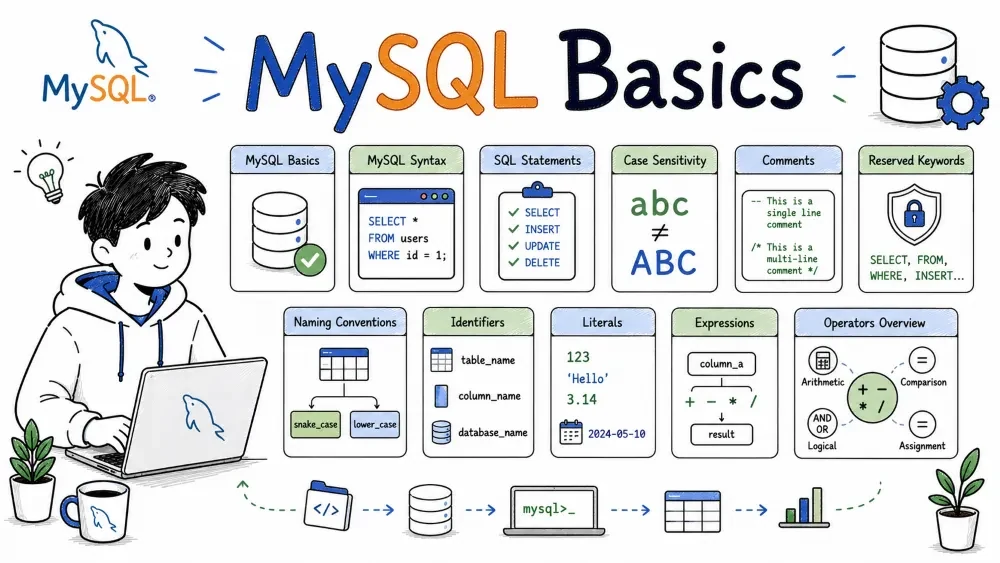
This guide covers the fundamental building blocks of MySQL syntax — how to write statements, name things, use values, and combine them with operators. No fluff, just practical foundations.
Everything you do in MySQL is done through statements — commands sent to the server that tell it to do something.
Statements are divided into categories based on what they do:
| Category | What it does | Examples |
|---|---|---|
| DDL (Data Definition Language) | Create, alter, drop database objects | CREATE TABLE, ALTER TABLE, DROP INDEX |
| DML (Data Manipulation Language) | Read and modify data | SELECT, INSERT, UPDATE, DELETE |
| DCL (Data Control Language) | Manage permissions | GRANT, REVOKE |
| TCL (Transaction Control Language) | Manage transactions | COMMIT, ROLLBACK, START TRANSACTION |
A statement ends with a semicolon (;). This tells MySQL you're done and it should execute the command.
SELECT * FROM users;
INSERT INTO products (name, price) VALUES ('Widget', 9.99);
CREATE TABLE orders (id INT, total DECIMAL(10,2));
You can write multiple statements in one go — just separate them with semicolons.
SQL has a loose syntax compared to programming languages, but there are a few rules you need to know:
Whitespace is flexible. Spaces, tabs, and newlines don't matter to MySQL. This lets you format your queries for readability.
-- These are the same:
SELECT * FROM users WHERE id = 1;
SELECT
  *
FROM
  users
WHERE
  id = 1;
Keywords are NOT case-sensitive by default (more on that below), but by convention most developers write them in UPPERCASE to distinguish them from column and table names.
String values must be quoted with single quotes (') — double quotes work too in some modes, but single quotes are the standard.
SELECT * FROM users WHERE name = 'John';
Numbers don't need quotes. Write them as-is.
SELECT * FROM products WHERE price > 19.99;
Case sensitivity in MySQL depends on two things: what you're writing, and the operating system.
| Element | Case-sensitive? | Notes |
|---|---|---|
| SQL keywords | No | SELECT, select, Select — all work |
| Database names | Depends on OS | Case-sensitive on Linux, not on Windows/macOS |
| Table names | Depends on OS | Same as databases — it's a filesystem thing |
| Column names | No | first_name, FIRST_NAME, First_Name — all the same |
| String values | Yes | 'John' and 'john' are different values |
Database and table names map to files on disk. On Linux, the filesystem is case-sensitive, so Users and users are different tables. On Windows, they're the same.
-- Keywords: any casing works
SELECT * FROM users;
select * from users;
SeLeCt * FrOm users;

-- But string values are case-sensitive:
SELECT * FROM users WHERE name = 'John';  -- different from 'john'
Best practice: Always use lowercase for database and table names, and set lower_case_table_names=1 in your MySQL config. This avoids cross-platform headaches.
Comments explain what your code does. MySQL ignores them when executing.
Single-line comments use -- or #:
-- This is a comment
SELECT * FROM users;  -- inline comment

# This also works (but is less common in SQL)
SELECT * FROM products;
Multi-line comments use /* */:
/*
  This is a block comment.
  It can span multiple lines.
  Useful for explaining complex queries.
*/
SELECT
  u.name,
  o.total
FROM users u
JOIN orders o ON u.id = o.user_id;
Multi-line comments can also go inline:
SELECT * FROM users /* only active users */ WHERE status = 'active';
Use comments sparingly. Good code documents itself — comments should explain why, not what.
Identifiers are names you give to database objects: tables, columns, indexes, views, stored procedures, and so on.
Rules for identifiers:
$, and __ (not a digit)-- Valid identifiers
user_id
firstName
_address
product2
-- Invalid identifiers
2nd_place -- starts with a digit
user-name -- contains a hyphen
select -- reserved keyword (needs quoting)
Quoted identifiers use backticks (`). This lets you use reserved keywords or special characters as names:
CREATE TABLE `select` (id INT);           -- using a reserved word as a table name
CREATE TABLE `order details` (id INT);    -- space in table name
Avoid quoted identifiers unless you really need them. They're harder to read and easy to forget.
MySQL doesn't enforce naming rules beyond the identifier rules above, but consistent conventions make your database easier to work with.
Common conventions used in practice:
| Object | Convention | Example |
|---|---|---|
| Database | snake_case | ecommerce_db |
| Table | snake_case, plural | users, order_items |
| Column | snake_case | first_name, created_at |
| Primary key | id | id |
| Foreign key | referenced_table_id | user_id, product_id |
| Index | idx_column_name | idx_email, idx_user_id_created_at |
CREATE TABLE order_items (
  id          INT PRIMARY KEY,
  order_id    INT NOT NULL,
  product_id  INT NOT NULL,
  quantity    INT NOT NULL DEFAULT 1,
  unit_price  DECIMAL(10,2) NOT NULL,
  created_at  TIMESTAMP DEFAULT CURRENT_TIMESTAMP,
  INDEX idx_order_id (order_id)
);
Consistency > creativity. Pick a style and stick with it. snake_case is the most common in the SQL world. Avoid camelCase for table and column names — it's less readable in SQL and MySQL's case-insensitive column names can cause confusion.
Reserved keywords are words that MySQL uses for its own syntax — like SELECT, FROM, WHERE, INSERT, TABLE, CREATE, etc.
You cannot use reserved keywords as unquoted identifiers:
-- This fails:
CREATE TABLE select (id INT);

-- This works (but don't do it):
CREATE TABLE `select` (id INT);
MySQL has a long list of reserved keywords (100+). You don't need to memorize them. If you get an error that looks like a syntax error but your SQL looks correct, check if you're using a reserved word as a name.
Common reserved words to watch out for:
SELECT, FROM, WHERE, INSERT, UPDATE, DELETE, CREATE, ALTER, DROP, TABLE, INDEX, INTO, VALUES, SET, ORDER, GROUP, BY, HAVING, JOIN, LEFT, RIGHT, INNER, OUTER, ON, AND, OR, NOT, IN, LIKE, BETWEEN, IS, NULL, TRUE, FALSE, DEFAULT, PRIMARY, KEY, FOREIGN, REFERENCES, CASCADE, UNIQUE, CHECK, CURRENT_DATE, CURRENT_TIME, CURRENT_TIMESTAMP, SESSION, USER, DATABASE, SCHEMA, TABLESPACE, VIEW, PROCEDURE, FUNCTION, TRIGGER, EVENT, IF, ELSE, CASE, WHEN, THEN, END, WHILE, LOOP, REPEAT, ITERATE, LEAVE, BEGIN, COMMIT, ROLLBACK, SAVEPOINT, LOCK, UNLOCK, GRANT, REVOKE, FLUSH, RESET, SHOW, DESCRIBE, EXPLAIN, USE, CONNECTION, STATUS, VARIABLES, CHARACTER, COLLATE, ENGINE, AUTO_INCREMENT, COMMENT, COLUMN, ROWS, LIMIT, OFFSET, UNION, ALL, DISTINCT, AS, ASC, DESC, EXISTS, ANY, SOME, INTERSECT, EXCEPT, WITH, RECURSIVE, RETURNING, ROW, LATERAL, GLOBAL, LOCAL, TEMPORARY, DEFINER, INVOKER, SECURITY, SQL, NO, INVOKER, ROLE, ADMIN, OPTION.
If you accidentally use a reserved word, backtick-quote it:
-- `order` is a reserved word, but this table legitimately needs that name
CREATE TABLE `order` (
  id INT PRIMARY KEY,
  customer_id INT
);
Again: avoid this when you can. Just pick a different name (orders instead of order, description instead of desc).
Literals are fixed values you write directly in your SQL — numbers, strings, dates, etc.
Enclosed in single quotes:
SELECT 'Hello, world!';
SELECT 'It''s working';  -- escape a single quote by doubling it
Special escape sequences inside strings use backslash:
SELECT 'Line 1\nLine 2';  -- newline
SELECT 'Tab\there';       -- tab
SELECT '100\%';           -- literal percent (for LIKE)
Written as plain numbers — integers or decimals:
SELECT 42;
SELECT 3.14159;
SELECT -10;
SELECT 1.5e3;  -- scientific notation: 1500
Written as strings in specific formats, then MySQL converts them:
SELECT DATE '2024-12-25';
SELECT TIME '14:30:00';
SELECT TIMESTAMP '2024-12-25 14:30:00';
Or you can use string-to-date functions:
SELECT * FROM orders WHERE order_date = '2024-12-25';
NULL represents "no value" or "unknown":
SELECT NULL;
SELECT * FROM users WHERE email IS NULL;     -- correct
SELECT * FROM users WHERE email = NULL;      -- wrong! Use IS NULL
MySQL treats TRUE as 1 and FALSE as 0:
SELECT TRUE;    -- shows 1
SELECT FALSE;   -- shows 0
SELECT * FROM users WHERE active = TRUE;
SELECT 0xABCDEF;  -- hex literal (MySQL 8+)
SELECT X'0F';     -- hex string
SELECT b'1010';   -- binary literal
SELECT B'1100';   -- same
An expression is a combination of values, operators, and functions that evaluates to a single value.
Expressions appear almost everywhere in SQL — in SELECT lists, WHERE clauses, SET clauses, HAVING clauses, and more.
-- Simple expressions
SELECT (100 + 50) * 2;           -- arithmetic: 300
SELECT CONCAT(first_name, ' ', last_name);  -- function call
SELECT price * quantity;         -- columns + arithmetic
SELECT id IN (1, 2, 3);          -- comparison: returns 1 or 0
Expressions in WHERE clauses filter rows:
SELECT * FROM products
WHERE price * quantity > 100;   -- expression in filter
Expressions in SELECT compute values on the fly:
SELECT
  product_name,
  price,
  quantity,
  price * quantity AS total_value   -- computed column
FROM order_items;
CASE expressions give you conditional logic:
SELECT
  name,
  price,
  CASE
    WHEN price < 10 THEN 'Cheap'
    WHEN price < 50 THEN 'Moderate'
    ELSE 'Expensive'
  END AS price_tier
FROM products;
An expression always produces one value per row. If you want to group or filter based on expressions, you can use them in GROUP BY or HAVING too.
Operators are symbols or keywords that perform operations on values. MySQL has several categories.
| Operator | What it does | Example | Result |
|---|---|---|---|
+ | Addition | 10 + 3 | 13 |
- | Subtraction | 10 - 3 | 7 |
* | Multiplication | 10 * 3 | 30 |
/ | Division | 10 / 3 | 3.3333 |
DIV | Integer division | 10 DIV 3 | 3 |
% or MOD | Modulo (remainder) | 10 % 3 | 1 |
- | Negation | -5 | -5 |
SELECT
  (100 + 50) / 3 AS result,       -- 50
  17 % 5 AS remainder;             -- 2
| Operator | What it does | Example |
|---|---|---|
= | Equal to | age = 25 |
!= or <> | Not equal to | age != 25 |
> | Greater than | price > 10 |
< | Less than | price < 10 |
>= | Greater than or equal | price >= 10 |
<= | Less than or equal | price <= 10 |
IS NULL | Checks for NULL | email IS NULL |
IS NOT NULL | Checks for NOT NULL | email IS NOT NULL |
BETWEEN | In a range (inclusive) | price BETWEEN 10 AND 20 |
IN | In a set of values | status IN ('a', 'b', 'c') |
LIKE | Pattern matching | name LIKE 'J%' |
SELECT * FROM products WHERE price BETWEEN 10 AND 50;
SELECT * FROM users WHERE email IS NOT NULL;
SELECT * FROM customers WHERE name LIKE 'A%';
=does not work withNULL. Always useIS NULLorIS NOT NULLwhen dealing with nulls.
| Operator | What it does |
|---|---|
AND or && | True if both sides are true |
OR or || | True if either side is true |
NOT or ! | Reverses a condition |
XOR | True if exactly one side is true |
SELECT * FROM products
WHERE price > 10 AND category = 'Electronics';

SELECT * FROM users
WHERE status = 'active' OR created_at > '2024-01-01';

SELECT * FROM products
WHERE NOT category = 'Discontinued';
Operators have a priority order, just like in math:
()*, /, DIV, %, MOD)+, -)=, >, <, >=, <=, !=, IN, LIKE, BETWEEN, IS NULL)NOTANDORWhen in doubt, use parentheses. They never hurt and make your intent clear:
-- Without parentheses, AND binds tighter than OR
SELECT * FROM products
WHERE category = 'Electronics' OR category = 'Books' AND price < 20;

-- Same thing but clear
SELECT * FROM products
WHERE (category = 'Electronics' OR category = 'Books') AND price < 20;
These two queries give different results. The first one returns Electronics (all prices) + cheap Books. The second returns cheap Electronics AND cheap Books. Parentheses save bugs.
Used mainly in SET statements or UPDATE:
SET @count = 10;       -- simple assignment
SET @count := 10;      -- := also works (and is safer in some contexts)
UPDATE users SET status = 'inactive' WHERE last_login < '2023-01-01';
The := operator can also assign in non-SET contexts (like SELECT), while = is ambiguous there:
SELECT @var := 100;                    -- assignment
SELECT @var = 100;                     -- comparison (returns whether @var equals 100)
Save your progress and earn XP for completing tutorials.
Keep learning
Technology
MySQL
Lesson group
MySQL Basics
Progress
100% complete

