Preparing your learning space...
100% through Sorting & Limiting tutorials
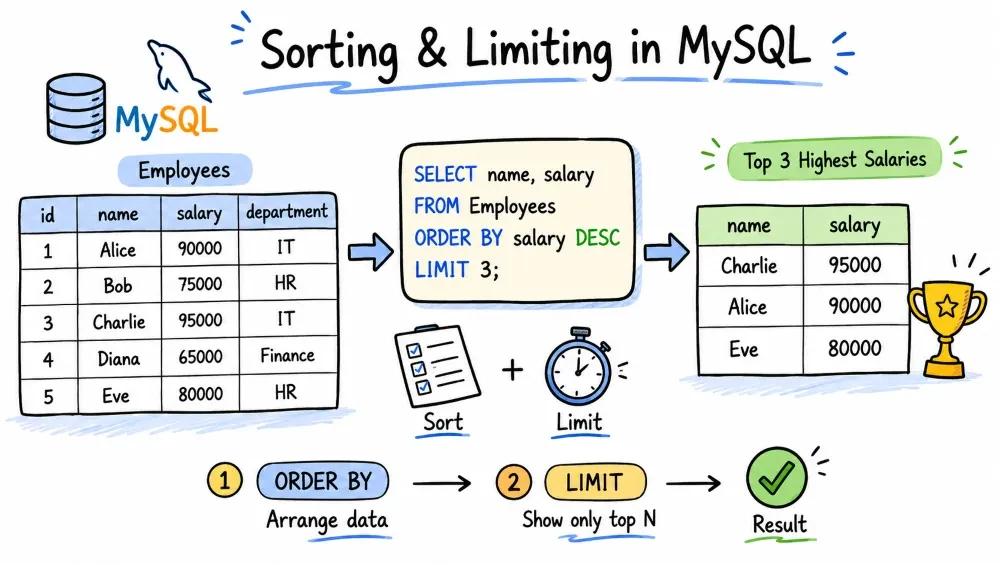
Real-world data is rarely in the order you need, and you almost never want to see every single row at once. Sorting and limiting let you control which rows come back and in what order.
ORDER BY tells the database to sort the result set before returning it. Without it, rows come back in whatever order the database feels like (usually insertion order, but never rely on that).
SELECT columns
FROM table
ORDER BY column_name;
SELECT name, price
FROM products
ORDER BY price;
This returns all products sorted by price, from cheapest to most expensive.
| name | price |
|---|---|
| Pencil | 0.50 |
| Notebook | 2.00 |
| Backpack | 25.00 |
ASC stands for ascending — smallest → largest (numbers), A → Z (text), earliest → latest (dates).
It's the default. ORDER BY price and ORDER BY price ASC do the exact same thing.
Most developers skip ASC because it's implied. You only need to write it when you want to be extra explicit.
SELECT name, price
FROM products
ORDER BY price ASC;   -- same as ORDER BY price
| name | price |
|---|---|
| Pencil | 0.50 |
| Notebook | 2.00 |
| Backpack | 25.00 |
DESC stands for descending — largest → smallest (numbers), Z → A (text), latest → earliest (dates).
Use this when you want the biggest, newest, or highest first.
SELECT name, price
FROM products
ORDER BY price DESC;
| name | price |
|---|---|
| Backpack | 25.00 |
| Notebook | 2.00 |
| Pencil | 0.50 |
-- Most recent users first
SELECT username, created_at
FROM users
ORDER BY created_at DESC;

-- Highest paid employees first
SELECT name, salary
FROM employees
ORDER BY salary DESC;
You can sort by one column, and when there's a tie, break it with another column.
SELECT name, department, salary
FROM employees
ORDER BY department ASC, salary DESC;
This puts employees in the same department together (sorted A–Z), and within each department, the highest-paid person comes first.
| name | department | salary |
|---|---|---|
| Alice | Engineering | 90000 |
| Bob | Engineering | 75000 |
| Charlie | Engineering | 75000 |
| Diana | Marketing | 80000 |
| Eve | Marketing | 65000 |
Notice Bob and Charlie have the same salary — the sort is stable across the primary column (department), and the secondary column (salary DESC) decides the tie.
Each column gets its own direction. You're not stuck with all ASC or all DESC.
LIMIT chops the result set to a specific number of rows. It always comes last in the query, after ORDER BY.
SELECT columns
FROM table
ORDER BY column
LIMIT number;
SELECT name, price
FROM products
ORDER BY price DESC
LIMIT 3;
Returns the three most expensive products and nothing else.
| name | price |
|---|---|
| Backpack | 25.00 |
| Wireless Mouse | 18.00 |
| Notebook | 2.00 |
LIMIT under the hoodOFFSET skips a number of rows before starting to return results. It's almost always used with LIMIT.
In MySQL, you write LIMIT with two numbers: the first is the offset (how many to skip), the second is the count (how many to return).
SELECT columns
FROM table
ORDER BY column
LIMIT offset, count;
SELECT name, price
FROM products
ORDER BY price DESC
LIMIT 3, 3;
This skips the 3 most expensive products and returns the next 3. The first 3 is the offset, the second 3 is the number of rows to return.
MySQL 8.0+ also supports LIMIT 3 OFFSET 3 syntax if you prefer to be more explicit about which number is which.
Pagination is just LIMIT + OFFSET used together to split a large result set into pages.
Page 1: LIMIT 0, 10          → rows 1–10
Page 2: LIMIT 10, 10         → rows 11–20
Page 3: LIMIT 20, 10         → rows 21–30
...
Page N: LIMIT (N-1)*10, 10
In MySQL's LIMIT offset, count, the offset is (page_number - 1) * page_size and the count is the page size.
-- Page 1: first 10 products
SELECT name, price FROM products
ORDER BY name
LIMIT 0, 10;

-- Page 2: next 10 products
SELECT name, price FROM products
ORDER BY name
LIMIT 10, 10;

-- Page 3: next 10 products
SELECT name, price FROM products
ORDER BY name
LIMIT 20, 10;
If a user clicks page 7 and you're showing 20 items per page:
SELECT name, price FROM products
ORDER BY name
LIMIT 120, 20;   -- offset = (7-1) * 20 = 120, count = 20
-- These are equivalent:
SELECT * FROM products LIMIT 20;     -- first 20 rows
SELECT * FROM products LIMIT 0, 20;  -- same thing, explicit offset 0
In OFFSET 10, the database still reads and discards those 10 rows internally — it's not free. For small offsets this is fine. For deep pagination (page 1000+), OFFSET gets slow because the database has to count through all skipped rows every time. At that scale, you'd switch to keyset pagination (using a WHERE clause on the last seen value), but that's an advanced topic.
A realistic query that uses all the pieces:
SELECT product_id, name, price, stock
FROM products
WHERE stock > 0                 -- only available items
ORDER BY price ASC, name ASC    -- cheapest first, alphabetically on ties
LIMIT 0, 20;                    -- page 1, show 20 per page
The execution order in the database is:
FROM — which tableWHERE — filter rowsORDER BY — sort the filtered rowsLIMIT / OFFSET — take a slice of the sorted resultSELECT — pick the columns to returnThat's why you can sort by a column that doesn't appear in your final output — the sort happens before the column trimming.
Use these to test your understanding. Assume a table orders with columns id, customer_name, total, order_date.
Show the 5 most recent orders.
-- Your solution here:
Show orders sorted by total, largest first. If two orders have the same total, show the newer one first.
-- Your solution here:
Show page 3 of orders, with 10 orders per page, sorted by customer name A–Z.
-- Your solution here:
Find the cheapest order that was placed this year.
-- Your solution here:
-- 1.
SELECT * FROM orders
ORDER BY order_date DESC
LIMIT 5;

-- 2.
SELECT * FROM orders
ORDER BY total DESC, order_date DESC;

-- 3.
SELECT * FROM orders
ORDER BY customer_name ASC
LIMIT 20, 10;   -- (3-1) * 10 = 20

-- 4.
SELECT * FROM orders
WHERE order_date >= '2026-01-01'
ORDER BY total ASC
LIMIT 1;
Save your progress and earn XP for completing tutorials.
Keep learning
Technology
MySQL
Lesson group
Sorting & Limiting
Progress
100% complete

