Preparing your learning space...
100% through Data Types tutorials
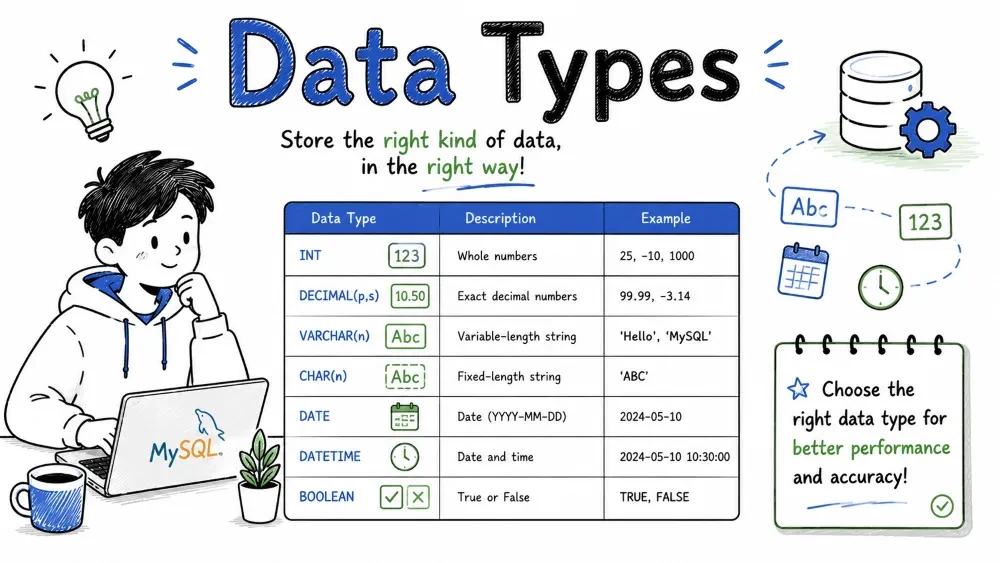
Data types define the kind of value a column can hold in a database table. Choosing the right data type is one of the most important decisions when designing a database schema — it affects storage efficiency, query performance, data integrity, and the operations you can perform on the data. This tutorial covers every major SQL data type category in MySQL: numeric, string, date/time, boolean, and binary types, along with practical guidance on how to choose the correct type for your needs.
A data type is an attribute that specifies what kind of data a column can store. Every column in a MySQL table must have a data type, and the database engine enforces that only valid data of that type can be inserted or updated.
Why data types matter:
Note: This tutorial uses MySQL syntax. While the core concepts apply to most SQL databases, MySQL-specific types and behaviors are noted throughout.
Numeric types store numbers — both whole numbers (integers) and numbers with decimal places.
Exact numeric types store values with exact precision — no rounding errors.
| Type | Storage | Signed Range | Unsigned Range | Description |
|---|---|---|---|---|
TINYINT | 1 byte | -128 to 127 | 0 to 255 | Very small integer |
SMALLINT | 2 bytes | -32,768 to 32,767 | 0 to 65,535 | Small integer |
MEDIUMINT | 3 bytes | -8,388,608 to 8,388,607 | 0 to 16,777,215 | Medium integer |
INT / INTEGER | 4 bytes | -2³¹ to 2³¹-1 | 0 to 2³²-1 | Standard integer |
BIGINT | 8 bytes | -2⁶³ to 2⁶³-1 | 0 to 2⁶⁴-1 | Large integer |
DECIMAL(p, s) / NUMERIC(p, s) | Varies | Fixed-point | Fixed-point | Monetary / precise values |
BIT(m) | 1–8 bytes | 0 to 2^m-1 | 0 to 2^m-1 | Bit-field (m = 1 to 64) |
Key MySQL detail: All integer types can take
UNSIGNEDattribute, doubling the upper range by disabling negative values. Always useUNSIGNEDfor IDs, ages, and counts.
Example — DECIMAL precision:
CREATE TABLE products (
    product_id INT UNSIGNED PRIMARY KEY,
    price DECIMAL(10, 2),        -- 10 total digits, 2 after decimal point
    tax_rate DECIMAL(5, 4)       -- 5 total digits, 4 after decimal point
);
DECIMAL(10, 2) can store values like 12345678.99 — 8 digits before the decimal and 2 after.
When to use DECIMAL:
DECIMAL for financial / monetary data. Floating-point rounding errors are unacceptable with money.Approximate numeric types store values using floating-point representation — they can represent a wide range of values but may introduce small rounding errors.
| Type | Storage | Description |
|---|---|---|
FLOAT(p) | 4 bytes | Single-precision (~7 decimal digits) |
DOUBLE / DOUBLE PRECISION | 8 bytes | Double-precision (~15 decimal digits) |
Example:
CREATE TABLE measurements (
    sensor_id INT UNSIGNED,
    temperature FLOAT(7),     -- ~6 decimal digits of precision
    humidity DOUBLE            -- ~15 decimal digits of precision
);
When to use FLOAT/DOUBLE:
MySQL note:
FLOAT(p)precision affects storage.pfrom 0 to 23 → 4 bytes, 24 to 53 → 8 bytes.
MySQL provides AUTO_INCREMENT for automatically generating sequential integer values — commonly used for primary keys.
CREATE TABLE users (
    user_id INT UNSIGNED AUTO_INCREMENT PRIMARY KEY,
    username VARCHAR(50)
);

INSERT INTO users (username) VALUES ('alice'), ('bob');
-- user_id automatically gets 1, 2, 3...

-- Check the last inserted ID
SELECT LAST_INSERT_ID();
Key MySQL AUTO_INCREMENT rules:
AUTO_INCREMENT column per table.ALTER TABLE users AUTO_INCREMENT = 1000;String types store sequences of characters — everything from short names to large documents.
| Type | Max Length | Storage | Description |
|---|---|---|---|
CHAR(n) | 255 characters | Fixed (n bytes) | Right-padded with spaces |
VARCHAR(n) | 65,535 bytes (max row size) | Actual length + 1-2 bytes | Variable-length |
TINYTEXT | 255 bytes | Actual length + 1 byte | Very small text |
TEXT | 65,535 bytes (~64 KB) | Actual length + 2 bytes | Standard text |
MEDIUMTEXT | 16,777,215 bytes (~16 MB) | Actual length + 3 bytes | Medium text |
LONGTEXT | 4,294,967,295 bytes (~4 GB) | Actual length + 4 bytes | Huge text |
CHAR vs VARCHAR — the key difference:
CREATE TABLE example (
    country_code CHAR(2),      -- Always 2 characters (e.g., 'US', 'IN')
    title VARCHAR(255)         -- Variable length up to 255
);
CHAR(10) always stores 10 characters — shorter values are right-padded with spaces.VARCHAR(10) stores only the actual string plus 1-2 bytes of length overhead.When to use CHAR:
When to use VARCHAR:
-- Insert examples
INSERT INTO example (country_code, title) VALUES ('IN', 'SQL Tutorial');
-- country_code becomes 'IN' (padded with spaces to 2 chars)
-- title stores 'SQL Tutorial' (14 characters)
MySQL note:
VARCHARvalues may be automatically converted toTEXTif the defined length exceeds the row-size limit (65,535 bytes total across all columns).
ENUM is a MySQL-specific string type that restricts a column to a predefined set of values.
CREATE TABLE orders (
    order_id INT UNSIGNED PRIMARY KEY,
    status ENUM('pending', 'processing', 'shipped', 'delivered', 'cancelled')
);

INSERT INTO orders (order_id, status) VALUES (1, 'pending');
INSERT INTO orders (order_id, status) VALUES (2, 'shipped');
-- INSERT INTO orders (order_id, status) VALUES (3, 'unknown');
-- ERROR: Data truncated for column 'status'
ENUM advantages:
-- Sorting is by the order values were defined, not alphabetically
SELECT * FROM orders ORDER BY status;
-- pending → processing → shipped → delivered → cancelled
Important: Adding new values requires an
ALTER TABLEstatement. For frequently changing value lists, use a lookup table with a foreign key instead.
For storing very large text data:
| Type | Max Size | Storage Overhead |
|---|---|---|
TINYTEXT | 255 bytes | 1 byte prefix |
TEXT | 65,535 bytes (~64 KB) | 2 byte prefix |
MEDIUMTEXT | 16,777,215 bytes (~16 MB) | 3 byte prefix |
LONGTEXT | 4,294,967,295 bytes (~4 GB) | 4 byte prefix |
CREATE TABLE articles (
    article_id INT UNSIGNED PRIMARY KEY,
    title VARCHAR(200),
    body TEXT,                          -- Main article content
    change_log MEDIUMTEXT               -- Optional: full revision history
);
MySQL note:
TEXTcolumns cannot have default values and require a prefix length for indexing (e.g.,INDEX (body(100))).
Date/time types store temporal data — dates, times, timestamps, and years.
| Type | Description | Format | Storage | Range |
|---|---|---|---|---|
DATE | Date only | YYYY-MM-DD | 3 bytes | 1000-01-01 to 9999-12-31 |
TIME | Time only | HH:MM:SS | 3 bytes | -838:59:59 to 838:59:59 |
DATETIME | Date + time | YYYY-MM-DD HH:MM:SS | 8 bytes | 1000-01-01 00:00:00 to 9999-12-31 23:59:59 |
TIMESTAMP | Date + time (timezone-aware) | YYYY-MM-DD HH:MM:SS | 4 bytes | 1970-01-01 00:00:01 UTC to 2038-01-19 03:14:07 UTC |
YEAR | Year only | YYYY | 1 byte | 1901 to 2155 |
CREATE TABLE events (
    event_id INT UNSIGNED PRIMARY KEY,
    event_name VARCHAR(100),
    event_date DATE,                    -- e.g., '2026-07-29'
    start_time TIME,                    -- e.g., '09:00:00'
    created_at DATETIME,                -- e.g., '2026-07-01 10:30:00'
    updated_at TIMESTAMP DEFAULT CURRENT_TIMESTAMP ON UPDATE CURRENT_TIMESTAMP
);
MySQL detail:
TIMESTAMPhas a limited range (up to 2038 — the "Year 2038 Problem"). For dates beyond 2038, useDATETIME.
| Feature | DATETIME | TIMESTAMP |
|---|---|---|
| Range | 1000-01-01 to 9999-12-31 | 1970-01-01 to 2038-01-19 |
| Storage | 8 bytes | 4 bytes |
| Timezone | No conversion — stores as-is | Converts to UTC on storage, back to connection timezone on retrieval |
| Auto-initialize | Manual | DEFAULT CURRENT_TIMESTAMP and ON UPDATE CURRENT_TIMESTAMP |
| Index-friendly | Yes | Yes |
-- Current date and time
SELECT CURRENT_DATE;                    -- 2026-07-29
SELECT CURRENT_TIMESTAMP;               -- 2026-07-29 14:30:00
SELECT NOW();                           -- 2026-07-29 14:30:00

-- Date arithmetic
SELECT DATE_ADD('2026-07-29', INTERVAL 7 DAY);       -- 2026-08-05
SELECT DATEDIFF('2026-12-31', '2026-07-29');          -- 155 (days)
SELECT DATE_SUB('2026-07-29', INTERVAL 1 MONTH);      -- 2026-06-29

-- Extract parts
SELECT EXTRACT(YEAR FROM '2026-07-29');               -- 2026
SELECT MONTH('2026-07-29');                           -- 7
SELECT DAY('2026-07-29');                             -- 29

-- Formatting
SELECT DATE_FORMAT(CURRENT_DATE, '%Y-%m-%d');         -- 2026-07-29
SELECT DATE_FORMAT(CURRENT_DATE, '%W, %M %d, %Y');   -- Wednesday, July 29, 2026
SELECT TIME_FORMAT('14:30:00', '%h:%i %p');           -- 02:30 PM

-- Last day of month
SELECT LAST_DAY('2026-07-29');                        -- 2026-07-31
Best practice: Always store timestamps in UTC in your database and convert to local time in your application layer. Set MySQL's timezone with
SET time_zone = '+00:00';
MySQL does not have a native BOOLEAN type. BOOL and BOOLEAN are aliases for TINYINT(1) — values are stored as 0 (false) or 1 (true).
CREATE TABLE tasks (
    task_id INT UNSIGNED PRIMARY KEY,
    task_name VARCHAR(100),
    is_completed BOOL DEFAULT FALSE      -- Actually TINYINT(1)
);

INSERT INTO tasks (task_name, is_completed) VALUES
    ('Learn SQL', TRUE),                 -- TRUE = 1
    ('Build a project', FALSE),          -- FALSE = 0
    ('Review code', NULL);               -- NULL means "unknown / not yet set"
Querying boolean columns:
-- These are equivalent in MySQL
SELECT * FROM tasks WHERE is_completed = TRUE;
SELECT * FROM tasks WHERE is_completed = 1;

-- Check for NULL
SELECT * FROM tasks WHERE is_completed IS NULL;    -- NOT: is_completed = NULL
MySQL note: Because
BOOLEANis justTINYINT(1), you can technically insert values other than 0 and 1. Add aCHECKconstraint if you need strict enforcement (MySQL 8.0.16+):is_completed TINYINT(1) DEFAULT 0 CHECK (is_completed IN (0, 1))
Binary types store raw byte data — images, files, encrypted data, serialized objects.
| Type | Max Size | Storage Overhead |
|---|---|---|
BINARY(n) | Fixed n bytes (max 255) | Fixed length |
VARBINARY(n) | Up to 65,535 bytes | Actual length + 1-2 bytes |
TINYBLOB | 255 bytes | 1 byte prefix |
BLOB | 65,535 bytes (~64 KB) | 2 byte prefix |
MEDIUMBLOB | 16,777,215 bytes (~16 MB) | 3 byte prefix |
LONGBLOB | 4,294,967,295 bytes (~4 GB) | 4 byte prefix |
BLOB stands for Binary Large Object. TEXT and BLOB variants are identical except TEXT stores characters and BLOB stores bytes.
CREATE TABLE files (
    file_id INT UNSIGNED PRIMARY KEY,
    file_name VARCHAR(255),
    file_data BLOB,                      -- The raw file content
    thumbnail BINARY(1024),              -- Fixed-size thumbnail (1024 bytes)
    metadata VARBINARY(500)              -- Variable metadata up to 500 bytes
);
When to store binary data in the database:
When NOT to store binary data in the database:
MySQL note:
BLOBcolumns can significantly slow downSELECTqueries because blob data isn't always kept in memory. Consider storing file paths instead of file contents for larger files.
MySQL 5.7+ supports a native JSON data type that stores JSON documents in an efficient binary format.
CREATE TABLE users (
    user_id INT UNSIGNED PRIMARY KEY,
    username VARCHAR(50),
    preferences JSON                      -- Stores JSON objects / arrays
);

INSERT INTO users (username, preferences) VALUES
    ('alice', '{"theme": "dark", "notifications": true, "language": "en"}'),
    ('bob', '{"theme": "light", "language": "fr"}');
-- Extract a single field
SELECT
    username,
    JSON_UNQUOTE(JSON_EXTRACT(preferences, '$.theme')) AS theme
FROM users;

-- Shorthand using -> and ->>
SELECT username, preferences->>'$.theme' AS theme FROM users;

-- Query inside JSON
SELECT * FROM users
WHERE JSON_EXTRACT(preferences, '$.language') = '"en"';

-- Simpler with ->> operator
SELECT * FROM users WHERE preferences->>'$.language' = 'en';

-- Check if a path exists
SELECT * FROM users WHERE JSON_CONTAINS_PATH(preferences, 'one', '$.notifications');
-- Update a single JSON key
UPDATE users
SET preferences = JSON_SET(preferences, '$.theme', 'light')
WHERE username = 'alice';

-- Remove a key
UPDATE users
SET preferences = JSON_REMOVE(preferences, '$.notifications')
WHERE username = 'alice';
When to use JSON:
When NOT to use JSON:
TEXT or MEDIUMTEXT instead.MySQL note:
JSONcolumns are stored internally in a binary format (JSONB-like) that allows fast lookups without reparsing the string. They are automatically validated when data is inserted.
This is the most practical skill in schema design. Here are the decision criteria:
Choose the smallest type that fits your data.
-- BAD: Overly large types
CREATE TABLE users (
    age INT,                   -- Only stores 0-150, needs only TINYINT UNSIGNED
    country_code VARCHAR(255), -- Country codes are always 2-3 chars, needs CHAR(3)
    is_active VARCHAR(5)       -- Boolean values, needs TINYINT(1) / BOOL
);

-- GOOD: Appropriate types
CREATE TABLE users (
    age TINYINT UNSIGNED,       -- 0-255 range is enough
    country_code CHAR(3),       -- Exactly 2-3 characters
    is_active BOOL              -- TRUE or FALSE (TINYINT(1))
);
Storage size comparison (MySQL):
| Data | Bad Type | Size | Good Type | Size | Savings |
|---|---|---|---|---|---|
| Age (0-150) | INT | 4 bytes | TINYINT UNSIGNED | 1 byte | 75% |
| Status (Y/N) | VARCHAR(10) | 11 bytes | TINYINT(1) / BOOL | 1 byte | 91% |
| Price | DOUBLE | 8 bytes | DECIMAL(10,2) | 5 bytes | 37% |
| Description | VARCHAR(500) avg 100 | 101 bytes | VARCHAR(255) avg 100 | 101 bytes | Same* |
* VARCHAR only stores the actual data length, so an overestimated maximum doesn't waste space for individual rows — but it does affect MySQL's memory allocation in temporary tables.
| Guideline | Why |
|---|---|
| Use integer primary keys | Integers compare faster and use less space than strings or UUIDs. |
| Avoid TEXT/BLOB for frequently accessed data | TEXT/BLOB columns use external storage; every access requires extra lookups. |
| Add indexes on columns used in WHERE | But index only what you query — each index slows writes. |
| Avoid functions in WHERE clauses | WHERE YEAR(date_col) = 2026 can't use an index on date_col. |
Example — choosing a primary key type:
-- BAD: String primary key (slower joins, more index size)
CREATE TABLE orders (
    order_code VARCHAR(50) PRIMARY KEY,  -- e.g., 'ORD-2026-07-29-001'
    ...
);

-- GOOD: Integer surrogate key (AUTO_INCREMENT)
CREATE TABLE orders (
    order_id INT UNSIGNED PRIMARY KEY AUTO_INCREMENT,
    order_code VARCHAR(50) UNIQUE,       -- Still unique, but not the PK
    ...
);
| Scenario | Recommended Type | Why |
|---|---|---|
| Financial values | DECIMAL(p, s) | Exact precision; no rounding errors |
| Percentages | DECIMAL(5, 2) or DECIMAL(5, 4) | Exact representation |
| IDs / Foreign keys | INT UNSIGNED or BIGINT UNSIGNED | Exact, fast joins, no negatives |
| Phone numbers | VARCHAR(20) | Never store as INT — loses leading zeros and formatting |
| ZIP codes | CHAR(5) or VARCHAR(10) | Never store as INT — loses leading zeros |
| Email addresses | VARCHAR(255) | Variable length, indexable |
| Passwords (hashed) | CHAR(60) for bcrypt | Fixed-length hash |
| Large text content | TEXT / MEDIUMTEXT | No length limit worries |
| True/false flags | BOOL / TINYINT(1) | Compact, clear intent |
| Predefined values | ENUM | Built-in validation |
The phone number trap:
-- BAD: Integer phone number -- loses leading zeros, can't store dashes/+
CREATE TABLE contacts (
    phone INT                           -- 0212345678 becomes 212345678
);

-- GOOD: String phone number
CREATE TABLE contacts (
    phone VARCHAR(20)                   -- '+1 (555) 123-4567' stays as-is
);
MySQL automatically converts between compatible types (implicit conversion), but sometimes you need explicit conversion to control the result.
CAST(expression AS type)

-- Examples
SELECT CAST('2026-07-29' AS DATE);              -- String → Date
SELECT CAST('123' AS UNSIGNED);                  -- String → Integer
SELECT CAST(price AS DECIMAL(10, 2)) FROM products;
SELECT CAST(12345 AS CHAR(10));                  -- Integer → String
CONVERT(expression, type)
-- or with USING for character sets
CONVERT(expression USING charset)

-- Examples
SELECT CONVERT('2026-07-29', DATE);              -- Same as CAST
SELECT CONVERT('Hello' USING utf8mb4);            -- Convert character set
-- String to number (automatic in arithmetic)
SELECT '10' + '20';                              -- 30 (implicit conversion)

-- Explicit type safety
SELECT CAST('10' AS UNSIGNED) + CAST('20' AS UNSIGNED);  -- 30

-- Date to string
SELECT CAST(CURRENT_DATE AS CHAR(10));           -- '2026-07-29'

-- Number to formatted string
SELECT CONCAT('Order #', CAST(order_id AS CHAR(10))) FROM orders;

-- Prevent truncation warnings
INSERT INTO products (price) VALUES (CAST('99.99' AS DECIMAL(10, 2)));
Warning: Implicit conversion can cause performance issues in
WHEREclauses — it prevents index usage. Always match data types to avoid it. For example,WHERE user_id = '1'(string) is worse thanWHERE user_id = 1(integer) ifuser_idisINT.
Always use UNSIGNED for integer columns that can never be negative — IDs, ages, counts, foreign keys. This doubles your range for free.
Use DECIMAL for money, FLOAT/DOUBLE for measurements — Never swap them. Rounding errors in financial data are unacceptable.
Use TIMESTAMP with DEFAULT CURRENT_TIMESTAMP and ON UPDATE CURRENT_TIMESTAMP for automatic tracking of row creation and modification times.
Use VARCHAR with a reasonable max, not TEXT, for short-to-medium strings. TEXT columns cannot have default values and are more complex to index.
Use CHAR only for truly fixed-length values — country codes, hashes, fixed codes. Ensure they are always the same length.
Use BOOL / TINYINT(1) for binary flags — it's compact and clear.
Store file paths, not file contents in the database for large binary files. Keep the actual files on the filesystem or object storage.
Use ENUM for small, stable value lists — but prefer a lookup table if the list changes frequently.
Use JSON sparingly — great for flexible schemas and settings, but not a replacement for normalized relational tables.
Choose DATE over DATETIME when you only need the date — saves space and documents intent.
Be consistent — don't use INT UNSIGNED for one foreign key and BIGINT UNSIGNED for another in the same schema.
Match data types in JOINs — joining INT to VARCHAR forces MySQL to convert every row and breaks index usage.
Save your progress and earn XP for completing tutorials.
Keep learning
Technology
MySQL
Lesson group
Data Types
Progress
100% complete

