Preparing your learning space...
100% through Subqueries tutorials
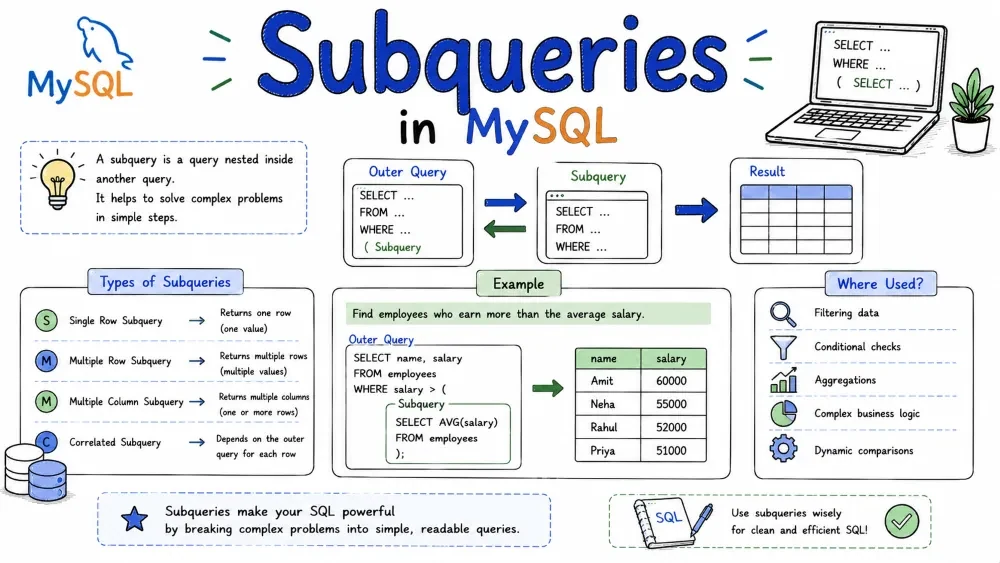
A subquery is a query nested inside another query. You use it when a single query isn't enough — when you need data from one table to decide what to do with another. Subqueries live inside parentheses and can go in SELECT, FROM, WHERE, or HAVING.
This tutorial covers MySQL subqueries only. Other databases (PostgreSQL, SQL Server, Oracle) follow similar concepts, but syntax, operators, and optimizer behavior differ.
A subquery (or inner query) is a SELECT statement inside another SQL statement. The outer query uses the subquery's result as a filter, a value, or a table.
SELECT name, salary
FROM employees
WHERE salary > (SELECT AVG(salary) FROM employees);
The subquery runs first (or once per row for correlated ones), and the outer query uses its result. The inner query must always be enclosed in parentheses.
Subqueries are categorized by what they return:
| Type | Returns | Operators Allowed |
|---|---|---|
| Single Row | One row, one column | =, >, <, >=, <=, <> |
| Multiple Row | Multiple rows, one column | IN, ANY, ALL, EXISTS |
| Correlated | Can return single or multiple rows — depends on outer query | Same as above |
| Scalar | One row, one column (technically a single-row variant) | Same as single row |
A single-row subquery returns exactly one row with one column. You compare it with single-value operators (=, >, <, etc.).
Find employees who earn more than the average salary:
SELECT employee_id, first_name, salary
FROM employees
WHERE salary > (SELECT AVG(salary) FROM employees);
Find the product that was ordered the most:
SELECT product_name
FROM products
WHERE product_id = (
    SELECT product_id
    FROM order_items
    GROUP BY product_id
    ORDER BY SUM(quantity) DESC
    LIMIT 1
);
The subquery runs first, returns a single value (like 65000 or 42), and the outer query uses that value in its condition.
⚠️ If the subquery returns more than one row, MySQL throws an error: Subquery returns more than 1 row.
A multiple-row subquery returns several rows but still one column. You cannot use = with it — you must use IN, ANY, or ALL.
SELECT first_name, last_name
FROM employees
WHERE department_id IN (
    SELECT department_id
    FROM departments
    WHERE location_id = 1700
);
The inner query returns a list of department IDs (like [60, 80, 90]). The outer query checks if each employee's department matches any of them.
> ANY(...) means greater than at least one value in the list.
SELECT first_name, salary
FROM employees
WHERE salary > ANY (
    SELECT salary
    FROM employees
    WHERE department_id = 60
);
This returns employees who earn more than the lowest-paid person in department 60.
> ALL(...) means greater than every value in the list.
SELECT first_name, salary
FROM employees
WHERE salary > ALL (
    SELECT salary
    FROM employees
    WHERE department_id = 60
);
This returns employees who earn more than the highest-paid person in department 60.
SELECT department_name
FROM departments d
WHERE EXISTS (
    SELECT 1
    FROM employees e
    WHERE e.department_id = d.department_id
);
EXISTS returns TRUE if the subquery produces at least one row. It doesn't care about the values — only whether rows exist. That's why SELECT 1 is common here; it's just a flag.
A correlated subquery references a column from the outer query. This means the inner query depends on the outer query — it runs once for every row the outer query processes.
Normal subquery: runs once, gives one result.
Correlated subquery: runs repeatedly — once per outer row.
SELECT e1.first_name, e1.salary, e1.department_id
FROM employees e1
WHERE e1.salary > (
    SELECT AVG(e2.salary)
    FROM employees e2
    WHERE e2.department_id = e1.department_id
);
What happens step by step:
employees e1.department_id.Find customers who have placed more than 5 orders:
SELECT customer_name
FROM customers c
WHERE (
    SELECT COUNT(*)
    FROM orders o
    WHERE o.customer_id = c.customer_id
) > 5;
Correlated subqueries are slower because they run N times. For large tables, a JOIN with GROUP BY is usually faster. But correlated subqueries are sometimes clearer and necessary with EXISTS.
The most common correlated pattern uses EXISTS:
-- Find departments that have at least one employee
SELECT department_name
FROM departments d
WHERE EXISTS (
    SELECT 1
    FROM employees e
    WHERE e.department_id = d.department_id
);
This is often faster than IN on large datasets because EXISTS stops scanning as soon as it finds a match. IN builds the full result set first.
A subquery inside another subquery inside another. MySQL allows nesting up to 255 levels, but in practice: if you're past 3 levels, a JOIN or CTE is almost always cleaner.
SELECT first_name, salary
FROM employees
WHERE salary > (
    SELECT AVG(salary)
    FROM employees
    WHERE department_id IN (
        SELECT department_id
        FROM departments
        WHERE location_id = (
            SELECT location_id
            FROM locations
            WHERE city = 'London'
        )
    )
);
Execution order (for non-correlated): innermost first, then outward.
location_id for London → [2500][40]6500Three levels deep and already hard to read. For more than 2 levels, use a CTE:
WITH london_dept AS (
    SELECT department_id
    FROM departments
    WHERE location_id = (SELECT location_id FROM locations WHERE city = 'London')
),
avg_salary AS (
    SELECT AVG(salary) AS avg_sal
    FROM employees
    WHERE department_id IN (SELECT department_id FROM london_dept)
)
SELECT first_name, salary
FROM employees
WHERE salary > (SELECT avg_sal FROM avg_salary);
Same result, much easier to debug.
The most common placement. Already covered above.
Must return exactly one row and one column.
SELECT
    first_name,
    salary,
    (SELECT AVG(salary) FROM employees) AS company_avg,
    salary - (SELECT AVG(salary) FROM employees) AS difference
FROM employees;
Each row gets the same average. This is fine for one or two values — for many, use a JOIN or a window function.
The subquery acts as a temporary table. It must have an alias.
SELECT dept_avg.department_id, dept_avg.avg_salary
FROM (
    SELECT department_id, AVG(salary) AS avg_salary
    FROM employees
    GROUP BY department_id
) AS dept_avg
WHERE dept_avg.avg_salary > 8000;
The inner query runs first, produces a virtual table, and the outer query queries that table.
MySQL 8.0.14+ also supports LATERAL derived tables — the subquery can reference columns from tables that appear before it in the FROM clause:
SELECT d.department_name, dept_stats.avg_salary
FROM departments d,
LATERAL (
    SELECT AVG(salary) AS avg_salary
    FROM employees e
    WHERE e.department_id = d.department_id
) AS dept_stats;
LATERAL lets you use correlated subqueries inside FROM — useful when you need to compute per-row values and then filter or join on them.
SELECT department_id, AVG(salary) AS avg_sal
FROM employees
GROUP BY department_id
HAVING AVG(salary) > (
    SELECT AVG(salary) FROM employees
);
Departments whose average salary is above the company-wide average.
MySQL's optimizer handles subqueries differently than you might expect. Knowing this helps you write faster queries and read EXPLAIN outputs.
When you use IN or EXISTS with a subquery, MySQL often rewrites it internally as a semi-join — it runs like a JOIN, but stops after the first match per row.
-- You write this:
SELECT * FROM departments WHERE department_id IN (
    SELECT department_id FROM employees
);

-- MySQL may rewrite it internally as:
SELECT DISTINCT d.*
FROM departments d
INNER JOIN employees e ON d.department_id = e.department_id;
You don't control this — the optimizer decides. But it means IN and EXISTS often perform the same in MySQL, unlike in other databases. Check with EXPLAIN: if you see "FirstMatch" or "SemiJoin" in the output, MySQL used a semi-join.
For subqueries in FROM (derived tables) and IN subqueries, MySQL may create a temporary table once and reuse it instead of re-running the subquery.
SELECT AVG(avg_sal)
FROM (
    SELECT AVG(salary) AS avg_sal
    FROM employees
    GROUP BY department_id
) AS dept_avg;
MySQL may materialize dept_avg into a temporary table, then run the outer query against it. In the EXPLAIN output, look for "Materialize" or "Derived table".
Since MySQL 8.0, the optimizer tries to merge simple derived tables into the outer query instead of materializing them. This is faster — no temporary table.
-- MySQL will merge this:
SELECT d.department_name, dept_stats.emp_count
FROM departments d
JOIN (
    SELECT department_id, COUNT(*) AS emp_count
    FROM employees
    GROUP BY department_id
) AS dept_stats ON d.department_id = dept_stats.department_id;

-- ...into the equivalent query without a subquery.
If a derived table uses LIMIT, GROUP BY, or aggregate functions, MySQL can't merge it and falls back to materialization.
Always check how MySQL runs your subquery:
EXPLAIN SELECT first_name FROM employees
WHERE department_id IN (
    SELECT department_id FROM departments WHERE location_id = 1700
);
Look for: "Using temporary", "Materialize", "FirstMatch", or "DEPENDENT SUBQUERY" in the Extra column. "DEPENDENT SUBQUERY" means the subquery runs per outer row — a correlated execution. That's often a red flag.
You can tell MySQL which strategy to use with SEMIJOIN or NO_SEMIJOIN hints:
SELECT /*+ NO_SEMIJOIN(@subq) */ first_name
FROM employees
WHERE department_id IN (
    SELECT department_id FROM departments WHERE location_id = 1700
);
Not needed often, but useful when the optimizer picks a bad plan.
Save your progress and earn XP for completing tutorials.
Keep learning
Technology
MySQL
Lesson group
Subqueries
Progress
100% complete

