Preparing your learning space...
100% through Transactions tutorials
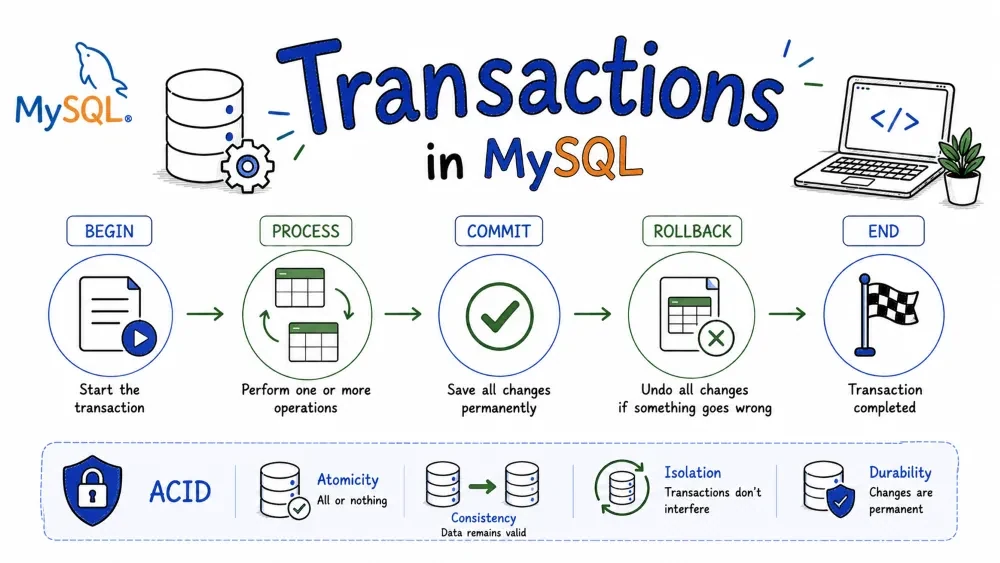
A transaction groups multiple SQL statements into one unit. Either all of them run, or none of them run. This keeps your data safe when multiple people update the same records at the same time.
These four rules make transactions reliable. Every database that supports transactions follows them.
| Property | What it means |
|---|---|
| Atomicity | All statements succeed together or fail together. No half updates. |
| Consistency | The database stays valid — constraints, triggers, and rules are always applied. |
| Isolation | One transaction can't see another transaction's unfinished work. Each runs in its own bubble. |
| Durability | Once committed, the data stays even if the power goes out. |
Tells MySQL to begin a transaction. Everything after it is part of the transaction until you commit or roll back.
START TRANSACTION;
You can also use BEGIN or BEGIN WORK — same thing.
BEGIN;
While the transaction is active, only your session sees your changes. Everyone else still sees the old data.
Saves all changes from the current transaction to the database permanently.
START TRANSACTION;

UPDATE accounts SET balance = balance - 100 WHERE id = 1;
UPDATE accounts SET balance = balance + 100 WHERE id = 2;

COMMIT;
After COMMIT, everyone sees the changes and they survive a restart.
Discards everything done since START TRANSACTION and puts the database back to where it was.
START TRANSACTION;

DELETE FROM orders WHERE id = 101;
DELETE FROM order_items WHERE order_id = 101;

-- Something went wrong, undo it all
ROLLBACK;
Use this when you hit an error mid-way — insufficient balance, validation failed, whatever.
Lets you undo part of a transaction instead of the whole thing. You set a marker, and later roll back to that marker.
START TRANSACTION;

INSERT INTO users (name) VALUES ('Alice');
SAVEPOINT after_alice;

INSERT INTO users (name) VALUES ('Bob');
SAVEPOINT after_bob;

INSERT INTO users (name) VALUES ('Charlie');

-- Charlie was a mistake, undo only him
ROLLBACK TO SAVEPOINT after_bob;

COMMIT;
-- Alice and Bob saved, Charlie gone
| Command | What it does |
|---|---|
SAVEPOINT name | Set a marker |
ROLLBACK TO SAVEPOINT name | Undo everything after that marker |
RELEASE SAVEPOINT name | Remove the marker without undoing anything |
Handy for long transactions where one small mistake shouldn't waste all the work done so far.
Controls how much a transaction can see of other transactions that are still running. More isolation = safer but slower.
| Level | Dirty Read | Non-repeatable Read | Phantom Read |
|---|---|---|---|
READ UNCOMMITTED | Can happen | Can happen | Can happen |
READ COMMITTED | Prevented | Can happen | Can happen |
REPEATABLE READ (MySQL default) | Prevented | Prevented | Can happen |
SERIALIZABLE | Prevented | Prevented | Prevented |
Dirty Read — Seeing data from a transaction that hasn't committed yet. That transaction might roll back, so you're reading garbage.
Non-repeatable Read — Read the same row twice and get different values because another transaction changed and committed it in between.
Phantom Read — Run the same WHERE query twice and get different rows because another transaction inserted or deleted in between.
SET TRANSACTION ISOLATION LEVEL READ COMMITTED;

START TRANSACTION;
SELECT * FROM orders WHERE status = 'pending';
-- Meanwhile, another transaction inserts a new pending order and commits
SELECT * FROM orders WHERE status = 'pending';
-- Now you might see an extra row (phantom read)
COMMIT;
MySQL uses REPEATABLE READ by default. Inside a transaction, every SELECT sees the same snapshot from when the transaction started. Your own changes are still visible to you.
One thing to know — MySQL's InnoDB is stricter than the SQL standard here. It actually prevents phantom reads too using snapshots and next-key locking. So you don't need to worry about phantoms in MySQL.
Locks stop two transactions from editing the same row at the same time. MySQL InnoDB locks rows by default, not whole tables.
You don't have to do anything. UPDATE, DELETE, and INSERT automatically lock the rows they touch.
-- Session A
START TRANSACTION;
UPDATE products SET stock = stock - 1 WHERE id = 10;
-- Row 10 is locked by A

-- Session B (separate connection)
UPDATE products SET stock = stock - 1 WHERE id = 10;
-- B waits until A commits or rolls back
Locks the rows you read so no one else can change or lock them. Use this when you plan to update those rows later in the same transaction.
START TRANSACTION;

SELECT * FROM accounts WHERE id = 1 FOR UPDATE;
-- Row 1 is now mine

UPDATE accounts SET balance = balance - 50 WHERE id = 1;
UPDATE accounts SET balance = balance + 50 WHERE id = 2;

COMMIT;
-- Locks released
Other sessions can still read the row, but they can't update or delete it.
START TRANSACTION;

SELECT * FROM inventory WHERE product_id = 5 LOCK IN SHARE MODE;
-- Others can read, but can't update or delete this row

COMMIT;
Happens when two transactions are waiting on each other's locks.
Transaction A: locked row 1, needs row 2
Transaction B: locked row 2, needs row 1
MySQL spots this and automatically rolls back one transaction so the other can finish. Your app should retry the failed one.
ERROR 1213 (40001): Deadlock found when trying to get lock; try restarting transaction
FOR UPDATE is stronger than LOCK IN SHARE MODE. Use FOR SHARE when you just need to block writes, not reads.Puts everything together — isolation level, transaction, savepoint, rollback, and commit.
-- Set isolation
SET TRANSACTION ISOLATION LEVEL REPEATABLE READ;

START TRANSACTION;

-- Check balance and lock the row
SELECT balance FROM accounts WHERE id = 1 FOR UPDATE;
-- Balance is 500

SAVEPOINT before_transfer;

-- Try to deduct
UPDATE accounts SET balance = balance - 200 WHERE id = 1;

-- Balance went negative? Undo and try smaller amount
ROLLBACK TO SAVEPOINT before_transfer;

UPDATE accounts SET balance = balance - 100 WHERE id = 1;
UPDATE accounts SET balance = balance + 100 WHERE id = 2;

COMMIT;
Save your progress and earn XP for completing tutorials.
Keep learning
Technology
MySQL
Lesson group
Transactions
Progress
100% complete

