Preparing your learning space...
100% through Window Functions tutorials
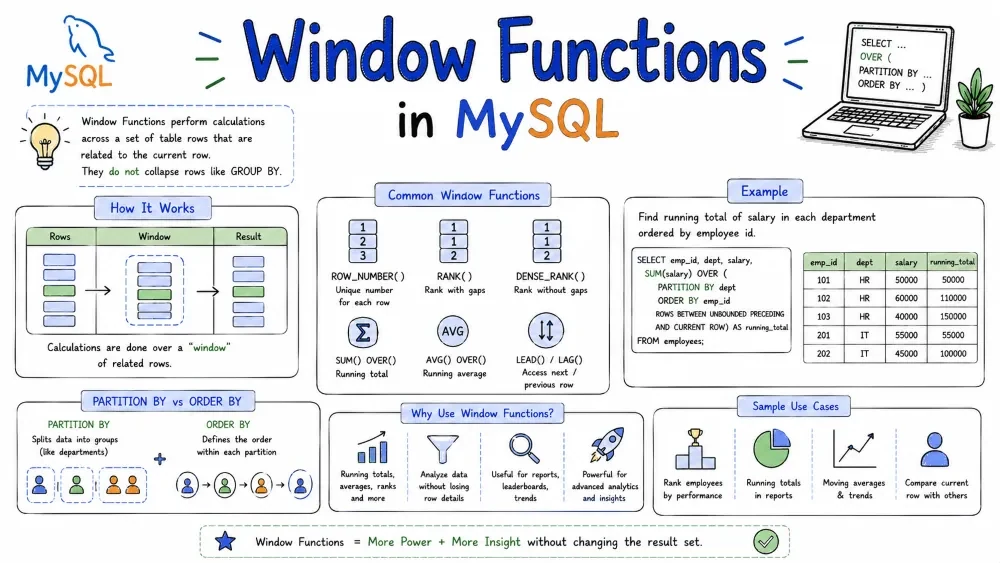
You already know GROUP BY — it smashes rows together and you lose detail. Window functions do the opposite: they let you run calculations across rows without collapsing them. Every row stays, and you get an extra column with the result.
Only works in MySQL 8.0+. Nothing before that supports window functions.
Run this once and you're good for every example in the tutorial:
CREATE TABLE employees (
    id INT PRIMARY KEY,
    name VARCHAR(50),
    department VARCHAR(50),
    salary INT
);

INSERT INTO employees VALUES
(1, 'Alice',   'Engineering', 90000),
(2, 'Bob',     'Engineering', 75000),
(3, 'Charlie', 'Engineering', 75000),
(4, 'Diana',   'Marketing',   65000),
(5, 'Eve',     'Marketing',   72000),
(6, 'Frank',   'Marketing',   60000),
(7, 'Grace',   'Sales',       80000),
(8, 'Henry',   'Sales',       85000),
(9, 'Ivy',     'Sales',       80000);
SELECT * FROM employees;
| id | name | department | salary |
|---|---|---|---|
| 1 | Alice | Engineering | 90000 |
| 2 | Bob | Engineering | 75000 |
| 3 | Charlie | Engineering | 75000 |
| 4 | Diana | Marketing | 65000 |
| 5 | Eve | Marketing | 72000 |
| 6 | Frank | Marketing | 60000 |
| 7 | Grace | Sales | 80000 |
| 8 | Henry | Sales | 85000 |
| 9 | Ivy | Sales | 80000 |
Every window function hangs off OVER(). Think of it as the instruction that says "hey, here's the window I want to work with."
function_name(args) OVER (
    PARTITION BY col   -- split into groups (optional)
    ORDER BY col       -- order within each group (optional)
    frame_clause       -- pick which rows to include (optional)
)
Three knobs you can turn:
PARTITION BY — chops rows into groups, same way GROUP BY does, except it doesn't mash them together. Leave it out and the whole result set is one big partition.ORDER BY — decides the order of rows inside each partition. Ranking functions require this.If you're slapping the same window on multiple columns, define it once with WINDOW:
SELECT
    name, salary,
    ROW_NUMBER() OVER w AS row_num,
    RANK() OVER w AS rnk,
    DENSE_RANK() OVER w AS dense_rnk
FROM employees
WINDOW w AS (ORDER BY salary DESC);
Cleaner, and if you need to change the order, you change it in one place.
These three assign numbers to rows. They look alike but treat ties differently. This trips people up constantly, so pay attention to the behavior more than the syntax.
Every row gets a unique number. If two rows have the same salary, MySQL picks an order for you — you don't control which one gets 3 vs 4.
SELECT
    name, department, salary,
    ROW_NUMBER() OVER (ORDER BY salary DESC) AS row_num
FROM employees;
| name | department | salary | row_num |
|---|---|---|---|
| Alice | Engineering | 90000 | 1 |
| Henry | Sales | 85000 | 2 |
| Grace | Sales | 80000 | 3 |
| Ivy | Sales | 80000 | 4 |
| Bob | Engineering | 75000 | 5 |
| Charlie | Engineering | 75000 | 6 |
| Eve | Marketing | 72000 | 7 |
| Diana | Marketing | 65000 | 8 |
| Frank | Marketing | 60000 | 9 |
Notice Grace and Ivy both earn 80k but got different numbers. That's ROW_NUMBER — no ties allowed.
Ties get the same rank, but a gap appears after them. Two people tied for 1st? The next rank is 3.
SELECT
    name, department, salary,
    RANK() OVER (ORDER BY salary DESC) AS rnk
FROM employees;
| name | department | salary | rnk |
|---|---|---|---|
| Alice | Engineering | 90000 | 1 |
| Henry | Sales | 85000 | 2 |
| Grace | Sales | 80000 | 3 |
| Ivy | Sales | 80000 | 3 |
| Bob | Engineering | 75000 | 5 |
| Charlie | Engineering | 75000 | 5 |
| Eve | Marketing | 72000 | 7 |
| Diana | Marketing | 65000 | 8 |
| Frank | Marketing | 60000 | 9 |
See the jump from 3 to 5? That's the gap. Useful if you're building a leaderboard and want to show "there are actually two people ahead of you."
Same tie handling as RANK, but no gaps. Tied for 1st together? Next person is rank 2, not 3.
SELECT
    name, department, salary,
    DENSE_RANK() OVER (ORDER BY salary DESC) AS dense_rnk
FROM employees;
| name | department | salary | dense_rnk |
|---|---|---|---|
| Alice | Engineering | 90000 | 1 |
| Henry | Sales | 85000 | 2 |
| Grace | Sales | 80000 | 3 |
| Ivy | Sales | 80000 | 3 |
| Bob | Engineering | 75000 | 4 |
| Charlie | Engineering | 75000 | 4 |
| Eve | Marketing | 72000 | 5 |
| Diana | Marketing | 65000 | 6 |
| Frank | Marketing | 60000 | 7 |
| Salaries | ROW_NUMBER | RANK | DENSE_RANK |
|---|---|---|---|
| 90000 | 1 | 1 | 1 |
| 85000 | 2 | 2 | 2 |
| 80000 | 3 | 3 | 3 |
| 80000 | 4 | 3 | 3 |
| 75000 | 5 | 5 | 4 |
The gap at rank 4 tells you RANK was used. DENSE_RANK never skips numbers.
ROW_NUMBER — picking exactly N rows per group (like "top 3 per department"), pagination, removing duplicates.RANK — competitions, olympic-style scoring where gaps matter.DENSE_RANK — "show me all distinct salary tiers" or when you want compact groupings.Add PARTITION BY and the numbering resets per group:
SELECT
    name, department, salary,
    ROW_NUMBER() OVER (PARTITION BY department ORDER BY salary DESC) AS dept_rank
FROM employees;
| name | department | salary | dept_rank |
|---|---|---|---|
| Alice | Engineering | 90000 | 1 |
| Bob | Engineering | 75000 | 2 |
| Charlie | Engineering | 75000 | 3 |
| Eve | Marketing | 72000 | 1 |
| Diana | Marketing | 65000 | 2 |
| Frank | Marketing | 60000 | 3 |
| Henry | Sales | 85000 | 1 |
| Grace | Sales | 80000 | 2 |
| Ivy | Sales | 80000 | 3 |
Each department restarts at 1. This is probably what you'll use ROW_NUMBER for most of the time.
NTILE(n) divides rows into n buckets as evenly as possible and tells you which bucket each row landed in.
NTILE(n) OVER (ORDER BY column)
SELECT
    name, salary,
    NTILE(3) OVER (ORDER BY salary DESC) AS bucket
FROM employees;
| name | salary | bucket |
|---|---|---|
| Alice | 90000 | 1 |
| Henry | 85000 | 1 |
| Grace | 80000 | 1 |
| Ivy | 80000 | 2 |
| Bob | 75000 | 2 |
| Charlie | 75000 | 2 |
| Eve | 72000 | 3 |
| Diana | 65000 | 3 |
| Frank | 60000 | 3 |
9 rows split into 3 buckets = perfectly even at 3 rows each.
When counts don't divide evenly, the first buckets get the extra rows. 10 rows into 3 buckets gives you 4 + 3 + 3.
Why you'd use it: quartiles, deciles, splitting a customer list into N equal groups for A/B testing, assigning work batches.
Per-department version works the same way:
SELECT
    name, department, salary,
    NTILE(3) OVER (PARTITION BY department ORDER BY salary DESC) AS dept_bucket
FROM employees;
These two let you reach into the row before or after the current one without writing a self-join. Incredibly handy for comparisons.
Grabs a value from the row above.
LAG(column, offset, default) OVER (ORDER BY column)
offset — how many rows back (default 1).default — what to return when there's no previous row (default NULL).SELECT
name, salary,
LAG(salary) OVER (ORDER BY salary) AS previous_salary,
salary - LAG(salary) OVER (ORDER BY salary) AS difference
FROM employees;
| name | salary | previous_salary | difference |
|---|---|---|---|
| Frank | 60000 | NULL | NULL |
| Diana | 65000 | 60000 | 5000 |
| Eve | 72000 | 65000 | 7000 |
| Bob | 75000 | 72000 | 3000 |
| Charlie | 75000 | 75000 | 0 |
| Grace | 80000 | 75000 | 5000 |
| Ivy | 80000 | 80000 | 0 |
| Henry | 85000 | 80000 | 5000 |
| Alice | 90000 | 85000 | 5000 |
This is how you'd calculate "how much did we grow compared to last month?" — pull previous month's revenue with LAG and subtract.
Same idea, but looks at the next row instead.
LEAD(column, offset, default) OVER (ORDER BY column)
SELECT
    name, salary,
    LEAD(salary) OVER (ORDER BY salary) AS next_salary,
    LEAD(salary) OVER (ORDER BY salary) - salary AS gap
FROM employees;
| name | salary | next_salary | gap |
|---|---|---|---|
| Frank | 60000 | 65000 | 5000 |
| Diana | 65000 | 72000 | 7000 |
| Eve | 72000 | 75000 | 3000 |
| Bob | 75000 | 75000 | 0 |
| Charlie | 75000 | 80000 | 5000 |
| Grace | 80000 | 80000 | 0 |
| Ivy | 80000 | 85000 | 5000 |
| Henry | 85000 | 90000 | 5000 |
| Alice | 90000 | NULL | NULL |
Real examples:
LAG — month-over-month revenue, week-over-week traffic, comparing current value to previous.LEAD — finding out if a session is the user's last before they churned, or checking "what's the next event in this sequence."Per-department comparison:
SELECT
    name, department, salary,
    LAG(salary) OVER (PARTITION BY department ORDER BY salary) AS prev_dept_salary
FROM employees;
These grab the first or last row in a window. Sounds simple, but LAST_VALUE has a trap that'll bite you if you don't know about it.
OVER (ORDER BY col) by itself only sees rows from the start up to the current row. That's the default frame: RANGE BETWEEN UNBOUNDED PRECEDING AND CURRENT ROW. Fine for FIRST_VALUE — the first row stays the same regardless. But LAST_VALUE will just return the current row, which is useless.
To fix this, you explicitly say "look at the whole partition":
OVER (ORDER BY col ROWS BETWEEN UNBOUNDED PRECEDING AND UNBOUNDED FOLLOWING)
Returns the first value in the window. Works fine with the default frame.
SELECT
    name, salary,
    FIRST_VALUE(name) OVER (ORDER BY salary) AS lowest_paid
FROM employees;
| name | salary | lowest_paid |
|---|---|---|
| Frank | 60000 | Frank |
| Diana | 65000 | Frank |
| Eve | 72000 | Frank |
| Bob | 75000 | Frank |
| Charlie | 75000 | Frank |
| Grace | 80000 | Frank |
| Ivy | 80000 | Frank |
| Henry | 85000 | Frank |
| Alice | 90000 | Frank |
Lowest-paid person shows up on every row. Useful for benchmarks like "what's the minimum salary in this department?"
Per-department:
SELECT
    name, department, salary,
    FIRST_VALUE(name) OVER (PARTITION BY department ORDER BY salary) AS dept_lowest
FROM employees;
Same idea, but you must override the default frame:
SELECT
    name, salary,
    LAST_VALUE(name) OVER (
        ORDER BY salary
        ROWS BETWEEN UNBOUNDED PRECEDING AND UNBOUNDED FOLLOWING
    ) AS highest_paid
FROM employees;
| name | salary | highest_paid |
|---|---|---|
| Frank | 60000 | Alice |
| Diana | 65000 | Alice |
| Eve | 72000 | Alice |
| Bob | 75000 | Alice |
| Charlie | 75000 | Alice |
| Grace | 80000 | Alice |
| Ivy | 80000 | Alice |
| Henry | 85000 | Alice |
| Alice | 90000 | Alice |
Now it works — Alice (highest salary) shows on every row.
Without the right frame, here's what you get:
SELECT
    name, salary,
    LAST_VALUE(name) OVER (ORDER BY salary) AS wrong
FROM employees;
| name | salary | wrong |
|---|---|---|
| Frank | 60000 | Frank |
| Diana | 65000 | Diana |
| Eve | 72000 | Eve |
| ... | ... | ... |
| Alice | 90000 | Alice |
Every row shows its own name. Not helpful. Always spell out the frame for LAST_VALUE.
{ROWS | RANGE | GROUPS} BETWEEN
    {UNBOUNDED PRECEDING | n PRECEDING | CURRENT ROW}
AND
    {UNBOUNDED FOLLOWING | n FOLLOWING | CURRENT ROW}
ROWS — counts literal rows.RANGE — counts rows whose values fall within a range of the current row.GROUPS (MySQL 8.0+) — counts groups of rows that share the same ORDER BY value.WHERE, GROUP BY, and HAVING. If a row is filtered out, it's not part of any window.PARTITION BY means the entire result set is one window.ORDER BY inside OVER() controls the order within the window, independent of your query's final ORDER BY.WHERE — wrap it in a subquery or CTE if you need to filter on the result.WITH ROLLUP = error. They don't work together.WINDOW w AS ...) can only reference names defined earlier in the same SELECT.Save your progress and earn XP for completing tutorials.
Keep learning
Technology
MySQL
Lesson group
Window Functions
Progress
100% complete

