Preparing your learning space...
100% through Cyber Laws tutorials
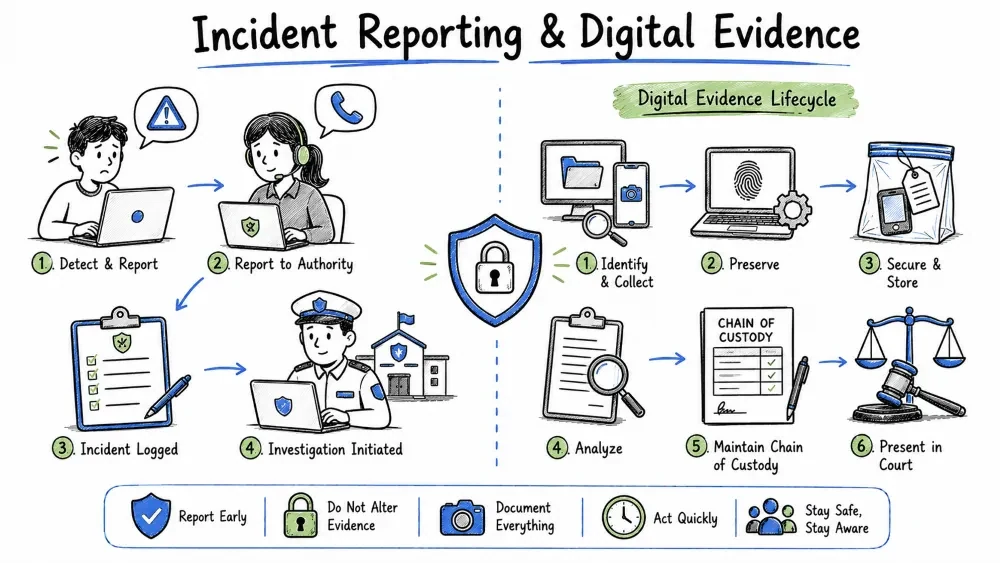
When a cyber crime occurs, two critical actions follow:
This tutorial covers CERT-In, Cyber Crime Reporting, Digital Evidence, and Incident Reporting in detail.
CERT-In stands for Indian Computer Emergency Response Team.
| Service | Description |
|---|---|
| Incident Response | Handle and coordinate response to cyber incidents |
| Advisories & Alerts | Publish timely warnings about vulnerabilities and threats |
| Vulnerability Management | Track, analyse, and coordinate disclosure of vulnerabilities |
| Malware Analysis | Analyse malware samples to understand behaviour |
| Forensic Support | Assist law enforcement with digital forensics |
| Training & Workshops | Conduct cyber security training programs |
| Security Audit | Empanel security auditors for government organisations |
| Information Sharing | Maintain early warning systems and share threat intelligence |
In April 2022, CERT-In issued directions under Section 70B of the IT Act making cyber incident reporting mandatory.
| Requirement | Detail |
|---|---|
| Who must report | Service providers, intermediaries, data centres, VPN providers, cloud providers, government agencies |
| Timeline | Report within 6 hours of noticing or being notified of an incident |
| What to report | All incidents listed in the directive (see 3.5) |
| Log retention | Maintain ICT logs for 180 days |
| Sync clocks | Systems must sync with NTP servers (National Time Protocol) |
| VPN providers | Must maintain customer details (name, IP, purpose, dates) for 5 years |
| S.No. | Incident Type |
|---|---|
| 1 | Targeted scanning or probing of networks/systems |
| 2 | Compromise of critical systems / data breach |
| 3 | Unauthorised access to IT systems |
| 4 | Malware / ransomware attacks |
| 5 | Denial of Service (DoS) / Distributed DoS (DDoS) attacks |
| 6 | Website defacement or malicious redirect |
| 7 | Phishing attacks and phishing hosting sites |
| 8 | Identity theft or identity fraud |
| 9 | Data exfiltration |
| 10 | Attacks on IoT devices, SCADA, or OT systems |
| 11 | Attacks on servers (email, DNS, web, database) |
| 12 | Any incident affecting national security or critical infrastructure |
Website: www.cybercrime.gov.in
This is the centralised portal for reporting all types of cyber crimes in India.
| Category | Examples |
|---|---|
| Financial Fraud | UPI fraud, credit/debit card fraud, net banking fraud, online shopping fraud |
| Social Media Crime | Fake profiles, harassment, impersonation, bullying |
| Cyber Stalking | Online tracking and harassment |
| Identity Theft | Someone using your Aadhaar/PAN/photo/name |
| Online Defamation | False/defamatory content posted about you |
| Ransomware | Files locked and ransom demanded |
| Child Pornography | Any content involving minors |
| Cryptocurrency Crime | Crypto fraud or scams |
| Hacking | Email hacked, website defaced, account compromised |
Complaint Filed
      ↓
Verification by Cyber Cell
      ↓
Registration of FIR (if cognisable offence)
      ↓
Investigation Begins
      ↓
Digital Forensics (if required)
      ↓
Evidence Collection & Preservation
      ↓
Arrest / Notice to Accused (if identified)
      ↓
Charge Sheet Filed in Court
      ↓
Trial
Digital evidence (or electronic evidence) is any probative information stored or transmitted in digital form that a party may use in a court of law.
| File Copy | Forensic Image |
|---|---|
| Copies only visible files | Copies every bit including free space, slack space, deleted files |
| Does not capture metadata | Captures metadata (timestamps, permissions, partition table) |
| Modifies file access times | Hashes (MD5/SHA256) are generated to verify integrity |
| Can be easily altered | Uses a write-blocker so original data is never modified |
| Not considered reliable evidence in court | Considered legally admissible with proper chain of custody |
The most common forensic image format is DD (raw) or E01 (EnCase). A forensic image is verified by comparing hash values — if even one bit changes, the hash changes.
The forensic soundness of digital evidence depends on following these principles:
| Principle | Description |
|---|---|
| 1. No action should change evidence | The investigator must not alter original data |
| 2. Competence | Only trained persons should handle digital evidence |
| 3. Audit trail | Every action must be documented and repeatable |
| 4. Case officer responsibility | The case officer is responsible for the integrity of evidence |
| 5. Compliance with law | All actions must follow legal requirements |
| Do's | Don'ts |
|---|---|
| Create a forensic image (bit-by-bit copy) | Don't work on the original device |
| Use write-blockers when connecting devices | Don't turn on the computer to "check" data |
| Maintain chain of custody | Don't delete or modify anything |
| Document every step thoroughly | Don't use the suspect's device casually |
| Use hash values (MD5/SHA256) to verify integrity | Don't store evidence on the same device |
| Secure the scene (photograph, label cables) | Don't boot from the suspect's hard drive |
The standard Digital Forensics Framework has four phases:
Data must be collected from most volatile to least volatile:
| Priority | Data Type | How to Collect |
|---|---|---|
| 1 (Highest) | CPU registers, cache | Immediate dump |
| 2 | RAM (running processes, open connections) | Memory dump tool |
| 3 | Network connections, active sessions | netstat, network capture |
| 4 | Temporary files, swap/page files | Forensic copy |
| 5 | Hard drive data (deleted files, logs) | Forensic image |
| 6 (Lowest) | Backups, archived data | Physical copy |
Why? RAM data is completely lost when power is cut. Always collect volatile data before shutting down.
| Type | Focus |
|---|---|
| Computer Forensics | Hard drives, laptops, desktops |
| Mobile Forensics | Smartphones, tablets, SIM cards |
| Network Forensics | Logs, packets, firewall traces |
| Cloud Forensics | AWS, Azure, Google Cloud, SaaS data |
| Memory Forensics | RAM, running processes |
| Database Forensics | Database records, SQL logs |
| Email Forensics | Headers, attachments, metadata |
| Social Media Forensics | Posts, messages, timelines, friend lists |
| Tool | Type | Purpose |
|---|---|---|
| FTK (Forensic Toolkit) | Commercial | Hard drive analysis, email analysis, password recovery |
| EnCase | Commercial | Full forensic imaging and analysis (industry standard) |
| Autopsy / Sleuth Kit | Open-source | File system analysis, deleted file recovery, timeline analysis |
| dd / Guymager | Open-source | Creating forensic disk images |
| Volatility | Open-source | Memory (RAM) forensics — analyse running processes, network connections |
| Wireshark | Open-source | Network packet capture and analysis |
| Cellebrite / UFED | Commercial | Mobile device forensics — extract data from phones |
| Magnet AXIOM | Commercial | Multi-device forensics (computer, mobile, cloud) |
| X-Ways Forensics | Commercial | Disk cloning, data recovery, analysis |
| Paladin / CAINE | Linux distro | Bootable forensic environment with pre-installed tools |
Free vs Paid: For learning, start with Autopsy (GUI) or Volatility (memory). For professional work, FTK and EnCase are industry standards.
The chain of custody documents every person who handled the evidence, when, and why.
| Date/Time | Evidence Item | From | To | Purpose | Signature |
|---|---|---|---|---|---|
| 01-Jan-25 10:30 | Laptop HP SN123 | Crime Scene | Investigating Officer | Collected | A. Kumar |
| 01-Jan-25 14:00 | Laptop HP SN123 | IO | Forensic Lab | Analysis | B. Singh |
| 03-Jan-25 18:00 | Laptop HP SN123 | Forensic Lab | Evidence Room | Storage | C. Patel |
Why it matters: If the chain is broken, the evidence may be declared inadmissible in court.
A cyber security incident is any event that:
| Event | Incident |
|---|---|
| Any observable occurrence | An event that harms or threatens security |
| User logging in successfully | A user logging in from an unknown country at 3 AM |
| System reboot | System reboot followed by unknown data transfer |
| Type | Example |
|---|---|
| Data Breach | Customer database exfiltrated |
| Malware Infection | Ransomware encrypting files |
| Phishing Attack | Employees receiving fraudulent emails |
| DoS/DDoS Attack | Website unavailable to customers |
| Insider Threat | Employee stealing data |
| Unauthorised Access | Hacker gaining admin privileges |
| Policy Violation | Employee sharing credentials |
| Physical Theft | Laptop with sensitive data stolen |
The standard NIST Incident Response Lifecycle (SP 800-61):
         ┌─────────────────────────────────┐
         │       1. Preparation             │
         └────────────┬────────────────────┘
                      ↓
         ┌─────────────────────────────────┐
         │   2. Detection & Analysis        │
         └────────────┬────────────────────┘
                      ↓
         ┌─────────────────────────────────┐
         │     3. Containment               │
         │    Eradication & Recovery        │
         └────────────┬────────────────────┘
                      ↓
         ┌─────────────────────────────────┐
         │     4. Post-Incident Activity    │
         │     (Lessons Learned)            │
         └─────────────────────────────────┘
Indicators of Compromise (IoCs):
Short-term containment:
Long-term containment:
Eradication:
Recovery:
| Level | Colour | Definition | Response Time |
|---|---|---|---|
| Level 1 | 🔴 Critical | Major data breach, ransomware, large-scale DoS, critical infrastructure affected | Immediate (< 1 hour) |
| Level 2 | 🟠 High | Targeted attack, confirmed data loss, DDoS affecting services | Within 2–4 hours |
| Level 3 | 🟡 Medium | Malware detected, phishing campaign, unauthorised access attempt | Within 24 hours |
| Level 4 | 🟢 Low | Single user phishing, policy violation, scan attempts | Within 48–72 hours |
A professional incident report should include:
INCIDENT REPORT

1. Report Metadata
   - Report ID: IR-2025-001
   - Date of Report: 20-Jul-2026
   - Reporter Name: [Name]
   - Reporter Role: [Role]
   - Organisation: [Org Name]

2. Incident Overview
   - Incident Type: [Malware / Phishing / Data Breach / DDoS / etc.]
   - Date/Time Detected: [DD-Mon-YYYY HH:MM]
   - Date/Time Occurred: [DD-Mon-YYYY HH:MM]
   - Severity Level: [Critical / High / Medium / Low]
   - Status: [Open / In Progress / Resolved / Closed]

3. Systems Affected
   - Hostnames: [List]
   - IP Addresses: [List]
   - Operating Systems: [List]

4. Description
   [Detailed narrative of what happened, how it was detected,
    and initial observations]

5. Indicators of Compromise (IoCs)
   - IP Addresses: [List]
   - Domains/URLs: [List]
   - File Hashes: [List of MD5/SHA256]
   - Email Addresses: [List]

6. Actions Taken
   - [Action 1 with timestamp]
   - [Action 2 with timestamp]
   - [Action 3 with timestamp]

7. Evidence Collected
   - Log files: [Paths]
   - Forensic images: [Paths]
   - Screenshots: [Paths]
   - Other: [Description]

8. Impact Assessment
   - Data compromised: [Yes/No — details]
   - Financial loss: [Amount, if known]
   - Systems impacted: [Count]
   - Users affected: [Count]
   - Regulatory impact: [If any]

9. Recommendations
   - [Short-term fixes]
   - [Long-term improvements]

10. Attachments
    - [List of attached files]

Reported By: ______________     Approved By: ______________
Date: ______________            Date: ______________
Save your progress and earn XP for completing tutorials.
Technology
Cyber Security & Networking
Lesson group
Cyber Laws
Progress
100% complete

