Preparing your learning space...
71% through Ethical Hacking tutorials
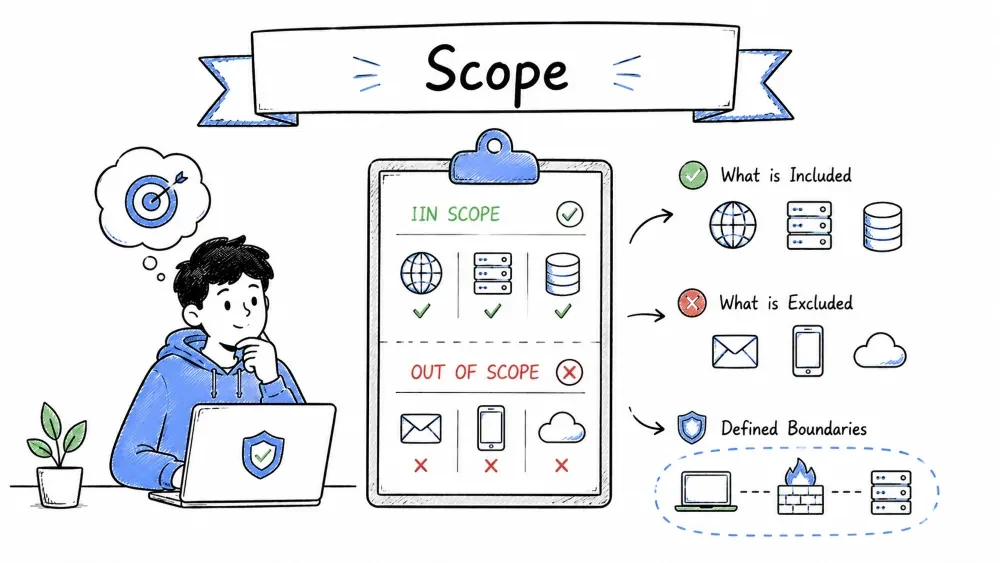
Scope defines the boundaries of a security testing engagement — exactly what systems, networks, applications, and techniques are authorized for testing, and what is explicitly excluded.
A well-defined scope is the most critical part of any ethical hacking engagement. Testing outside scope is illegal — regardless of intent.
Remember: Going outside scope turns an ethical hacker into someone breaking the law, even if they find real vulnerabilities.
"When in doubt, don't." — If you're not 100% sure a system is in scope, stop testing and ask. Pausing to ask is professional. Testing first and asking later can get you sued.
| Reason | Explanation | Real-World Consequence |
|---|---|---|
| Legal Protection | Staying in-scope keeps testing legally authorized | Going out-of-scope = CFAA violation (felony in US) |
| Risk Management | Prevents accidental damage to untargeted systems | Crashed a production database → sued for $1.5M |
| Focus | Resources are concentrated on the agreed targets | Wasted time on irrelevant systems costs the client money |
| Professionalism | Demonstrates discipline and respect for boundaries | Out-of-scope testing = reputation destroyed |
| Client Trust | The client knows exactly what will be tested | Trust is the foundation of the consultant-client relationship |
| Case | What Happened | Consequence |
|---|---|---|
| Case 1 (2018) | Pentester scanned AWS IP ranges beyond the client's account, hitting a different AWS customer | Client sued for $1.5M — the other AWS customer claimed damages |
| Case 2 (2020) | Tester found credentials in-scope and used them to access a third-party partner's system (out-of-scope) | Contract terminated, tester banned from the platform |
| Case 3 (2022) | Researcher on a bug bounty program tested all subdomains of *.company.com — including an acquired company's separate infrastructure | $50,000 legal threat from the acquired company (not part of the program) |
| Case 4 (2023) | Automated scanning tool on a researcher's laptop auto-discovered and scanned devices on the client's guest Wi-Fi, which connected to a medical device network | HIPAA violation risk — testing had to be suspended for 3 weeks |
A proper scope document defines several categories:
The specific systems allowed for testing:
| Asset Type | Examples | How to Document |
|---|---|---|
| IP Ranges | 203.0.113.0/24, 198.51.100.10-198.51.100.50 | CIDR notation or specific ranges |
| Domains / Subdomains | *.example.com, app.example.com, api.example.com | Wildcards or explicit list |
| Applications | Production web app, mobile API v2, admin portal | URL + version |
| Subnets | Internal network 10.10.10.0/24 | Private IP ranges |
| Cloud Accounts | AWS Account ID 123456789012, Azure Subscription ID | Account ID / Tenant ID |
| Authentication Methods | SSO, LDAP, OAuth | Login mechanism to test |
Example Statement: "The tester is authorized to perform penetration testing on the following:
web.example.com(production web application, v3.2.1)api.example.com(REST API, v2)192.168.1.0/24(internal network segment)- Employee mobile devices running iOS 17+ (with employee consent obtained)
- AWS Account: 123456789012 (us-east-1 region only)"
Explicitly excluded systems are just as important as included ones:
| Reason for Exclusion | Example | Why Excluded |
|---|---|---|
| Third-party hosted | cdn.example.com (Cloudflare) | Not the client's infrastructure; may violate Cloudflare ToS |
| Legacy systems | Internal ERP on Windows Server 2008 | Too fragile for aggressive scanning |
| Customer data stores | Database servers containing PII | Risk of data exposure; GDPR concerns |
| Production-critical | Payment processing system (PCI scope only) | If crashes, business stops |
| Partners/acquired | Subsidiary company's systems | Different contracts, different legal entities |
| SCADA/ICS | Manufacturing control systems | Could cause physical damage if disrupted |
| Cloud shared services | Shared databases, shared Kubernetes clusters | Risk of affecting other tenants |
Example Statement: "The following are OUT OF SCOPE and must not be tested:
payments.example.com(live payment processing — PCI scope only)hr.example.com(contains employee PII)- Third-party SaaS applications (Salesforce, Slack, GitHub, Jira)
- SCADA/ICS systems in the manufacturing network (10.50.0.0/16)
- Any systems owned by ExampleCorp's subsidiaries"
| Category | Allowed | Forbidden |
|---|---|---|
| Network Testing | Port scanning (nmap, masscan) | Denial of Service attacks |
| Web Testing | Parameter fuzzing, auth testing | SQL injection on DELETE/UPDATE operations |
| Social Engineering | (Only if separately scoped) | Any form of coercion or blackmail |
| Physical Access | (Only if separately scoped) | Damaging property, stealing physical items |
| Credential Testing | Password spraying (limited attempts) | Storing/exfiltrating user passwords |
| Exploitation | Manual exploitation with proof of concept | Installing ransomware, cryptominers |
| Aspect | Detail |
|---|---|
| Information Given | IP range or domain name only |
| Credentials | None |
| Network Access | External only (no VPN into internal network) |
| Documentation | None |
| Realism | ✅ Very realistic — simulates external attacker |
| Time Required | Longest (tester must discover everything) |
| Cost | Highest per unit of depth |
| Best For | Testing detection capabilities, simulating real attacks |
| Aspect | Detail |
|---|---|
| Information Given | IP ranges + documentation |
| Credentials | Standard user account(s) provided |
| Network Access | VPN access into internal network |
| Documentation | Architecture docs, API docs |
| Realism | ✅ Balance of realism and efficiency |
| Time Required | Medium |
| Cost | Moderate |
| Best For | Most standard pentests — best value for money |
| Aspect | Detail |
|---|---|
| Information Given | Everything |
| Credentials | All user roles (standard, admin, root) |
| Network Access | Full access to all environments |
| Documentation | Source code, network diagrams, architecture, source code |
| Realism | ❌ Least realistic |
| Time Required | Shortest (direct path to deep testing) |
| Cost | Lower per unit of depth (but deeper coverage) |
| Best For | Code review, compliance deadlines, maximum coverage |
| Limitation | Why it Exists | Impact on Testing | How to Work Around |
|---|---|---|---|
| Time bound | "Testing only Friday 9PM — Sunday 9AM" | Pressure to find everything in limited window | Prioritize critical paths first; save enumeration for if time permits |
| No DoS testing | Risk of system crash | Cannot test load-based vulnerabilities | Document "likely DoS" based on config analysis |
| No social engineering | Employee privacy, union concerns | Cannot test human element | Recommend separate SE engagement |
| Read-only access | "Find but don't exploit" | Cannot prove real impact | Document as "limited testing" and recommend full pentest |
| No privileged access | Cannot provide admin credentials | Cannot test privilege escalation paths | Start from standard user; escalate as much as possible |
| Production only | No dev/staging provided | Risk of impacting live systems | Request a maintenance window; use careful scanning rates |
| Specific users only | Only certain accounts can be tested | Limited lateral movement | Test from those users; note scope limitation |
| Sensitive data exclusion | PII, PHI, PCI data not to be accessed | Cannot fully validate data exfiltration risk | Use synthetic test data where possible |
Scope Creep happens when testing intentionally or unintentionally goes beyond what was agreed. It is one of the most dangerous situations in security testing.
| Scenario | How It Happens | The Problem |
|---|---|---|
| Broad scanning | Nmap CIDR too wide: scanning 10.0.0.0/8 instead of 10.0.1.0/24 | Tester accidentally scans the entire internal network — including partner systems |
| DNS name resolution | * .example.com resolves to a CDN. Scanning the CDN's IP hits thousands of other websites | Testing Cloudflare IPs means testing OTHER Cloudflare customers |
| Cloud shared tenancy | Kubernetes cluster has pods from multiple customers | Attacking a shared cluster may compromise other tenants |
| Mergers & Acquisitions | Company A acquires Company B. A's * .example.com still resolves to B's old servers | B's infrastructure wasn't part of the contract |
| Auto-discovery tools | Researcher runs gobuster which finds a subdomain on a different AWS account | The subdomain belongs to a subsidiary not in scope |
| OAuth / SSO trust | In-scope app uses SSO that connects to an out-of-scope identity provider | Researcher inadvertently tests the IdP (third-party) |
| Vendor infrastructure | In-scope API relies on AWS API Gateway or Firebase | The cloud provider's infrastructure is NOT in scope |
[You realize you're out of scope]
         │
         ▼
1. STOP IMMEDIATELY
   - Stop all scans, stop all exploitation
   - Close all reverse shells / sessions
   - Do not touch any more data
         │
         ▼
2. DOCUMENT EVERYTHING
   - What did you access?
   - When did you access it?
   - How did it happen? (CIDR mistake? DNS resolution? Subdomain?)
   - What data, if any, was viewed?
         │
         ▼
3. REPORT TO THE CLIENT
   - Immediate notification to primary contact
   - Include the documentation from Step 2
   - Be transparent — hiding it makes it worse
         │
         ▼
4. SEEK GUIDANCE
   - Ask the client: "Should we add this system to scope?"
   - Or: "Should I delete all data from this system?"
   - Offer a root-cause analysis
         │
         ▼
5. LEARN AND PREVENT
   - Update verification procedures
   - Add checks: "ping target — does it match scope?"
   - Consider using a scope-checking script
Before sending a single packet, verify the target is actually in scope:
$ nslookup app.example.com
Server:         8.8.8.8
Address:        8.8.8.8#53

Non-authoritative answer:
app.example.com canonical name = app.example-customer.com.
app.example.com  → 203.0.113.45      ← Is this IP in the agreed range?

$ whois 203.0.113.45 | grep -i "OrgName\|NetRange"
NetRange:       203.0.113.0 - 203.0.113.255
OrgName:        ExampleCorp Inc.     ← Does this match the client?
# Find the Autonomous System Number
$ whois -h whois.cymru.com " -v 203.0.113.45"
AS      | IP               | AS Name
64496   | 203.0.113.45     | EXAMPLECORP, US

# Check if this ASN is in scope
$ grep -i "64496" scope-verification.txt
AS64496 — ExampleCorp — ✅ IN SCOPE
$ echo | openssl s_client -connect app.example.com:443 2>/dev/null | openssl x509 -text | grep "Subject:\|Issuer:\|DNS:"
Subject: CN = app.example.com
DNS:app.example.com, DNS:*.example.com, DNS:*.example-corp.internal
If the certificate lists domains you don't recognize, they might belong to a CDN or proxy (potential scope issue).
$ nslookup 203.0.113.45
45.113.0.203.in-addr.arpa  name = ec2-203-0-113-45.compute.amazonaws.com.
If this returns an AWS/Azure/GCP hostname (not the client's domain), the client is using a cloud provider. The underlying cloud infrastructure is NOT in scope — only the client's application/data.
□ Verified DNS resolves to expected IP range
□ WHOIS confirms IP ownership matches client
□ SSL certificate lists expected domains only
□ No unexpected CDN/WAF IPs (Cloudflare, Akamai, Fastly)
□ ASN ownership matches client registration
□ Target domain is explicitly listed in the scope document
□ IP falls within the agreed CIDR range
□ Subdomain resolves and is not a parked/redirect page
Cloud adds complexity to scope because of shared responsibility:
┌─────────────────────────────────────────────────────────┐
│  CLIENT RESPONSIBILITY (IN SCOPE)                       │
│  ┌─────────────────────────────────────────────────────┐│
│  │ Application code, data, configurations, IAM roles   ││
│  │ Customer-managed: EC2 instances, containers, Lambda  ││
│  │ Customer-owned: S3 bucket policies, Security Groups  ││
│  └─────────────────────────────────────────────────────┘│
├─────────────────────────────────────────────────────────┤
│  CLOUD PROVIDER RESPONSIBILITY (OUT OF SCOPE)           │
│  ┌─────────────────────────────────────────────────────┐│
│  │ Physical hardware, hypervisor, network fabric        ││
│  │ Services: S3, DynamoDB, Lambda (underlying infra)    ││
│  │ Global infrastructure: Regions, AZs, edge locations  ││
│  └─────────────────────────────────────────────────────┘│
└─────────────────────────────────────────────────────────┘
| Cloud Resource | Typically In Scope? | Notes |
|---|---|---|
| EC2 instance (client-managed) | ✅ Yes | It's a virtual server they control |
| S3 bucket with client data | ✅ Yes | Configuration, access policies |
| Lambda function (client code) | ✅ Yes | Code + configuration |
| CloudFormation / Terraform | ✅ Yes | Infrastructure-as-Code |
| AWS API Gateway | ⚠️ Yes (app level) | Not the underlying AWS infrastructure |
| AWS global network | ❌ No | That's AWS's responsibility |
| Shared Kubernetes cluster | ⚠️ Carefully | Cluster-scoped vs namespace-scoped |
| Third-party SaaS (Salesforce) | ❌ No | Unless specifically contracted |
| Acquired company's cloud | ❌ No | Unless added to scope explicitly |
Written document signed by both parties:
Scope Agreement #2026-001
ExampleCorp Inc. & SecureTest Solutions

1. IN SCOPE
   - app.example.com (web app, prod)
   - api.example.com (REST API, v3)
   - 203.0.113.0/25

2. EXCLUDED (OUT OF SCOPE)
   - payments.example.com
   - Any third-party SaaS
   - Social engineering requests

3. PERMITTED METHODS
   - Port scanning, vuln scanning
   - Manual exploitation (non-destructive)
   - Password spraying (max 3 tries/account)

4. RESTRICTED METHODS
   - No SQL injection on write queries
   - No data exfiltration
   - No DoS or stress testing

5. SIGNED:
   Client: _______________ Date: ________
   Tester: _______________ Date: ________
Before starting, the tester should:
Scope is a legally binding part of the contract:
| Legal Dimension | Explanation |
|---|---|
| Contract Law | Scope defines the services. Going beyond scope = breach of contract |
| Criminal Law (US) | CFAA criminalizes "unauthorized access." Scope = authorization boundary |
| Criminal Law (UK) | Computer Misuse Act §1 — "unauthorized access" = 6 months / £5,000 fine |
| Criminal Law (EU) | Directive 2013/40/EU — attacks against information systems |
| Insurance | Professional liability is void if you act outside scope |
| Certification | EC-Council, Offensive Security can revoke your certification |
| Employment | Violating scope is grounds for termination with cause |
Real-World Example: In 2018, a penetration tester entered a client's building (physical pentest was NOT in scope) after hours and was arrested by security. The tester was sued for $1.5 million by the client. The contract specifically excluded physical testing. The tester lost their certifications and their insurance didn't cover the claim.
| Do | Don't |
|---|---|
| Provide an explicit asset list (IPs, domains, apps) | Say "just test everything" — this is never valid scope |
| Include what's out of scope | Assume the tester knows what not to touch |
| Keep your asset list updated | Provide an IP list from 2 years ago |
| Designate a point of contact | Leave the tester guessing who to call |
| Define escalation — what if scope needs to change mid-test? | Ignore scope change requests — testers will keep testing |
| Do | Don't |
|---|---|
| Get it in writing — verbal approval is not enough | Start testing without a signed scope |
| Verify before testing — check DNS, WHOIS, IP ranges | Trust the list blindly — it may be outdated |
| Record everything — logs of every connection made in a scope log | Test without documentation |
| Stay current — check for scope changes each day | Assume scope hasn't changed since the contract |
| When in doubt, ask — pause and confirm rather than break scope | Guess — if you're unsure, stop and email the client |
| Keep a scope log — every target you test, with timestamp | Have no proof of what you did and didn't test |
SCOPE VERIFICATION LOG
━━━━━━━━━━━━━━━━━━━━━━━

Date: July 20, 2026
Tester: John Smith

TARGET    | VERIFICATION METHOD | RESULT          | IN SCOPE?
──────────┼─────────────────────┼─────────────────┼──────────
10.0.0.10 | DNS: mail.example.   | Matches scope   | ✅ YES
          | com → 10.0.0.10      | document        |
          | WHOIS: ExampleCorp   |                 |
──────────┼─────────────────────┼─────────────────┼──────────
10.0.0.50 | DNS: vault.example.  | Contains "PII"  | ✅ YES
          | com → 10.0.0.50      | but in scope    | (handle
          |                      | per contract    | carefully)
──────────┼─────────────────────┼─────────────────┼──────────
54.2.3.4  | DNS: ec2-54-2-3-4.  | AWS IP —        | ❌ NO
          | compute.amazonaws.   | not confirmed   | SKIPPED
          | com                  | client-owned    |
Save your progress and earn XP for completing tutorials.
Technology
Cyber Security & Networking
Lesson group
Ethical Hacking
Progress
71% complete

