Preparing your learning space...
20% through Network Security tutorials
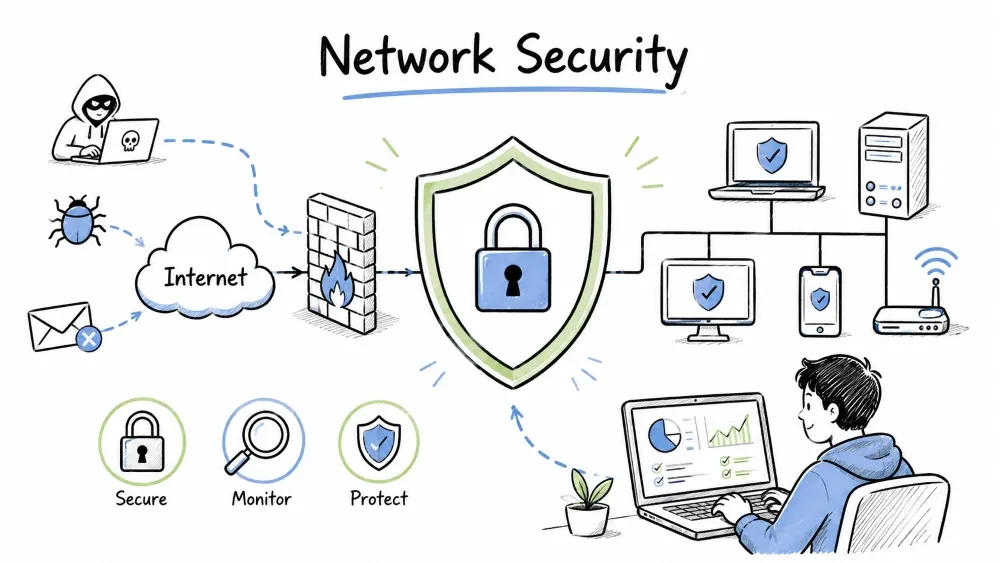
Network Security is the practice of protecting a computer network infrastructure from unauthorized access, misuse, malfunction, modification, destruction, or improper disclosure. It combines multiple layers of defenses at the edge and within the network.
Network Security is an essential field for anyone who uses the internet or connects to any network. In today's digital world, data is the most valuable asset — whether personal or business — and protecting this data is the primary goal of network security.
| Reason | Explanation |
|---|---|
| Data Breaches | Millions of records are leaked every year — banking details, passwords, medical records |
| Ransomware Epidemic | Hackers lock entire networks and demand ransom payments |
| Remote Work | People work from home — unsecured home networks are also at risk |
| IoT Devices | Smart TVs, cameras, smart bulbs — every device is a potential entry point |
| Legal Compliance | GDPR, HIPAA, PCI DSS — security is mandatory by law |
This Category 8 will take you through the world of network security step by step:
Every topic is covered with real-world examples and practical configurations.
Network Security refers to the policies, processes, and practices adopted to prevent, detect, and monitor unauthorized access, misuse, modification, or denial of a computer network and network-accessible resources.
| Objective | Description |
|---|---|
| Confidentiality | Data is accessible only to authorized users |
| Integrity | Data is accurate, consistent, and not tampered with |
| Availability | Network and data are accessible when needed |
Network threats are any potential dangers that can exploit vulnerabilities in your network to breach security, steal data, or disrupt operations. These threats come in many forms and target different parts of the network.
Malware (malicious software) is any program or code designed to damage, disrupt, or gain unauthorized access to a computer system without the user's consent.
Network-level attacks target the network infrastructure itself — routers, switches, and communication protocols — rather than individual computers or applications.
| Attack Type | How It Works |
|---|---|
| DoS / DDoS | Overwhelms network with traffic to make it unavailable |
| Man-in-the-Middle (MITM) | Attacker intercepts communication between two parties |
| Packet Sniffing | Capturing data packets traveling over the network |
| DNS Spoofing | Redirecting traffic to malicious websites |
| ARP Spoofing | Associating attacker's MAC with a legitimate IP |
Access attacks focus on gaining unauthorized entry into systems by exploiting authentication and authorization weaknesses.
A defense-in-depth approach uses multiple layers:
┌─────────────────────────────────────┐
│         Policy & Procedures         │
├─────────────────────────────────────┤
│         Physical Security           │
├─────────────────────────────────────┤
│         Authentication (MFA)        │
├─────────────────────────────────────┤
│         Firewalls                   │
├─────────────────────────────────────┤
│         IDS / IPS                   │
├─────────────────────────────────────┤
│         VPN & Encryption            │
├─────────────────────────────────────┤
│         Antivirus / Anti-malware    │
├─────────────────────────────────────┤
│         Network Monitoring          │
└─────────────────────────────────────┘
Security controls are safeguards or countermeasures designed to protect the confidentiality, integrity, and availability of network data. They are typically categorized into three types based on how they operate.
Administrative controls are policies, procedures, and guidelines that govern how security is managed — they define what people should and should not do.
Technical controls are hardware and software mechanisms that enforce security rules and protect systems through technology rather than human action.
Physical controls are tangible barriers and mechanisms that protect physical access to network hardware, servers, and infrastructure.
Security zones segment a network into areas with different trust levels so that a breach in one zone does not automatically compromise the entire network. Trust models define how traffic is treated between these zones.
| Model | Description |
|---|---|
| Trusted (Internal) | Corporate LAN — high trust |
| Untrusted (External) | Internet — zero trust |
| DMZ (Demilitarized Zone) | Public-facing servers (web, email, DNS) |
| Guest Network | Isolated access for visitors |
"Never trust, always verify." Every request is authenticated, authorized, and encrypted regardless of origin.
Security protocols are communication standards that implement encryption, authentication, and integrity checks to protect data as it travels across the network.
| Protocol | Purpose |
|---|---|
| TLS/SSL | Encrypts web traffic (HTTPS) |
| IPsec | Secures IP communications |
| SSH | Secure remote administration |
| SNMPv3 | Secure network management |
| 802.1X | Port-based network access control |
Objective: Apply the CIA triad to real-world scenarios.
Task: For each scenario below, identify which part of the CIA triad (Confidentiality, Integrity, or Availability) is violated — some scenarios may violate multiple.
| Scenario | Which CIA element is violated? |
|---|---|
| A hacker steals customer credit card data from a database | |
| A DDoS attack takes down a company's website | |
| An employee accidentally modifies a critical file without permission | |
| A network outage prevents access to email for 4 hours | |
| An attacker intercepts and reads unencrypted messages | |
| A virus corrupts files on a file server |
Bonus: For each scenario, write one sentence on how to prevent it.
Objective: Understand defense-in-depth by mapping security tools to the correct layer.
Task: Draw a defense-in-depth diagram (on paper or in a file) and place each of the following items in the correct layer:
Questions:
Save your progress and earn XP for completing tutorials.
Technology
Cyber Security & Networking
Lesson group
Network Security
Progress
20% complete

