Preparing your learning space...
55% through Projects tutorials
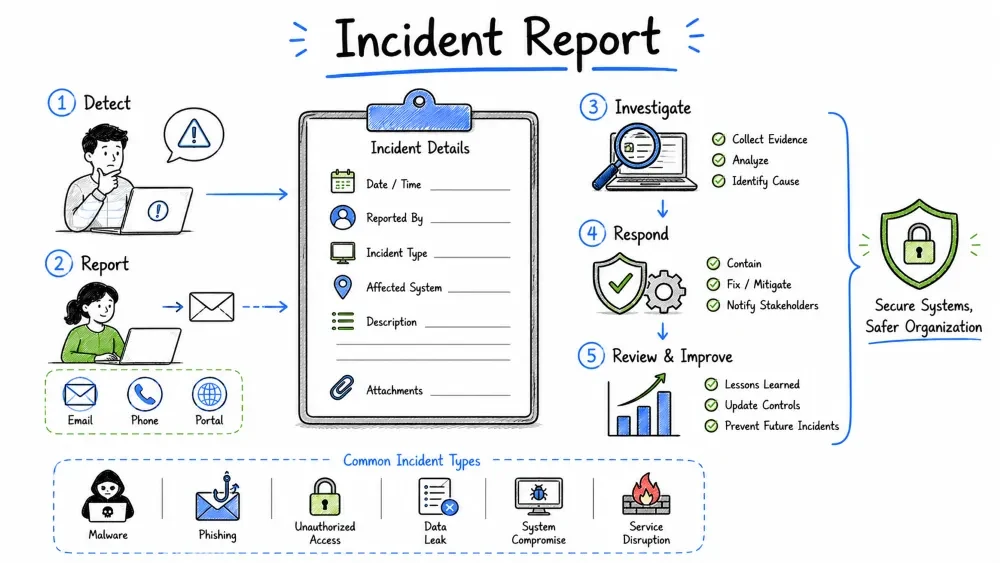
In this project, you will learn how to write a professional cybersecurity incident report. You'll analyze a simulated security incident, document findings, create a timeline, assess impact, and provide remediation recommendations. Incident reporting is a critical skill for any security professional.
The Incident: On June 15, 2026, at approximately 2:30 PM, the BrightPath Education IT team detected unusual network activity. Investigation revealed that an employee's credentials were compromised through a phishing email, leading to unauthorized access to the student database containing 5,000+ records.
Your task is to write a comprehensive incident report documenting this incident.
💡 Free Lab Setup: Incident reporting requires no special software — just documentation tools you already have:
- Google Docs / LibreOffice — Report writing (free)
- Google Sheets / LibreOffice Calc — Evidence logs, timelines (free)
- draw.io — Network/attack flow diagrams (free)
- All templates and checklists are included in this tutorial — just copy and fill in!
- No paid tools required.
📋 Your Step-by-Step Task:
- Read the incident scenario — BrightPath Education data breach (below)
- Study the incident response lifecycle framework
- Review the chain of custody and evidence collection procedures
- Create an incident timeline using the template provided
- Write a technical analysis of the phishing attack
- Perform a "5 Whys" root cause analysis
- Calculate business impact using the cost estimate template
- Write an executive summary (1 page, plain language)
- Complete the full incident report using the sample as a guide
- Complete the deliverables checklist and take the quiz
After completing this project, you will be able to:
Incident Response (IR) is the systematic approach to managing and responding to security incidents. The goal is to handle the situation in a way that limits damage, reduces recovery time and costs, and helps prevent future incidents.
PURPOSE OF INCIDENT REPORTS:
  1. Documentation: Record what happened for legal and compliance
  2. Analysis: Understand how and why the incident occurred
  3. Improvement: Identify gaps and improve defenses
  4. Communication: Inform stakeholders at all levels
  5. Compliance: Meet regulatory reporting requirements
  6. Lessons Learned: Share knowledge to prevent recurrence
  7. Legal Protection: Demonstrate due diligence
| Regulation | Reporting Requirement | Deadline |
|---|---|---|
| GDPR | Notify data protection authority | 72 hours |
| HIPAA | Notify affected individuals and HHS | 60 days |
| PCI DSS | Notify card brands | Varies |
| CCPA | Notify affected California residents | Without reasonable delay |
| SEC (public companies) | Report material incidents | 4 business days |
1. EXECUTIVE SUMMARY
   └─ Brief overview for management (1 page maximum)

2. INCIDENT DETAILS
   └─ Classification, severity, status, timeline

3. CHRONOLOGY / TIMELINE
   └─ What happened, when, and in what order

4. TECHNICAL ANALYSIS
   └─ Detailed technical findings

5. BUSINESS IMPACT
   └─ Data, financial, operational, reputational impact

6. ROOT CAUSE ANALYSIS
   └─ Why the incident happened

7. EVIDENCE COLLECTED
   └─ Chain of custody, evidence types

8. RECOMMENDATIONS
   └─ Short-term and long-term remediation

9. LESSONS LEARNED
   └─ What went well, what could improve

10. APPENDICES
    └─ Logs, screenshots, raw data, references
| Principle | Description | Example |
|---|---|---|
| Factual | State facts, not opinions | "Logs show 15 failed login attempts" not "Attacker tried many times" |
| Objective | Avoid blame language | "The account was compromised" not "The user was careless" |
| Clear | Use plain language, define acronyms | Define "SIEM" on first use |
| Timely | Document as events happen | Record timestamps immediately |
| Complete | Cover all relevant aspects | Don't leave questions unanswered |
| Confidential | Mark appropriately | Include confidentiality notice |
| Verifiable | Include evidence references | Reference log file names and locations |
                ┌─────────────────────────────────┐
                │         PREPARATION              │
                │  (Policies, tools, training)     │
                └───────────────┬─────────────────┘
                                │
                ┌───────────────▼─────────────────┐
                │     DETECTION & ANALYSIS         │
                │  (Monitor, detect, triage)       │
                └───────────────┬─────────────────┘
                                │
                ┌───────────────▼─────────────────┐
                │      CONTAINMENT, ERADICATION    │
                │        & RECOVERY                │
                └───────────────┬─────────────────┘
                                │
                ┌───────────────▼─────────────────┐
                │       POST-INCIDENT ACTIVITY     │
                │  (Lessons learned, reporting)    │
                └─────────────────────────────────┘
1. PREPARATION
   - IR policy and procedures
   - IR team roles defined
   - Tools and technologies in place
   - Communication plans established
   - Training conducted

2. DETECTION & ANALYSIS
   - Alert triggered / incident reported
   - Initial triage and assessment
   - Evidence collection begins
   - Scope determination
   - Severity classification

3. CONTAINMENT, ERADICATION & RECOVERY
   - Short-term containment (isolate affected systems)
   - Long-term containment (apply patches, change passwords)
   - Eradication (remove malware, close backdoors)
   - Recovery (restore from backups, return to production)

4. POST-INCIDENT
   - Investigation complete
   - Report written
   - Lessons learned meeting
   - Remediation plan implemented
   - Report filed for compliance
| Level | Name | Description | Response Time |
|---|---|---|---|
| 4 | Informational | No impact, potential concern | Report only |
| 3 | Low | Minor impact, single user | 24 hours |
| 2 | Medium | Department-level impact, data exposure risk | 4 hours |
| 1 | High | Organization-wide impact, data breach | 1 hour |
| 0 | Critical | Life safety, existential threat | Immediate |
| Type | Description | Example |
|---|---|---|
| Phishing | Deceptive email to obtain credentials | Fake login page |
| Malware | Malicious software installation | Ransomware |
| Unauthorized Access | Improper system access | Stolen credentials |
| Data Breach | Unauthorized data exfiltration | Customer data stolen |
| DDoS | Service disruption | Site taken offline |
| Insider Threat | Malicious or negligent employee | Data theft |
| Physical Security | Physical access compromise | Server room breach |
| Policy Violation | Violation of security policy | Unauthorized software |
Incident: BrightPath Education Data Breach
Classification: Data Breach / Unauthorized Access
Severity: HIGH (Level 1)
Status: Contained / Under Investigation
Confidentiality: CONFIDENTIAL — DO NOT DISTRIBUTE
═══════════════════════════════════════════
CHAIN OF CUSTODY FORM
═══════════════════════════════════════════

Case Number: IR-2026-001
Incident: Student Database Unauthorized Access

ITEM #1
────────
Description: Export of authentication logs (auth.log)
Source System: DC01.domain.local (Domain Controller)
Date/Time Collected: 2026-06-15 16:45 EDT
Collected By: Jordan Chen (Security Analyst)
Collection Method: Secure copy via winrm — sha256 verified
Hash (SHA256): a1b2c3d4e5f6...
Storage Location: \\forensic\cases\IR-2026-001\evidence\
Media Type: Network share (encrypted volume)

Transfer History:
┌──────────────┬─────────────────┬────────────────────────┐
│ Date/Time    │ From            │ To                     │
├──────────────┼─────────────────┼────────────────────────┤
│ 2026-06-15   │ Jordan Chen     │ Evidence Locker        │
│ 16:45        │ (Collector)     │ (Encrypted Share)      │
├──────────────┼─────────────────┼────────────────────────┤
│ 2026-06-16   │ Evidence Locker │ Dr. Sarah Williams     │
│ 09:30        │                 │ (Lead Investigator)    │
└──────────────┴─────────────────┴────────────────────────┘

Purpose: Analysis of login events during incident timeframe
Intact upon receipt? Yes ☐ / No ☐ (If no, explain)
DIGITAL EVIDENCE:
  • System logs (Windows Event Log, syslog)
  • Network logs (firewall, proxy, DNS)
  • Email headers and content
  • File system artifacts
  • Memory dumps
  • Disk images (forensic copies)
  • Database transaction logs
  • Application logs
  • SIEM alerts and correlation data
  • Packet captures (PCAP)

PHYSICAL EVIDENCE:
  • Hardware (if seized)
  • Written notes and documentation
  • Photographs of physical configuration

DOCUMENTARY EVIDENCE:
  • Access control lists
  • User account information
  • Policy documents
  • Previous security assessments
  • Employee records
DO'S:
  ✓ Work from copies, never originals
  ✓ Document every action taken
  ✓ Use write blockers when acquiring drives
  ✓ Verify integrity with hashes (SHA256)
  ✓ Store evidence in secure, access-controlled location
  ✓ Maintain detailed chain of custody

DON'TS:
  ✗ Don't modify original evidence
  ✗ Don't use the suspect system for analysis
  ✗ Don't discuss case details unnecessarily
  ✗ Don't store evidence on unencrypted media
  ✗ Don't let evidence leave custody unattended
═══════════════════════════════════════════════════════════
INCIDENT TIMELINE — IR-2026-001
═══════════════════════════════════════════════════════════

Date: June 15, 2026

TIME (EDT)   | EVENT                                        | SOURCE
─────────────┼──────────────────────────────────────────────┼─────────────
08:45        │ Phishing email sent to employee jdoe@...    │ Email logs
09:12        │ Employee clicked link in phishing email      │ Proxy logs
09:13        │ Credentials phished via fake login page      │ Web logs
09:15        │ Attacker authenticated as jdoe (first login) │ AD logs
09:15        │ GeoIP: Login from unusual location (RU)      │ GeoIP alert
09:30-11:45  │ Attacker enumerated AD, mapped network       │ Event logs
11:50        │ Attacker accessed student database (SELECT)  │ DB logs
11:50-12:30  │ Data exfiltration: 5,000+ records exported  │ FW logs (outbound)
12:35        │ Attacker established persistence (scheduled task)│ Sysmon
13:00        │ Employee reported suspicious email to IT     │ Email
13:15        │ IT security team starts investigation        │ Log
14:30        │ Alert triggered: Unusual outbound traffic    │ SIEM
14:35        │ Incident declared (Level 1 - High)           │ IR team
15:00        │ Affected account disabled                    │ AD logs
15:15        │ Database server isolated from network        │ Network team
15:30        │ Containment verified                         │ Security team
16:00        │ Executive notified                           │ Email
16:30        │ Evidence collection begins                   │ Forensics
─────────────────────────────────────────────────────────────────────────
1. Use a SINGLE timezone throughout (EDT/EST or UTC)
2. Include "unknown period" notations where gaps exist
3. Source each event (how do you know this happened)
4. Note confidence level (Confirmed / Likely / Possible)
5. Include both attacker and defender actions
6. Add time between events (dwell time, response time)
7. Reference evidence items in brackets [E-001, E-002]
8. Keep updating as investigation progresses
1. EMAIL ANALYSIS
   - Original phishing email headers and body
   - Sender domain analysis (SPF, DKIM, DMARC)
   - Link destinations (URL analysis)
   - Attachment analysis (if any)

2. NETWORK ANALYSIS
   - Source IPs and geolocation
   - C2 server communications
   - Data exfiltration patterns
   - Protocols and ports used
   - DNS queries made

3. ENDPOINT ANALYSIS
   - Compromised user account activity
   - Processes executed
   - Files created/modified
   - Registry changes
   - Scheduled tasks/jobs

4. DATABASE ANALYSIS
   - Queries executed
   - Data accessed
   - Export operations
   - Authentication attempts
TECHNICAL ANALYSIS REPORT
─────────────────────────────────────────

1. PHISHING EMAIL ANALYSIS
   ───────────────────────
   Original email received: jdoe@brightpath.edu
   From: "IT Support" <support@brightpath-verify.com>
   Subject: "Action Required: Verify Your Account"
   SPF: Fail (sending IP not authorized)
   DKIM: Not signed
   DMARC: No policy (p=none)
   Sending IP: 203.0.113.45 (hosted in Bulgaria)
   Link: https://brightpath-verify.com/login (Typosquatting)
   Link domain registered: June 10, 2026 (5 days before attack)
   Link domain registrar: GoDaddy (anonymous WHOIS)

2. ATTACKER ACCESS ANALYSIS
   ─────────────────────────
   Initial access: 2026-06-15 09:15 via VPN (203.0.113.50)
   VPN IP geolocation: Russia (Moscow)
   Protocols used: RDP via jump host
   Accounts used: jdoe (compromised), then escalated to svc_admin
   Lateral movement: 3 systems accessed between 09:30-11:45

3. DATA ACCESS
   ────────────
   Database: StudentRecords (SQL Server)
   Queries: SELECT * FROM Students WHERE GraduationYear >= 2024
   Records accessed: 5,247 student records
   Data exfiltrated: Confirmed via outbound traffic analysis
   Exfiltration method: HTTPS POST to 203.0.113.60
   Data size: ~45 MB

4. PERSISTENCE
   ────────────
   Method: Scheduled task created (TaskName: "SystemUpdate")
   Runs as: SYSTEM
   Interval: Daily at 3:00 AM
   Action: PowerShell reverse shell
   Artifact: C:\Windows\Tasks\SystemUpdate.ps1 (deleted on containment)
📊 Educational example — The dollar figures below are scenario-based estimates for practicing impact assessment. No real costs involved.
| Category | Impact Description | Quantification |
|---|---|---|
| Data Impact | Student PII exposed | 5,247 records |
| Financial Impact | Breach response costs | $180,000 estimated |
| Operational Impact | Database offline for 48 hours | Extended recovery |
| Reputational Impact | Parent/student trust affected | High |
| Legal Impact | Potential FERPA/HIPAA violations | Investigation ongoing |
| Regulatory Impact | State breach notification laws | 60-day notification window |
💡 Educational example only — These are industry-average breach costs used to practice impact assessment. No actual spending is involved.
BREACH COST ESTIMATE
─────────────────────────────────────
Direct Costs:
  Incident response team (200 hours @ $150/hr)   $30,000
  Forensic investigation (external)               $25,000
  Legal counsel                                    $20,000
  Notification costs (5,247 recipients)            $15,000
  Credit monitoring (12 months)                    $40,000
  Public relations support                         $15,000
  System restoration and hardening                 $20,000
  ─────────────────────────────────────────────────
  Total Direct Costs                              $165,000

Indirect Costs:
  Productivity loss                                 $25,000
  Increased insurance premiums                       $10,000
  Potential regulatory fines                         $50,000+
  ─────────────────────────────────────────────────
  Total Indirect Costs                              $85,000+

TOTAL ESTIMATED COST: $250,000+
─────────────────────────────────────
AFFECTED DATA:
  ┌──────────────────────┬────────┬──────────┐
  │ Data Field           │ Type   │ Sensitivity │
  ├──────────────────────┼────────┼──────────┤
  │ Student Name         │ PII    │ High     │
  │ Date of Birth        │ PII    │ High     │
  │ Social Security #    │ PII    │ Critical │
  │ Home Address         │ PII    │ High     │
  │ Parent/Guardian Name │ PII    │ High     │
  │ Grade Level          │ Educational │ Low │
  │ Enrollment Status    │ Educational │ Low │
  │ Medical Info         │ PHI    │ Critical │
  └──────────────────────┴────────┴──────────┘
PROBLEM: Student database accessed by unauthorized attacker

WHY 1: Why was the attacker able to access the database?
       → Because the attacker had valid credentials (jdoe's account).

WHY 2: Why did the attacker have jdoe's credentials?
       → Because jdoe entered them on a fake login page.

WHY 3: Why did jdoe fall for the phishing page?
       → Because the email looked legitimate and bypassed spam filter.

WHY 4: Why did the email bypass the spam filter?
       → Because SPF/DMARC wasn't properly configured to reject spoofed emails.

WHY 5: Why wasn't SPF/DMARC properly configured?
       → Because email security configuration wasn't prioritized
         during the last infrastructure review.

ROOT CAUSE: Inadequate email security controls (SPF/DMARC)
and lack of MFA allowed a successful phishing attack to
compromise credentials and lead to data breach.
SECURITY GAPS IDENTIFIED:
  1. No MFA on user accounts (allows credential-only access)
  2. SPF/DMARC not configured for email domain
  3. Database accessible from user workstations (no network segmentation)
  4. No data exfiltration detection (outbound data monitoring)
  5. Insufficient user security awareness (fall victim to sophisticated phishing)
  6. No privileged access management (PAM) for database access
  7. No alert for unusual geo-location logins
  8. Delayed detection (dwell time: ~5 hours before alert)
| # | Action | Priority | Owner | Status |
|---|---|---|---|---|
| 1 | Reset ALL user passwords | Critical | IT Team | ✅ Complete |
| 2 | Enable MFA for all accounts | Critical | IT Team | ⏳ In Progress |
| 3 | Remove persistence mechanisms | Critical | IR Team | ✅ Complete |
| 4 | Review and revoke unauthorized access | Critical | Security Team | ✅ Complete |
| 5 | Notify affected individuals (FERPA) | High | Legal | 📅 Planned |
| 6 | Implement geo-blocking for known malicious regions | High | Network Team | ⏳ In Progress |
| 7 | Scan entire environment for IOCs | High | IR Team | ⏳ In Progress |
| # | Action | Priority | Owner |
|---|---|---|---|
| 1 | Configure SPF, DKIM, and DMARC with reject policy | High | IT Team |
| 2 | Implement network segmentation (database VLAN) | High | Network Team |
| 3 | Deploy DLP solution for data exfiltration detection | High | Security Team |
| 4 | Enhance SIEM rules for geo-anomaly detection | Medium | SOC Team |
| 5 | Conduct organization-wide security awareness training | High | HR/Security |
| 6 | Implement Privileged Access Management (PAM) | Medium | IT Team |
| 7 | Deploy endpoint detection and response (EDR) | High | IT Team |
| # | Action | Priority | Owner |
|---|---|---|---|
| 1 | Adopt Zero Trust architecture | High | Security |
| 2 | Implement SOAR for automated response | Medium | Security |
| 3 | Regular penetration testing (quarterly) | High | External |
| 4 | Bug bounty program | Medium | Security |
| 5 | Cyber insurance review | Medium | Risk/Legal |
═══════════════════════════════════════════════════════════
INCIDENT RESPONSE REPORT — IR-2026-001
═══════════════════════════════════════════════════════════

CLASSIFICATION: CONFIDENTIAL — PRIVILEGED

TO:          Board of Directors, BrightPath Education
FROM:        Security Incident Response Team
DATE:        June 22, 2026
SUBJECT:     Student Database Unauthorized Access Incident

───────────────────────────────────────────────────────────
EXECUTIVE SUMMARY
───────────────────────────────────────────────────────────

On June 15, 2026, BrightPath Education experienced a security
incident involving unauthorized access to the student database.
The incident was the result of a successful phishing attack that
compromised an employee's credentials.

TIMELINE OVERVIEW:
  • 08:45 — Phishing email sent
  • 09:15 — Credentials compromised, attacker gains access
  • 14:30 — Anomalous activity detected by SIEM
  • 14:35 — Incident declared
  • 15:30 — Containment achieved

IMPACT:
  • 5,247 student records accessed (PII including SSN)
  • Estimated financial impact: $250,000+
  • No evidence of lateral movement to other systems
  • No ransomware or malware deployed

ROOT CAUSE:
  • Inadequate email security (SPF/DMARC not configured)
  • No multi-factor authentication (MFA)
  • Lack of network segmentation (database accessible from user LAN)

STATUS: CONTAINED — All active threats neutralized

REMEDIATION (COMPLETED):
  ✓ All passwords forcibly reset
  ✓ Compromised account disabled
  ✓ Database server isolated and secured
  ✓ Backup verified and clean
  ✓ IOCs shared with threat intelligence partners

RECOMMENDATIONS (PRIORITY):
  1. Enable MFA for all accounts — IMMEDIATE
  2. Implement network segmentation — 30 DAYS
  3. Deploy DLP solution — 60 DAYS
  4. Conduct security awareness training — 30 DAYS
[COMPLETE REPORT — TABLE OF CONTENTS]

1. Executive Summary ................................... 1
2. Incident Classification ............................ 2
3. Detailed Timeline .................................. 3
4. Technical Analysis ................................. 5
   4.1 Phishing Email Analysis
   4.2 Network Traffic Analysis
   4.3 Endpoint Analysis
   4.4 Database Access Analysis
5. Evidence Inventory ................................. 9
6. Chain of Custody .................................. 10
7. Business Impact Assessment ........................ 12
8. Root Cause Analysis ............................... 14
9. Containment Actions ............................... 15
10. Remediation Plan .................................. 16
11. Lessons Learned ................................... 18
12. Recommendations ................................... 19
13. Appendices ........................................ 20
    A. Raw Log Data
    B. Phishing Email (Full Headers)
    C. IOC List (Indicators of Compromise)
    D. Regulatory Notification Requirements
    E. Communications Log
# INCIDENT REPORT — QUICK REFERENCE

**Case ID**: IR-YYYY-###
**Date Reported**:
**Reported By**:
**Incident Type**:
**Severity**: Critical / High / Medium / Low

**SUMMARY**:
[2-3 sentences describing the incident]

**AFFECTED SYSTEMS**:
- System 1 (IP, Role)
- System 2 (IP, Role)

**IMPACT**:
- Data:
- Systems:
- Users:

**TIMELINE**:
- Detection:
- Containment:
- Eradication:
- Recovery:

**ROOT CAUSE**:
[Brief explanation]

**ACTIONS TAKEN**:
- [ ] Action 1
- [ ] Action 2
- [ ] Action 3

**NEXT STEPS**:
- [ ] Step 1
- [ ] Step 2
## EVIDENCE LOG

| Item # | Description | Source | Collector | Date/Time | Hash (SHA256) | Location |
|--------|-------------|--------|-----------|-----------|---------------|----------|
| E-001 | | | | | | |
| E-002 | | | | | | |
| E-003 | | | | | | |
| Mistake | Why It's a Problem | Better Approach |
|---|---|---|
| Blaming individuals | Creates fear, discourages reporting | Focus on processes, not people |
| Incomplete timelines | Gaps in timeline mean missed evidence | Document in real-time, fill gaps ASAP |
| Jargon overload | Management can't understand | Executive summary in plain language |
| No evidence references | Claims without proof are worthless | "As shown in E-001, log X shows..." |
| Speculation as fact | Misleads investigation | Label speculation as "Likely," "Possible" |
| Poor chain of custody | Evidence inadmissible | Document every transfer |
| No lessons learned | Same mistake repeats | Include improvement section |
| Delayed reporting | Regulatory/compliance failure | Report on timeline |
| Over-classification | Hinders information sharing | Classify appropriately, share need-to-know |
| Missing recommendations | Report ends without action plan | Always include actionable remediation |
Before marking this project complete:
Save your progress and earn XP for completing tutorials.
Technology
Cyber Security & Networking
Lesson group
Projects
Progress
55% complete

