Preparing your learning space...
100% through TCP/IP tutorials
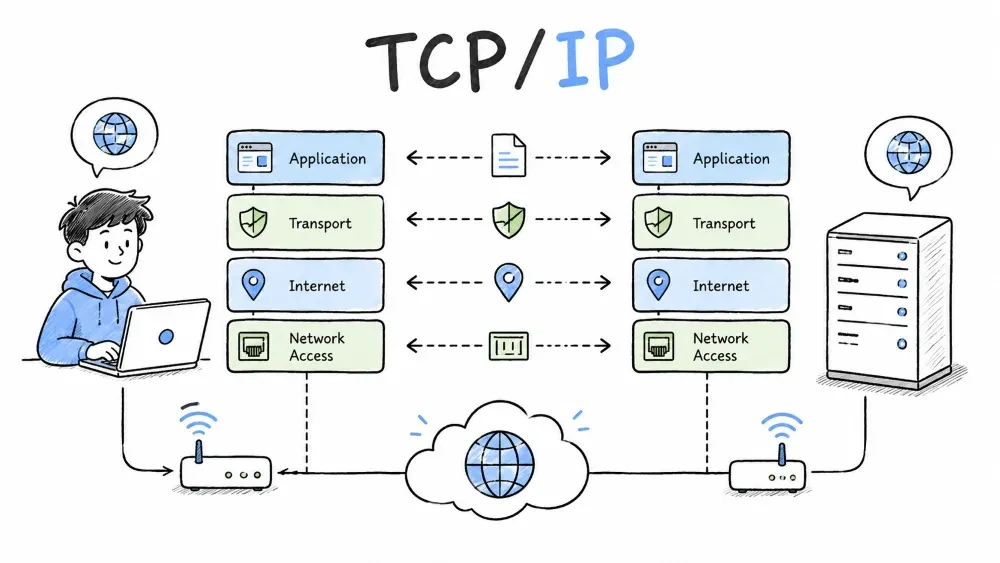
Introduction to the fundamental protocol suite that powers the internet and most private networks.
TCP/IP (Transmission Control Protocol / Internet Protocol) is the fundamental communication protocol suite of the internet and most private networks. It defines how data is packaged, addressed, transmitted, routed, and received across networks.
This single comprehensive tutorial covers all 9 topics — TCP/IP Introduction, Network Interface Layer, Internet Layer, Transport Layer, TCP, UDP, Ports, Sockets, and the Application Layer.
Introduction to the TCP/IP protocol suite — its definition, history, 4-layer stack, and how data flows through it.
Defines the core protocol suite that powers all internet communication.
TCP/IP is a suite of communication protocols used to interconnect network devices. It is named after its two most important protocols:
| Protocol | Role |
|---|---|
| TCP (Transmission Control Protocol) | Ensures reliable, ordered, and error-checked delivery of data between applications |
| IP (Internet Protocol) | Handles addressing and routing — gets packets from source to destination |
Timeline of TCP/IP's evolution from ARPANET to the global internet standard.
| Year | Milestone |
|---|---|
| 1969 | ARPANET, the predecessor of the internet, is created |
| 1974 | Vint Cerf and Bob Kahn publish the first paper on TCP |
| 1978 | TCP is split into TCP and IP (the modern separation) |
| 1983 | ARPANET switches fully to TCP/IP — the "birth" of the modern internet |
| Today | TCP/IP powers billions of devices across the globe |
Why was TCP/IP created? The U.S. Department of Defense needed a robust, decentralized network that could survive partial outages — if one route was destroyed, packets would automatically find another path.
Explains the four layers (Network Interface, Internet, Transport, Application) that organize network communication.
TCP/IP is organized into 4 layers, each with a specific job:
 ┌─────────────────────────────────────────────┐
 │            Application Layer                │  ← HTTP, DNS, SMTP, FTP, SSH
 ├─────────────────────────────────────────────┤
 │             Transport Layer                 │  ← TCP, UDP
 ├─────────────────────────────────────────────┤
 │              Internet Layer                 │  ← IP, ICMP, ARP
 ├─────────────────────────────────────────────┤
 │         Network Interface Layer             │  ← Ethernet, Wi-Fi, Fiber
 └─────────────────────────────────────────────┘
| Layer | Responsibility | Examples |
|---|---|---|
| Network Interface | Physical transmission, MAC addressing, framing | Ethernet, Wi-Fi, DSL |
| Internet | Logical addressing (IP), routing, packet forwarding | IP (IPv4/IPv6), ICMP, ARP |
| Transport | End-to-end communication between applications | TCP, UDP |
| Application | Network services for user applications | HTTP, DNS, SMTP, SSH, FTP |
Shows how each layer adds its own header as data travels down the protocol stack.
When an application sends data, it travels down the stack, and each layer adds its own header:
[Application]                     Data (e.g., HTTP request)
       │
       ▼
[Transport]    +─────────+──────────────────────────────+
               | TCP hdr |          Data                |
               +─────────+──────────────────────────────+
       │
       ▼
[Internet]     +──+─────────+──────────────────────────────+
               |IP| TCP hdr |          Data                |
               +──+─────────+──────────────────────────────+
       │
       ▼
[Network]      +──+──+─────────+──────────────────────────────+
               |Eth|IP| TCP hdr |          Data               |
               +──+──+─────────+──────────────────────────────+
       │
       ▼      Physical bits on the wire/air
At the receiving end, each layer strips its header and passes the payload up (decapsulation).
Compares the 4-layer TCP/IP model with the 7-layer OSI reference model.
| OSI Model (7 Layers) | TCP/IP Model (4 Layers) |
|---|---|
| 7. Application | ─┐ |
| 6. Presentation | ─┤ Application |
| 5. Session | ─┘ |
| 4. Transport | Transport |
| 3. Network | Internet |
| 2. Data Link | ─┐ |
| 1. Physical | ─┤ Network Interface |
Key difference: TCP/IP combines OSI's top 3 layers into Application Layer, and bottom 2 into Network Interface Layer.
Compares the two IP versions — address size, format, and features.
| Feature | IPv4 | IPv6 |
|---|---|---|
| Address Size | 32 bits | 128 bits |
| Format | 192.168.1.1 | 2001:db8::1 |
| Total Addresses | ~4.3 billion | 340 undecillion |
| Security | Optional (IPsec) | Built-in |
| Header | Variable length | Fixed (simpler) |
The lowest layer handling physical data transmission, MAC addressing, Ethernet framing, and ARP resolution.
The lowest TCP/IP layer responsible for physical data transmission and local network addressing.
The Network Interface Layer (Link Layer or Network Access Layer) is the lowest layer. It handles the physical transmission of data and local network addressing.
Analogy: If the Internet Layer is the postal service, the Network Interface Layer is the mail truck, the roads, and the wheels.
Core functions of the Network Interface Layer — framing, MAC addressing, error detection, media access control.
| Responsibility | Description |
|---|---|
| Framing | Wraps packets into frames with header and trailer |
| Physical Addressing | Uses MAC addresses for local identification |
| Error Detection | CRC checksum (FCS) in every frame |
| Media Access Control | Determines which device transmits next |
| Signal Encoding | Converts bits to electrical/optical/radio signals |
The hardware medium (copper, fiber, radio) that carries raw bits as signals across the network.
| Medium | Type | Speed | Max Distance | Common Use |
|---|---|---|---|---|
| Twisted Pair | Copper (Cat5e, Cat6) | 100 Mbps – 10 Gbps | 100m | Office/home LANs |
| Coaxial | Copper | 10–100 Mbps | 500m | Cable internet |
| Fiber Optic | Glass | 1 Gbps – 400 Gbps | 40+ km | Backbone, data centers |
| Radio | Wireless (2.4/5/6 GHz) | 150 Mbps – 9.6 Gbps | 30–100m | Wi-Fi, cellular |
Signaling: Electrical (voltage changes on copper), Optical (light on/off in fiber), Radio (modulated radio waves)
Manages local addressing via MAC addresses and formats data into Ethernet frames.
Unique 48-bit hardware identifiers burned into each network interface card.
A MAC address is a 48-bit hardware address burned into every NIC:
Format:  XX:XX:XX:YY:YY:YY
Example: 00:1A:2B:3C:4D:5E
| Part | Meaning |
|---|---|
| First 3 bytes (OUI) | Manufacturer identifier (e.g., 00:1A:2B = Cisco) |
| Last 3 bytes (NIC) | Unique device identifier |
| FF:FF:FF:FF:FF:FF | Broadcast (all devices on the local network) |
Format of data packets at the link layer — preamble, MAC addresses, EtherType, payload, and FCS.
 ┌────────┬────────┬──────────┬────────────┬───────────────┬──────────┬──────────┐
 │Preamble│ SFD    │Dest MAC  │Source MAC  │  EtherType    │  Payload │   FCS    │
 │ 7 bytes│ 1 byte │ 6 bytes  │ 6 bytes    │  2 bytes      │46-1500 B │ 4 bytes  │
 └────────┴────────┴──────────┴────────────┴───────────────┴──────────┴──────────┘
| Field | Purpose |
|---|---|
| Preamble + SFD | Synchronization |
| Dest MAC | Receiver's MAC address |
| Source MAC | Sender's MAC address |
| EtherType | Payload protocol (0x0800 = IPv4, 0x0806 = ARP, 0x86DD = IPv6) |
| Payload | 46–1500 bytes of data |
| FCS | CRC checksum for error detection |
Legacy collision detection protocol used in classic shared Ethernet (hub-based) networks.
In classic Ethernet (hubs), CSMA/CD prevents collisions:
Modern switched Ethernet does not use CSMA/CD — each device has a dedicated switch port.
Popular Ethernet and Wi-Fi standards with their speeds, cable types, and generations.
Ethernet:
| Standard | Speed | Cable | Year |
|---|---|---|---|
| 100BASE-TX | 100 Mbps | Cat5 | 1995 |
| 1000BASE-T | 1 Gbps | Cat5e | 1999 |
| 10GBASE-T | 10 Gbps | Cat6a | 2006 |
Wi-Fi (802.11):
| Standard | Name | Band | Max Speed |
|---|---|---|---|
| 802.11n | Wi-Fi 4 | 2.4/5 GHz | 600 Mbps |
| 802.11ac | Wi-Fi 5 | 5 GHz | 3.5 Gbps |
| 802.11ax | Wi-Fi 6/6E | 2.4/5/6 GHz | 9.6 Gbps |
Protocol that maps IP addresses to MAC addresses on the same local network.
ARP maps IP addresses to MAC addresses on the same local network.
Broadcast-request and unicast-reply process for resolving a device's MAC address from its IP address.
"Who has 192.168.1.10? Tell AA:AA:AA:AA:AA:AA" (broadcast to FF:FF:FF:FF:FF:FF)"I have 192.168.1.10. My MAC is BB:BB:BB:BB:BB:BB"[Device A] [Device B]
│─── ARP Request (Broadcast) ──→│ "Who has 192.168.1.10?"
│←── ARP Reply (Unicast) ──────│ "I do. MAC = BB:BB:BB:BB:BB:BB"
│─── Data Frame ───────────────→│ With correct destination MAC
Security risk: ARP has no authentication — attackers can send fake replies (ARP Spoofing).
Local cache of resolved IP-to-MAC address mappings maintained by each host.
$ arp -a
Interface: 192.168.1.5
  Internet Address    Physical Address      Type
  192.168.1.1         00:14:22:ab:cd:01     dynamic
  192.168.1.10        bb:bb:bb:bb:bb:bb    dynamic
Maximum frame payload size (MTU) and how larger packets are split into smaller pieces for transmission.
MTU (Maximum Transmission Unit) = maximum payload size per frame:
| Technology | MTU |
|---|---|
| Ethernet | 1500 bytes |
| Jumbo Frames | 9000 bytes |
| PPPoE (DSL) | 1492 bytes |
| Wi-Fi | 2304 bytes |
If an IP packet exceeds the link's MTU, it is fragmented into smaller pieces.
The layer responsible for logical IP addressing, routing across networks, ICMP diagnostics, and NAT translation.
The layer responsible for logical addressing (IP) and routing packets across multiple networks.
The Internet Layer is the heart of TCP/IP. It handles logical addressing and routing — getting packets from any source to any destination across multiple networks.
Analogy: The Internet Layer is the postal system. You write an address on an envelope (IP address), and routers figure out how to get it there.
Core functions of the Internet Layer — IP addressing, routing, forwarding, fragmentation, and ICMP error reporting.
| Responsibility | Description |
|---|---|
| Logical Addressing | IP addresses identify hosts |
| Routing | Determines best path across networks |
| Packet Forwarding | Moves packets between routers |
| Fragmentation | Splits packets exceeding link MTU |
| Error Reporting | ICMP messages for delivery problems |
The 20-60 byte header format showing all fields — version, TTL, protocol, source/destination IP, and more.
 0               1               2               3
├─────┬─────┬───────────┬──────┬──────────────────────────────────┤
│Vers │ IHL │   DSCP    │  TL  │       Total Length (16)          │
├─────┴─────┴───────────┴──────┴──────────────────────────────────┤
│          Identification (16)     │Flags│   Fragment Offset (13) │
├─────────────────────────────────┴─────┴─────────────────────────┤
│     Time to Live (8)    │   Protocol (8)    │   Header Checksum │
├─────────────────────────────────────────────────────────────────┤
│                    Source IP Address (32)                       │
├─────────────────────────────────────────────────────────────────┤
│                  Destination IP Address (32)                    │
└─────────────────────────────────────────────────────────────────┘
| Field | Size | Purpose |
|---|---|---|
| Version | 4 bits | 4 for IPv4, 6 for IPv6 |
| IHL | 4 bits | Header length (minimum 5 = 20 bytes) |
| Total Length | 16 bits | Full packet size (header + data), max 65535 |
| TTL | 8 bits | Decremented by each router; packet discarded at 0 |
| Protocol | 8 bits | 6 = TCP, 17 = UDP, 1 = ICMP |
| Source/Dest IP | 32 bits each | IPv4 addresses |
32-bit dotted-decimal addresses (e.g., 192.168.1.10) identifying hosts and their networks.
An IPv4 address is a 32-bit number in dotted decimal:
Binary:      11000000 10101000 00000001 00001010
Decimal:     192.168.1.10
Each address has two parts separated by the subnet mask:
| Part | Purpose | Example (/24) |
|---|---|---|
| Network | Identifies the network | 192.168.1.0 |
| Host | Identifies the device | 0.0.0.10 |
Reserved IP ranges for internal network use — not routable on the public internet.
| Range | CIDR | Use |
|---|---|---|
| 10.0.0.0 – 10.255.255.255 | /8 | Large private networks |
| 172.16.0.0 – 172.31.255.255 | /12 | Medium private networks |
| 192.168.0.0 – 192.168.255.255 | /16 | Home/small office |
Special addresses:
Method for dividing IP networks using prefix-length notation (e.g., /24) to calculate host capacity.
CIDR notation: IP/prefix_length (e.g., 192.168.1.0/24)
Available hosts: 2^(32 - prefix) - 2
| CIDR | Subnet Mask | Usable Hosts |
|---|---|---|
| /24 | 255.255.255.0 | 254 |
| /25 | 255.255.255.128 | 126 |
| /26 | 255.255.255.192 | 62 |
| /27 | 255.255.255.224 | 30 |
| /28 | 255.255.255.240 | 14 |
| /29 | 255.255.255.248 | 6 |
128-bit addressing scheme replacing IPv4 with a simpler header and vastly more address space.
IPv6 uses 128-bit addresses and has a simpler header (40 bytes fixed, no checksum, no fragmentation by routers).
Full:     2001:0db8:85a3:0000:0000:8a2e:0370:7334
Short:    2001:db8:85a3::8a2e:370:7334
Loopback: ::1
Shortening rules:
0370 → 370:: (use only once)IPv6 address types:
| Type | Description | Prefix |
|---|---|---|
| Global Unicast | Routable on public internet | 2000::/3 |
| Unique Local | Private (like IPv4 private) | fd00::/8 |
| Link-Local | Local link only (auto-assigned) | fe80::/10 |
| Multicast | One-to-many (no broadcast in IPv6) | ff00::/8 |
Process of forwarding packets across networks through routers using routing tables.
Same-network direct delivery vs cross-network delivery requiring a router.
| Type | Description |
|---|---|
| Direct | Destination is on the same network |
| Indirect | Destination is on a different network — requires a router |
A table in routers and hosts listing destination networks, gateways, and interfaces for packet forwarding.
Every router (and host) has a routing table:
Destination     Netmask          Gateway         Interface
0.0.0.0         0.0.0.0          192.168.1.1     eth0    (Default route)
192.168.1.0     255.255.255.0    0.0.0.0         eth0    (Local network)
10.0.0.0        255.255.255.0    192.168.1.10    eth0    (Via router)
Each router forwards to the next hop without knowing the full path to the destination.
[Host A] ──── [Router 1] ──── [Router 2] ──── [Server B]
   │         192.168.1.1       10.0.0.1        198.51.100.1
192.168.1.50
Each router only knows the next hop, not the entire path.
Protocol for error reporting and network diagnostics — used by ping and traceroute tools.
ICMP (Internet Control Message Protocol) is used for error reporting and diagnostics.
| Type | Code | Message | Use |
|---|---|---|---|
| 0 | 0 | Echo Reply | Ping response |
| 3 | 0 | Network Unreachable | No route |
| 3 | 3 | Port Unreachable | No service on port |
| 8 | 0 | Echo Request | Ping |
| 11 | 0 | TTL Expired | Traceroute |
Ping tests reachability and measures round-trip time:
$ ping google.com
64 bytes from 142.250.80.4: icmp_seq=0 ttl=116 time=12.3 ms

--- google.com ping statistics ---
3 packets transmitted, 3 received, 0% packet loss
Traceroute maps the path by sending packets with increasing TTL:
$ traceroute google.com
 1  192.168.1.1       1.2 ms
 2  10.0.0.1          3.1 ms
 3  203.0.113.1       8.4 ms
 4  142.250.80.4     12.8 ms
Maps multiple private IP addresses to a single public IP address for internet access.
NAT allows multiple private devices to share a single public IP:
Internal: 192.168.1.10:55000
                 │
                 ▼
NAT Table: 192.168.1.10:55000 ↔ 100.50.25.10:32000
                 │
                 ▼
External: 100.50.25.10:32000 → Internet
NAT is used in virtually every home/office router. It also provides basic security by hiding internal IPs.
The layer providing end-to-end application communication via port numbers, sockets, and the client-server model.
Provides end-to-end communication between applications on different hosts using TCP or UDP.
The Transport Layer provides end-to-end communication between application processes on different hosts. While the Internet Layer (IP) delivers data between hosts, the Transport Layer delivers it to specific applications.
 Host A                      Host B
┌─────────┐                 ┌─────────┐
│ Browser │                 │ Web Svr │  ← Applications
├─────────┤                 ├─────────┤
│  TCP    │──── Network ───→│  TCP    │  ← Transport Layer (app-to-app)
├─────────┤                 ├─────────┤
│   IP    │                 │   IP    │  ← Internet Layer (host-to-host)
└─────────┘                 └─────────┘
Overview of TCP (reliable, connection-oriented) and UDP (fast, connectionless).
| Protocol | Type | Key Trait |
|---|---|---|
| TCP | Connection-oriented | Reliable, ordered, guaranteed delivery |
| UDP | Connectionless | Fast, lightweight, no guarantees |
Core transport functions — multiplexing, port addressing, segmentation, reassembly, and error detection.
| Responsibility | Description |
|---|---|
| Multiplexing | Multiple applications share the network simultaneously |
| Port Addressing | Identifies specific applications via port numbers |
| Segmentation | Splits large data into smaller segments |
| Reassembly | Reconstructs original data at the receiver |
| Error Detection | Checksums detect corrupted data |
16-bit identifiers (0-65535) that distinguish different applications and services on a host.
A port is a 16-bit number (0–65535) that identifies a specific application on a host.
Analogy: IP address = building address. Port number = apartment door in that building.
Three categories of ports — well-known (0-1023), registered (1024-49151), and ephemeral (49152-65535).
| Range | Category | Description |
|---|---|---|
| 0–1023 | Well-Known | System services (require admin/root) |
| 1024–49151 | Registered | Assigned by IANA to specific apps |
| 49152–65535 | Ephemeral | Temporary client ports (OS-assigned) |
Standard port assignments for popular network services like SSH, HTTP, DNS, and HTTPS.
| Port | Protocol | Service |
|---|---|---|
| 20, 21 | TCP | FTP |
| 22 | TCP | SSH |
| 23 | TCP | Telnet |
| 25 | TCP | SMTP |
| 53 | TCP/UDP | DNS |
| 67, 68 | UDP | DHCP |
| 80 | TCP | HTTP |
| 110 | TCP | POP3 |
| 143 | TCP | IMAP |
| 161 | UDP | SNMP |
| 443 | TCP | HTTPS |
| 3306 | TCP | MySQL |
| 3389 | TCP | RDP |
Real example of how source and destination ports identify a connection between a browser and a server.
Browser: 192.168.1.5:49152  ←──→  Google: 142.250.80.4:443
             ↑  ↑                      ↑   ↑
           IP  Port                  IP  Port
         (host) (app)             (host) (app)
The combination (Source IP, Source Port, Dest IP, Dest Port) uniquely identifies every connection on the internet.
Commands to view listening services and active connections using netstat.
# Linux/macOS
$ netstat -tln
Proto Recv-Q Local Address    Foreign Address   State
tcp        0 0.0.0.0:22       0.0.0.0:*         LISTEN
tcp        0 0.0.0.0:80       0.0.0.0:*         LISTEN
tcp        0 0.0.0.0:443      0.0.0.0:*         LISTEN

# Windows
C:\> netstat -an
Proto  Local Address        Foreign Address      State
TCP    0.0.0.0:135          0.0.0.0:0            LISTENING
TCP    192.168.1.5:49152    93.184.216.34:80     ESTABLISHED
Ephemeral port ranges by OS: Linux (32768–60999), Windows/macOS (49152–65535)
Software endpoints that applications use to send and receive data over a network.
A socket is a software endpoint for network communication — the programming interface that applications use to send and receive data.
The 5-element set (protocol, source IP, source port, destination IP, destination port) uniquely identifying each connection.
A connection is identified by a 5-tuple:
{ Protocol, Source IP, Source Port, Dest IP, Dest Port }
{ TCP,      192.168.1.5, 49152,     93.184.216.34, 80     }
Stream sockets for TCP, datagram sockets for UDP, and raw sockets for direct IP access.
| Type | Transport | Behavior |
|---|---|---|
| Stream (SOCK_STREAM) | TCP | Reliable, ordered, connection-oriented |
| Datagram (SOCK_DGRAM) | UDP | Unreliable, message-oriented, connectionless |
| Raw (SOCK_RAW) | None (direct IP) | For diagnostics (ping, traceroute) |
API call sequence for establishing TCP and UDP communication between client and server.
TCP Server:                     TCP Client:
  socket()                        socket()
  bind(port=80)                   connect(server_ip, 80)
  listen()                        send()/recv()
  accept() → new_socket           close()
  send()/recv()
  close()

UDP Server:                     UDP Client:
  socket()                        socket()
  bind(port=5353)                 sendto(data, server_ip, port)
  recvfrom(buffer)                recvfrom(buffer)
  sendto(response, client)
Architecture where clients (using ephemeral ports) request services from servers (listening on well-known ports).
Client                           Server
  │                                │
  │  Chooses ephemeral port       │  Binds to well-known port (e.g., 80)
  │  (e.g., 49152)                │  Listens for connections
  │                                │
  │──── Connection Request ──────→│
  │←── Connection Accepted ──────│
  │════════ Data Transfer ═══════│
  │──── Close ──────────────────→│
A server can handle many clients simultaneously via threads or async I/O:
Server
├── Port 80 (listening)
├── Client 1: 192.168.1.10:49152  (thread A)
├── Client 2: 10.0.0.5:53000      (thread B)
└── Client 3: 203.0.113.8:60001   (thread C)
Techniques for accessing services behind NAT — port forwarding, UPnP, STUN, TURN, and ICE.
Port Forwarding allows external access to internal servers behind NAT:
Internet → Router (100.50.25.10:8080) → Internal Server (192.168.1.100:80)
NAT Traversal techniques:
| Technique | How It Works |
|---|---|
| UPnP | Auto-configures port forwarding on the router |
| STUN | Discovers your external IP/port assigned by NAT |
| TURN | Relays traffic through a public server (fallback) |
| ICE | Tries multiple paths (STUN → TURN → direct) |
Reliable, connection-oriented protocol that guarantees delivery, ordering, and data integrity.
TCP is a reliable, connection-oriented protocol that guarantees delivery, ordering, and data integrity.
The 20-60 byte TCP header format showing source/dest ports, sequence numbers, flags, and window size.
 0               1               2               3
├────────────────────────┬────────────────────────────────────────┤
│        Source Port (16)            │    Destination Port (16)   │
├───────────────────────────────────┴─────────────────────────────┤
│                      Sequence Number (32)                       │
├─────────────────────────────────────────────────────────────────┤
│                   Acknowledgment Number (32)                    │
├──────────┬────┬──────────┬──────────┬───────────────────────────┤
│ Data Off │Rsvd│ Flags (9)│         Window Size (16)             │
├──────────┴────┴──────────┴──────────┴───────────────────────────┤
│         TCP Checksum (16)          │      Urgent Pointer (16)   │
└─────────────────────────────────────────────────────────────────┘
| Field | Purpose |
|---|---|
| Sequence Number | Byte position in the data stream (32-bit) |
| Acknowledgment Number | Next expected byte (32-bit) |
| Flags | SYN, ACK, FIN, RST, PSH, URG |
| Window Size | Buffer space available at receiver |
| Checksum | Error detection for header + data |
TCP Flags:
| Flag | Meaning |
|---|---|
| SYN | Synchronize — initiates a connection |
| ACK | Acknowledgment field is valid |
| FIN | Finish — gracefully terminates connection |
| RST | Reset — abruptly terminates connection |
| PSH | Push — deliver to application immediately |
Three-step process (SYN, SYN-ACK, ACK) that establishes a TCP connection between client and server.
Before data transfer, a connection must be established:
Client                          Server
  │                               │
  │────── SYN (Seq=100) ────────→│  Step 1: Client requests connection
  │                               │
  │←── SYN-ACK (Seq=300, Ack=101)│  Step 2: Server responds & ACKs
  │                               │
  │────── ACK (Seq=101, Ack=301) ─→│  Step 3: Client ACKs
  │═══════════════════════════════│  Connection Established!
  │←────── Data Transfer ────────→│
Why three steps? To synchronize both sides' sequence numbers and confirm both parties are ready.
Four-step graceful close (FIN, ACK, FIN, ACK) where each direction closes independently.
Client                          Server
  │────── FIN (Seq=X) ──────────→│  "I'm done sending"
  │←── ACK (Ack=X+1) ───────────│  "Got it"
  │←── FIN (Seq=Y) ─────────────│  "I'm done too"
  │────── ACK (Ack=Y+1) ────────→│  "Got it"
  │          Connection Closed    │
TCP connections are full-duplex — each direction closes independently.
Mechanisms ensuring TCP data arrives intact, complete, and in the correct order.
Byte tracking system where every byte has a sequence number and the receiver ACKs the next expected byte.
Every byte has a sequence number. The receiver acknowledges the next expected byte:
Client sends:   Seq=101, Data=500 bytes  →  Bytes 101-600
Server ACKs:    Ack=601                  →  "Received 101-600, expect 601 next"

Normal flow:
  Client                          Server
    │──── Seq=101 (500 bytes) ────→│
    │←── Ack=601 ─────────────────│
    │──── Seq=601 (500 bytes) ────→│
    │←── Ack=1101 ────────────────│
Timer-based retransmission — if an ACK isn't received before the adaptive timeout (RTO), the segment is resent.
If an ACK isn't received before the timer expires:
Client                          Server
  │──── Seq=101 (500 bytes) ────→│  Packet LOST!
  │         ⏱ Timer expires      │
  │──── Seq=101 (500 bytes) ────→│  Retransmitted!
  │←── Ack=601 ─────────────────│  Received now
RTO is adaptive: RTO = RTT + 4 × RTT_variation (exponential backoff on repeated loss).
Immediate retransmission triggered by three duplicate ACKs — no need to wait for timeout.
Instead of waiting for timeout, 3 duplicate ACKs trigger immediate retransmission:
Client                          Server
  │──── Seq=101 ────────────────→│
  │──── Seq=601 ────────────────→│  LOST!
  │──── Seq=1101 ───────────────→│
  │←── Ack=601 ─────────────────│  Duplicate (expecting 601)
  │←── Ack=601 ─────────────────│  Duplicate
  │←── Ack=601 ─────────────────│  Duplicate (3rd = FAST RETRANSMIT)
  │──── Seq=601 ────────────────→│  Sent immediately!
  │←── Ack=1601 ────────────────│  "Now I have everything"
Receiver-driven mechanism where the window size field prevents buffer overflow by controlling how much data the sender can transmit.
The receiver advertises a Window Size — the amount of data it can accept:
Sender's perspective:
◀══════ Sent & ACKed ══════▶◀── Window (can send) ──▶◀── Can't send yet ──▶
As the receiver reads data from its buffer, the window opens, allowing more data:
Sender                      Receiver
  │──── Seq 101-1100 ────────→│  Window=10000
  │──── Seq 1101-2100 ───────→│  Window shrinks to 8000
  │                           │  Receiver reads data
  │←── Ack=3101, Window=10000─│  Window opens again
Zero Window: If the receiver's buffer fills up, Window=0. The sender probes periodically to check if space is available.
Algorithms (slow start, congestion avoidance, fast recovery) that prevent TCP from overloading the network.
TCP prevents network overload with these algorithms:
Exponential increase of sending rate — begins with 1 segment and doubles each RTT until reaching the threshold.
Begin with 1 segment, double each RTT: 1 → 2 → 4 → 8 → 16 → ... (until threshold)
Linear window increase after reaching the slow start threshold — adds 1 segment per RTT.
After the slow start threshold (ssthresh), increase by 1 segment per RTT (linear growth).
When loss is detected via 3 duplicate ACKs, the congestion window is halved without returning to slow start.
When loss is detected (3 duplicate ACKs):
This is AIMD (Additive Increase, Multiplicative Decrease) :
CUBIC (default on Linux), BBR (Google's model-based), and Reno (classic AIMD) implementations.
| Algorithm | Description |
|---|---|
| Reno | Classic AIMD — slow start, congestion avoidance, fast retransmit, fast recovery |
| CUBIC | Default on Linux — uses cubic function for better throughput over long-distance links |
| BBR | Google's model-based algorithm — estimates bandwidth and RTT directly instead of using packet loss as a signal |
Connectionless, unreliable protocol optimized for speed and low overhead.
UDP is a connectionless, unreliable protocol focused on speed and low overhead.
The 8-byte fixed header format with only four fields — source port, dest port, length, and checksum.
 0               1               2               3
├────────────────────────┬─────────────────────────────────────────┤
│        Source Port (16)            │    Destination Port (16)    │
├───────────────────────────────────┴──────────────────────────────┤
│            Length (16)              │         Checksum (16)      │
├──────────────────────────────────────────────────────────────────┤
│                          Data (payload)                          │
└──────────────────────────────────────────────────────────────────┘
Total UDP header: 8 bytes (vs TCP's minimum 20 bytes).
Maximum UDP payload: 65535 - 8 (UDP header) - 20 (IP header) = 65507 bytes, but typically limited by MTU (1500 bytes).
Connectionless communication — no handshake, no ACKs, no retransmission, no flow or congestion control.
Connectionless: No handshake — send immediately:
Client                          Server
  │──── Data (no handshake!) ────→│  Immediate!
  │──── More data ───────────────→│  No setup needed
No ACKs, no retransmission, no flow control, no congestion control. UDP sends as fast as the application provides data.
Checksum: Optional in IPv4, mandatory in IPv6. Covers a pseudo-header (IP addresses) + UDP data.
Real-world applications that benefit from UDP's speed and simplicity — DNS, DHCP, VoIP, gaming, streaming.
| Application | Why UDP? |
|---|---|
| DNS | Single query/response — TCP handshake adds unnecessary latency |
| DHCP | Client has no IP yet (needs broadcast, can't use TCP) |
| VoIP (Zoom, Skype) | Retransmitting old audio doesn't help — tiny glitch > 200ms delay |
| Online Gaming | Old data is worthless; players need the latest state |
| Live Streaming | Low latency critical for real-time communication |
| SNMP | Low overhead for network monitoring |
| TFTP | Simple file transfer with app-level ACKs |
Quick query-response exchange without handshake overhead — lost queries are retried by the application.
Client                          DNS Server
  │── UDP Query ─────────────────→│  "IP of google.com?"
  │←── UDP Response ─────────────│  "142.250.80.4"  (~20ms total)
If the query is lost, the application simply retries.
Real-time voice transmission where small packet losses are acceptable but low latency is critical.
Sender                          Receiver
  │── RTP (20ms audio) ──────────→│
  │── RTP (20ms audio) ──────────→│  LOST — tiny glitch, no retransmit
  │── RTP (20ms audio) ──────────→│
Retransmitting old audio doesn't help in a real-time call.
Side-by-side comparison of features — connection, reliability, ordering, flow control, header size, and use cases.
| Feature | TCP | UDP |
|---|---|---|
| Connection | Connection-oriented | Connectionless |
| Reliability | Guaranteed delivery | No guarantee |
| Ordering | Data arrives in order | No ordering |
| Flow Control | Yes (sliding window) | No |
| Congestion Control | Yes (AIMD) | No |
| Header Size | 20–60 bytes | 8 bytes (fixed) |
| Overhead | High (ACKs, retransmissions, connection mgmt) | Very low |
| Data Model | Stream-oriented | Message-oriented |
| Multicast/Broadcast | No | Yes |
| Speed | Slower (due to overhead) | Faster |
| Use Cases | Web, email, file transfer, SSH | DNS, DHCP, VoIP, gaming, streaming |
Decision guide — TCP when reliability matters, UDP when speed is critical.
| Choose TCP when... | Choose UDP when... |
|---|---|
| Every byte must arrive intact | Speed is critical |
| Ordering matters | Occasional loss is acceptable |
| Data is valuable | Old data is worthless (real-time) |
| You can tolerate latency | Low latency is required |
Modern protocols like QUIC (HTTP/3) that add reliability features on top of UDP for better performance.
Modern protocols often build reliability on top of UDP for better performance:
QUIC (Quick UDP Internet Connections) — the foundation of HTTP/3:
| Feature | TCP | QUIC (over UDP) |
|---|---|---|
| Connection setup | 1 RTT (3-way handshake + TLS) | 0-RTT (if previously connected) |
| Multiplexing | Head-of-line blocking | Independent streams (no HOL blocking) |
| Encryption | Optional (TLS) | Mandatory (built-in) |
| Connection migration | Breaks if IP changes | Survives IP changes (WiFi → Cellular) |
Other protocols that build on UDP: WebRTC, WireGuard VPN, DNS (with client retry), custom game server protocols.
The topmost layer providing network services to users — HTTP, DNS, DHCP, SMTP, SSH, and more.
The topmost TCP/IP layer providing network services directly to user applications.
The Application Layer is the topmost layer — where network protocols meet user applications. It provides services we interact with daily: web pages, email, file transfers, domain names, and remote access.
Analogy: Lower layers are the highway, GPS, and truck. The Application Layer is the actual cargo being delivered.
Client-server model where clients request services from servers using text-based, binary, or structured message formats.
Most application protocols follow the client-server model:
Browser ── HTTP request ──→ Web Server
Email Client ── SMTP ─────→ Mail Server
SSH Client ── SSH ────────→ Remote Server
DNS Resolver ── DNS query ─→ DNS Server
Message formats:
Foundation of web communication — a request-response protocol for transferring hypertext documents.
Client sends a request with method, URL, and headers; server returns a response with status code and content.
Client (Browser)                  Server
      │                                │
      │──── GET /index.html HTTP/1.1 ──→│
      │    Host: www.example.com        │
      │    User-Agent: Chrome/120.0     │
      │                                 │
      │←── HTTP/1.1 200 OK ─────────────│
      │    Content-Type: text/html      │
      │    Content-Length: 4500         │
      │    <html>...</html>             │
Verbs defining the action — GET (retrieve), POST (create), PUT (replace), DELETE (remove).
| Method | Action | Safe? | Idempotent? |
|---|---|---|---|
| GET | Retrieve a resource | Yes | Yes |
| HEAD | Retrieve headers only | Yes | Yes |
| POST | Submit data (create) | No | No |
| PUT | Replace a resource | No | Yes |
| DELETE | Remove a resource | No | Yes |
Three-digit codes indicating request outcomes — 2xx (success), 3xx (redirect), 4xx (client error), 5xx (server error).
| Code | Meaning |
|---|---|
| 200 | OK — success |
| 301 | Moved Permanently (redirect) |
| 302 | Found (temporary redirect) |
| 400 | Bad Request |
| 401 | Unauthorized |
| 403 | Forbidden |
| 404 | Not Found |
| 500 | Internal Server Error |
| 502 | Bad Gateway |
| 503 | Service Unavailable |
HTTP Headers:
| Header | Example | Purpose |
|---|---|---|
Host | Host: www.example.com | Target server |
User-Agent | User-Agent: Chrome/120 | Identifies client |
Content-Type | Content-Type: text/html | Response format |
Cookie | Cookie: session_id=abc123 | Session data |
Cache-Control | Cache-Control: max-age=3600 | Caching directive |
Encrypted HTTP using TLS certificates and session keys — protects data from eavesdropping and tampering.
HTTP:  All data in plaintext — anyone on the network can read it
HTTPS: All data encrypted — only client & server can read it
How TLS works (simplified):
Modern HTTP versions — HTTP/2 adds multiplexing over TCP, HTTP/3 uses QUIC over UDP for reduced latency.
| Feature | HTTP/1.1 | HTTP/2 | HTTP/3 |
|---|---|---|---|
| Transport | TCP | TCP | QUIC (over UDP) |
| Multiplexing | No (one request per connection) | Yes (multiple streams) | Yes |
| Header compression | No | HPACK | QPACK |
| Head-of-line blocking | Yes | At TCP level | No |
| Setup | 1+ RTT | 1+ RTT | 0-1 RTT |
The "phonebook of the internet" — translates human-readable domain names (google.com) into IP addresses.
DNS translates human-readable domain names to IP addresses — the "phonebook of the internet."
Step-by-step query from browser cache through recursive resolver, root, TLD, and authoritative DNS servers.
Browser: "www.example.com"
    │
    ▼
1. DNS Resolver checks local cache
2. Root Server → "Ask .com TLD server"
3. .com TLD Server → "Ask example.com's authoritative DNS"
4. Authoritative DNS Server → "93.184.216.34"
    │
    ▼
Browser connects to 93.184.216.34:80
Different record types — A (IPv4), AAAA (IPv6), CNAME (alias), MX (mail), NS (nameserver), TXT (text), SOA (authority).
| Record | Purpose | Example |
|---|---|---|
| A | IPv4 address | example.com → 93.184.216.34 |
| AAAA | IPv6 address | example.com → 2606:2800:220::1 |
| CNAME | Alias (domain → another domain) | www → example.com |
| MX | Mail exchange server | example.com → mail.example.com (prio 10) |
| NS | Name server | example.com → ns1.example.com |
| TXT | Text (SPF, DKIM, verification) | "v=spf1 include:_spf.google.com" |
| SOA | Zone metadata | Admin email, serial number, timers |
| PTR | Reverse lookup (IP → domain) | 34.216.184.93 → example.com |
Tree structure from root (.) to TLDs (.com, .org) to authoritative servers, with caching at every level.
Root (.)
├── .com        ├── .org       ├── .net       ├── .uk
│   ├── example │              │              │
│   │   ├── www → 93.184.216.34               │
│   │   └── mail → 192.0.2.10                 │
│   └── google                                │
└── ...
DNS is cached at every level: browser (seconds), OS (minutes), ISP (hours).
Automatically assigns IP addresses, subnet masks, gateways, and DNS servers to devices on a network.
DHCP automatically assigns IP addresses to devices on a network.
Four-step exchange — Discover (client seeks server), Offer (server offers IP), Request (client accepts), Acknowledge (server confirms).
Client                          DHCP Server
  │── DHCP Discover (Broadcast) ──→│  "I need an IP address!"
  │←── DHCP Offer ────────────────│  "You can use 192.168.1.100"
  │── DHCP Request (Broadcast) ───→│  "I accept 192.168.1.100"
  │←── DHCP Acknowledgment ───────│  "Confirmed! Here's your config"
  ▼
Client now has: IP 192.168.1.100, Subnet 255.255.255.0,
                Gateway 192.168.1.1, DNS 8.8.8.8
| Step | Name | Description |
|---|---|---|
| D | Discover | Client broadcasts to find a DHCP server |
| O | Offer | Server offers an IP address |
| R | Request | Client requests that specific IP |
| A | Acknowledge | Server confirms the lease |
DHCP provides: IP address, subnet mask, default gateway, DNS server(s), lease time. Uses UDP: Client port 68, Server port 67.
Protocols for sending (SMTP) and receiving (POP3 for download, IMAP for server sync) email messages.
Path from sender's client via SMTP to sender's server, then relayed via SMTP to receiver's server, where it's retrieved via POP3 or IMAP.
[Alice's Email Client]
        │
        │ SMTP (port 587)
        ▼
[Alice's Mail Server (smtp.gmail.com)]
        │
        │ SMTP (relay across internet)
        ▼
[Bob's Mail Server (mail.yahoo.com)]
        │
        ├── POP3 (port 110/995) → [Bob downloads email to one device]
        └── IMAP (port 143/993) → [Bob reads/ manages email on server, synced to all devices]
Protocol for outgoing mail submission — uses HELO, MAIL FROM, RCPT TO, and DATA commands to deliver messages.
Client                          SMTP Server
  │──── HELO/EHLO ───────────────→│  Hello, I'm mail.example.com
  │←── 250 Hello ────────────────│
  │──── MAIL FROM:<alice@a.com> ─→│  Sender address
  │──── RCPT TO:<bob@b.com> ────→│  Recipient address
  │──── DATA ────────────────────→│  Email content follows
  │──── Subject: Hello!          │
  │──── Hi Bob, ...              │
  │──── . ──────────────────────→│  End of message
  │←── 250 OK ──────────────────│  Message accepted
SMTP ports: 25 (original, often blocked), 587 (authenticated submission — recommended), 465 (legacy SSL)
Comparison — POP3 downloads and deletes from server (one device), IMAP keeps on server (synced across devices).
| Feature | POP3 | IMAP |
|---|---|---|
| Storage | Downloads + (usually) deletes from server | Keeps messages on server |
| Multi-device | No (one device only) | Yes (synced across all devices) |
| Folders | No (single inbox) | Yes (folders, labels, flags) |
| Search | Local only | Server-side search |
| Offline | Full (messages are local) | Partial (cached) |
| Port (plain) | 110 | 143 |
| Port (TLS) | 995 | 993 |
| Use case | One device, limited storage | Multiple devices, access everywhere |
IMAP dominates today — it syncs seamlessly across phone, laptop, and webmail.
Secure encrypted remote administration protocol (port 22) — supports key authentication, tunneling, and proxying.
SSH (Secure Shell) — the standard for secure remote administration:
ssh -L 8080:localhost:80 user@serverssh -D 1080 user@server (SOCKS proxy)Telnet — same concept but no encryption:
Telnet Client: "password: hunter2" ──→ Server (IN PLAINTEXT!)
Never use Telnet on untrusted networks. Use SSH instead.
Protocols for transferring files — FTP (plaintext), FTPS (TLS), SFTP (SSH-based), and SCP.
| Protocol | Based On | Port | Encryption |
|---|---|---|---|
| FTP | FTP | 21 (control), 20 (data) | None (plaintext) |
| FTPS | FTP + TLS/SSL | 21 | TLS/SSL |
| SFTP | SSH (not FTP!) | 22 | SSH encryption |
| SCP | SSH | 22 | SSH encryption |
SFTP is not FTP — it is a file transfer protocol built into SSH, despite the name.
FTP modes: Active (server connects back to client — fails through firewalls), Passive (client connects to server port — works through firewalls).
Additional protocols — NTP (time sync), LDAP (directory), SNMP (monitoring), RDP (remote desktop), and more.
| Protocol | Port | Purpose |
|---|---|---|
| NTP | UDP 123 | Network Time Protocol — clock synchronization |
| LDAP | TCP 389/636 | Directory services (Active Directory, OpenLDAP) |
| SNMP | UDP 161/162 | Network device monitoring and management |
| RDP | TCP 3389 | Remote Desktop Protocol — Windows GUI access |
| NFS | TCP/UDP 2049 | Network File System — file sharing over network |
| SMB/CIFS | TCP 445 | Windows file and printer sharing |
| MQTT | TCP 1883/8883 | IoT messaging protocol |
| WebSocket | TCP 80/443 | Full-duplex communication over a single TCP connection |
Common threats (SQL injection, XSS, DNS spoofing, MITM) and best practices (encryption, certificate validation, MFA).
| Threat | Description | Mitigation |
|---|---|---|
| SQL Injection | Malicious SQL in web forms | Input sanitization, prepared statements |
| XSS | Malicious scripts in web pages | Output encoding, Content Security Policy |
| DNS Spoofing | Fake DNS responses redirecting traffic | DNSSEC |
| Email Spoofing | Fake sender addresses | SPF, DKIM, DMARC |
| Man-in-the-Middle | Intercepting unencrypted traffic | TLS everywhere (HTTPS, SSH, SFTP) |
| Phishing | Fake websites stealing credentials | User education, MFA |
Best practices: Use encrypted protocols (HTTPS, SSH, SFTP, IMAPS), validate TLS certificates, use strong authentication (SSH keys, multi-factor auth), keep software updated.
Recap of all seven parts — TCP/IP Introduction, Network Interface, Internet, Transport (Ports/Sockets, TCP, UDP), and Application Layer.
TCP/IP is the foundation of modern networking. Here is what each part of the protocol suite contributes:
| Part | Layer / Topic | Key Concepts |
|---|---|---|
| A | TCP/IP Introduction | 4-layer stack, encapsulation, OSI comparison |
| B | Network Interface Layer | MAC addresses, Ethernet frames, ARP, MTU |
| C | Internet Layer | IPv4/IPv6 addressing, subnetting, routing, ICMP, NAT |
| D | Transport Layer — Ports & Sockets | Port ranges (0–65535), socket 5-tuple, client-server model |
| E | TCP | Connection-oriented, 3-way handshake, sequence numbers, flow control, congestion control |
| F | UDP | Connectionless, 8-byte header, DNS/DHCP/VoIP use cases, QUIC |
| G | Application Layer | HTTP/HTTPS, DNS resolution, DHCP DORA, SMTP/POP3/IMAP, SSH |
Key takeaway: Data travels down the stack at the sender (each layer adds a header — encapsulation), across the network, and up the stack at the receiver (each layer strips its header — decapsulation). The layers work together to deliver data from one application to another across the global internet.
Hands-on tasks to test your understanding of all TCP/IP layers, protocols, and concepts.
Test your knowledge of which TCP/IP layer handles each networking scenario.
Task: Which TCP/IP layer is primarily involved?
| Scenario | Layer |
|---|---|
| A router forwards a packet to the next network | |
| Ethernet cable transmits electrical signals | |
| ARP finds the MAC address for an IP | |
| TCP ensures a file download arrived without errors | |
| DNS resolves a domain name to an IP address | |
| A switch forwards a frame based on MAC address | |
| TLS encrypts an HTTPS connection | |
| NAT translates a private IP to a public IP | |
| A browser sends an HTTP GET request | |
| UDP carries a DNS query |
Practice analyzing an Ethernet frame header and interpreting a routing table.
Part A — Ethernet Frame:
Dest MAC:  FF:FF:FF:FF:FF:FF
Src MAC:   00:1A:2B:3C:4D:5E
EtherType: 0x0806
Payload:   [ARP Request — Who has 192.168.1.1?]
Part B — Routing Table:
Destination     Netmask          Gateway         Interface
0.0.0.0         0.0.0.0          10.0.1.1        eth0
10.0.1.0        255.255.255.0    0.0.0.0         eth0
192.168.10.0    255.255.255.0    10.0.1.100      eth0
Practice filling in missing fields in a TCP three-way handshake capture.
Packet 1: Client → Server — Flags: SYN, Seq=1000
Packet 2: Server → Client — Flags: SYN, ACK, Seq=5000, Ack=_______
Packet 3: Client → Server — Flags: _______, Seq=1001, Ack=5001
Decide which transport protocol is appropriate for each scenario and justify your choice.
| Scenario | TCP or UDP? | Why? |
|---|---|---|
| Downloading a large file from a server | ||
| A real-time multiplayer shooter game | ||
| Checking your email | ||
| A DNS lookup | ||
| Streaming a 4K Netflix movie | ||
| A Zoom voice call | ||
| SSH into a remote server | ||
| An IoT sensor sending temperature every second |
Scenario: An IoT sensor sends temperature readings every second to a server. The sensor has limited battery and processing power. One lost reading is acceptable.
Identify which Application Layer protocol(s) are involved in each real-world scenario.
Task: Which Application Layer protocol(s) are involved?
| Scenario | Protocol(s) |
|---|---|
| You type "google.com" in your browser | |
| You send an email from Gmail to Outlook | |
| Your computer gets a new IP on WiFi | |
A developer uploads code using git push | |
| You check work email on your phone | |
| A security camera streams video to cloud | |
| A network admin checks if a server is online | |
You transfer a file using scp |
Save your progress and earn XP for completing tutorials.
Technology
Cyber Security & Networking
Lesson group
TCP/IP
Progress
100% complete

