Preparing your learning space...
100% through WiFi tutorials
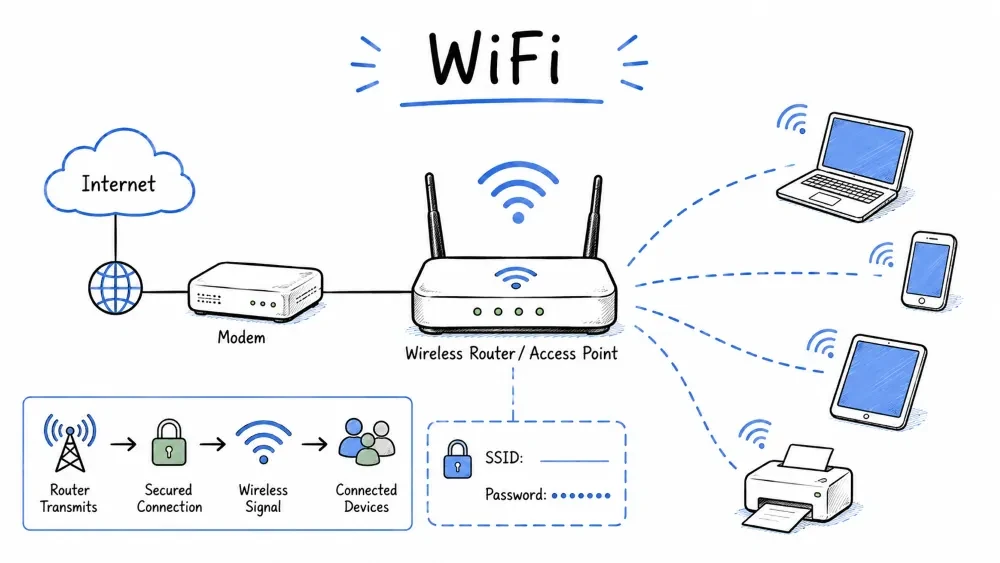
WiFi (Wireless Fidelity) is a technology that allows electronic devices to connect to a wireless Local Area Network (WLAN). It uses radio waves to transmit data between devices and an access point (router), eliminating the need for physical Ethernet cables.
[Device] <---> Radio Waves (2.4 GHz / 5 GHz / 6 GHz) <---> [Router/Access Point] <---> [Internet]
| Feature | Description |
|---|---|
| Frequency Bands | 2.4 GHz, 5 GHz, 6 GHz |
| Range | Typically 30–100 meters indoors (depends on standard & obstacles) |
| Speed | From 11 Mbps (802.11b) to multiple Gbps (WiFi 6/6E/7) |
| Medium | Unlicensed radio spectrum (no government license required) |
WiFi standards are defined by the IEEE 802.11 family of specifications. Over the years, they have evolved to deliver higher speeds, better range, and improved security.
| Standard | WiFi Generation | Year | Frequency Band | Max Speed (Theoretical) |
|---|---|---|---|---|
| 802.11b | WiFi 1 | 1999 | 2.4 GHz | 11 Mbps |
| 802.11a | WiFi 2 | 1999 | 5 GHz | 54 Mbps |
| 802.11g | WiFi 3 | 2003 | 2.4 GHz | 54 Mbps |
| 802.11n | WiFi 4 | 2009 | 2.4 / 5 GHz | 600 Mbps |
| 802.11ac | WiFi 5 | 2014 | 5 GHz | 3.5 Gbps |
| 802.11ax | WiFi 6 / 6E | 2019 / 2021 | 2.4 / 5 / 6 GHz | 9.6 Gbps |
| 802.11be | WiFi 7 | 2024 | 2.4 / 5 / 6 GHz | Up to 46 Gbps |
Naming Change: The WiFi Alliance introduced simplified naming (WiFi 4, WiFi 5, WiFi 6, etc.) to make standards easier for consumers to understand.
WiFi channels divide the available frequency band into smaller segments, allowing multiple networks to operate without interference.
| Channel | Frequency | Notes |
|---|---|---|
| 1 | 2412 MHz | Non-overlapping (with 5 & 11) |
| 6 | 2437 MHz | Non-overlapping (with 1 & 11) |
| 11 | 2462 MHz | Non-overlapping (with 1 & 6) |
| Others | 2412–2472 MHz | Overlap with adjacent channels |
Why channels 1, 6, 11? Each 2.4 GHz channel is 22 MHz wide, but channels are spaced only 5 MHz apart. Channels 1, 6, and 11 are the only set where the signals do not overlap.
| Width | Use Case |
|---|---|
| 20 MHz | Standard; better range and penetration |
| 40 MHz | Higher throughput; more prone to interference (2.4 GHz) |
| 80 MHz | Common for WiFi 5/6 on 5 GHz |
| 160 MHz | Very high speed; requires clean spectrum (6 GHz ideal) |
Pro Tip: For minimal interference in crowded areas (apartments, offices), use 5 GHz or 6 GHz with 20–40 MHz channel width for stability.
Understanding WiFi signal strength is critical for troubleshooting, placing access points, and evaluating network performance.
| Metric | Full Name | What It Measures | Typical Range |
|---|---|---|---|
| dBm | Decibel-milliwatts | Absolute power level (logarithmic) | -30 to -100 |
| RSSI | Received Signal Strength Indicator | Relative signal quality (vendor-specific) | 0 to 255 (varies) |
| SNR | Signal-to-Noise Ratio | Signal clarity vs background noise | 0 dB to 60 dB |
| Noise Floor | Background noise level | Ambient RF interference | -90 to -100 dBm |
Signal Strength (dBm)     Quality           What You Can Do
─────────────────────────────────────────────────────────────────
  -30 dBm                 Amazing           Right next to the AP
  -50 dBm                 Excellent         Ideal for streaming/gaming
  -60 dBm                 Good              Reliable for most tasks
  -67 dBm                 Fair             Minimum for VoIP/streaming
  -70 dBm                 Weak             Web browsing OK, video may buffer
  -80 dBm                 Very Weak        Frequent disconnections
  -90 dBm                 Unusable         No reliable connection
Rule of Thumb: Every 3 dBm increase = double the power. Every 10 dBm decrease = 90% signal loss.
| SNR Value | Quality |
|---|---|
| 40 dB+ | Excellent |
| 25–40 dB | Good |
| 15–25 dB | Fair |
| 10–15 dB | Poor |
| < 10 dB | No connection possible |
| OS | Command / Tool |
|---|---|
| Windows | netsh wlan show interfaces |
| macOS | Option+Click WiFi icon, or airport -s |
| Linux | iwconfig or nmcli dev wifi |
| Android | WiFi Analyzer app (free) |
| iPhone | Field Test mode: *3001#12345#* |
| Cross-Platform | wavemon (Linux TUI), WiFi Explorer (macOS) |
WPA2 is a security protocol introduced in 2004 to replace the broken WEP (Wired Equivalent Privacy) and the transitional WPA. It remains the most widely supported WiFi security standard.
Authentication (PSK or 802.1X)
         |
         v
4-Way Handshake (Generates encryption keys)
         |
         v
CCMP / AES Encryption (Data confidentiality & integrity)
| Feature | Detail |
|---|---|
| Encryption | AES (Advanced Encryption Standard) — 128-bit |
| Protocol | CCMP (Counter Mode CBC-MAC Protocol) |
| Authentication | PSK (Pre-Shared Key) for home / 802.1X (RADIUS) for enterprise |
| Key Length | 256-bit PMK (Pairwise Master Key) |
| Status | Mandatory for all WiFi-certified devices since 2006 |
| Mode | Authentication | Use Case |
|---|---|---|
| WPA2-Personal (PSK) | Single pre-shared password | Home / small office |
| WPA2-Enterprise | Per-user credentials via RADIUS server | Corporate / school networks |
Bottom Line: WPA2 is still secure when used with a strong, complex password (12+ random characters) and up-to-date firmware.
WPA3 is the next-generation WiFi security standard, introduced in 2018 to address WPA2's weaknesses. It became mandatory for new WiFi-certified devices from July 2020.
| Issue | WPA2 | WPA3 |
|---|---|---|
| Handshake | 4-way handshake (vulnerable to dictionary attacks) | SAE (Simultaneous Authentication of Equals) |
| Forward Secrecy | No | Yes — past captures cannot decrypt future traffic |
| Password Guessing | Offline dictionary attack possible | Offline dictionary attack prevented |
| IoT / Simple Devices | No dedicated mode | WPA3-Transition — allows mixed-mode networks |
| Public WiFi | No encryption per user | OWE (Opportunistic Wireless Encryption) — encrypts even open networks |
| Variant | Description |
|---|---|
| WPA3-Personal | Uses SAE (Dragonfly handshake) — resistant to offline dictionary attacks |
| WPA3-Enterprise | 192-bit minimum security suite (CNSA Suite) for government/corporate |
| WPA3-Enterprise (GCMP-256) | 256-bit encryption for high-security environments |
| OWE | Opportunistic Wireless Encryption — encrypts "open" WiFi (no password needed, but traffic is encrypted) |
Important: For maximum security, use WPA3-only mode if all your devices support it.
WiFi and Cellular are complementary wireless technologies. Understanding their differences helps in choosing the right connectivity for each scenario.
| Feature | WiFi | Cellular (4G/5G/6G) |
|---|---|---|
| Range | ~30–100 m indoors | Up to several km (tower dependent) |
| Speed | Up to 46 Gbps (WiFi 7) | Up to ~10 Gbps (5G mmWave) |
| Latency | ~1–5 ms (local) | ~10–30 ms (4G), ~1–10 ms (5G) |
| Frequency | Unlicensed (2.4, 5, 6 GHz) | Licensed (varies by carrier) |
| Cost | Free after equipment purchase | Monthly data plan |
| Mobility | Limited (stay within AP range) | High (handoff between towers) |
| Interference | High (crowded spectrum) | Low (carrier-managed spectrum) |
| Security | User-managed (WPA2/WPA3) | Carrier-managed (SIM + encryption) |
| Setup | Router + SSID + password | SIM card, auto-connect |
┌────────────────────────────────────────────────────────────┐
│                     USE CASE                               │
├────────────────────┬───────────────────────────────────────┤
│  Home / Office     │  WiFi (speed, cost, control)          │
│  Walking / Driving │  Cellular (mobility, coverage)        │
│  Streaming Video   │  WiFi (no data cap)                   │
│  IoT Sensors       │  WiFi + LoRa / Cellular (NB-IoT)     │
│  Public Hotspots   │  WiFi (free) + VPN (security)         │
│  Emergency Calls   │  Cellular (carrier priority)          │
│  Gaming (competitive) │  WiFi 6/7 (low latency)            │
└────────────────────┴───────────────────────────────────────┘
Modern phones can act as a bridge between cellular and WiFi:
[Internet] <--- 5G ---> [Phone Hotspot] <--- WiFi ---> [Laptop]
Takeaway: WiFi is for local, high-speed, low-cost connectivity. Cellular is for wide-area, mobile, always-on connectivity. They work best together.
The SSID is the name of a WiFi network. It is a human-readable string (up to 32 characters) that identifies a wireless network to clients.
| Practice | Why |
|---|---|
| Use a unique name | Avoids confusion with neighbor networks |
| Do NOT use personal info | Avoid names with your name, address, or phone |
| Avoid default SSIDs | "NETGEAR67" or "TP-LINK_2.4G" makes router model identifiable to attackers |
| Keep it professional | Avoid offensive or attention-grabbing names (they invite probing) |
Many modern routers support broadcasting multiple SSIDs on the same access point, each mapped to a different VLAN:
[Router] -- SSID: "Home"      --> VLAN 1 (Trusted devices)
         -- SSID: "IoT"        --> VLAN 10 (Smart bulbs, sensors)
         -- SSID: "Guest"      --> VLAN 20 (Visitors, no LAN access)
This provides network segmentation without requiring separate hardware.
A Hidden SSID (also called "Closed Network" or "SSID Broadcast Disabled") is a network where the router stops including the SSID in beacon frames.
Beacon Frame = [SSID: "MyNetwork"] → visible to all.Beacon Frame = [SSID: null] → network does not appear in scan lists.Short answer: No — it provides NO real security.
Here's why:
| Myth | Reality |
|---|---|
| "Hackers can't see my network" | Tools like Kismet, Airodump-ng can detect hidden networks by analyzing probe requests and traffic |
| "It prevents neighbors from connecting" | A determined attacker will discover the SSID within seconds |
| "It's an extra layer of security" | The SSID is still sent unencrypted in probe requests and association frames |
| "It makes my network invisible" | Hidden networks still respond to probe requests from known clients |
Security Advice: Do NOT rely on hiding your SSID. Use WPA3 encryption and a strong password instead.
A Guest WiFi network is a separate, isolated wireless network that provides internet access to visitors without granting access to your main private network.
[Guest SSID] <---> Guest VLAN <---> Internet ONLY
[Main SSID]  <---> Main VLAN  <---> LAN + Internet
| Benefit | Explanation |
|---|---|
| Security | Visitors cannot access your internal devices or files |
| Convenience | No need to share your main password |
| Bandwidth Control | Limit guest speeds to reserve bandwidth for yourself |
| Time Limits | Some routers allow scheduled guest access |
| Client Isolation | Prevents guests from communicating with each other (important for public WiFi) |
SSID: "Home-Guest"
Security: WPA2-PSK (or WPA3 if supported)
Password: Strong, unique password (change periodically)
Band: 2.4 GHz only (better range for guests)
Bandwidth Limit: 10–20 Mbps per device
Client Isolation: Enabled
LAN Access: Disabled
Schedule: Optional (e.g., disable overnight)
Important: Even on guest WiFi, use encryption (WPA2/WPA3). An open guest network puts your router and ISP liability at risk.
Choosing the right network topology is essential for coverage, performance, and reliability — especially in larger homes or offices.
┌─────────────────────────────────────────────────────────────┐
│                    TOPOLOGY DECISION TREE                     │
├─────────────────────────────────────────────────────────────┤
│  Small home (<1000 sq ft)  ────── Single Router              │
│  Medium home (1000–2500)   ────── Mesh or Router + AP        │
│  Large home (>2500)        ────── Mesh (multi-node)          │
│  Office / Enterprise       ────── APs + Controller           │
│  Outdoor / Warehouse       ────── Outdoor APs + PtP links    │
└─────────────────────────────────────────────────────────────┘
[Modem] <──> [Router + Switch + AP] <──> Devices
| Pros | Cons |
|---|---|
| Simple, cheap | Limited coverage |
| Easy to configure | Single point of failure |
| Good for small spaces | All devices compete for same radio |
[Modem] <──> [Router] <──Ethernet──> [AP (extended room)]
                                    Devices
[Main Router] <──WiFi──> [Extender] <──WiFi──> [Devices]
            (half speed)            (half speed)
| Pros | Cons |
|---|---|
| No cables needed | Halves bandwidth (repeats on same channel) |
| Cheap and quick | Adds latency |
| Good for temporary use | Can cause interference |
⚠️ Warning: WiFi extenders are often a poor solution. If possible, use an Access Point with Ethernet or Mesh instead.
[Modem] <──> [Main Node] <──WiFi──> [Satellite Node 1]
                                <──WiFi──> [Satellite Node 2]
| Pros | Cons |
|---|---|
| Seamless roaming | More expensive than single router |
| Easy setup (app-based) | Wireless backhaul reduces speed |
| Good coverage | Some nodes may have limited ports |
Popular Mesh Systems: Google Nest WiFi, TP-Link Deco, Eero, Netgear Orbi, Ubiquiti AmpliFi.
[Controller (software/hardware)]
         |
    +----+----+
    |    |    |
   AP1  AP2  AP3   (thin APs, managed centrally)
| Scenario | Best Choice |
|---|---|
| 1-room apartment | Single router |
| 2-3 bedroom house | Mesh (3-pack) or Router + AP |
| Large house (multi-floor) | Mesh with wired backhaul |
| Office (< 50 people) | 3–5 ceiling-mount APs + Controller |
| Warehouse / Outdoor | Outdoor directional APs |
Practical solutions for the most common WiFi problems.
| Symptom | Likely Cause | Quick Fix |
|---|---|---|
| No WiFi found | WiFi disabled / Radio off | Toggle WiFi; check router lights |
| Network not showing | SSID hidden / Wrong band | Manually enter SSID; check 2.4 vs 5 GHz |
| Can't connect | Wrong password / MAC filter | Verify password; check MAC allowlist |
| Connected, no internet | DHCP / DNS / ISP issue | Release/renew IP; restart router |
| Slow speeds | Channel congestion / Distance | Change channel; move closer; use 5 GHz |
| Intermittent drops | Interference / Overheating | Move router away from electronics; check ventilation |
| WiFi works, LAN doesn't | VLAN misconfiguration | Check network isolation settings |
| One device won't connect | Device-specific issue | Forget network; reconnect; update driver |
┌──────────────────────┐
│   WiFi not working   │
└──────────┬───────────┘
           ▼
┌──────────────────────┐
│  Is WiFi on? (device)│──No──→ Enable WiFi
└──────────┬───────────┘
           ▼ Yes
┌──────────────────────┐
│  Router powered on?  │──No──→ Check power / restart router
└──────────┬───────────┘
           ▼ Yes
┌──────────────────────┐
│  Can you see SSID?   │──No──→ Check SSID broadcast / move closer
└──────────┬───────────┘
           ▼ Yes
┌──────────────────────┐
│  Can you connect?    │──No──→ Check password / MAC filter
└──────────┬───────────┘
           ▼ Yes
┌──────────────────────┐
│  Internet working?   │──No──→ Ping 8.8.8.8 → restart modem
└──────────┬───────────┘
           ▼ Yes
┌──────────────────────┐
│  Speed as expected?  │──No──→ Run speed test → check channel
└──────────┬───────────┘
           ▼ Yes
       All good!
| Command | What It Does | Example |
|---|---|---|
ipconfig /all | Shows IP, MAC, gateway, DNS | Check if DHCP assigned an IP |
ping 8.8.8.8 | Tests internet connectivity | 0% loss = internet OK |
ping 192.168.1.1 | Tests router reachability | 0% loss = LAN OK |
tracert 8.8.8.8 | Shows network path to destination | Find where the connection drops |
nslookup google.com | Tests DNS resolution | "Non-existent domain" = DNS issue |
netsh wlan show wlanreport | Generates WiFi report (Windows) | See connection history & errors |
| Action | What It Does | When to Use |
|---|---|---|
| Restart (power cycle) | Clears temporary issues, keeps settings | Slow speeds, no internet, devices not connecting |
| Reset (factory reset) | Erases all settings, returns to default | Forgotten password, bricked router, selling device |
Pro Tip: Schedule a weekly automatic router restart via the router's admin panel to clear memory leaks.
A VPN (Virtual Private Network) adds a layer of encryption and privacy on top of any WiFi connection.
Without VPN: [Device] <──WiFi──> [ISP] <──> [Website]
              Traffic visible to router owner, ISP, or attacker

With VPN:    [Device] <──WiFi──> [VPN Server] <──> [Website]
              Traffic encrypted; only sees encrypted tunnel
| Risk | Without VPN | With VPN |
|---|---|---|
| Public WiFi (coffee shop) | Attacker can sniff traffic | Traffic encrypted |
| ISP tracking | ISP logs browsing history | ISP sees only encrypted traffic |
| Geo-blocking | Content restricted by region | Appear in VPN server's location |
| Employer monitoring | Company sees all traffic | Company sees only encrypted tunnel |
| Method | How It Works | Best For |
|---|---|---|
| Client VPN | App on each device (WireGuard, OpenVPN) | Individuals, travelers |
| Router VPN | Entire home network routes through VPN | Whole-home protection |
| VPN Gateway | Secondary router for VPN-only subnet | Mixed use (some devices VPN, others direct) |
| Split Tunnel | Only specific traffic goes through VPN | Streaming + privacy (no double-hop) |
[Internet] <──> [VPN Client on Router] <──> [Home Network]
                   All devices protected
| Use Case | Recommendation |
|---|---|
| Public WiFi (cafe, airport) | Always use VPN — auto-connect on untrusted networks |
| Home WiFi | Optional — ISP can still see your traffic |
| Hotel WiFi | Essential — hotel networks are often poorly secured |
| Guest WiFi | Use VPN — guest networks may be monitored |
| Censored countries | Router-level VPN with obfuscation |
Bottom Line: Use a VPN on any WiFi network you do not personally control. For home networks, it's optional but recommended for privacy-conscious users.
Building a Secure WiFi network involves multiple layers — encryption, authentication, network design, and ongoing maintenance. Below is a comprehensive guide.
Layer 1: Encryption & Authentication
Layer 2: Network Segmentation
Layer 3: Device & Firmware Security
Layer 4: Monitoring & Maintenance
| Setting | Recommended | Avoid |
|---|---|---|
| Security Protocol | WPA3 or WPA2 + WPA3 (Transition) | WEP, WPA (TKIP) |
| Encryption | AES / CCMP | TKIP, TKIP+AES mixed |
| Password | 16+ random characters (upper, lower, digits, symbols) | Dictionary words, names, dates |
| Authentication | WPA2/WPA3-Enterprise for corporate | Shared generic credentials |
Separate your network into trust zones using VLANs or multiple SSIDs:
[Internet]
    |
[Router/Firewall]
    |
    +-- VLAN 1 (Trusted): Family computers, phones, laptops   (WPA3)
    +-- VLAN 10 (IoT):    Smart bulbs, thermostats, cameras   (WPA2, isolated)
    +-- VLAN 20 (Guest):  Visitors, temporary devices          (WPA2, limited BW)
    +-- VLAN 30 (DMZ):    Servers accessible from internet     (Strict firewall rules)
| Task | Frequency |
|---|---|
| Check for firmware updates | Monthly |
| Review connected devices | Monthly |
| Change WiFi password | Every 6–12 months |
| Disable unused features (UPnP, WPS, Telnet) | Once (during setup) |
| Audit guest access logs | Quarterly |
| Threat | How It Works | Prevention |
|---|---|---|
| Evil Twin | Fake AP with same SSID lures users | Always verify certificates; use WPA3-Enterprise |
| KRACK | Replays handshake messages | Patch devices; use WPA3 |
| De-authentication Attack | Spoofed de-auth frames disconnect clients | Use WPA3 (management frame protection) |
| Dictionary Attack | Captures handshake, cracks offline | Strong password; WPA3 (SAE prevents offline cracking) |
| Rogue AP | Unauthorized AP on your network | Port security; network monitoring |
| Pineapple Attack | Rogue AP that responds faster than legitimate APs | Avoid auto-connect; verify SSID/security |
Quick reference for common WiFi terms and acronyms.
| Term | Full Form | Meaning |
|---|---|---|
| AP | Access Point | Device that broadcasts WiFi signal |
| BSSID | Basic Service Set Identifier | MAC address of a specific access point |
| CCMP | Counter Mode CBC-MAC Protocol | Encryption protocol used by WPA2 (AES) |
| dBm | Decibel-milliwatts | Logarithmic unit for signal power measurement |
| DFS | Dynamic Frequency Selection | Radar avoidance mechanism for 5 GHz channels |
| DHCP | Dynamic Host Configuration Protocol | Automatically assigns IP addresses to devices |
| DNS | Domain Name System | Resolves domain names to IP addresses |
| EAP | Extensible Authentication Protocol | Authentication framework used in WPA2/3-Enterprise |
| ESSID | Extended Service Set Identifier | The network name (same as SSID in practice) |
| GHz | Gigahertz | Frequency unit — 2.4, 5, and 6 GHz used for WiFi |
| IEEE | Institute of Electrical and Electronics Engineers | Standards body behind 802.11 |
| IoT | Internet of Things | Smart devices (bulbs, sensors, cameras) |
| IP | Internet Protocol | Address assigned to each device on a network |
| LAN | Local Area Network | Devices connected within a local area |
| MAC | Media Access Control | Hardware address of a network interface |
| MIMO | Multiple Input Multiple Output | Multiple antennas for better throughput |
| MU-MIMO | Multi-User MIMO | Serves multiple devices simultaneously |
| NAT | Network Address Translation | Maps private IPs to public IP (router function) |
| OFDM | Orthogonal Frequency Division Multiplexing | Digital modulation used in WiFi |
| OFDMA | Orthogonal Frequency Division Multiple Access | Efficient multi-user channel sharing (WiFi 6) |
| OWE | Opportunistic Wireless Encryption | Encrypts open/public WiFi (WPA3 feature) |
| PMK | Pairwise Master Key | The root encryption key derived from password |
| PSK | Pre-Shared Key | Password-based authentication (WPA2-Personal) |
| PtP / PtMP | Point-to-Point / Point-to-Multi-Point | Wireless bridge links between locations |
| QoS | Quality of Service | Traffic prioritization (e.g., gaming > browsing) |
| RADIUS | Remote Authentication Dial-In User Service | Centralized authentication server (Enterprise WiFi) |
| RF | Radio Frequency | The electromagnetic spectrum used for wireless |
| RSSI | Received Signal Strength Indicator | Relative measure of signal strength |
| SAE | Simultaneous Authentication of Equals | Dragonfly handshake (WPA3's replacement for PSK) |
| SNR | Signal-to-Noise Ratio | Signal clarity vs background noise |
| TKIP | Temporal Key Integrity Protocol | Older encryption (WPA1); deprecated, insecure |
| VLAN | Virtual Local Area Network | Logical network segmentation over same hardware |
| WEP | Wired Equivalent Privacy | Original WiFi security — completely broken, never use |
| WLAN | Wireless Local Area Network | A network using WiFi technology |
| WPA | Wi-Fi Protected Access | Family of security protocols (WPA, WPA2, WPA3) |
| WPS | Wi-Fi Protected Setup | Push-button/PIN setup — disable for security |
Save your progress and earn XP for completing tutorials.
Technology
Cyber Security & Networking
Lesson group
WiFi
Progress
100% complete

