Preparing your learning space...
100% through Debugging & Troubleshooting tutorials
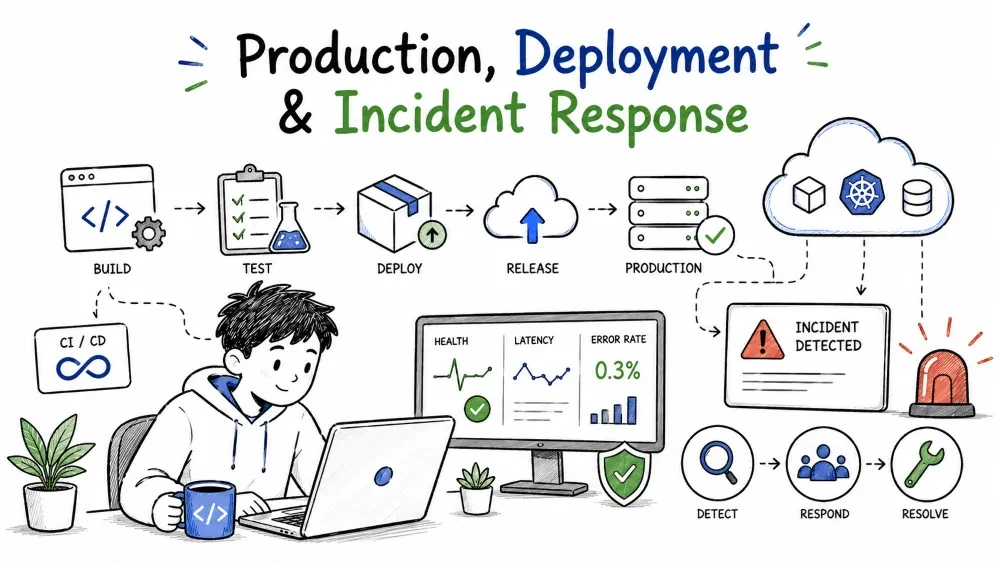
Debugging technique is only half the story — you also have to deal with the reality of a live, deployed system. Releases break, and outages happen. This tutorial merges the three "production-facing" skills: debugging a live production application safely, handling the common deployment problems that break a release, and running a structured incident response when something serious goes down.
When an app is live, you can't attach a debugger or drop a print statement into a customer's session. You're working with the evidence you have — logs, metrics, traces — and every change you make risks affecting real users. The debugging loop from Tutorial 1 still applies, but you run it under constraints: reproduce safely, observe first, and keep changes reversible.
You can investigate a live system without making it worse. The principles:
Best Practice: when you must touch a live system, prefer additive and reversible changes, and time-box them. The goal is evidence with a quick, safe way back if the change doesn't work.
A few habits keep live debugging from becoming the next incident:
The most basic deployment failure is a build that never succeeded. Before debugging the running service, confirm the artifact built correctly:
Build -> Test -> Package -> Deploy -> Smoke test
Explanation: a failure at any stage stops the deploy. Read the stage logs to find which one. If the build stage failed, nothing downstream ran — the "deployment problem" is actually a compile or packaging error, and the fix is in the pipeline, not in the running system.
It ran fine locally but fails in production. The difference is almost always one of a small set of environment factors:
Why it is useful: "works locally" is evidence the environment matched, not that the code is proven. Debug by listing what differs between the two.
Deployed code reads settings from configuration, and a wrong setting behaves like a code bug:
# what you think is set:       # what production resolves:
DB_HOST=localhost               DB_HOST=prod-db.internal
Explanation: if code connects to DB_HOST and the production value points at the wrong or unreachable host, the app fails even though everything looks right in the repo. Configuration mismatches are invisible unless you look at the running environment's values.
Best Practice: log or expose the effective configuration at startup, so "which settings did this actually load?" has a surface you can check.
Code that reads a secret from an environment variable works anywhere the variable exists — and fails exactly where it doesn't.
import os

api_key = os.environ["ACME_API_KEY"]   # KeyError if unset in this env
Explanation: if ACME_API_KEY is set locally and in staging but not in production, every request that needs it fails there. The code is identical; the environment is missing a value. Verify every secret the app reads is actually present in the target environment.
Common Mistake: assuming a secret is set because it's in some .env file somewhere. Verify the exact environment, and never commit the real secret.
Some apps pass a smoke test and fail only under real traffic. This is usually a capacity or performance problem the deploy uncovered, not caused:
Why it is useful: "works until it's loaded" points at saturation — the performance-debugging skills from Tutorial 2 — not at re-deploying. Measure under load and scale or optimize accordingly.
An incident is a disruption that affects users and needs urgent, coordinated action. The difference from an ordinary bug is not severity alone — it's that time to resolution becomes the priority, and the risk of making things worse is real. Incidents need a process; ordinary bugs need a debugger.
Why it is useful: knowing the difference changes how you act. You don't calmly bisect a commit while the customer's users are down.
Every incident passes through a predictable set of phases:
Detect -> Declare -> Contain -> Mitigate -> Resolve -> Postmortem
Explanation: first you notice the problem, then you tell people, then you stop it spreading, then you restore service, then you confirm it's over, and finally you learn from it. The temptation is to jump straight to "mitigate" and skip declaring — that hides the incident and slows the team.
Detect and declare. Detection is monitoring, alerts, or a customer report. Declaration is the moment you formally say "this is an incident," so the right people drop in with the right urgency. Declare early and often — a false alarm costs far less than a silent outage.
Containment comes before diagnosis. Stop the harm before you understand it:
Roll back -> stop the bleed -> then diagnose in peace
Mitigation restores service — often with a workaround, not the final fix. A scaled-up tier to absorb load, a temporary config change, or a route around the broken part all buy time while the real fix is built. The user cares that service is back; a workaround now plus a complete fix later beats a perfect fix that takes hours.
Sometimes the fastest, safest fix is not fixing forward — it's going back. Reverting to the last-known-good version restores service immediately and buys time to debug the bad release properly.
git revert <release-commit> && deploy
Explanation: a rollback swaps the broken artifact for a known-good one. It's quick, reversible, and preserves the evidence for later debugging. Roll forward only when you're confident; roll back when you're not.
Best Practice: keep the previous version deployable at all times — a one-click rollback is the safety net that makes forward progress less risky.
Resolution isn't "the code changed" — it's users seeing normal service again for a sustained period. Verify the metric that triggered the alert is back to normal, watch long enough to trust it's stable, then close with a clear end time.
After service is restored, the incident isn't finished. A postmortem answers what happened, why, and what changes prevent a repeat — in blameless language, because the goal is to fix the system, not blame a person.
Timeline:      what happened, when (from logs and chat)
Root cause:    why it failed (not who caused it)
Action items:  changes that prevent recurrence
Best Practice: keep it blameless and honest. A postmortem that punishes people teaches everyone to hide problems; one that fixes the system makes the next response safer.
Save your progress and earn XP for completing tutorials.
4 questions · Pass with 70%+
1 A deploy fails and the running service errors. Before debugging the service, check what first?
2Code works locally but fails in production. Most likely cause?
3During an incident, what comes before full diagnosis?
4 A postmortem should be written in blameless language because…?
Technology
Forward Deployed Engineer
Lesson group
Debugging & Troubleshooting
Progress
100% complete

