Preparing your learning space...
80% through Debugging & Troubleshooting tutorials
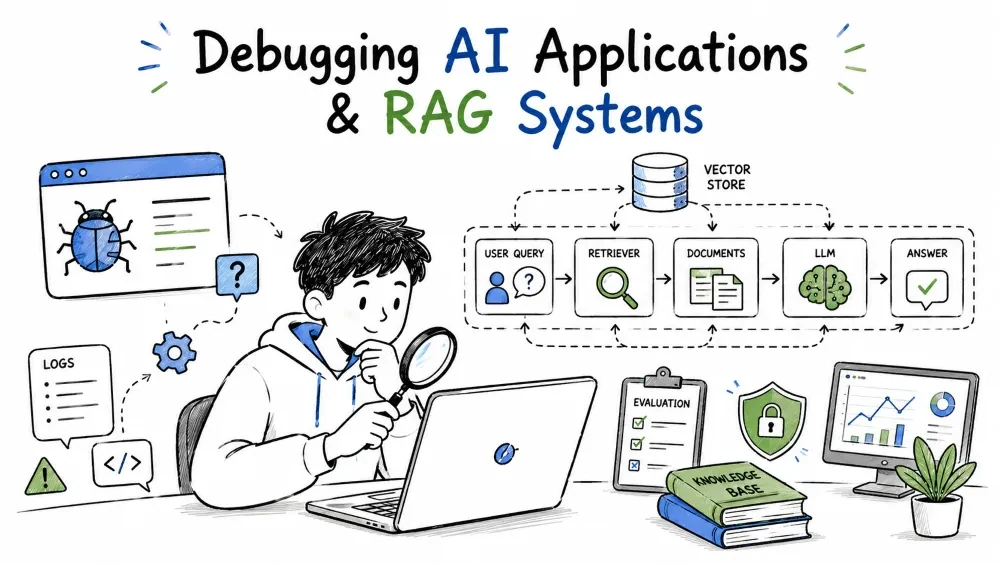
AI programs fail differently from ordinary software. Instead of a deterministic crash, you get a wrong answer, a hallucination, a retrieval that finds nothing, or an API timeout. This tutorial covers how to debug LLM applications generally, then the specific failure modes of RAG systems — where the quality of the answer depends on what your pipeline retrieved.
Most bugs are deterministic: given the same input, the same wrong output. AI is probabilistic — the same prompt can return slightly different answers, and a model can be confidently wrong without raising an error. So debugging an AI app is less "find the crash" and more "find which stage produced bad output, and fix that stage."
For any AI failure, ask "did the model do it, or did we feed it the wrong thing?" Most AI bugs trace back to the pipeline feeding the model, not the model itself.
You can't debug an LLM output you can't see the inputs to. Log the full request context for every call:
{
  "model": "claude-sonnet-5",
  "system": "Answer using only the context.",
  "input_tokens": 4120,
  "output_tokens": 210,
  "total_tokens": 4330,
  "context_used": true,
  "latency_ms": 1900
}
Explanation: token counts tell you the cost and the size of what you sent; context_used tells you whether retrieval actually fed the model anything. A debugging session without the exact prompt and retrieved context is guessing — log it so you can replay the failure later.
Most AI failures fall into one of a few buckets:
| Symptom | Likely cause |
|---|---|
| API error (rate limit, quota) | provider limits, key misuse |
| Empty or truncated output | token or length limits, early abort |
| Wrong answer, confident | wrong context, or the model itself |
| Slow response | long context, provider overload |
| Formatting broken | missing output constraints |
Why it is useful: most "wrong answer" complaints trace not to the model but to the data you gave it. Bucket the failure before blaming the model.
When the API call itself fails, treat it like the API-debugging flow in Tutorial 3: check status, quota, and input shape.
import anthropic

try:
    resp = anthropic.Anthropic().messages.create(
        model="claude-sonnet-5",
        max_tokens=200,
        messages=[{"role": "user", "content": "Hello"}],
    )
    print(resp.content[0].text)
except anthropic.RateLimitError as e:
    print("quota or burst limit hit:", e.message)      # retry with backoff
except anthropic.AuthenticationError:
    print("API key invalid or revoked")
Explanation: map the exception type to the likely fix. A rate limit means retry with backoff; an auth error means check the key; a timeout means the call took too long. The exception points at the right fix before you hunt.
If the call succeeds but the output's shape is wrong — a missing field, extra text, not valid JSON — the prompt never told the model what structure to return. Ask for a defined structure and parse it strictly.
from pydantic import BaseModel

class Suggestion(BaseModel):
    idea: str
    reason: str
Explanation: with an explicit output schema, parse failures surface immediately. An invalid parse is debuggable — you can print the exact bad output — whereas an unstructured answer gives you nothing precise to complain about. Ask the model for output that validates against a schema.
A hallucination — a confident, made-up answer — is usually a grounding problem: the model had no fact to rely on, so it guessed from its training memory. The fix is to give it ground truth it can cite, or to make it admit it doesn't know.
A RAG failure can be any one of several stages. You debug by checking each stage's output to find where the chain first goes wrong.
Indexing:  chunk -> embed -> store
Querying:  embed question -> retrieve top-N -> build prompt -> model answers
Most RAG bugs are one of two things: bad retrieval (wrong or missing context) or bad grounding (the model ignores good context). You tell which by inspecting what was retrieved.
Retrieval quality means: was the document the answer needs actually found? Check whether the retrieved chunks contain the answer:
q_vec = embed(question)
hits = col.query(query_embeddings=[q_vec], n_results=3)
print("retrieved:", hits["documents"])     # is the answer even in here?
Explanation: if the retrieved chunks don't contain the answer, no prompt engineering helps — the model is fed the wrong context. The fix is at the retrieval level, such as better chunking or re-ranking, not in the prompt.
Best Practice: if the top-1 result is wrong but the answer is in the top-5, the model and prompt are fine — retrieval is just too narrow. Retrieve more candidates and re-rank, rather than rewriting the prompt.
Chunks are the unit of retrieval. Too big, and a chunk is vague; too small, and it lacks context. If the answer spans two chunks, neither alone is enough.
Too big   ->  irrelevant chunks and slow search
Too small ->  answer split across boundaries, missing context
Good size ->  one self-contained idea per chunk, with a little overlap
Explanation: an answer that needs context from two non-adjacent chunks won't be found. Chunk on paragraph or section boundaries, with a small overlap, so no idea is sliced in two.
Even with perfect retrieval, the model can ignore the context and confabulate. Force it to stay grounded and make its reasoning auditable:
system=("Answer only from the CONTEXT below. "
        "Cite the source passage you used. "
        "If the answer isn't there, say you don't know.")
Explanation: an explicit "answer only from the context" instruction plus a citation requirement makes the model's reasoning auditable. If it fabricates despite good context, the instruction is too weak. Strengthen the constraint and re-test.
Save your progress and earn XP for completing tutorials.
4 questions · Pass with 70%+
1Your LLM app gives a confident but wrong answer. Where should you look first?
2What must you log to make a failing AI call replayable?
3 In RAG, the top-1 retrieved chunk is wrong, but the correct answer is in the top-5. What's the right move?
4You gave the model perfect context, yet it still fabricates. The best next step?
Technology
Forward Deployed Engineer
Lesson group
Debugging & Troubleshooting
Progress
80% complete

