Preparing your learning space...
100% through FDE Project Management tutorials
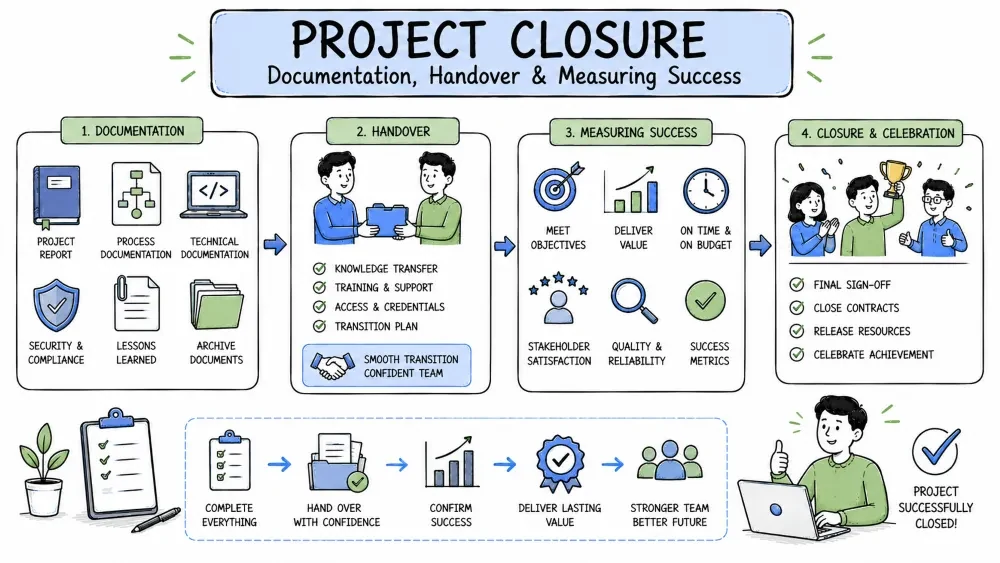
Closing a project well matters as much as starting it. This tutorial covers documenting what you built, handing it to the people who will own it next, and measuring whether it actually delivered the outcome the customer wanted.
Project documentation is the written record of what the project is, what was decided, and how it works — from the README to architecture decisions to runbooks.
Why it is useful: Documentation is the memory of the project when you're away or gone. Good docs cut onboarding from weeks to days and end the "how did this ever work?" archaeology when something breaks.
| Document | What it answers | Keep it |
|---|---|---|
| README | How do I run and understand this? | Page or two |
| Architecture overview | What are the pieces and how do they connect? | One diagram + short text |
| Runbook / ops guide | What do I do when X breaks? | Steps you actually use |
| Decision log (ADRs) | Why did we choose this? | A few lines per decision |
Everything else — exhaustive API reference, line-by-line comments, irrelevant setup history — is noise nobody will read.
## Architecture

- App: Next.js frontend + Express API (2 services)
- DB: PostgreSQL on RDS (db.t3.small)
- Queue: SQS named "export-jobs"
- Deploy: elastic beanstalk, blue/green

### Diagram

[web] -> [api] -> [postgres]
               -> [sqs] -> [worker]

### Key decisions

- SQS instead of cron so exports retry automatically (ADR-004)
- Blue/green because we need zero-downtime deploys
Simple explanation: Three short sections — components, a diagram, and the key decisions — tell a future engineer most of what they need. The diagram and the "why" matter far more than listing every config setting.
# ADR-004: Use SQS for export jobs

**Status:** Accepted

**Context:** Exports were timing out in the request path.
Users expected a retry when a pull failed mid-way.

**Decision:** Push export jobs to SQS and process asynchronously.

**Consequences:** + automatic retries and progress tracking;
- exports no longer complete synchronously in the UI.
Simple explanation: An ADR records the context, the decision, and the trade-offs in five lines. Without it, someone will later "simplify" your design back into the broken synchronous path because they never knew why it was built this way.
Write docs in the repo, right next to the code, as you build. Not from memory at the end of the project. Keep runbooks short and actually tested — if you can't run the steps yourself, the doc is worse than having none. One-page summaries beat long documents nobody reads. And record the why of decisions, not just the what, because that's what stops someone "simplifying" your design back into the broken version.
Handover is the structured transfer of a project to a new owner — the person who will maintain, extend, or operate it after you leave. Your documentation is the raw material; handover is the act of putting it to work.
Why it is useful: A good handover changes "months to pick up" into "days." It protects the customer's trust and stops a new engineer from breaking a system they don't yet understand.
## Handover Checklist

- [ ] Repo access and CI/CD ownership transferred
- [ ] Env vars / secrets documented in the vault
- [ ] Runbook walked through live with the new owner
- [ ] Known issues + workarounds listed
- [ ] Roadmap / backlog handed off, priorities explained
- [ ] Stakeholder contact list with preferences and quirks
- [ ] Demo of the interesting / fragile code paths
- [ ] Two-week shadowing period agreed with the customer
Simple explanation: Each checkbox is a specific, verifiable item. Note the last one — the handover isn't complete when the doc is written; it's complete when the new engineer has run things themselves and met the stakeholders.
handover = {
    "access_transferred": True,
    "runbook_walkthrough": False,
    "known_issues_documented": True,
    "new_owner_solo_task": False,
}

open_items = [k for k, v in handover.items() if not v]
print("Still open:", ", ".join(open_items))
Simple explanation: A tiny checklist in code (or a spreadsheet) shows at a glance what's left. The "new owner does a solo task" gate is the one most people skip — and it's the one that proves they can actually work independently.
Hand over early and gradually — not in one final all-nighter. Have the new engineer complete a real task alone before you walk out the door. And transfer relationships too: introduce the new owner to the customer yourself, so trust doesn't evaporate when you leave.
The things that go wrong here feel obvious once they happen: one giant handover meeting where the new person hasn't even run the code yet. Holding back access until the last minute. And the killer — leaving out the unwritten knowledge, like who approves what, or which customer screams about which change.
A success metric is a measurable number that shows whether the project actually delivered its intended business outcome — not just whether the features were built.
Why it is useful: "We delivered everything on time" can still be a failed project if the customer doesn't adopt it or the process isn't faster. Metrics tie the work back to the reason it was funded in the first place.
| Output | Outcome | |
|---|---|---|
| What it measures | What we built | What changed because of it |
| Example | "CSV export shipped" | "Export time fell from 40 to 5 minutes" |
| Slippery? | Easy to measure, easy to fake | Harder, but that's the real win |
Decide the outcome metrics at kickoff, from the customer's own goals — they usually already know the number they care about (hours saved, errors reduced, sales up).
success = {
    "baseline": {"export_time_min": 40, "support_emails_month": 120},
    "after":    {"export_time_min": 5,  "support_emails_month": 45},
}

b, a = success["baseline"], success["after"]
saved = 100 - (a["export_time_min"] / b["export_time_min"] * 100)
print(f"Export time reduced by {saved:.0f}%")   # 88%
print(f"Support emails down {b['support_emails_month'] - a['support_emails_month']} per month")
Simple explanation: You must measure before the project to prove the after. These two numbers — time saved and support load — are the kind of outcome that makes a customer say the project was worth it.
| Metric | Baseline | Target | After | Met? |
|---|---|---|---|---|
| Export time | 40 min | ≤ 10 min | 5 min | ✅ |
| Support emails / mo | 120 | ≤ 60 | 45 | ✅ |
| User adoption (weekly active) | — | 30 users | 27 | ⚠️ close |
Agree on success metrics with the customer at kickoff — not after delivery. Favor outcome metrics (time saved, errors dropped) over output metrics (features shipped). Record baselines before the work starts; you literally cannot measure "before" once the project is over. And keep the scorecard to a handful of real numbers, not a wall of vanity charts.
The thing that kills projects here is measuring only what's easy — task counts instead of real impact. Or worse, deciding the success metric after the project. That's not measuring; that's rationalizing.
Once the metrics are set, you track them during the project and report them in a way stakeholders can actually react to.
Why it is useful: A project that only reports "we are 80% done" gives nobody anything to act on. Trend lines and lead indicators let everyone spot a problem while it's still cheap to fix.
def status(tasks_done, tasks_total, changes_open_days, debt_hours):
    pct = round(tasks_done / tasks_total * 100)
    print(f"Tasks complete: {pct}%")
    print(f"Change backlog: {changes_open_days} days")
    print(f"Tech debt: {debt_hours} hours")

status(12, 15, 4.5, 12)
# Tasks complete: 80%
# Change backlog: 4.5 days
# Tech debt: 12 hours
Simple explanation: The percentage answers "where are we?" — but the change backlog and debt answer "where are we going?" A high percentage with 4.5 days of open changes is a warning, not a celebration. Report the trend, not the snapshot.
Report against the plan and metrics in the same cadence as your milestones. Show trends — sparklines, last three weeks — instead of a single number that doesn't tell you anything on its own. And flag problems early with the data behind them, because bad news ages badly in consulting.
The thing that bites every project: reporting percent-complete without forward-looking indicators. Or hiding a slipping date until the review meeting — by then it's a crisis.
The project review is the structured, honest look at whether the project worked, held after go-live and once the outcomes have had time to land.
Why it is useful: The review closes the loop. It proves value to the customer, documents lessons for your next project, and turns a finished engagement into a reference story.
## Project Review Agenda

1. Revisit the success scorecard — measured after go-live, not on launch day
2. Walk through plan variance: milestones, estimates, scope changes
3. Lessons learned:
   - What would we repeat?
   - What would we change?
   - What surprised us?
4. Agree follow-ups: carry-over tech debt, handover gaps, support handoffs
Simple explanation: The agenda forces three things — evidence against the scorecard, honesty about the variance, and concrete follow-ups. Notice the first item: the "after" numbers come from real usage after go-live, not a launch-day guess.
Measure the "after" numbers after real usage, not on the day of the demo — customers can smell a script, and they're right to. Frame lessons around the system, not the people. "The estimate buffer was too thin" beats "you underestimated badly." Invite the customer into the lessons section; their view of what went wrong is gold. And write follow-ups with owners — then actually verify them a month later.
Save your progress and earn XP for completing tutorials.
4 questions · Pass with 70%+
1Which document answers the question "why did we choose this?" and is the one most commonly skipped?
2 When is a project handover actually complete?
3Why must success metrics be decided and baselines recorded before the project starts?
4 In the output vs outcome table, which of these is an outcome metric?
Technology
Forward Deployed Engineer
Lesson group
FDE Project Management
Progress
100% complete

