Preparing your learning space...
17% through Integrations & APIs tutorials
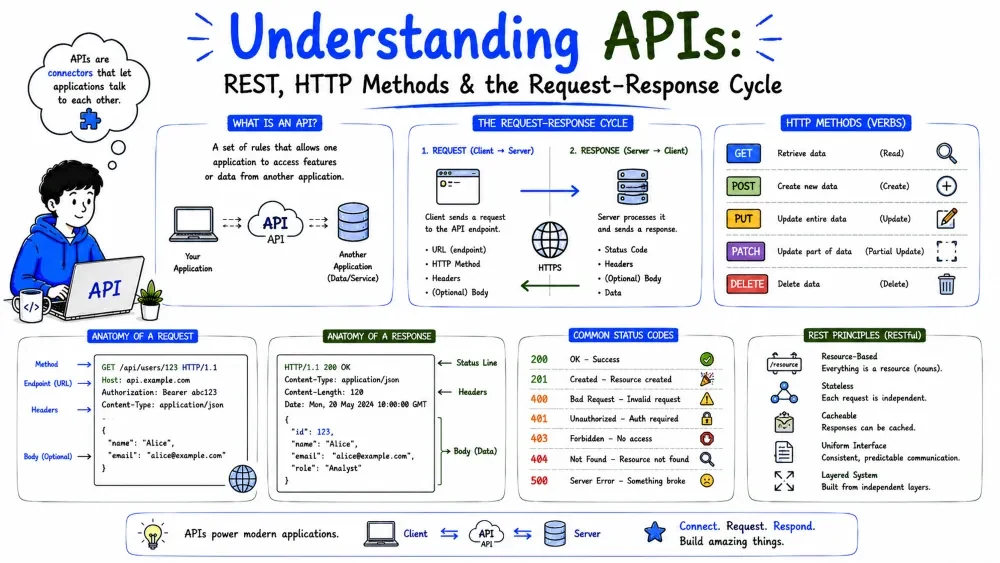
An integration lets two systems talk without a human forwarding data by hand. The most common way they talk is through an API — and the most common kind of API is REST. This tutorial builds the mental model: what an API is, how a REST API is structured, the vocabulary every integration assumes, and the four HTTP methods you'll use to actually operate on it.
An API (Application Programming Interface) is a contract that lets one program ask another for data or an action, in a way both already understand. Think of a waiter: you don't walk into the kitchen and cook — you give an order to a fixed interface, and the kitchen sends back exactly what you asked for.
An integration is just one system using another's API on a regular basis. Every time your CRM writes to your inbox, or your dashboard pulls live revenue, an API is doing the work behind the scenes.
Note: "API" is the interface itself; "integration" is what you build on top of it.
Without APIs, moving data between two programs means somebody exporting a CSV, emailing it, and someone importing it by hand. APIs remove the human from the loop:
Every API interaction has two roles:
  Client  ──(request)──▶  Server
  (asks)                 (answers)
  ◀──(response)──────────
One client can talk to many servers. That's exactly what an integration platform does — your app is a client calling Slack's API, Salesforce's API, and your own database's API.
REST (Representational State Transfer) is a set of design conventions for building an HTTP API so it behaves predictably. It's not software; it's a style. Most business APIs you'll meet — CRMs, ERPs, payment gateways — are REST APIs.
A REST API is built from three habits:
users, orders, contacts.The payoff: if the designer followed REST conventions, you can almost guess how to use a new API without the docs.
A resource is a distinct thing the API knows about, with its own name (usually plural). You don't say "give me the thing about the order"; you say "/orders/ the order resource."
| Resource | Represents | Example value |
|---|---|---|
/users | all users | a collection of user records |
/orders | all orders | a collection of order records |
/users/42 | one specific user | the user whose id is 42 |
Every resource is identified by a URL, and relationships can be nested — e.g. /users/42/orders means "the orders that belong to user 42".
An endpoint is a specific address (URL) that does one specific thing. The URL's path names a resource; the method says what to do with it.
https://api.acme.com/v1/users?active=true&limit=50
│        │              │ │  │        └ query string (filters/pagination)
│        │              │ └──┴────── resource path
│        └──────────────┴──────────── base URL of the API
└──────────────────────────────────── protocol
Note: the /v1 in the path is an API version. When the API changes, the owner ships /v2 instead of breaking everyone. Always pin to a version in your integrations.
A request has a body and some headers — tiny key-value pairs that carry metadata: what format it's in, who's calling, how to reply. Common ones:
| Header | What it tells the server |
|---|---|
Content-Type | What format the request body is (e.g., application/json) |
Accept | What format you want back (usually also JSON) |
Authorization | Your credentials — API key or token (Tutorial 2) |
Practically, every REST call looks the same:
import requests

resp = requests.get(
    "https://api.crm.example.com/v1/contacts/42",
    headers={"Authorization": "Bearer TOKEN"},
    timeout=30,
)
print(resp.status_code)   # e.g. 200
print(resp.json())        # the payload
Explanation: you send a request (method + URL + headers), the server replies. The reply always has a status code and usually a body. That's the whole loop.
The server reports the result with a status code, a three-digit number grouped by result:
| Range | Meaning | Example |
|---|---|---|
2xx | Worked | 200 OK, 201 Created |
4xx | Your fault (bad request) | 404 Not Found, 429 Too Many Requests |
5xx | The server's fault | 500 Internal Server Error |
Note: you only need the ranges. The huge practical lesson: a non-2xx is still a valid HTTP response — you must check it, never assume you got the data (Tutorial 6).
Most REST APIs send and receive JSON — a lightweight text format made of keys and values, familiar if you've seen a Python dict.
{
  "id": 42,
  "name": "Acme Corp",
  "industry": "logistics",
  "contact": { "email": "a@acme.com", "news": true }
}
JSON can be nested (an object inside an object) and supports the basics: strings, numbers, booleans, lists, and null. In REST it's the shared language — both sides agree it's JSON via the Content-Type: application/json header.
A REST API names the thing you're touching with a URL; the HTTP method says what you want to do to it. There are only a handful, and once you know them you can operate on almost any REST API.
| Method | Intent | Safe to repeat? |
|---|---|---|
GET | Read a resource | Yes |
POST | Create a new resource | No |
PUT | Replace/update a resource | Yes |
DELETE | Remove a resource | Yes |
The same URL does different things depending on which verb you send. GET /orders lists orders; POST /orders creates one — same address, different intent.
Every practical API is, underneath, doing the four data operations you already know from databases (Data Engineering Tutorial 2):
Create  → POST
Read    → GET
Update  → PUT / PATCH
Delete  → DELETE
Memorize this mapping and you've memorized most of the API. When someone hands you "an orders API," you already know it almost certainly has these four operations in some form.
GET fetches a resource and never changes anything. It's the only method that's safe to call freely — you can't damage data with it.
import requests

resp = requests.get(
    "https://api.crm.example.com/v1/contacts",
    params={"limit": 100},        # query string → filters / pagination
    headers={"Authorization": "Bearer TOKEN"},
    timeout=30,
)
resp.raise_for_status()
for c in resp.json()["contacts"]:
    print(c["id"], c["email"])
Explanation: we fetch the list of contacts, read the JSON body, and print each record. No data was written — GET only reads.
Best Practice: GET takes its inputs in the URL (path or query string), not in a body. A GET with a body is a smell most APIs reject.
POST asks the server to create something new, sending the new record's data in the request body.
import requests

payload = {"email": "bob@acme.com", "name": "Bob", "active": True}
resp = requests.post(
    "https://api.crm.example.com/v1/contacts",
    json=payload,                             # send the body as JSON
    headers={"Authorization": "Bearer TOKEN"},
    timeout=30,
)
print(resp.status_code)   # 201 Created
print(resp.json()["id"])  # the new record's id
Explanation: we POST a new contact. A well-behaved API replies 201 Created and, crucially, returns the new record so your code knows its id.
Note: requests has a json= parameter that both sets Content-Type: application/json and serializes your dict — use it instead of hand-building the body string.
PUT targets a specific existing resource and replaces it wholesale with what you send. You send the whole record; whatever the server had becomes what you sent.
import requests

resp = requests.put(
    "https://api.crm.example.com/v1/contacts/42",
    json={"email": "bob.new@acme.com", "name": "Bob", "active": True},
    headers={"Authorization": "Bearer TOKEN"},
    timeout=30,
)
print(resp.status_code)   # 200 OK
Explanation: PUT /contacts/42 replaces contact 42 entirely with the record we sent. Because it's a full replace, the client sends every field — a partial body wipes the rest.
PATCH updates only the fields you send and leaves the rest alone. Often the safer choice — you don't need to know the full current record.
import requests

resp = requests.patch(
    "https://api.crm.example.com/v1/contacts/42",
    json={"active": False},                   # only touch this field
    headers={"Authorization": "Bearer TOKEN"},
    timeout=30,
)
Explanation: we flip just active to False; the rest of contact 42 is untouched. Use PATCH to alter one or two fields, PUT to save the whole record.
DELETE removes a resource, typically responding 204 No Content (success, nothing to return).
import requests

resp = requests.delete(
    "https://api.crm.example.com/v1/contacts/42",
    headers={"Authorization": "Bearer TOKEN"},
    timeout=30,
)
print(resp.status_code)   # 204 No Content
Explanation: contact 42 is gone. Note there's no body — deletion is identified purely by the URL.
Important: deletion is destructive and often irreversible. Verify the target before you delete it, and treat this verb with respect. In real business APIs a DELETE often soft-deletes (sets deleted_at) or archives rather than hard-removing.
You can call GET, PUT, and DELETE twice and the world is the same — that's idempotency (the same idea Data Engineering Tutorial 5 applies to pipelines).
GET /contacts → you get the same list again. Harmless.PUT /contacts/42 with the same body → contact 42 ends up the same. Harmless.DELETE /contacts/42 twice → it's gone either way (the second may return 404).POST /contacts twice → two different contacts created. POST exists to "make a new one each time," so it is not idempotent.Why it matters: when a request times out, your integration can't tell whether it reached the server. If the verb is idempotent, you may safely retry. If it's a POST, a blind retry creates a duplicate — so retry logic treats POST carefully (Tutorial 6).
| You want to... | Use |
|---|---|
| Read / search data | GET |
| Create a new record | POST |
| Update most fields of a record | PUT |
| Update one or two fields | PATCH |
| Remove a record | DELETE |
Save your progress and earn XP for completing tutorials.
4 questions · Pass with 70%+
1An API key sent in a URL query string rather than a header is riskier because...
2Which HTTP method is not idempotent?
3Response code 429 falls into which group?
4To change just one field of a record, best practice is...
Technology
Forward Deployed Engineer
Lesson group
Integrations & APIs
Progress
17% complete

