Preparing your learning space...
33% through Integrations & APIs tutorials
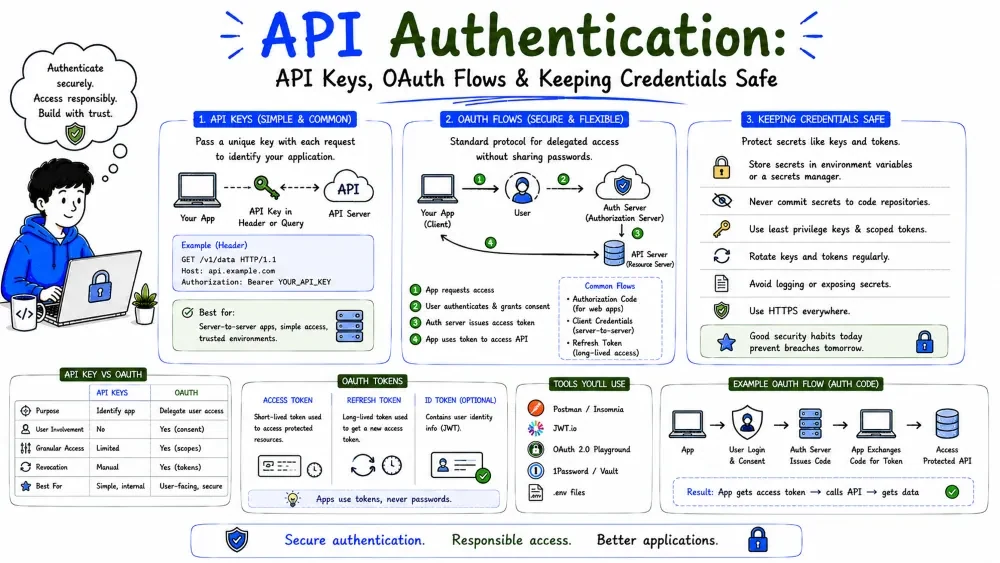
Almost every API is locked. To use it you must prove who you are — and, in many business APIs, what that identity is allowed to do. This tutorial covers the two dominant models: simple API keys and the more complex-but-more-powerful OAuth, plus the practical habits of keeping credentials safe.
A public API that accepts any request would let anyone read your customers' medical records, your order book, or your invoices. Authentication is the gate: it verifies who is calling, and it lets the API owner revoke a caller without shutting everyone down.
Authentication answers one question: "prove you are who you claim to be." Two very different models handle it:
| Model | Identifies | Typical for | Security |
|---|---|---|---|
| API key | your application | simple/internal APIs | good, if handled well |
| OAuth | a user + app pair, scoped | third-party / user-data | strong, granular |
As you scale from "my code talking to one service" to "my product acting on behalf of many users," you slide from keys to OAuth.
An API key is a long secret string the API owner issues you (one per account or per app), like a password for your integration.
sk_live_4f9c…3ab2
You send it with every request so the server recognizes you. It's simple: one secret, one identity, one scope (whatever the key was granted).
Keys travel in a header or, sometimes, a query parameter. Header is safer — a query string can leak into logs:
import requests, os

api_key = os.getenv("ACME_API_KEY")          # never hardcode!
resp = requests.get(
    "https://api.crm.example.com/v1/contacts",
    headers={"Authorization": f"ApiKey {api_key}"},   # check each API's scheme
    timeout=30,
)
print(resp.status_code)
Explanation: we read the key from an environment variable and send it in an Authorization header. Every API has its own header format (ApiKey, X-API-Key, sometimes just the bare key) — the docs tell you which.
Best Practice — treat a key exactly like a password:
Keys work great for your code calling their API. They fall apart when your users' data is involved:
For that, you need OAuth.
OAuth 2.0 is the standard for delegated access: it lets a user grant your app a limited, revocable right to act on their behalf, without ever giving you their password. Think of a hotel key card — the guest gets access only to their room, for a limited time, without you knowing anything secret about them.
This is how Slack, Google, Microsoft, and most SaaS integrations work: your app never sees the user's password.
OAuth has four specific roles. Knowing them makes every diagram click:
| Role | Who | Example |
|---|---|---|
| Resource Owner | the user whose data it is | a Slack workspace admin |
| Client (app) | your integration | your sync tool |
| Authorization Server | issues tokens | Slack / Google's auth server |
| Resource Server | holds the data, checks tokens | Slack's API itself |
In practice the Auth Server and Resource Server are often the same company. The point: your app (client) gets a token that says "this user approved these scopes."
OAuth has several grants (scenarios). The one virtually every user-facing integration uses is the Authorization Code flow:
User approves your app → you get a code → you exchange it for tokens
Two other grants worth knowing:
client_id + client_secret.?client_id=…&redirect_uri=…&scope=…).client_secret safe) swaps that code for an access token and usually a refresh token.The flow gives you two tokens, and it's vital to treat them differently:
| Token | Lifetime | Purpose |
|---|---|---|
| Access token | short (minutes–hours) | sent on every API call |
| Refresh token | long (days+) | used only to get a new access token |
Best Practice: never store access tokens where scripts can accidentally expose them. When an access token expires (you'll get 401), use the refresh token to get a new one — most SDKs automate this. Access tokens expire precisely so a leaked one is only briefly dangerous.
At the moment of an API call, OAuth looks just like an API key — the difference is where the token came from:
import requests, os

access_token = os.getenv("ACCESS_TOKEN")   # obtained via the OAuth flow
resp = requests.get(
    "https://slack.com/api/conversations.list",
    headers={"Authorization": f"Bearer {access_token}"},
    timeout=30,
)
print(resp.status_code, resp.json().get("error"))
Explanation: OAuth access tokens are sent as Bearer <token> in the Authorization header. The token itself encodes the scopes the user approved — that's how the server knows it may read your conversations but not, say, post as you.
Whatever the method, credentials follow the same rules:
.env.Save your progress and earn XP for completing tutorials.
4 questions · Pass with 70%+
1What does an OAuth refresh token do?
2OAuth solves something API keys can't:
3Which OAuth grant is best for server-to-server calls with no user involved?
4The card's API key should be stored where, per the rules?
Technology
Forward Deployed Engineer
Lesson group
Integrations & APIs
Progress
33% complete

