Preparing your learning space...
50% through Integrations & APIs tutorials
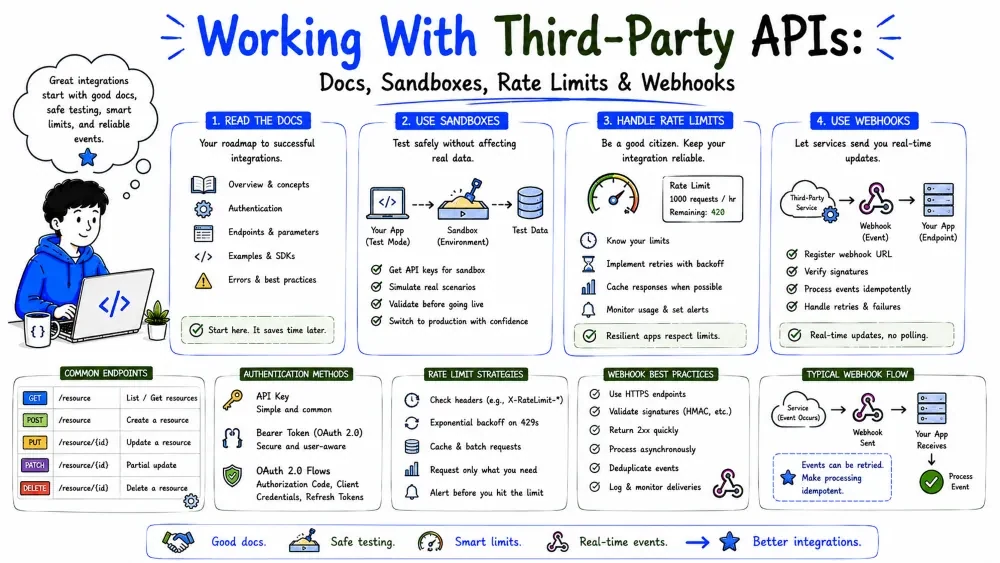
Two facts define integration work: the API you're calling belongs to someone else, and sometimes it calls you. This tutorial covers both halves — a playbook for approaching any third-party API (docs, auth, sandbox, pagination, versioning), and webhooks, where the server pushes an event to your URL instead of you polling.
A third-party API is not yours. You can't change its behavior, its bugs, its rate limits, or its breaking changes — you can only adapt to it. That flips your priorities:
Five minutes of preparation saves an hour of debugging:
Docs look intimidating, but you only need a few sections:
| Section | What it gives you |
|---|---|
| Authentication | how to get and send credentials |
| Endpoints / Reference | the URLs, methods, params, response shape |
| Errors | status codes and what they mean |
| Rate limits | how fast you may call |
| Webhooks | event push, if available (Part 2 below) |
Best Practice: build one tiny request against the docs before designing the whole integration. A single working call validates auth, URL, and response format — then scale from there.
Start smallest: one GET to a simple endpoint, print the raw JSON, and look at it before writing any parsing.
import requests, os, json

resp = requests.get(
    "https://api.example.com/v1/ping",              # some trivial endpoint
    headers={"Authorization": f"Bearer {os.getenv('TOKEN')}"},
    timeout=30,
)
print(resp.status_code)
print(json.dumps(resp.json(), indent=2)[:1000])     # inspect the real shape
Explanation: before you trust any schema from the docs, print what the API actually returns. Docs drift; reality doesn't. This raw dump tells you the true field names, types, and nesting you must handle.
Credentials go in environment variables or a secret manager, never in code (Tutorial 2). Copy the header format from the docs:
import os, requests
resp = requests.get(
    "https://api.example.com/v1/contacts",
    headers={"Authorization": f"Bearer {os.getenv('ACME_TOKEN')}"},
    timeout=30,
)
If the API needs OAuth, use the flow that matches your scenario (user-facing vs server-to-server) and let the SDK manage token refresh when available.
Providers ship SDKs (Stripe, Slack, Twilio, Google all do) that wrap their API. Using one means:
import os
from slack_sdk import WebClient

client = WebClient(token=os.getenv("SLACK_TOKEN"))
res = client.conversations_list(limit=100)
for c in res["channels"]:
    print(c["name"])
Explanation: the SDK hides the raw HTTP. You still need to understand the underlying API to debug it, but the SDK removes most of the boilerplate. When the provider's SDK doesn't cover your language, you're back to raw requests (Tutorial 1).
Nearly every serious API has a sandbox or test mode: a separate environment with dummy data and no real side effects. Use it.
Real data exceeds one response. APIs page results; you must loop through them (the patterns from Data Engineering Tutorial 5 apply). The robust cursor pattern:
def fetch_all(url, headers):
    results = []
    while url:
        resp = requests.get(url, headers=headers, timeout=30)
        resp.raise_for_status()
        body = resp.json()
        results.extend(body.get("items", []))
        url = body.get("next")          # None when done
    return results
Explanation: each response carries the URL for the next page; keep following until next is None. This handles any page count without guessing, and it's the pattern most modern APIs expect.
Providers cap how fast you can call. Exceed it → 429 Too Many Requests. Respect the server's hint with backoff (details in Tutorial 6):
import time, requests

def get(url, headers, tries=4):
    for i in range(tries):
        r = requests.get(url, headers=headers, timeout=30)
        if r.status_code == 429:
            time.sleep(int(r.headers.get("Retry-After", 2 ** i)))
            continue
        r.raise_for_status()
        return r.json()
    raise RuntimeError("rate limited out")
Explanation: on 429 we honor Retry-After (falling back to exponential backoff). This is the difference between a stable integration and one that gets banned.
APIs change, and they don't break everyone at once — they ship versions (Tutorial 1's /v1). Because the provider controls the API, your code can break when they change behavior.
Best Practice: pin your integration to a specific version, subscribe to the provider's changelog, and read the breaking-change notices before upgrading. When you do upgrade, re-run your integration tests (Tutorial 6) against the new version in the sandbox first.
Two ways to learn that something changed:
| Polling | Webhooks | |
|---|---|---|
| Direction | you → them | them → you |
| Freshness | depends on your schedule | immediate |
| Load | you keep hammering even when idle | they only call on real events |
| Complexity | simple | needs a public endpoint + verification |
Polling is simpler to build but wasteful and laggy. Webhooks are immediate and efficient but require you to run a reachable, hardened endpoint.
A webhook is a URL on your side that the remote service calls (usually with POST) when an event happens. "Sign up on Stripe → they POST a charge.succeeded event to your URL." It's just a normal API call you receive instead of sending.
  Event happens        Service POSTs to your URL        You act
  (new order)   ──▶    (https://you.com/hook/orders) ──▶ (update your DB)
A webhook request looks exactly like an API request you'd send — but it arrives at your endpoint:
POST /hooks/orders
Content-Type: application/json
X-Signature: t=1724000000,v1=abc123…     ← signature header (often)
User-Agent: stripe-webhook/…

{ "id": "evt_123", "type": "order.created",
  "data": { "id": 42, "amount": 1999 } }
The payload carries an event type (order.created) and the data. Your handler's job is: verify the sender, acknowledge fast, then do the real work.
Using a simple Python web server (or any framework), a handler looks like this:
import json
from flask import Flask, request, Response

app = Flask(__name__)

@app.route("/hooks/orders", methods=["POST"])
def order_hook():
    event = request.get_json()
    if event["type"] == "order.created":
        # queue the real work; don't block here
        process_order.delay(event["data"])
    return Response(status=200)   # ack to the sender
Explanation: when the event arrives we branch on its type and hand the heavy work to a background job, then return 200 immediately. Returning fast is important — see "Responding Fast" below.
Anyone with your webhook URL can fake an event. Most providers sign each delivery with a signature header (e.g., Stripe, GitHub use HMAC). Verify it or you're trusting random internet traffic:
import hashlib, hmac, os

def verify(signature, payload):
    secret = os.getenv("HOOK_SECRET").encode()
    expected = hmac.new(secret, payload, hashlib.sha256).hexdigest()
    return hmac.compare_digest(f"v1={expected}", signature)

# in handler:
if not verify(request.headers.get("X-Signature"), request.data):
    return Response(status=400)
Explanation: we recompute an HMAC over the raw body using a shared secret, then compare it to the sender's signature with a constant-time compare. Only the real provider (who shares your secret) can produce a matching signature. Never accept the event if this check fails.
Best Practice: store the webhook secret in an environment variable, compute the signature over the raw body bytes (not re-serialized JSON — whitespace breaks it), and use hmac.compare_digest to avoid timing attacks.
Webhook providers expect a quick 2xx acknowledgment — usually within a few seconds. If you block on slow work (querying a database, calling another API), you risk timeout and a duplicate redelivery.
Best Practice: validate and acknowledge immediately (200), then push the payload into a queue (a DB row, a message queue like RabbitMQ/SQS) for a background worker to process. This makes your handler fast, and a crash mid-processing doesn't lose the event — it's safe in the queue.
If you return anything other than 2xx, or your server is down, the provider will redeliver the webhook — later, repeatedly, often with exponential backoff. That's a feature, not a bug: it's how the event finally gets through.
So build your handler assuming the same event may arrive more than once. That's idempotency again (below).
Providers redeliver on failure, which means your handler must tolerate seeing the same event twice. The safe pattern: deduplicate on the event id.
seen = cache_connection  # Redis / a table keyed by event id

if not seen.set_if_absent(event["id"]):   # already handled
    return Response(status=200)            # still ack — don't reprocess
Explanation: we record each event id as "done." If the same event comes back (retry), we skip reprocessing and still return 200 so the provider stops. Without this, a single redelivery duplicates orders, emails, or payments.
Save your progress and earn XP for completing tutorials.
4 questions · Pass with 70%+
1Why should you print the real JSON response before trusting the docs?
2When a webhook event arrives, your handler should first...
3A webhook provider redelivers a failed event. Your handler must tolerate this by...
4When an API responds 429, what should your code do?
Technology
Forward Deployed Engineer
Lesson group
Integrations & APIs
Progress
50% complete

