Preparing your learning space...
67% through Integrations & APIs tutorials
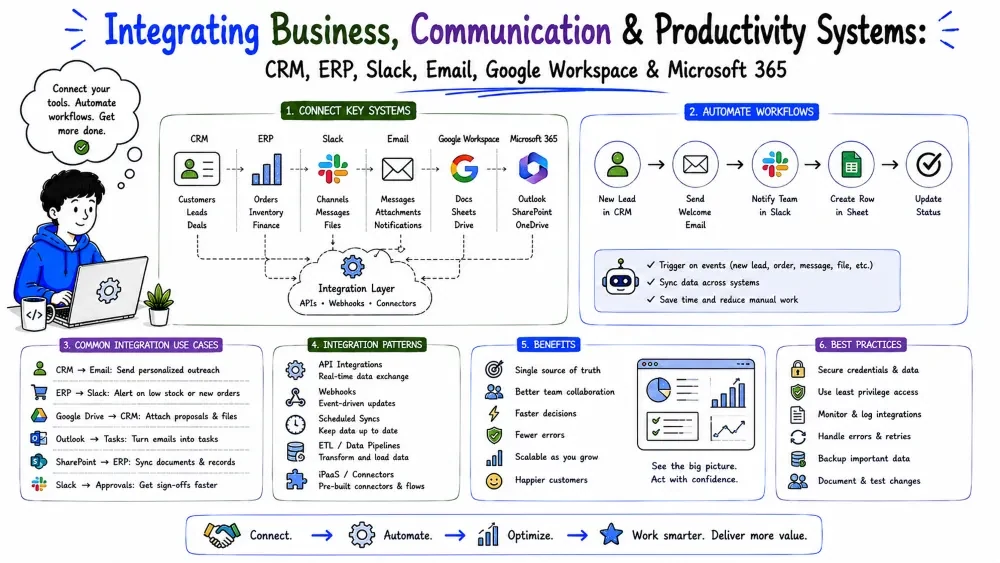
Real integrations connect to the systems a company actually lives in: the business systems that hold the records (CRM, ERP, payments), the communication tools where people work (Slack, email), and the productivity suites and databases underneath (Google Workspace, Microsoft 365, the database). This tutorial covers all three families as one chapter, because they share the same underlying pattern — read real responses, scope auth tightly, paginate, respect rate limits, write idempotently.
CRM, ERP, and payment systems are the systems of record — they hold the facts a business legally and operationally depends on: who customers are, what was ordered, what was paid. Integrations to them move real, sensitive business data through your code, so the stakes are higher and the discipline matters more.
A CRM (Customer Relationship Management) system tracks a company's interactions with customers and prospects — contacts, companies, deals, notes, emails. The big ones: Salesforce, HubSpot, Zoho, Microsoft Dynamics.
CRMs live on the sales/front side. The pattern you'll build most: sync records in and out (contacts, companies, deals) and push activity (notes, events, emails) back into the timeline so sales sees everything in one place.
import os, requests

# read new deals from the CRM
resp = requests.get(
    "https://api.hubspot.com/crm/v3/objects/deals",
    headers={"Authorization": f"Bearer {os.getenv('HUBSPOT_TOKEN')}"},
    params={"limit": 100},
    timeout=30,
)
resp.raise_for_status()
for d in resp.json()["results"]:
    print(d["id"], d["properties"].get("amount"))
Explanation: HubSpot (and most CRMs) expose their records via REST object APIs. The pattern is "hit an object endpoint, paginate, map to your shape" — exactly the work of Tutorials 1–3, now against a domain object.
Best Practices for CRM sync:
id and your external_id to upsert, not append (Tutorial 5).An ERP (Enterprise Resource Planning) system runs a company's back-office operations: finance, inventory, purchasing, manufacturing, HR, and accounting. Think SAP, NetSuite, Microsoft Dynamics, Odoo. It's often the "single source of truth" for the money.
ERPs are heavy — the data model is enormous and often not where you'd expect. Integration usually means pulling a narrow slice: orders, inventory levels, invoices, or stock on hand. It's more about reading and keeping consistent than about creating data.
# check inventory levels from the ERP
import requests, os
resp = requests.get(
    "https://api.netsuite.com/services/rest/record/v1/item",
    headers={"Authorization": f"Bearer {os.getenv('NETSUITE_TOKEN')}"},
    timeout=30,
)
resp.raise_for_status()
print("items:", len(resp.json().get("items", [])))
Explanation: NetSuite uses REST against its record model; the pattern (auth + GET + paginate) is the same, but you must learn its object names and fields. Don't guess the schema — verify against a real response (Tutorial 3).
The ERP Reality:
Best Practice: treat the ERP as a slow, precious system. Pull what you need, push nothing you don't have to, and always cross-check against a real "does this inventory number match reality?" test rather than trusting the doc.
A payment integration lets your app take money (and handle refunds, subscriptions, invoices) through a processor — Stripe, PayPal, Braintree, Adyen, or Square. This is the closest to a pure developer-friendly API, but it has unique rules: security, PCI, and crypto.
If your app handles, stores, or transmits raw card numbers, you bring on PCI DSS compliance — a heavy set of security obligations.
Best Practice — never touch the card data yourself. Use the processor's hosted page (Stripe Checkout, Stripe Payment Element, PayPal) so the card number never passes through your server. That instantly removes you from almost all PCI scope. You only receive a token and the amount.
Payment APIs are usually clean and well-documented:
import os, stripe
from flask import Flask, request

stripe.api_key = os.getenv("STRIPE_SECRET_KEY")
app = Flask(__name__)

@app.route("/checkout", methods=["POST"])
def checkout():
    # 1. create a payment intent server-side
    intent = stripe.PaymentIntent.create(
        amount=1999,          # minor units: 19.99 in cents
        currency="usd",
    )
    # 2. pass only the *client secret* to the frontend
    return {"client_secret": intent["client_secret"]}
Explanation: you never touch the card. The server creates a PaymentIntent; the frontend completes card entry against Stripe using only a short-lived client_secret. Amounts are minor units (cents) as integers — never floats.
Payment Integration Habits:
0.1 + 0.2 breaks accounting (Data Engineering Tutorial 1). Store amounts as integers in minor units (1999 = $19.99).charge.succeeded), not by reading the API response synchronously. Verify signatures and deduplicate by payment id (Tutorial 3).4242…) before real keys. Refunds, disputes, and failures all need an integration path.Systems that only hold data are half an integration — the other half is delivering the result to a human. Slack and email are how that happens: an order lands → Slack notifies ops; an invoice is ready → email sends it to the customer. These integrations are simple in mechanics and easy to get wrong in etiquette and deliverability.
Slack has bots (apps that act under their own identity), channels (public/private rooms), direct messages (DMs), and incoming webhooks (a URL that posts a message without full app plumbing). You can send plain text or formatted blocks (rich messages with fields, buttons, headers).
The two ways your code gets permission to talk to Slack:
chat:write, and store the resulting bot token (Tutorial 2's OAuth). This is the flexible, production path.POST a JSON payload to it. Zero scopes, zero OAuth setup — ideal for quick notifications.With a bot token, use the official SDK or raw requests:
import os
from slack_sdk import WebClient

client = WebClient(token=os.getenv("SLACK_BOT_TOKEN"))
res = client.chat_postMessage(
    channel="C12345678",            # or a channel name like "#ops"
    text="A new order just arrived!",
)
print(res["ok"])
Explanation: we post a text message to one channel using the bot's token. res["ok"] tells us whether Slack accepted it. The bot must be invited to the channel first, or Slack returns a not_in_channel error.
chat:write + user scopes). Useful for "schedule on my calendar" style flows, but it uses that user's permissions.Best Practice: default to bot posts. Impersonation is powerful but confusing (whose messages are whose?) and needs the user's own OAuth consent.
When you don't need a full app, an incoming webhook is one POST:
import os, requests, json

webhook_url = os.getenv("SLACK_WEBHOOK_URL")
requests.post(
    webhook_url,
    json={"text": "Deploy finished ✅", "username": "deploy-bot"},
    timeout=30,
)
Explanation: we POST a JSON payload to Slack's webhook URL; Slack posts it to the configured channel. No token, no SDK. Great for alerts, CI notifications, and scripts — but limited (no dynamic channels, no user interactions).
Email integration splits into two very different jobs:
This section covers transactional email, which is what integrations most often need.
Transactional APIs are simple: send a from, to, subject, and body, and they handle delivery (and often retries, opens, bounces). Example with SendGrid:
import os, requests

resp = requests.post(
    "https://api.sendgrid.com/v3/mail/send",
    headers={"Authorization": f"Bearer {os.getenv('SENDGRID_KEY')}"},
    json={
        "personalizations": [{"to": [{"email": "customer@acme.com"}]}],
        "from": {"email": "no-reply@yourapp.com"},
        "subject": "Your invoice",
        "content": [{"type": "text/plain", "value": "Invoice #1042 is ready."}],
    },
    timeout=30,
)
print(resp.status_code)   # 202 Accepted → queued for delivery
Explanation: we hand the email to SendGrid's API as JSON. The response 202 means it's accepted for delivery — actual delivery, bounces, and retries are handled by the provider, not your code.
Best Practice: send transactional email only via an API (or SMTP relay), not by connecting your app directly to someone's mail server — deliverability, SPF/DKIM, and bounces are the provider's job.
429 (Tutorial 6).| Need | Pick | Why |
|---|---|---|
| Internal alert / ops notification | Slack | fast, visible, low-friction for a team |
| Customer-facing document/account message | durable, formal, goes outside the org | |
| Automated daily summary for a manager | Slack | where they're already reading |
They often pair: a webhook (Tutorial 3) fires → Slack notifies the team → email confirms the customer.
Google Workspace and Microsoft 365 are where business users already live. Integrations to them turn your system from "something the customer visits" into "something that shows up where they work." Email, calendars, spreadsheets, files, and chats are all reachable — each behind an API, all under one auth umbrella per vendor.
Both suites use OAuth 2.0 (Tutorial 2) as the gate, and both are strict about scopes — you must declare, per user, exactly which slice you're allowed to touch (e.g., "read email only," "write to one sheet").
You request:  https://www.googleapis.com/auth/gmail.readonly
              https://www.googleapis.com/auth/spreadsheets
User approves → you get a scoped token → call only those APIs
Best Practice: request the narrowest scopes that work. The suites review apps that ask for broad scopes, users distrust them, and a narrow scope limits the blast radius if a token leaks. Use the official client libraries — they handle token refresh (Tutorial 2) for you.
Google's Google API Client (for Python, etc.) turns the REST calls of Tutorial 1 into method calls. A "read the subject lines of the last emails" example:
from googleapiclient.discovery import build
import os

creds = build_creds_from_oauth(os.getenv("GOOGLE_CREDENTIALS_FILE"))
service = build("gmail", "v1", credentials=creds)

msgs = service.users().messages().list(
    userId="me", maxResults=5).execute().get("messages", [])
for m in msgs:
    detail = service.users().messages().get(userId="me", id=m["id"]).execute()
    subject = next(
        (h["value"] for h in detail["payload"]["headers"] if h["name"] == "Subject"),
        "(no subject)")
    print(subject)
Explanation: we build an authenticated Gmail service from an OAuth credential file, list messages, and read each message's headers to pull the subject. The auth is the hard part; once built, the calls read like plain REST.
Writing a row into Google Sheets uses a similar service — you point at a spreadsheet id and append values:
service = build("sheets", "v4", credentials=creds)
values = [["acme.com", "2026-08-19", "paid"]]
body = {"values": values}
service.spreadsheets().values().append(
    spreadsheetId=os.getenv("SHEET_ID"),
    range="Sheet1!A1",
    valueInputOption="USER_ENTERED",
    body=body,
).execute()
Explanation: we append one row to a named spreadsheet. Sheets is a frequent FDE target precisely because non-technical stakeholders can read the result without any tooling.
Calendar & Drive: calendar.events().insert(...) for events (mind time zones and recurring events); drive.files() for file access, often paired with webhooks (Tutorial 3) so you know when a file changes.
Microsoft's unified API is Microsoft Graph — one endpoint covering Outlook, Excel, Teams, SharePoint, OneDrive, and more. Auth is OAuth 2.0 (often with Azure AD). A "read my next meeting" example:
import os, requests

token = get_msal_token()   # OAuth via Microsoft Authentication Library (MSAL)
headers = {"Authorization": f"Bearer {token}"}
resp = requests.get(
    "https://graph.microsoft.com/v1.0/me/events",
    params={"$top": 5, "$orderby": "start/dateTime"},
    headers=headers,
    timeout=30,
)
resp.raise_for_status()
for ev in resp.json()["value"]:
    print(ev.get("subject"), ev["start"].get("dateTime"))
Explanation: Graph returns our calendar events. Note the query params ($top, $orderby) — Graph uses a slightly different query syntax than plain REST, another reason to read its docs rather than guess. The same graph.microsoft.com/v1.0 host serves mail (/me/messages), Excel, and everything else.
Teams & SharePoint: post messages and build bots under Graph (resembling the Slack patterns of Part 2 but using Graph endpoints); file access via /me/drive and SharePoint sites for document flows, paired with webhooks for change notifications.
Note: Microsoft's auth surface is bigger than Google's — expect tenant/app registration, and grant scopes like Mail.Read, Calendars.ReadWrite. MSAL handles token refresh; don't hand-roll it.
Beneath every suite integration is the same root need: getting data in and out of a database. This is where your Data Engineering work comes together. The pattern is direct and well-trodden:
import os
import psycopg2

conn = psycopg2.connect(os.getenv("DATABASE_URL"))
with conn.cursor() as cur:
    cur.execute(
        "SELECT id, email FROM users WHERE active = %s LIMIT %s",
        (True, 100),
    )
    rows = cur.fetchall()
print(rows)
Explanation: we connect to Postgres from our code and run a parameterized SELECT. The %s placeholders (never f-string interpolation) both prevent SQL injection and keep the query readable.
Reads, Writes, and Schemas:
ON CONFLICT DO UPDATE, Data Engineering Tutorial 5) so reruns don't duplicate.Best Practice: every database write in an integration should be idempotent and logged (rows-in vs rows-out), the same hardening Data Engineering Tutorial 5 teaches. Databases don't forgive silent duplicate rows.
Putting it together, the archetypal FDE flow combines all three families:
  Database ──▶ (read orders) ──▶ Google Sheets (share with finance)
  Webhook ───▶ (new event)  ──▶ Postgres (record it) ──▶ Slack (notify)
  Outlook ───▶ (meeting)    ──▶ Database (log it)    ──▶ Calendar (block)
The shared rules across every leg: scoped OAuth or a well-guarded key, narrow access, idempotent writes, and observation. Get those right and the specific system barely matters.
Every system-specific detail above focusses down to the same steps you now know:
Save your progress and earn XP for completing tutorials.
3 questions · Pass with 70%+
1To keep out of PCI scope, your app should...
2Amounts for money should be represented as...
3The authoritative result of a payment charge arrives where?
Technology
Forward Deployed Engineer
Lesson group
Integrations & APIs
Progress
67% complete

