Preparing your learning space...
83% through Integrations & APIs tutorials
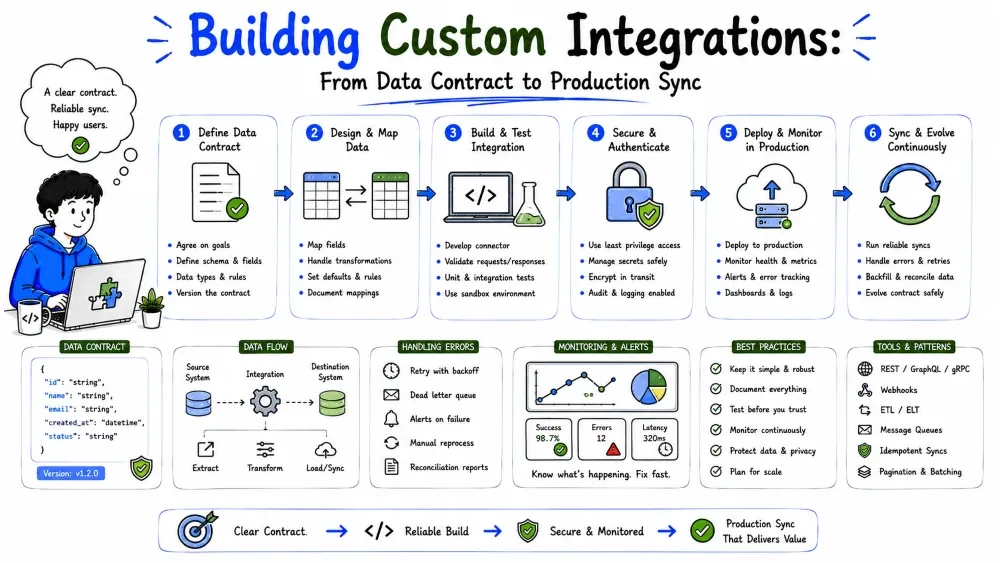
Off-the-shelf connectors don't always fit. When you need something bespoke — a proprietary system, an unusual field mapping, an internal app with no connector — you build it yourself. This tutorial walks the full lifecycle of a custom integration: scope, design the data contract, build the sync, and operate it so it survives contact with the real world.
Use a custom integration when the standard tools fall short:
Note: prefer a managed connector first if it truly fits — custom code is a maintenance commitment. Build custom only when it's genuinely needed.
Before writing anything, answer the "what and why" (the discipline from your Solution Design tutorials):
Best Practice: write these four answers down and keep them visible. An integration built without them drifts into feature-creep and endless field-mapping debates.
The core artifact of a custom integration is the mapping — the translation between one system's fields and the other's. Make it explicit, in a table, and agree on it before coding:
| Your field | Source system | Target system | Transform |
|---|---|---|---|
| customer_id | crm.contact.id | erp.account.external_id | as-is |
| full_name | first_name + last_name | name | concat |
| signed_at | created_date | signup_ts | format to ISO |
Note: the contract (this mapping) is more durable than the code. When a field changes, you edit the mapping, not the whole integration. Keep it versioned like any other document.
Two systems will eventually disagree (a customer updated in the CRM but not the ERP). Decide who wins:
email, the ERP owns price. Powerful but needs discipline.Best Practice: for most custom integrations, make one system the source of truth and sync one-way. Bidirectional sync with conflicts is where custom integrations rot — you now need conflict resolution for every race.
A copy-and-paste mental model produces duplicated, drifting data. Build a sync instead: records are matched by a stable id, and each run reconciles differences rather than blindly appending.
Match by external_id → compare fields → update what changed → never append
Your system stores the target's external_id so next time you recognize the same record. That single habit is what stops an integration from creating a duplicate on every run.
With the contract set, the implementation is the ETL you already know (Data Engineering Tutorial 5) pointed at two systems:
import os, requests

def pull_contacts():
    """Extract: read the latest contacts from system A."""
    resp = requests.get(
        "https://api.a.com/v1/contacts",
        headers={"Authorization": f"Bearer {os.getenv('TOKEN_A')}"},
        params={"since": os.getenv("LAST_RUN")},
        timeout=30,
    )
    resp.raise_for_status()
    return resp.json()["contacts"]

def push_contact(c):
    """Load: upsert one contact into system B, matched by id."""
    resp = requests.post(
        "https://api.b.com/v1/accounts",
        headers={"Authorization": f"Bearer {os.getenv('TOKEN_B')}"},
        json={"external_id": c["id"], "name": f"{c['first']} {c['last']}"},
        timeout=30,
    )
    resp.raise_for_status()
    return resp.json()["id"]
Explanation: pull_contacts extracts with a since high-water mark (only what changed); push_contact upserts by external_id. Extract → transform (the name concat) → load, exactly as the pipeline tutorial teaches.
Custom integrations rerun — at 3 a.m., after a crash, after you redeploy. Idempotent means a rerun produces the same result as the first run: no duplicates, no partial state. Key habits (from Data Engineering Tutorial 5):
since) rather than a full dump each time, so reruns are cheap and bounded.Networks fail, APIs throttle, payloads change shape. A custom integration that assumes success breaks the moment it's real. Wrap every fragile step:
import time, requests

def get_with_retry(url, headers, tries=4):
    for i in range(tries):
        r = requests.get(url, headers=headers, timeout=30)
        if r.status_code == 429:                       # rate limited
            time.sleep(int(r.headers.get("Retry-After", 2 ** i)))
            continue
        r.raise_for_status()
        return r.json()
    raise RuntimeError(f"failed after {tries} tries")
Explanation: on 429 we honor Retry-After with exponential backoff; other failures raise loudly rather than silently returning bad data (Tutorial 6 is the full treatment). A loud failure you see beats a silent wrong result you don't.
A custom integration nobody watches quietly rots. Log the essentials and alert on anomalies:
import logging
log = logging.getLogger("integ")

def run():
    pulled = len(pull_contacts())
    pushed = sum(1 for c in pull_contacts() if push_contact(c))
    log.info("pulled=%d pushed=%d", pulled, pushed)
    if pushed == 0 and pulled > 0:
        log.warning("pulled %d but pushed 0 — check mapping", pulled)
Best Practice: log records-in vs records-out and alert when output is zero or wildly off from the rolling average. A silent integration is a failed integration — it just hasn't failed loudly yet.
Tying it together — sync contacts from A to B, idempotently, with retries:
import os, time, requests

def sync():
    headers_a = {"Authorization": f"Bearer {os.getenv('TOKEN_A')}"}
    headers_b = {"Authorization": f"Bearer {os.getenv('TOKEN_B')}"}
    pulled = get_with_retry(
        "https://api.a.com/v1/contacts?since=2026-01-01", headers_a)
    for c in pulled:
        push_contact(c)          # upsert by external_id (defined earlier)
    log.info("synced %d contacts", len(pulled))

if __name__ == "__main__":
    sync()
Explanation: extract with a since filter, push each by external_id with retry-wrapped requests, and log the count. That's a real, operable custom integration in skeleton — every piece of this tutorial is in those few lines.
Save your progress and earn XP for completing tutorials.
4 questions · Pass with 70%+
1The most durable artifact of a custom integration is...
2When two systems disagree on a value, best practice is...
3How do you make a rerun produce the same result as the first (idempotency)?
4To know your integration is still working, you should...
Technology
Forward Deployed Engineer
Lesson group
Integrations & APIs
Progress
83% complete

