Preparing your learning space...
50% through Security for FDEs tutorials
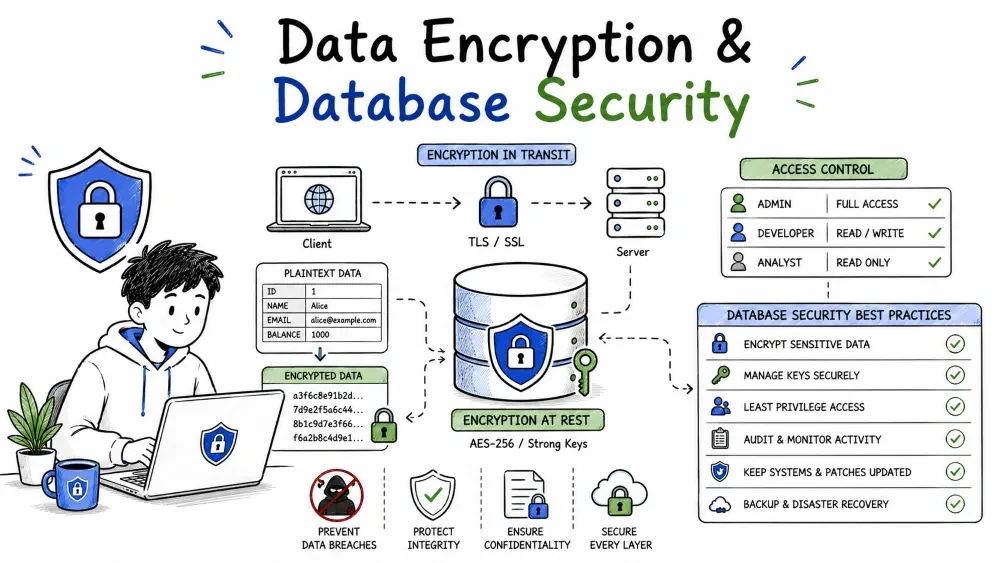
The database holds everything worth stealing: customers, invoices, secrets. This tutorial covers the two ways data is protected once it stops being a request and becomes a record — encryption (so stolen data is unreadable) and database hardening (so it is never stolen in the first place). You'll learn encryption vs hashing, encrypting in transit and at rest, and the concrete database habits — least-privilege DB users, secret-safe queries, network isolation — that keep a customer's data safe.
Think of your data as valuables in a house guarded two ways:
Both matter. Encryption without hardening means the thief grabs the safe contents openly; hardening without encryption means a public dump is fully readable. Do both.
These are two different tools, not interchangeable:
| Purpose | Tool | Reversible? |
|---|---|---|
| Hide data you must read back (a name, an email) | Encryption | Yes, with the key |
| Prove data wasn't changed (or store a password) | Hashing | No |
Encryption transforms data so it can be decrypted later with the right key. Hashing turns data into a fixed fingerprint that cannot be turned back. Use encryption for things you will read again; use hashing for things you only ever compare, like passwords.
Two families, defined by the key model:
| Type | Keys | Used for |
|---|---|---|
| Symmetric | one shared secret encrypts and decrypts | fast, default for data at rest |
| Asymmetric | public key encrypts, private key decrypts | TLS, signatures, OAuth exchanges |
Symmetric is fast and is the default for bulk data at rest. Asymmetric solves the sharing problem — two parties never exchange one secret — which is why TLS and OAuth use it for the handshake, then fall back to a symmetric session key for speed.
When data travels over a network it must travel encrypted. TLS (which powers https://) encrypts data moving between your app and a server, and between services. The rule is simple: if data leaves your process over a wire, it travels over TLS.
import requests
resp = requests.get("https://api.example.com/v1/contacts", timeout=30)
Explanation: the scheme is https://. The "s" means the transport is encrypted end-to-end, so an eavesdropper between you and the server sees only ciphertext. No plaintext over the wire.
Note: TLS protects the link, not the data. Once the server has received it, that payload is at rest and needs storage-level protection too.
Encryption at rest protects data on disk. Usually you don't hand-roll it — your database or cloud provider offers transparent disk or table encryption you simply turn on:
Encryption at rest also covers the log and export files your app writes down.
Never store a password — store a hash of it, and only ever compare hashes. When a user logs in, hash what they typed and compare to the stored hash. Use a slow, salt-aware algorithm:
import hashlib

password = "SuperSecret!"
stored = hashlib.pbkdf2_hmac("sha256", password.encode(), b"salt", 100_000)
Explanation: pbkdf2_hmac repeats the hash thousands of times, which makes guessing a password expensive for the attacker. In production, prefer a library that wraps this well — bcrypt, argon2, or your framework's hash_password. Do not use plain md5 or a bare sha256 for passwords — they are fast enough to brute-force trivially.
A salt is a random, per-user value mixed into the password before hashing, so two users with the same password get two different hashes. Without a salt, an attacker looks up a hash in a precomputed dictionary ("rainbow table") and instantly reverses most common passwords. With a salt, every user forces a separate brute-force.
import os, hashlib
salt = os.urandom(16)                       # fresh random value per user
digest = hashlib.pbkdf2_hmac("sha256", password.encode(), salt, 100_000)
Explanation: store the salt next to the hash and reuse the same salt when verifying later. The salt does not need secrecy — its job is keeping the same password from hashing to the same value everywhere.
Encryption has costs. Choose carefully:
Match the tool to the column: per-field encryption only where you truly need it; let disk encryption carry the rest.
Your database is the crown jewels — the data your customer cares about most. Two principles govern:
Picture the database behind a wall: the correct app reaches it with a scoped connection; everything else is pushed back.
Grant the app a DB user with only the minimum rights — just the tables and operations it actually performs. A root user an exploit can reach through contaminated input is a disaster. Use separate users: one to read, one to write, an admin that's never reachable from the app.
CREATE USER 'app_read'@'%' IDENTIFIED BY '<from_secret_manager>';
REVOKE ALL PRIVILEGES ON *.* FROM 'app_read'@'%';
GRANT SELECT ON appdb.* TO 'app_read'@'%';
Explanation: app_read can read the appdb schema but nothing else — no DROP, no DELETE, no access to other databases. If this credential leaks, the damage is limited to reading a few tables, not owning the cluster.
The DB password is a secret, so it belongs in the secret manager and is injected as an environment variable — exactly the Tutorial 2 pattern. Give each app (or deployment) its own scoped credential, so revoking one doesn't affect the others. The app holds exactly one narrowly-scoped key, passed through secrets infrastructure.
When talking to the DB, never build a query by string-interpolating a value — the value may be user input, and that's how injection happens (expanded in Tutorial 6). Always use parameterized queries / prepared statements, where SQL and values stay separate:
import sqlite3

# BAD: user-controlled text interpolated into SQL
cursor.execute(f"SELECT * FROM users WHERE email = '{email}'")

# GOOD: a placeholder carries the value, safely, separately
cursor.execute("SELECT * FROM users WHERE email = ?", (email,))
Explanation: with the placeholder ?, the database treats email strictly as data, never as command text. This single habit removes an entire class of SQL-injection leaks.
Don't expose the database to the public internet. The app reaches it over a private network — an internal VPC, a closed port, or localhost. Even if an attacker finds the DB address, there should be no route to it from outside:
A backup with no encryption is the same leak as the live DB. Treat backups as the same grade of data:
Make the recovery plan written and practiced. Security counts only if it works the day you need it.
This database framing previews the attacker you'll expand in Tutorial 6: SQL injection is the "value-as-command" failure above. User text reaching a query as command instead of data. Parameterized queries are its fix — good to have met it here.
bcrypt/argon2.Save your progress and earn XP for completing tutorials.
4 questions · Pass with 70%+
1Which needs a reversible transformation?
2Safest way to store a password:
3The app's DB user should be…
4Building SQL by string-interpolating user input invites…
Technology
Forward Deployed Engineer
Lesson group
Security for FDEs
Progress
50% complete

