Preparing your learning space...
63% through Security for FDEs tutorials
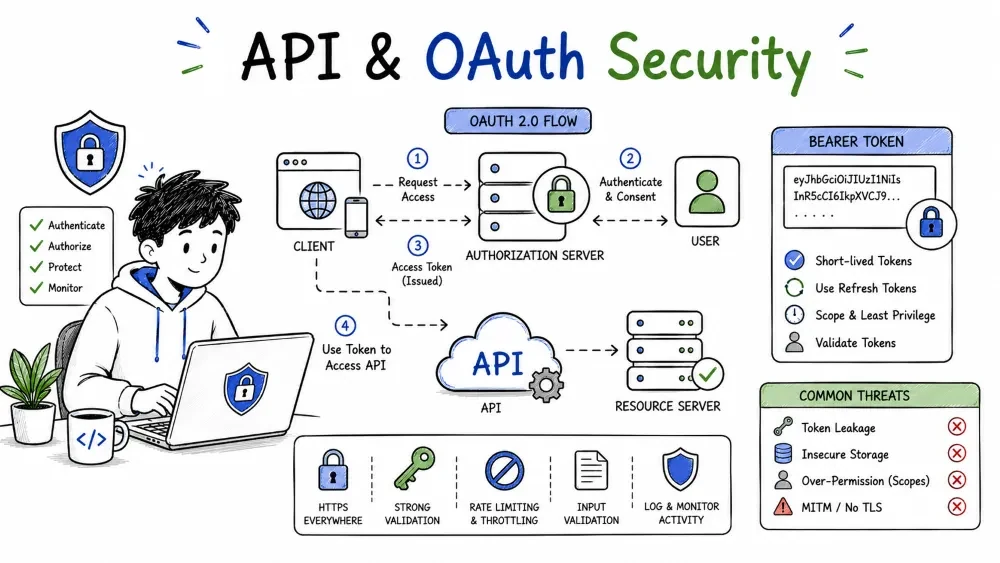
Most FDE work is building on top of someone else's API — or exposing one. This tutorial covers the two security halves of that: API security (how your own endpoints stay safe: authentication, TLS, rate limits, error hygiene, CORS) and OAuth security (how you obtain and use delegated tokens safely, without falling into the classic OAuth footguns).
As an FDE you almost always work on two sides of an API:
This tutorial is both. Everything under API Security protects your endpoint; everything under OAuth Security governs the tokens you handle on either side.
A well-protected API:
Each one is a section below.
Authenticate every request, including the ones that seem harmless. An endpoint that's "just reading" is still an endpoint anyone can quietly mine:
import os, requests

api_key = os.getenv("API_KEY")                     # from the environment (Tutorial 2)
resp = requests.get(
    "https://api.crm.example.com/v1/contacts",
    headers={"Authorization": f"Bearer {api_key}"},
    timeout=30,
)
print(resp.status_code)
Explanation: the key travels in the Authorization header — not the URL — and it is read from the environment, not typed into the code. The server authenticates the caller before serving the first row.
Your API should be reachable only over https://. TLS is what protects your tokens and tokens in transit (Tutorial 4). Don't ship an endpoint that accepts plain http:// "for dev":
http requests to https.Note: if a local http:// is genuinely needed for development, bind it to localhost only and document that it never leaves the machine.
Query strings survive into logs — access logs, proxies, browser history, analytics. A key in ?key=… is a key that is also in your logs. Put credentials in the Authorization header (or, for a login exchange, in the request body) — never as a URL parameter.
Why this is a hard default: one misplaced key-in-URL ships a credential to every log line the request touches.
A public API can be hammered — brute-forcing logins, scraping data, or driving a small customer's quota up. Rate limiting caps how many requests a caller may make in a window, and returns 429 Too Many Requests when the cap is hit (the retry rules live in Integrations Tutorial 3).
Allowed:  100 requests / minute per API key
Over:     429 with Retry-After: 60
Explanation: limit per caller, not globally; return 429 with a retry hint so well-behaved clients back off. This is both a brute-force brake and a DoS shield.
An error message is data. A stack trace, a raw SQL error, a DB detail — each reveals the shape of your system. In production, reply to clients with small, safe messages and keep full detail on your side:
try:
    result = run_query(user_input)
except Exception:
    log.exception("query failed")                  # full detail stays yours
    return {"error": "unable to complete request"} # safe message to client
Explanation: the full trace goes to your structured logs; the client gets a generic message that reveals nothing about your stack, DB, or query shape. This starves reconnaissance.
When a browser script calls your API, the browser enforces CORS — a policy that declares which origins may read responses. A server that answers Access-Control-Allow-Origin: * to everything lets any website's JS read your API's responses under the user's cookies or tokens.
Access-Control-Allow-Origin to your real app origins only.* whenever real cookies/tokens are involved.Log the audit facts that help you answer a real incident: which authenticated user hit which route, with which identity, timestamped and keyed by request id (Debugging series). When the API is misused, you can reconstruct who and when — not merely "it was called."
Rule of thumb: log user, role, resource, verb, status, and a request id — never passwords, tokens, or full payload bodies.
You met OAuth 2.0 mechanics in Integrations Tutorial 2. Here it's about security alone — the places OAuth goes wrong and how to keep the delegation model safe. The goal is unchanged: the user lets your app act for a while, inside well-defined scopes, without ever giving you their password.
Five details carry nearly all the risk. OAuth's power — delegation by token — is also its danger; the whole model stands on how the token is obtained, where it's stored, and what it's scoped to. Get these right and you match the industry default; get one wrong and you become the case study.
In the Authorization Code flow, the provider redirects the user back to your app — with an authorization code — to the redirect_uri you declared when you registered. If the provider doesn't check it exactly, an attacker can supply a different redirect_uri and have the code (and then the token) delivered to their server.
This is the classic OAuth trap: the safe version refuses mismatches like localhost vs 127.0.0.1, https vs http, or any extra path the attacker appends.
Two cheap additions plug the biggest browser-flow holes:
state — a random value you send on the auth request and verify unchanged on return. It blocks CSRF on the callback: an attacker can't force your app to finish a login the victim never started.code_verifier and a hash of it sent as the code_challenge. When you exchange the code, you prove you know the verifier. It stops a stolen code from being replayed by anyone who didn't start the flow.at the start: app picks a 'state' and a 'code_verifier' at the return: app checks 'state' matches, exchanges the code plus the verifier
Do both. PKCE protects the code on the wire; state stops someone from tying the user's session to a login they never started.
The two tokens have very different risk:
| Token | Lifetime | Where to keep it |
|---|---|---|
| Access token | minutes–hours | sent on every call; leaks are briefly dangerous |
| Refresh token | days | a secret, like a stored key (Tutorial 2) |
The refresh token mints new access tokens, so treat it as a secret: secret-manager or encrypted storage, never in a log, URL, or browser. When the access token expires (a 401), use the refresh flow server-side to mint the next one. Short-lived access plus an armored refresh keeps a leaked token briefly dangerous instead of permanently.
The scope you request names what your app may do, and you ask for it at the login. Ask for the minimum that works, not a generous "everything." A token scoped read:contacts reads contacts and nothing else:
read and your needs, not *;Why it's like least privilege (Tutorial 1): a hijacked narrow token is a bounded leak; a wide "everything" token is a breach in one scoop.
Two incidents define "don't do this":
?token=, and is replayed for days to mint new access tokens. Fix: keep refresh tokens in a secret store, bind scopes, never log them.Both are logic mistakes, not fragile crypto — which is why they return and why the checklist (redirect_uri, state, PKCE, token storage, scopes) matters.
Don't confuse the provider's token with your own session cookie. The cookie is the user's session with your app; the OAuth token is how your app proves itself to the provider. And never copy the provider token into a cookie that's sent to every page.
429 with Retry-After.* only when no cookies/tokens are in play.redirect_uri, a state, PKCE, least scope.Save your progress and earn XP for completing tutorials.
4 questions · Pass with 70%+
1A credential should travel in…
2The classic OAuth code-capture leak is caused by…
3state in an OAuth flow prevents…
4A refresh token should be treated like…
Technology
Forward Deployed Engineer
Lesson group
Security for FDEs
Progress
63% complete

