Preparing your learning space...
100% through Solution Design tutorials
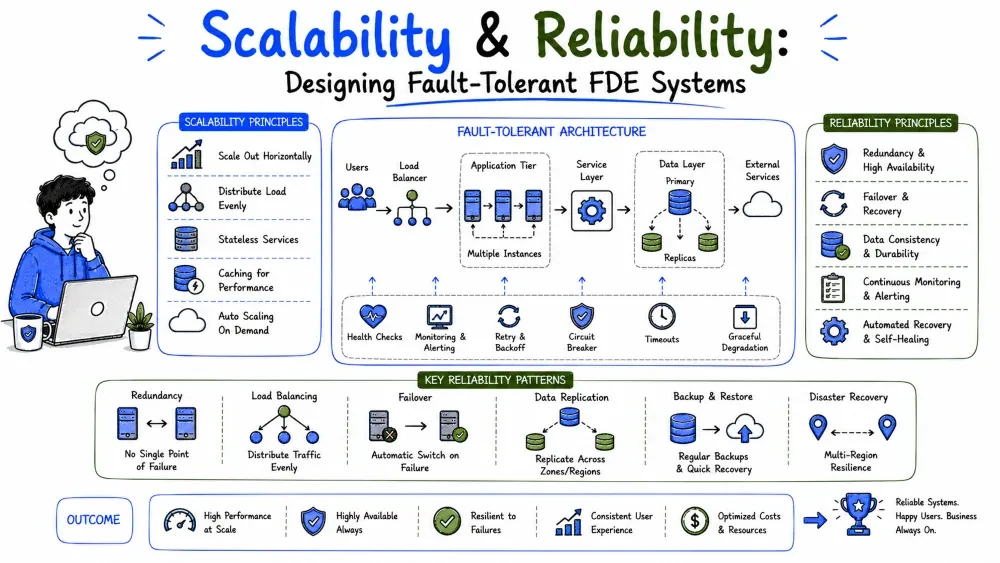
Scalability is how a solution behaves when the load grows; reliability is how it behaves when things break. Both are designed in — they can't be bolted on after launch. This tutorial covers the vocabulary, the standard techniques, and how much of each an FDE solution actually needs.
| Scalability | Reliability | |
|---|---|---|
| Question | Does it still work at 10× the load? | Does it still work when a part fails? |
| Stress | Volume — users, requests, data | Failure — crashes, outages, bad deploys |
| Failure looks like | Everything gets slow, then falls over | Parts die; the question is whether the whole does |
A system can be scalable but unreliable (fast at any load, loses data on restart) or reliable but unscalable (never loses data, crawls at 100 users). You design for each separately — and both start from the same habit: decide the numbers before building, not after.
You can't design for growth you haven't quantified. Before choosing any technique, write down three numbers:
Current load:    2,000 deliveries/day, 40 concurrent office users
Peak load:       6,000/day during holiday season (3×)
Growth target:   20,000/day within two years (10×)
Then express load in the units that stress systems:
Note: most business systems are far smaller than their owners imagine. "We'll have millions of users" usually means "a few hundred people at 9am Monday." Design for the number with evidence, plus a comfortable margin — not for the fantasy.
There are exactly two directions to scale:
Scale up:   [ one server, twice as big ]
Scale out:  [ server ] [ server ] [ server ]  ← behind a load balancer
The practical rule: scale up first (it's a config change, not a project), and design so you can scale out when the ceiling arrives. The one thing that blocks scaling out is state: if a server keeps session data in memory, requests must keep returning to the same server. Move state out — to a database, cache, or token — and any request can hit any server.
Five techniques cover nearly everything you'll meet:
| Technique | What it does | When to use |
|---|---|---|
| Caching | Serve repeated reads from fast memory instead of recomputing | Same queries/results requested over and over |
| Load balancing | Spread requests across several servers | Traffic outgrows one machine |
| Queues | Absorb bursts; workers process at their own pace | Spiky load; slow steps (email, reports) |
| Async processing | Move slow work out of the user's request path | Anything the user doesn't need instantly |
| Read replicas | A copy of the database serves reads | Reads vastly outnumber writes (dashboards, reports) |
A queue deserves special attention because it solves both scale and reliability:
Without queue:  500 requests arrive → all 500 processed at once → overload
With queue:     500 requests arrive → queue holds them → workers drain
                steadily → peak becomes a slightly longer wait, not a crash
Best Practice: cache and queues are the highest-value, lowest-risk techniques. Before adding servers, ask whether a cache (for reads) or a queue (for bursts) removes the problem entirely.
Under load, systems slow down in a predictable order:
The counterintuitive lesson: adding application servers rarely fixes slowness, because the bottleneck is usually below them. Measure before scaling — a single missing database index can matter more than doubling the fleet.
The core assumption of reliable design: every component fails eventually. Servers crash, networks partition, databases fill up, deploys go wrong, third-party APIs have outages. Reliability isn't preventing failures — it's deciding in advance what happens when they occur.
The mental exercise: for each box on your architecture diagram, ask "this is down for an hour — what does the user experience?" If the answer is unacceptable, that box needs a failure design.
Availability is the percentage of time a system is usable, usually quoted in "nines":
| Level | Downtime allowed per year | Typical meaning |
|---|---|---|
| 99% ("two nines") | ~3.7 days | Internal tool, best effort |
| 99.9% | ~8.8 hours | Standard business system |
| 99.99% | ~53 minutes | Customer-facing, high stakes |
| 99.999% | ~5 minutes | Payments-grade; costs multiply |
Each extra nine costs roughly 10× more to achieve. Match the target to the business impact: a reporting dashboard used 9-to-5 needs very different availability than the system that confirms deliveries in real time. Ask the customer what outage length they can actually tolerate — the answer sets your whole reliability budget.
Note: availability is also about whose clock. A system used only in business hours can be "99.9% available" while being patched every Sunday night. Define the window before promising a number.
| Technique | What it protects against | Notes |
|---|---|---|
| Redundancy | A single machine dying | Run ≥2 copies behind a load balancer; managed databases often give you this as a setting |
| Backups + tested restores | Data loss, corruption, "oops" deletes | A backup you've never restored is a hope, not a backup |
| Retries with backoff | Temporary failures in dependencies | Combine with idempotency (Tutorial 4) so retries can't duplicate work |
| Timeouts | Dependencies that hang | Every external call gets a timeout; fail fast, then retry or degrade |
| Graceful degradation | A non-critical part being down | Photo upload fails → confirmation still saves; the core keeps working |
| Health checks | Silent failure | Each service answers "are you alive?" so the platform can replace it |
| Rollback plan | A bad deploy | Keep the previous version one command away; deploys are the most common cause of outages |
Two of these carry most of the weight in FDE work:
Backups with tested restores. Taking backups is automatic; restoring is a skill. Run a restore drill before launch — it takes an hour and converts your backup from faith into fact.
Graceful degradation. Rank your features: what must keep working (confirmations), what can wait (photo upload), what can fail silently (analytics). When a dependency dies, the system sheds the optional parts and keeps the core — like a ship sealing compartments.
You can't reliably run what you can't see. Monitoring has three layers:
The four golden signals for any service:
  latency    — how slow are requests?
  traffic    — how much load?
  errors     — how many failures?
  saturation — how full are the resources?
Best Practice: alert on symptoms users feel (errors, latency), not on causes (CPU at 90%). High CPU with happy users needs no 3am page; a rising error rate with calm CPU absolutely does.
The failure mode of this whole topic is over-engineering: building a five-nines globally-distributed system for a tool used by 40 people. The right-sizing discipline:
This is the same boring-technology logic from Tutorial 3: pay for complexity only when a requirement hands you the bill.
Requirements: volume triples at holidays; confirmations must never be lost; the office dashboard is nice-to-have during outages.
| Concern | Design decision | Technique |
|---|---|---|
| 3× holiday volume | Confirmations already land in a queue (Tutorial 4); add workers for the season | Queue + horizontal workers |
| Confirmations never lost | Offline queue on the phone + durable queue server-side + idempotent processing | Queues + idempotency |
| ERP down on Sundays | Sync retries with backoff; unsynced rows keep a flag | Retries + resumable state |
| Dashboard during outages | Dashboard reads from a cache; if the API is down it shows last-known data with a timestamp | Graceful degradation + caching |
| Data loss | Managed Postgres with daily backups; restore drill before launch | Backups + tested restore |
| Silent failure | Alerts on sync lag, error rate, queue depth | Monitoring |
Nothing exotic — no auto-scaling fleets, no multi-region. The design meets the stated numbers with techniques that are each individually simple. That's what right-sized looks like.
Save your progress and earn XP for completing tutorials.
4 questions · Pass with 70%+
1What is the primary bottleneck in most systems under load, according to the tutorial?
2What is the practical rule for scaling described in the tutorial?
3Which reliability technique does the tutorial identify as carrying "most of the weight in FDE work"?
4What are the "four golden signals" for monitoring any service?
Technology
Forward Deployed Engineer
Lesson group
Solution Design
Progress
100% complete

