Preparing your learning space...
100% through Advanced SQL tutorials
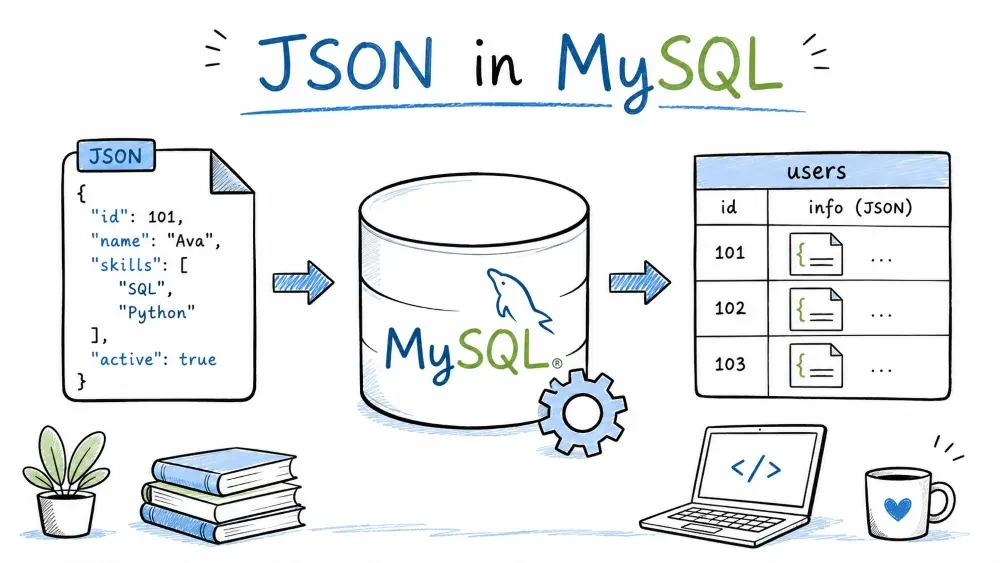
MySQL supports JSON natively since 5.7. You can store documents, create them with functions, extract values, and modify data — all inside SQL queries.
A JSON column stores a validated JSON document in an internal binary format. MySQL strips whitespace and reorders keys on insert.
CREATE TABLE users (
    id INT AUTO_INCREMENT PRIMARY KEY,
    name VARCHAR(100),
    metadata JSON
);

INSERT INTO users (name, metadata) VALUES
('Alice', '{"age": 30, "city": "New York", "skills": ["PHP", "MySQL", "JavaScript"]}'),
('Bob', '{"age": 25, "city": "London", "skills": ["Python", "Django"]}');
Why JSON over VARCHAR or TEXT?
INSERT INTO users (name, metadata) VALUES ('Eve', '{bad json}');
-- ERROR 3140: Invalid JSON text
JSON documents are limited to 1 GB. A JSON column cannot have a DEFAULT value other than NULL.
Use JSON_EXTRACT (or the -> operator) inside WHERE.
SELECT name FROM users
WHERE JSON_EXTRACT(metadata, '$.city') = '"New York"';
-- Note: the value includes quotes

-- Cleaner with ->>
SELECT name FROM users
WHERE metadata->>'$.city' = 'New York';
-- Filter by numeric value
SELECT name FROM users
WHERE metadata->'$.age' > 25;
Takes key-value pairs and returns a JSON object.
JSON_OBJECT(key, value, key, value, ...)
SELECT JSON_OBJECT('name', 'Alice', 'age', 30, 'active', true);
-- {"age": 30, "active": true, "name": "Alice"}
If a key is NULL or the argument count is odd, MySQL throws an error.
Takes a list of values and returns a JSON array.
JSON_ARRAY(value, value, ...)
SELECT JSON_ARRAY('PHP', 'MySQL', 'JavaScript');
-- ["PHP", "MySQL", "JavaScript"]
SQL NULL becomes JSON null. Duplicate keys in JSON_OBJECT — last one wins.
Combine them to build complex documents.
SELECT JSON_OBJECT(
    'name', 'Alice',
    'age', 30,
    'skills', JSON_ARRAY('PHP', 'MySQL', 'JavaScript'),
    'address', JSON_OBJECT('city', 'New York', 'zip', 10001)
);
Use this directly in INSERT:
INSERT INTO users (name, metadata) VALUES (
    'Charlie',
    JSON_OBJECT(
        'age', 28,
        'city', 'Berlin',
        'skills', JSON_ARRAY('Go', 'Kubernetes', 'MySQL')
    )
);
SELECT JSON_MERGE_PRESERVE(
    JSON_OBJECT('a', 1, 'b', 2),
    JSON_OBJECT('b', 3, 'c', 4)
);
-- {"a": 1, "b": [2, 3], "c": 4}
JSON_MERGE_PRESERVE combines objects. Duplicate keys become arrays.
Extracts values from a JSON document using path expressions.
JSON_EXTRACT(json_doc, path[, path]...)
Paths start with $ — the document root.
| Path | Meaning |
|---|---|
$.name | Key "name" |
$.address.city | Nested key |
$.skills[0] | First array element |
$.skills[*] | All array elements |
$**.zip | Any zip key at any depth |
SELECT
    name,
    JSON_EXTRACT(metadata, '$.age') AS age,
    JSON_EXTRACT(metadata, '$.city') AS city,
    JSON_EXTRACT(metadata, '$.skills[0]') AS first_skill
FROM users;
-> and ->> operators-> is shorthand for JSON_EXTRACT. ->> returns an unquoted string.
SELECT
    name,
    metadata->'$.age' AS age,
    metadata->>'$.city' AS city
FROM users;
metadata->'$.age' — same as JSON_EXTRACT(metadata, '$.age').
metadata->>'$.city' — strips surrounding quotes, returns plain string.
SELECT JSON_EXTRACT(metadata, '$.age', '$.city') FROM users WHERE name = 'Alice';
-- [30, "New York"]
Returns a single array with all requested values.
Checks whether a JSON document contains a specific value at a given path.
JSON_CONTAINS(target, candidate[, path])
-- Find users whose skills include 'PHP'
SELECT name FROM users
WHERE JSON_CONTAINS(metadata->'$.skills', '"PHP"');
-- Check for exact object match
SELECT name FROM users
WHERE JSON_CONTAINS(metadata, '{"city": "New York"}');
Returns 1 (true) or 0 (false). The candidate must be a valid JSON value.
Converts JSON arrays into relational rows — useful for reports and joins.
SELECT u.name, jt.skill
FROM users u,
JSON_TABLE(
    u.metadata->'$.skills',
    '$[*]' COLUMNS (skill VARCHAR(50) PATH '$')
) AS jt;
| name | skill |
|---|---|
| Alice | PHP |
| Alice | MySQL |
| Alice | JavaScript |
| Bob | Python |
| Bob | Django |
This turns ["PHP", "MySQL", "JavaScript"] into three rows, one per skill.
JSON_TABLE(expr, path COLUMNS (col_name type PATH path[, ...]))
expr — the JSON data.path — which part of the JSON to iterate over ($[*] = every array element).Three functions that look similar but behave differently:
| Function | Path exists | Path doesn't exist |
|---|---|---|
JSON_SET | Overwrites | Inserts |
JSON_REPLACE | Overwrites | Does nothing |
JSON_INSERT | Does nothing | Inserts |
JSON_SET(json_doc, path, value[, path, value]...)
UPDATE users
SET metadata = JSON_SET(
    metadata,
    '$.age', 31,
    '$.country', 'USA',
    '$.skills', JSON_ARRAY('PHP', 'MySQL', 'JavaScript', 'Python')
)
WHERE name = 'Alice';
Result: age updated to 31, country inserted, skills overwritten with new array.
UPDATE users
SET metadata = JSON_REPLACE(
    metadata,
    '$.age', 35,
    '$.country', 'USA'      -- ignored if 'country' doesn't exist
)
WHERE name = 'Bob';
Only changes age (it exists). country is silently ignored.
UPDATE users
SET metadata = JSON_INSERT(
    metadata,
    '$.age', 99,            -- ignored — age already exists
    '$.country', 'UK'       -- inserted
)
WHERE name = 'Bob';
SELECT JSON_ARRAY_APPEND(metadata->'$.skills', '$', 'TypeScript')
FROM users WHERE name = 'Alice';
-- ["PHP", "MySQL", "JavaScript", "TypeScript"]
Deletes keys or array elements from a JSON document.
JSON_REMOVE(json_doc, path[, path]...)
UPDATE users
SET metadata = JSON_REMOVE(metadata, '$.country', '$.skills[1]')
WHERE name = 'Alice';
Removes the "country" key and the element at index 1 from "skills".
Removing a non-existent path is silently ignored — no error.
MySQL cannot index a JSON column directly. Use a generated column to extract a value into a virtual column, then index that.
ALTER TABLE users ADD COLUMN city VARCHAR(100)
    GENERATED ALWAYS AS (metadata->>'$.city') VIRTUAL;

CREATE INDEX idx_city ON users(city);
Now queries filtering on city use the index:
SELECT name FROM users WHERE city = 'New York';
The generated column updates automatically when the JSON changes. No application code changes needed.
Save your progress and earn XP for completing tutorials.
4 questions · Pass with 70%+
1Which function overwrites a value if the path exists, and inserts it if the path doesn't exist?
2What does metadata->>'$.city' return for {"city": "New York"}?
3Which statement correctly finds users whose skills array contains "PHP"?
4Which function turns a JSON array like ["PHP", "MySQL"] into separate rows?
Technology
MySQL
Lesson group
Advanced SQL
Progress
100% complete

