Preparing your learning space...
33% through Database & Table Design tutorials
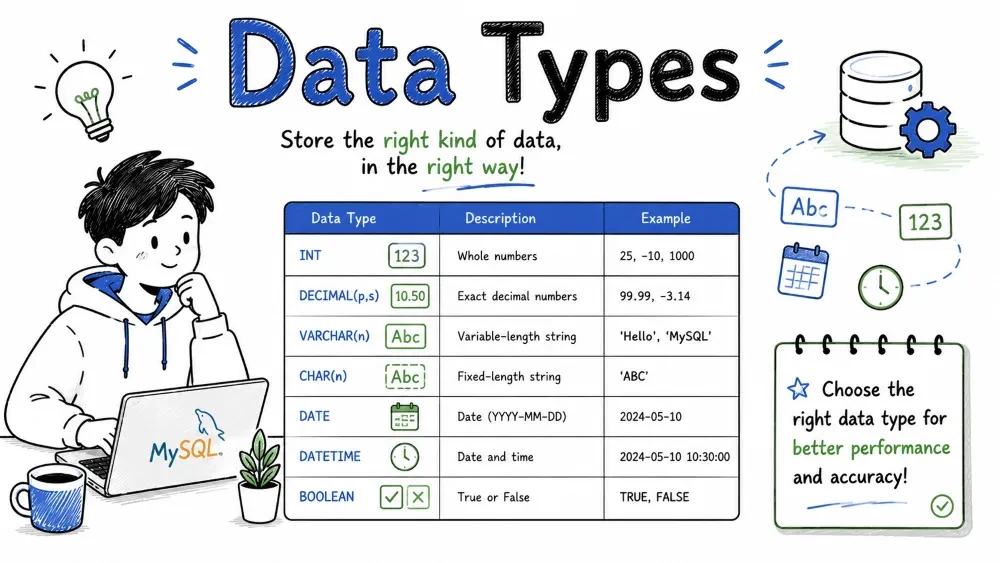
Every column in a database table must have a data type. It tells the database what kind of data to expect — numbers, text, dates, or something else. Choosing the right type saves storage and prevents bad data from being inserted.
SQL offers several numeric types, each designed for different kinds of numbers.
Use integers when you need whole numbers (no decimals). The difference between types is the range of values they can store and how much disk space they use.
| Type | Storage | Minimum | Maximum |
|---|---|---|---|
TINYINT | 1 byte | -128 | 127 |
SMALLINT | 2 bytes | -32,768 | 32,767 |
MEDIUMINT | 3 bytes | -8,388,608 | 8,388,607 |
INT | 4 bytes | -2,147,483,648 | 2,147,483,647 |
BIGINT | 8 bytes | -2⁶³ | 2⁶³-1 |
Use the smallest type your data allows. A person's age will never exceed 127, so TINYINT is enough. An auto-increment primary key on a table with millions of rows needs INT or BIGINT.
CREATE TABLE users (
    id INT AUTO_INCREMENT PRIMARY KEY,
    age TINYINT UNSIGNED,
    score SMALLINT DEFAULT 0
);
The UNSIGNED keyword makes the range start at 0, doubling the upper limit. For example, TINYINT UNSIGNED stores 0 to 255.
Use floating point for approximate decimal numbers — scientific measurements, coordinates, percentages.
| Type | Storage | Description |
|---|---|---|
FLOAT | 4 bytes | Single precision, ~7 digits |
DOUBLE | 8 bytes | Double precision, ~15 digits |
CREATE TABLE measurements (
    temperature FLOAT,
    latitude DOUBLE
);
Floating point stores numbers approximately. Calculations with FLOAT and DOUBLE can produce tiny rounding errors. For exact values like prices, use DECIMAL instead.
-- This might store as 0.33333334 instead of exactly 0.33333333
INSERT INTO measurements (temperature) VALUES (1.0/3.0);
DECIMAL (also called NUMERIC) stores exact fixed-point numbers. Use it for money, quantities, or anything where rounding errors are unacceptable.
price DECIMAL(10, 2)
-- 10 total digits, 2 after the decimal point
-- Range: -99999999.99 to 99999999.99
The first number is total digits, the second is digits after the decimal point.
CREATE TABLE products (
    product_name VARCHAR(100),
    price DECIMAL(10, 2),
    tax_rate DECIMAL(5, 4)
);

INSERT INTO products VALUES ('Widget', 19.99, 0.0725);
-- Values are stored exactly as entered
When to use what:
INT or smaller integer typeFLOAT or DOUBLEDECIMALBoth store text. The difference is how they handle storage length.
CHAR(n) has a fixed length. If you insert 'ab' into a CHAR(10) column, MySQL pads it with 8 spaces to fill the full 10 characters. It always uses n characters of storage.
VARCHAR(n) is variable length. 'ab' in a VARCHAR(10) column stores only 2 characters plus 1-2 bytes of length overhead. It uses only what it needs.
CREATE TABLE customers (
    country_code CHAR(2),       -- Always 2 letters (e.g., 'US', 'IN')
    email VARCHAR(255),         -- Length varies per user
    status CHAR(1)              -- 'A', 'I', 'P'
);
When to choose which:
CHAR → fixed-length data (country codes, status flags, ZIP codes, Y/N values)VARCHAR → variable-length data (names, addresses, email, descriptions)CHAR is slightly faster because the database knows exactly where each row ends. But the speed difference is tiny — pick the type that matches your data.
Use TEXT for large blocks of text — blog posts, comments, product descriptions.
| Type | Max Size |
|---|---|
TINYTEXT | 255 bytes |
TEXT | 65,535 bytes (~64 KB) |
MEDIUMTEXT | 16,777,215 bytes (~16 MB) |
LONGTEXT | 4,294,967,295 bytes (~4 GB) |
Unlike VARCHAR, text columns cannot have a default value. They are also stored differently — MySQL keeps them separate from the main row data, which can slow down queries if you select them carelessly.
CREATE TABLE articles (
    title VARCHAR(200),
    body TEXT,
    summary TINYTEXT
);
Don't use TEXT for short fields. A 100-character description should use VARCHAR(200), not TEXT. Indexing is also limited — you can only index a prefix of a TEXT column.
BLOB stands for Binary Large Object. It stores binary data — images, files, audio clips.
| Type | Max Size |
|---|---|
TINYBLOB | 255 bytes |
BLOB | 65,535 bytes (~64 KB) |
MEDIUMBLOB | 16 MB |
LONGBLOB | 4 GB |
BLOB behaves almost exactly like TEXT, but stores bytes instead of characters.
CREATE TABLE avatars (
    user_id INT,
    image BLOB,
    thumbnail TINYBLOB
);
Practical note: Most applications store files on disk or in object storage (S3, cloud storage) and keep only the file path in the database. Storing large blobs in the database slows backups, replication, and queries.
ENUM lets you restrict a column to a fixed set of values. MySQL stores each value as an integer internally, making it storage-efficient.
CREATE TABLE orders (
    order_id INT,
    status ENUM('pending', 'shipped', 'delivered', 'cancelled')
);

INSERT INTO orders VALUES (1, 'shipped');   -- OK
INSERT INTO orders VALUES (2, 'refunded');   -- Error: not in the list
Pros:
Cons:
ALTER TABLEFor small, rarely-changing sets of values (status flags, categories), ENUM works well. If the list changes often, use a reference table with a foreign key instead.
SET is similar to ENUM, but a column can hold multiple values at once.
CREATE TABLE user_preferences (
    user_id INT,
    permissions SET('read', 'write', 'delete', 'admin')
);

INSERT INTO user_preferences VALUES (1, 'read,write');
-- User has both read and write permissions
Internally, each value corresponds to a bit. Multiple selections are stored as a bitmask — efficient but tricky to query.
-- Find users with admin permission
SELECT * FROM user_preferences WHERE FIND_IN_SET('admin', permissions);

-- Find users with at least read and write
SELECT * FROM user_preferences WHERE permissions = 'read,write';
SET is rarely used in practice. Most applications use junction tables for many-to-many relationships — it is more flexible and easier to query.
SQL provides five temporal types. Picking the right one depends on what part of time you need to store.
Stores a calendar date — year, month, day. No time component.
CREATE TABLE events (
    event_name VARCHAR(100),
    event_date DATE
);

INSERT INTO events VALUES ('Conference', '2025-11-15');
Format: YYYY-MM-DD. Range: 1000-01-01 to 9999-12-31.
Stores time of day or a time interval.
CREATE TABLE gym_log (
    exercise VARCHAR(50),
    duration TIME
);

INSERT INTO gym_log VALUES ('Running', '00:45:30');
Format: HH:MM:SS. Range: -838:59:59 to 838:59:59 (it can exceed 24 hours, which makes it useful for durations).
Stores date and time together. No timezone awareness — if you insert '2025-11-15 14:30:00', that's what comes back regardless of where the server is.
CREATE TABLE posts (
    title VARCHAR(200),
    created_at DATETIME
);

INSERT INTO posts VALUES ('My Post', '2025-11-15 14:30:00');
Format: YYYY-MM-DD HH:MM:SS. Range: 1000-01-01 00:00:00 to 9999-12-31 23:59:59.
Also stores date and time, but with timezone awareness. MySQL converts stored values to UTC internally and converts back to the connection's timezone on retrieval.
CREATE TABLE logs (
    action VARCHAR(100),
    logged_at TIMESTAMP DEFAULT CURRENT_TIMESTAMP
);

INSERT INTO logs (action) VALUES ('User logged in');
-- logged_at automatically gets the current time
Range: 1970-01-01 00:00:00 UTC to 2038-01-19 03:14:07 UTC (the Year 2038 problem).
DATETIME vs TIMESTAMP:
| Feature | DATETIME | TIMESTAMP |
|---|---|---|
| Range | Year 1000 to 9999 | 1970 to 2038 |
| Timezone | Stores literal value | Converted to UTC |
| Auto-update | Manual only | Available via DEFAULT CURRENT_TIMESTAMP |
| Storage | 8 bytes | 4 bytes |
Use TIMESTAMP for tracking when rows change (created_at, updated_at). Use DATETIME for future dates, historical dates before 1970, or when timezone conversion would cause problems.
CREATE TABLE users (
    user_id INT,
    birthday DATE,                         -- Just the day they were born
    last_login TIMESTAMP DEFAULT CURRENT_TIMESTAMP ON UPDATE CURRENT_TIMESTAMP,  -- Auto-updated
    subscription_end DATETIME              -- Future date, don't convert timezone
);
Stores just a year value. Uses 1 byte.
CREATE TABLE cars (
    model VARCHAR(100),
    release_year YEAR
);

INSERT INTO cars VALUES ('Model T', 1908);
YEAR(4) or YEAR — both store a 4-digit year. YEAR(2) is deprecated. Rarely used on its own; you can store years in a DATE column too if you need flexibility.
MySQL's JSON type stores JSON documents in a native binary format. It validates JSON on insert and provides functions to query and modify JSON data efficiently.
CREATE TABLE profiles (
    user_id INT,
    metadata JSON
);

INSERT INTO profiles VALUES (1, '{"theme": "dark", "language": "en", "notifications": {"email": true, "sms": false}}');
Query specific fields using MySQL's JSON functions:
-- Extract a value
SELECT user_id, JSON_EXTRACT(metadata, '$.theme') FROM profiles;
-- Or use the shorthand arrow operator
SELECT user_id, metadata->'$.theme' FROM profiles;

-- Search within JSON
SELECT * FROM profiles WHERE JSON_CONTAINS(metadata, '"dark"', '$.theme');

-- Update part of the JSON
UPDATE profiles
SET metadata = JSON_SET(metadata, '$.language', 'fr')
WHERE user_id = 1;
Why use JSON type instead of a text column?
Don't put everything in a JSON column just because it is flexible. Relational data (related tables with clear structure) belongs in normal columns. Use JSON for flexible schemas — user preferences, form responses, API payloads, metadata that varies per row.
MySQL supports spatial data types for storing geographic and geometric data — points, lines, polygons.
| Type | Description |
|---|---|
GEOMETRY | Any spatial value |
POINT | A single coordinate |
LINESTRING | A line through multiple points |
POLYGON | A closed shape |
MULTIPOINT | Collection of points |
MULTILINESTRING | Collection of lines |
MULTIPOLYGON | Collection of polygons |
GEOMETRYCOLLECTION | Collection of any geometry types |
CREATE TABLE locations (
    name VARCHAR(100),
    coordinates POINT,
    boundary POLYGON
);

INSERT INTO locations VALUES (
    'Headquarters',
    POINT(40.7128, -74.0060),
    POLYGON((0 0, 10 0, 10 10, 0 10, 0 0))
);
Spatial functions let you calculate distances, check if a point is inside a polygon, find nearby locations, and more.
-- Find locations within 10 km of a given point
SELECT name, ST_Distance_Sphere(coordinates, POINT(40.7128, -74.0060)) AS distance
FROM locations
HAVING distance < 10000;
Spatial types are useful for mapping apps, delivery route planning, real estate searches ("find houses in this neighborhood"), and geofencing. Without them, you would have to calculate distances in application code, which is slower and more error-prone.
Save your progress and earn XP for completing tutorials.
4 questions · Pass with 70%+
1Which data type should you use to store a product price so that values are stored exactly, without rounding errors?
2A VARCHAR(10) column stores 'ab'. How much space does it actually use?
3Which data type auto-stores the current time when a row is inserted, without you writing the value yourself?
4You're storing a country code like 'US' or 'IN'. Which type is the best fit?
Technology
MySQL
Lesson group
Database & Table Design
Progress
33% complete

