Preparing your learning space...
58% through Real-World Projects tutorials
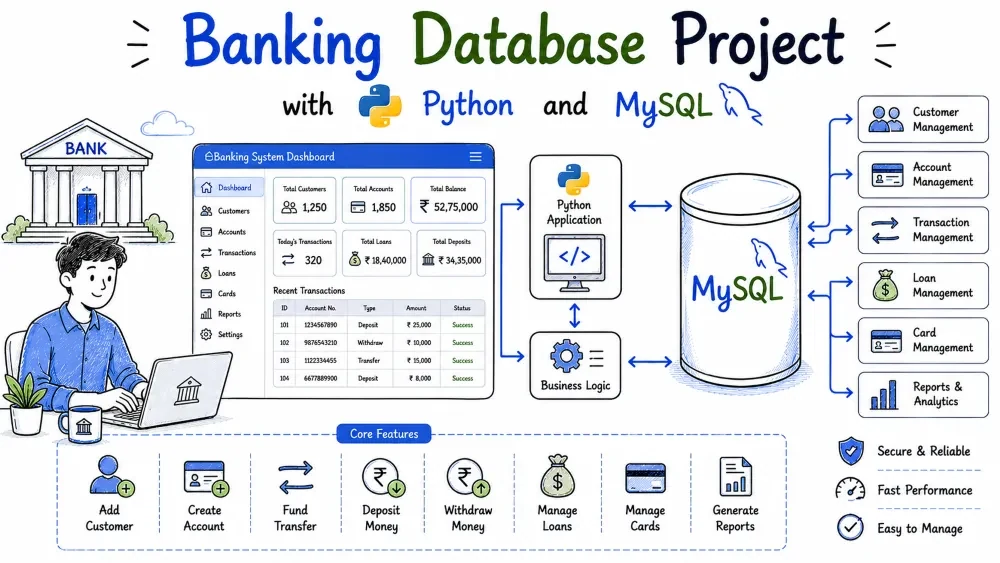
In this project you will build a command-line banking application. Customers can open savings and current accounts, deposit and withdraw money, and transfer funds between accounts. The application is written in Python and stores everything in MySQL.
The focus of this tutorial is data integrity. Banks cannot afford to lose a deposit or double-spend money, so you will learn how transactions, rollback, and foreign keys keep the data correct.
The banking system has three database tables: customers, accounts, and transactions. Each account belongs to a customer, and every transaction is linked to one account. The application shows a text menu in the terminal where a user picks an operation.
The program is useful as a learning model for any system that handles money: wallets, payment gateways, subscriptions, and even inventory where quantities must not go negative. As you build it you will practice foreign keys, parameterized queries, and the most important MySQL skill for money-handling applications: the transaction.
mysql-connector-python package.input()..sql file.Install the connector package with pip:
pip install mysql-connector-python
Create the database by loading the schema file. Do this once before the first run:
mysql -u root -p < database.sql
You will be asked for the MySQL root password. The rest of the tutorial assumes your MySQL user is root. If you use a different user, update db_connection.py.
banking-db/
├── database.sql
├── db_connection.py
├── main.py
├── requirements.txt
└── README.md
database.sql — creates the banking_db database, the three tables, and inserts seed data.db_connection.py — contains the get_connection() helper that returns a MySQL connection.main.py — the menu loop and one function per business operation.requirements.txt — lists the Python package needed to run the project.README.md — short setup notes.Three tables. customers stores a person. accounts stores one account belonging to that person, with a type and a balance. transactions records every deposit, withdrawal, and transfer.
A bank is built on a few relationships. One customer can own many accounts, so the accounts table gets a customer_id foreign key. One account can have many transactions, so transactions gets an account_id foreign key. Putting money movement in its own table means we never overwrite history; every change is a new row.
Create the database.sql file with the schema below.
CREATE DATABASE IF NOT EXISTS banking_db;
USE banking_db;

DROP TABLE IF EXISTS transactions;
DROP TABLE IF EXISTS accounts;
DROP TABLE IF EXISTS customers;

CREATE TABLE customers (
    customer_id INT AUTO_INCREMENT PRIMARY KEY,
    first_name VARCHAR(50) NOT NULL,
    last_name VARCHAR(50) NOT NULL,
    email VARCHAR(100) UNIQUE NOT NULL,
    phone VARCHAR(15) NOT NULL
);

CREATE TABLE accounts (
    account_id INT AUTO_INCREMENT PRIMARY KEY,
    customer_id INT NOT NULL,
    account_number VARCHAR(11) UNIQUE NOT NULL,
    account_type ENUM('savings', 'current') NOT NULL,
    balance DECIMAL(12,2) NOT NULL DEFAULT 0.00,
    branch_code VARCHAR(10) NOT NULL DEFAULT 'HDFC0001',
    created_at TIMESTAMP DEFAULT CURRENT_TIMESTAMP,
    FOREIGN KEY (customer_id) REFERENCES customers(customer_id) ON DELETE CASCADE
);

CREATE TABLE transactions (
    transaction_id INT AUTO_INCREMENT PRIMARY KEY,
    account_id INT NOT NULL,
    transaction_type ENUM('deposit', 'withdrawal', 'transfer') NOT NULL,
    amount DECIMAL(12,2) NOT NULL,
    transaction_date TIMESTAMP DEFAULT CURRENT_TIMESTAMP,
    description VARCHAR(255),
    FOREIGN KEY (account_id) REFERENCES accounts(account_id) ON DELETE CASCADE
);
A few things matter in this code. The DROP TABLE statements run in the right order: transactions first because it depends on accounts, then accounts, then customers. If you drop customers first, MySQL complains that other tables still reference it. The account_number column is UNIQUE so two accounts can never share a number. Money is stored as DECIMAL(12,2), never FLOAT, because floats introduce rounding errors and banks cannot have those. Both foreign keys use ON DELETE CASCADE, so deleting a customer automatically deletes their accounts and their account's transactions.
Realistic starting rows so the program has data to work with on the first run.
An empty database is harder to test. Seed data lets you try deposit, withdrawal, and transfer immediately without first typing in every customer and account by hand.
Append these INSERT statements to database.sql.
INSERT INTO customers (first_name, last_name, email, phone) VALUES
('Rohan', 'Sharma', 'rohan.sharma@example.com', '9876543210'),
('Priya', 'Patel', 'priya.patel@example.com', '9812345670'),
('Amit', 'Kumar', 'amit.kumar@example.com', '9123456780'),
('Sneha', 'Reddy', 'sneha.reddy@example.com', '9988776655'),
('Vikram', 'Singh', 'vikram.singh@example.com', '9765432109');

INSERT INTO accounts (customer_id, account_number, account_type, balance, branch_code) VALUES
(1, '10012345678', 'savings', 25000.00, 'HDFC0001234'),
(1, '10023456789', 'current', 80000.00, 'HDFC0001234'),
(2, '10034567890', 'savings', 15000.00, 'HDFC0004321'),
(3, '10045678901', 'savings', 50000.00, 'HDFC0004321'),
(4, '10056789012', 'current', 120000.00, 'HDFC0005678');

INSERT INTO transactions (account_id, transaction_type, amount, description) VALUES
(1, 'deposit', 25000.00, 'Opening deposit'),
(2, 'deposit', 80000.00, 'Opening deposit'),
(3, 'deposit', 15000.00, 'Opening deposit'),
(4, 'deposit', 50000.00, 'Opening deposit'),
(5, 'deposit', 120000.00, 'Opening deposit'),
(1, 'withdrawal', 2000.00, 'ATM withdrawal'),
(1, 'deposit', 5000.00, 'Salary credit'),
(3, 'withdrawal', 1000.00, 'Shopping');
The emails are unique, which matters because the program looks up customers by email in several operations. Each account has an 11-digit number that stays consistent with the format the Python code generates later. The transaction rows are the "opening deposits" that explain where each balance came from, plus a few extra deposits and withdrawals so the statement and summary screens show something interesting right away.
A small module with one function, get_connection(), that returns a connection to the banking_db database.
Every operation in main.py needs to talk to MySQL. Without a helper, you would repeat the same five connection arguments in every function. Centralizing them means you change the password in one place instead of ten.
Create db_connection.py.
import mysql.connector

def get_connection():
    return mysql.connector.connect(
        host="localhost",
        user="root",
        password="rootpassword",
        database="banking_db"
    )
Replace rootpassword with your own MySQL password. The database argument selects banking_db, so every query in the rest of the program runs against that database without a USE statement. This file is imported by main.py with from db_connection import get_connection.
Two functions. create_customer() inserts a new row into customers. open_account() finds the customer by email, generates a fresh 11-digit account number, inserts the account, and records the opening deposit.
Everything else depends on customers and accounts existing first. You cannot deposit into an account that was never opened. The account number must be unique and realistic, so we generate it in Python and verify it is not already in the table.
Add these functions to main.py, above the menu loop.
import random
import sys
import mysql.connector
from db_connection import get_connection


def create_customer():
    first_name = input("First name: ").strip()
    last_name = input("Last name: ").strip()
    email = input("Email: ").strip()
    phone = input("Phone: ").strip()

    conn = get_connection()
    cursor = conn.cursor()
    try:
        cursor.execute(
            "INSERT INTO customers (first_name, last_name, email, phone) VALUES (%s, %s, %s, %s)",
            (first_name, last_name, email, phone)
        )
        conn.commit()
        print(f"\nCustomer added. Customer ID: {cursor.lastrowid}")
    except mysql.connector.Error as err:
        print(f"\nError: {err}")
        conn.rollback()
    finally:
        cursor.close()
        conn.close()


def generate_account_number(conn, cursor):
    while True:
        number = str(random.randint(10000000000, 99999999999))
        cursor.execute(
            "SELECT account_id FROM accounts WHERE account_number = %s",
            (number,)
        )
        if cursor.fetchone() is None:
            return number


def open_account():
    email = input("Customer email: ").strip()

    conn = get_connection()
    cursor = conn.cursor()
    try:
        cursor.execute(
            "SELECT customer_id, first_name, last_name FROM customers WHERE email = %s",
            (email,)
        )
        row = cursor.fetchone()
        if row is None:
            print("\nNo customer found with that email.")
            return
        customer_id, first_name, last_name = row

        account_type = input("Account type (savings/current): ").strip().lower()
        if account_type not in ("savings", "current"):
            print("\nAccount type must be savings or current.")
            return

        opening_balance = float(input("Opening balance: ").strip())
        account_number = generate_account_number(conn, cursor)

        cursor.execute(
            "INSERT INTO accounts (customer_id, account_number, account_type, balance) VALUES (%s, %s, %s, %s)",
            (customer_id, account_number, account_type, opening_balance)
        )
        cursor.execute(
            "INSERT INTO transactions (account_id, transaction_type, amount, description) VALUES (%s, %s, %s, %s)",
            (cursor.lastrowid, "deposit", opening_balance, "Opening deposit")
        )
        conn.commit()
        print(f"\nAccount {account_number} opened for {first_name} {last_name}.")
    except mysql.connector.Error as err:
        print(f"\nError: {err}")
        conn.rollback()
    finally:
        cursor.close()
        conn.close()
Every query uses %s placeholders and passes the values as a tuple. That is parameterization, and it prevents SQL injection: user input can never be interpreted as SQL because MySQL sees it as plain data. Look at generate_account_number: it picks a random 11-digit number, checks the table, and only returns it when no account uses it yet. The loop keeps trying until it finds a free number. Opening an account writes two rows, one in accounts and one in transactions. Both are inside the same try, so a failure in either one is rolled back together.
deposit() adds money and records a deposit transaction. withdraw() removes money, but first checks that the balance is enough.
A balance is just a number in a column. The rule "you cannot withdraw more than you have" is not enforced by MySQL by default, so the application must check it. That check is the difference between a bank and a buggy program that lets balances go negative.
Add a small helper plus the two functions.
def get_account(conn, cursor):
    account_number = input("Account number: ").strip()
    cursor.execute(
        "SELECT account_id, balance FROM accounts WHERE account_number = %s",
        (account_number,)
    )
    return account_number, cursor.fetchone()


def deposit():
    conn = get_connection()
    cursor = conn.cursor()
    try:
        account_number, row = get_account(conn, cursor)
        if row is None:
            print("\nAccount not found.")
            return
        account_id, balance = row

        amount = float(input("Amount to deposit: ").strip())
        if amount <= 0:
            print("\nAmount must be positive.")
            return

        cursor.execute(
            "UPDATE accounts SET balance = balance + %s WHERE account_id = %s",
            (amount, account_id)
        )
        cursor.execute(
            "INSERT INTO transactions (account_id, transaction_type, amount, description) VALUES (%s, %s, %s, %s)",
            (account_id, "deposit", amount, "Cash deposit")
        )
        conn.commit()
        print(f"\nDeposited {amount:.2f}. New balance: {balance + amount:.2f}")
    except mysql.connector.Error as err:
        print(f"\nError: {err}")
        conn.rollback()
    finally:
        cursor.close()
        conn.close()


def withdraw():
    conn = get_connection()
    cursor = conn.cursor()
    try:
        account_number, row = get_account(conn, cursor)
        if row is None:
            print("\nAccount not found.")
            return
        account_id, balance = row

        amount = float(input("Amount to withdraw: ").strip())
        if amount <= 0:
            print("\nAmount must be positive.")
            return
        if amount > balance:
            print(f"\nInsufficient balance. Available: {balance:.2f}")
            return

        cursor.execute(
            "UPDATE accounts SET balance = balance - %s WHERE account_id = %s",
            (amount, account_id)
        )
        cursor.execute(
            "INSERT INTO transactions (account_id, transaction_type, amount, description) VALUES (%s, %s, %s, %s)",
            (account_id, "withdrawal", amount, "Cash withdrawal")
        )
        conn.commit()
        print(f"\nWithdrawn {amount:.2f}. New balance: {balance - amount:.2f}")
    except mysql.connector.Error as err:
        print(f"\nError: {err}")
        conn.rollback()
    finally:
        cursor.close()
        conn.close()
The get_account helper reads the account number once and returns the row, so deposit and withdraw share that logic. In withdraw, the guard if amount > balance runs before any SQL changes the data. When the balance is too low, the function prints a message and returns without touching the database. When the withdrawal is valid, two statements run: one updates the balance, the other records the transaction. Both are committed together, which keeps the balance and the history in sync.
transfer() moves money from one account to another: it checks the source balance, deducts the source, credits the destination, and writes two transaction rows.
A transfer is the perfect example of why transactions exist. Two updates happen at once. If the program deducts the source but crashes before crediting the destination, money disappears. If it credits the destination but never deducts the source, money is created out of thin air. Wrapping both updates in one transaction makes them all-or-nothing.
Add transfer() to main.py.
def transfer():
    conn = get_connection()
    cursor = conn.cursor()
    try:
        from_number = input("From account number: ").strip()
        to_number = input("To account number: ").strip()
        amount = float(input("Amount to transfer: ").strip())

        if from_number == to_number:
            print("\nCannot transfer to the same account.")
            return
        if amount <= 0:
            print("\nAmount must be positive.")
            return

        cursor.execute(
            "SELECT account_id, balance FROM accounts WHERE account_number = %s",
            (from_number,)
        )
        from_row = cursor.fetchone()
        cursor.execute(
            "SELECT account_id FROM accounts WHERE account_number = %s",
            (to_number,)
        )
        to_row = cursor.fetchone()

        if from_row is None or to_row is None:
            print("\nOne of the accounts was not found.")
            return

        from_id, from_balance = from_row
        to_id = to_row[0]

        if amount > from_balance:
            print(f"\nInsufficient balance in source account. Available: {from_balance:.2f}")
            return

        cursor.execute(
            "UPDATE accounts SET balance = balance - %s WHERE account_id = %s",
            (amount, from_id)
        )
        cursor.execute(
            "UPDATE accounts SET balance = balance + %s WHERE account_id = %s",
            (amount, to_id)
        )
        cursor.execute(
            "INSERT INTO transactions (account_id, transaction_type, amount, description) VALUES (%s, %s, %s, %s)",
            (from_id, "transfer", amount, f"Transfer to {to_number}")
        )
        cursor.execute(
            "INSERT INTO transactions (account_id, transaction_type, amount, description) VALUES (%s, %s, %s, %s)",
            (to_id, "transfer", amount, f"Transfer from {from_number}")
        )
        conn.commit()
        print(f"\nTransferred {amount:.2f} from {from_number} to {to_number}.")
    except mysql.connector.Error as err:
        print(f"\nTransfer failed. Rolling back. Error: {err}")
        conn.rollback()
    finally:
        cursor.close()
        conn.close()
All four statements run before the single conn.commit(). If any of them throws an error, the except block calls conn.rollback() and every change is undone, so the database stays exactly as it was before the transfer started. Notice the check for amount > from_balance happens before any update. Transfer never happens when the source account does not have enough money.
statement() prints the transaction history of one account, newest first. summary() prints total deposits, total outflows, and the net change.
Customers expect to see where their money went. These two screens turn the raw transaction rows into something readable, and they demonstrate aggregate functions and filtering.
Add both functions.
def statement():
    conn = get_connection()
    cursor = conn.cursor()
    try:
        account_number, row = get_account(conn, cursor)
        if row is None:
            print("\nAccount not found.")
            return
        account_id, _ = row

        cursor.execute(
            """SELECT transaction_type, amount, transaction_date, description
               FROM transactions
               WHERE account_id = %s
               ORDER BY transaction_date DESC""",
            (account_id,)
        )
        rows = cursor.fetchall()
        print(f"\nStatement for account {account_number}")
        print("-" * 60)
        for t_type, amount, t_date, desc in rows:
            print(f"{t_date} | {t_type:10s} | {amount:>10.2f} | {desc}")
    except mysql.connector.Error as err:
        print(f"\nError: {err}")
    finally:
        cursor.close()
        conn.close()


def summary():
    conn = get_connection()
    cursor = conn.cursor()
    try:
        account_number, row = get_account(conn, cursor)
        if row is None:
            print("\nAccount not found.")
            return
        account_id, _ = row

        cursor.execute(
            """SELECT COALESCE(SUM(CASE WHEN transaction_type = 'deposit' THEN amount END), 0)
               FROM transactions WHERE account_id = %s""",
            (account_id,)
        )
        total_deposits = cursor.fetchone()[0]

        cursor.execute(
            """SELECT COALESCE(SUM(CASE WHEN transaction_type IN ('withdrawal', 'transfer') THEN amount END), 0)
               FROM transactions WHERE account_id = %s""",
            (account_id,)
        )
        total_out = cursor.fetchone()[0]

        print(f"\nTotal deposits:    {total_deposits:.2f}")
        print(f"Total withdrawals: {total_out:.2f}")
        print(f"Net change:        {total_deposits - total_out:.2f}")
    except mysql.connector.Error as err:
        print(f"\nError: {err}")
    finally:
        cursor.close()
        conn.close()
The statement query filters by account and orders by date descending, so the newest transaction prints first. The summary uses SUM with CASE inside to add only the rows of one type. Transfers count as money leaving the account for this screen, because a transfer from this account is an outflow. The COALESCE(..., 0) turns an empty result into zero instead of NULL.
list_accounts() shows every account owned by one customer, found by email. main() is the menu loop that calls all the functions.
The menu ties the project together. It is the user interface, and the customer listing is the last read-only report. Without it, the functions exist but the user has no way to reach them.
Add the final two functions.
def list_accounts():
    email = input("Customer email: ").strip()

    conn = get_connection()
    cursor = conn.cursor()
    try:
        cursor.execute(
            "SELECT customer_id FROM customers WHERE email = %s",
            (email,)
        )
        row = cursor.fetchone()
        if row is None:
            print("\nNo customer found with that email.")
            return

        cursor.execute(
            """SELECT account_number, account_type, balance, created_at
               FROM accounts WHERE customer_id = %s""",
            (row[0],)
        )
        accounts = cursor.fetchall()
        print(f"\nAccounts for {email}")
        print("-" * 55)
        for number, a_type, balance, created in accounts:
            print(f"{number} | {a_type:8s} | {balance:>10.2f} | {created}")
    except mysql.connector.Error as err:
        print(f"\nError: {err}")
    finally:
        cursor.close()
        conn.close()


def main():
    while True:
        print("\n===== BANKING SYSTEM =====")
        print("1. Create customer")
        print("2. Open an account")
        print("3. Deposit")
        print("4. Withdraw")
        print("5. Transfer money")
        print("6. Account statement")
        print("7. Deposits vs withdrawals summary")
        print("8. List customer accounts")
        print("9. Exit")

        choice = input("Choose an option: ").strip()
        if choice == "1":
            create_customer()
        elif choice == "2":
            open_account()
        elif choice == "3":
            deposit()
        elif choice == "4":
            withdraw()
        elif choice == "5":
            transfer()
        elif choice == "6":
            statement()
        elif choice == "7":
            summary()
        elif choice == "8":
            list_accounts()
        elif choice == "9":
            print("\nGoodbye!")
            sys.exit(0)
        else:
            print("\nInvalid option. Try again.")


if __name__ == "__main__":
    main()
The if __name__ == "__main__": guard means main() only starts when this file is run directly, not when it is imported. The menu prints options, reads the user's choice, and routes to the matching function. Any unknown choice prints a message and loops again, so a typo never crashes the program. Every function returns to the loop after it finishes, and option 9 exits the program.
Here is every file in the project. Create these files in the banking-db folder and you can run the whole project.
CREATE DATABASE IF NOT EXISTS banking_db;
USE banking_db;

DROP TABLE IF EXISTS transactions;
DROP TABLE IF EXISTS accounts;
DROP TABLE IF EXISTS customers;

CREATE TABLE customers (
    customer_id INT AUTO_INCREMENT PRIMARY KEY,
    first_name VARCHAR(50) NOT NULL,
    last_name VARCHAR(50) NOT NULL,
    email VARCHAR(100) UNIQUE NOT NULL,
    phone VARCHAR(15) NOT NULL
);

CREATE TABLE accounts (
    account_id INT AUTO_INCREMENT PRIMARY KEY,
    customer_id INT NOT NULL,
    account_number VARCHAR(11) UNIQUE NOT NULL,
    account_type ENUM('savings', 'current') NOT NULL,
    balance DECIMAL(12,2) NOT NULL DEFAULT 0.00,
    branch_code VARCHAR(10) NOT NULL DEFAULT 'HDFC0001',
    created_at TIMESTAMP DEFAULT CURRENT_TIMESTAMP,
    FOREIGN KEY (customer_id) REFERENCES customers(customer_id) ON DELETE CASCADE
);

CREATE TABLE transactions (
    transaction_id INT AUTO_INCREMENT PRIMARY KEY,
    account_id INT NOT NULL,
    transaction_type ENUM('deposit', 'withdrawal', 'transfer') NOT NULL,
    amount DECIMAL(12,2) NOT NULL,
    transaction_date TIMESTAMP DEFAULT CURRENT_TIMESTAMP,
    description VARCHAR(255),
    FOREIGN KEY (account_id) REFERENCES accounts(account_id) ON DELETE CASCADE
);

INSERT INTO customers (first_name, last_name, email, phone) VALUES
('Rohan', 'Sharma', 'rohan.sharma@example.com', '9876543210'),
('Priya', 'Patel', 'priya.patel@example.com', '9812345670'),
('Amit', 'Kumar', 'amit.kumar@example.com', '9123456780'),
('Sneha', 'Reddy', 'sneha.reddy@example.com', '9988776655'),
('Vikram', 'Singh', 'vikram.singh@example.com', '9765432109');

INSERT INTO accounts (customer_id, account_number, account_type, balance, branch_code) VALUES
(1, '10012345678', 'savings', 25000.00, 'HDFC0001234'),
(1, '10023456789', 'current', 80000.00, 'HDFC0001234'),
(2, '10034567890', 'savings', 15000.00, 'HDFC0004321'),
(3, '10045678901', 'savings', 50000.00, 'HDFC0004321'),
(4, '10056789012', 'current', 120000.00, 'HDFC0005678');

INSERT INTO transactions (account_id, transaction_type, amount, description) VALUES
(1, 'deposit', 25000.00, 'Opening deposit'),
(2, 'deposit', 80000.00, 'Opening deposit'),
(3, 'deposit', 15000.00, 'Opening deposit'),
(4, 'deposit', 50000.00, 'Opening deposit'),
(5, 'deposit', 120000.00, 'Opening deposit'),
(1, 'withdrawal', 2000.00, 'ATM withdrawal'),
(1, 'deposit', 5000.00, 'Salary credit'),
(3, 'withdrawal', 1000.00, 'Shopping');
import mysql.connector

def get_connection():
    return mysql.connector.connect(
        host="localhost",
        user="root",
        password="rootpassword",
        database="banking_db"
    )
import random
import sys
import mysql.connector
from db_connection import get_connection


def create_customer():
    first_name = input("First name: ").strip()
    last_name = input("Last name: ").strip()
    email = input("Email: ").strip()
    phone = input("Phone: ").strip()

    conn = get_connection()
    cursor = conn.cursor()
    try:
        cursor.execute(
            "INSERT INTO customers (first_name, last_name, email, phone) VALUES (%s, %s, %s, %s)",
            (first_name, last_name, email, phone)
        )
        conn.commit()
        print(f"\nCustomer added. Customer ID: {cursor.lastrowid}")
    except mysql.connector.Error as err:
        print(f"\nError: {err}")
        conn.rollback()
    finally:
        cursor.close()
        conn.close()


def generate_account_number(conn, cursor):
    while True:
        number = str(random.randint(10000000000, 99999999999))
        cursor.execute(
            "SELECT account_id FROM accounts WHERE account_number = %s",
            (number,)
        )
        if cursor.fetchone() is None:
            return number


def open_account():
    email = input("Customer email: ").strip()

    conn = get_connection()
    cursor = conn.cursor()
    try:
        cursor.execute(
            "SELECT customer_id, first_name, last_name FROM customers WHERE email = %s",
            (email,)
        )
        row = cursor.fetchone()
        if row is None:
            print("\nNo customer found with that email.")
            return
        customer_id, first_name, last_name = row

        account_type = input("Account type (savings/current): ").strip().lower()
        if account_type not in ("savings", "current"):
            print("\nAccount type must be savings or current.")
            return

        opening_balance = float(input("Opening balance: ").strip())
        account_number = generate_account_number(conn, cursor)

        cursor.execute(
            "INSERT INTO accounts (customer_id, account_number, account_type, balance) VALUES (%s, %s, %s, %s)",
            (customer_id, account_number, account_type, opening_balance)
        )
        cursor.execute(
            "INSERT INTO transactions (account_id, transaction_type, amount, description) VALUES (%s, %s, %s, %s)",
            (cursor.lastrowid, "deposit", opening_balance, "Opening deposit")
        )
        conn.commit()
        print(f"\nAccount {account_number} opened for {first_name} {last_name}.")
    except mysql.connector.Error as err:
        print(f"\nError: {err}")
        conn.rollback()
    finally:
        cursor.close()
        conn.close()


def get_account(conn, cursor):
    account_number = input("Account number: ").strip()
    cursor.execute(
        "SELECT account_id, balance FROM accounts WHERE account_number = %s",
        (account_number,)
    )
    return account_number, cursor.fetchone()


def deposit():
    conn = get_connection()
    cursor = conn.cursor()
    try:
        account_number, row = get_account(conn, cursor)
        if row is None:
            print("\nAccount not found.")
            return
        account_id, balance = row

        amount = float(input("Amount to deposit: ").strip())
        if amount <= 0:
            print("\nAmount must be positive.")
            return

        cursor.execute(
            "UPDATE accounts SET balance = balance + %s WHERE account_id = %s",
            (amount, account_id)
        )
        cursor.execute(
            "INSERT INTO transactions (account_id, transaction_type, amount, description) VALUES (%s, %s, %s, %s)",
            (account_id, "deposit", amount, "Cash deposit")
        )
        conn.commit()
        print(f"\nDeposited {amount:.2f}. New balance: {balance + amount:.2f}")
    except mysql.connector.Error as err:
        print(f"\nError: {err}")
        conn.rollback()
    finally:
        cursor.close()
        conn.close()


def withdraw():
    conn = get_connection()
    cursor = conn.cursor()
    try:
        account_number, row = get_account(conn, cursor)
        if row is None:
            print("\nAccount not found.")
            return
        account_id, balance = row

        amount = float(input("Amount to withdraw: ").strip())
        if amount <= 0:
            print("\nAmount must be positive.")
            return
        if amount > balance:
            print(f"\nInsufficient balance. Available: {balance:.2f}")
            return

        cursor.execute(
            "UPDATE accounts SET balance = balance - %s WHERE account_id = %s",
            (amount, account_id)
        )
        cursor.execute(
            "INSERT INTO transactions (account_id, transaction_type, amount, description) VALUES (%s, %s, %s, %s)",
            (account_id, "withdrawal", amount, "Cash withdrawal")
        )
        conn.commit()
        print(f"\nWithdrawn {amount:.2f}. New balance: {balance - amount:.2f}")
    except mysql.connector.Error as err:
        print(f"\nError: {err}")
        conn.rollback()
    finally:
        cursor.close()
        conn.close()


def transfer():
    conn = get_connection()
    cursor = conn.cursor()
    try:
        from_number = input("From account number: ").strip()
        to_number = input("To account number: ").strip()
        amount = float(input("Amount to transfer: ").strip())

        if from_number == to_number:
            print("\nCannot transfer to the same account.")
            return
        if amount <= 0:
            print("\nAmount must be positive.")
            return

        cursor.execute(
            "SELECT account_id, balance FROM accounts WHERE account_number = %s",
            (from_number,)
        )
        from_row = cursor.fetchone()
        cursor.execute(
            "SELECT account_id FROM accounts WHERE account_number = %s",
            (to_number,)
        )
        to_row = cursor.fetchone()

        if from_row is None or to_row is None:
            print("\nOne of the accounts was not found.")
            return

        from_id, from_balance = from_row
        to_id = to_row[0]

        if amount > from_balance:
            print(f"\nInsufficient balance in source account. Available: {from_balance:.2f}")
            return

        cursor.execute(
            "UPDATE accounts SET balance = balance - %s WHERE account_id = %s",
            (amount, from_id)
        )
        cursor.execute(
            "UPDATE accounts SET balance = balance + %s WHERE account_id = %s",
            (amount, to_id)
        )
        cursor.execute(
            "INSERT INTO transactions (account_id, transaction_type, amount, description) VALUES (%s, %s, %s, %s)",
            (from_id, "transfer", amount, f"Transfer to {to_number}")
        )
        cursor.execute(
            "INSERT INTO transactions (account_id, transaction_type, amount, description) VALUES (%s, %s, %s, %s)",
            (to_id, "transfer", amount, f"Transfer from {from_number}")
        )
        conn.commit()
        print(f"\nTransferred {amount:.2f} from {from_number} to {to_number}.")
    except mysql.connector.Error as err:
        print(f"\nTransfer failed. Rolling back. Error: {err}")
        conn.rollback()
    finally:
        cursor.close()
        conn.close()


def statement():
    conn = get_connection()
    cursor = conn.cursor()
    try:
        account_number, row = get_account(conn, cursor)
        if row is None:
            print("\nAccount not found.")
            return
        account_id, _ = row

        cursor.execute(
            """SELECT transaction_type, amount, transaction_date, description
               FROM transactions
               WHERE account_id = %s
               ORDER BY transaction_date DESC""",
            (account_id,)
        )
        rows = cursor.fetchall()
        print(f"\nStatement for account {account_number}")
        print("-" * 60)
        for t_type, amount, t_date, desc in rows:
            print(f"{t_date} | {t_type:10s} | {amount:>10.2f} | {desc}")
    except mysql.connector.Error as err:
        print(f"\nError: {err}")
    finally:
        cursor.close()
        conn.close()


def summary():
    conn = get_connection()
    cursor = conn.cursor()
    try:
        account_number, row = get_account(conn, cursor)
        if row is None:
            print("\nAccount not found.")
            return
        account_id, _ = row

        cursor.execute(
            """SELECT COALESCE(SUM(CASE WHEN transaction_type = 'deposit' THEN amount END), 0)
               FROM transactions WHERE account_id = %s""",
            (account_id,)
        )
        total_deposits = cursor.fetchone()[0]

        cursor.execute(
            """SELECT COALESCE(SUM(CASE WHEN transaction_type IN ('withdrawal', 'transfer') THEN amount END), 0)
               FROM transactions WHERE account_id = %s""",
            (account_id,)
        )
        total_out = cursor.fetchone()[0]

        print(f"\nTotal deposits:    {total_deposits:.2f}")
        print(f"Total withdrawals: {total_out:.2f}")
        print(f"Net change:        {total_deposits - total_out:.2f}")
    except mysql.connector.Error as err:
        print(f"\nError: {err}")
    finally:
        cursor.close()
        conn.close()


def list_accounts():
    email = input("Customer email: ").strip()

    conn = get_connection()
    cursor = conn.cursor()
    try:
        cursor.execute(
            "SELECT customer_id FROM customers WHERE email = %s",
            (email,)
        )
        row = cursor.fetchone()
        if row is None:
            print("\nNo customer found with that email.")
            return

        cursor.execute(
            """SELECT account_number, account_type, balance, created_at
               FROM accounts WHERE customer_id = %s""",
            (row[0],)
        )
        accounts = cursor.fetchall()
        print(f"\nAccounts for {email}")
        print("-" * 55)
        for number, a_type, balance, created in accounts:
            print(f"{number} | {a_type:8s} | {balance:>10.2f} | {created}")
    except mysql.connector.Error as err:
        print(f"\nError: {err}")
    finally:
        cursor.close()
        conn.close()


def main():
    while True:
        print("\n===== BANKING SYSTEM =====")
        print("1. Create customer")
        print("2. Open an account")
        print("3. Deposit")
        print("4. Withdraw")
        print("5. Transfer money")
        print("6. Account statement")
        print("7. Deposits vs withdrawals summary")
        print("8. List customer accounts")
        print("9. Exit")

        choice = input("Choose an option: ").strip()
        if choice == "1":
            create_customer()
        elif choice == "2":
            open_account()
        elif choice == "3":
            deposit()
        elif choice == "4":
            withdraw()
        elif choice == "5":
            transfer()
        elif choice == "6":
            statement()
        elif choice == "7":
            summary()
        elif choice == "8":
            list_accounts()
        elif choice == "9":
            print("\nGoodbye!")
            sys.exit(0)
        else:
            print("\nInvalid option. Try again.")


if __name__ == "__main__":
    main()
mysql-connector-python
# Banking Database Project

A command-line banking system built with Python and MySQL.

## Setup

1. Install the dependency: `pip install -r requirements.txt`
2. Load the schema and seed data: `mysql -u root -p < database.sql`
3. Run the application: `python main.py`

## Files

- `database.sql` - database schema and seed data
- `db_connection.py` - MySQL connection helper
- `main.py` - the menu-driven application
Install the connector package:
pip install mysql-connector-python
Load the schema and seed data. Run this once before the first launch:
mysql -u root -p < database.sql
Start the application:
python main.py
Your first run should look like this:
===== BANKING SYSTEM =====
1. Create customer
2. Open an account
3. Deposit
4. Withdraw
5. Transfer money
6. Account statement
7. Deposits vs withdrawals summary
8. List customer accounts
9. Exit
Choose an option: 3
Account number: 10012345678
Amount to deposit: 1000
Deposited 1000.00. New balance: 28000.00
Work through these scenarios after the project runs. Each one checks a specific rule of the application.
Input
Option: 3 (Deposit)
Account number: 10034567890
Amount to deposit: 500
Expected Output
Deposited 500.00. New balance: 15500.00
Explanation
Account 10034567890 belongs to Priya and starts at 15000. The deposit adds 500 and records a deposit transaction in the same commit. The printed balance uses the original balance plus the amount, which matches what the UPDATE stored.
Input
Option: 4 (Withdraw)
Account number: 10034567890
Amount to withdraw: 999999
Expected Output
Insufficient balance. Available: 15500.00
Explanation
The balance check if amount > balance catches the invalid request before any SQL runs. Nothing changes in the database and no transaction row is created. This is the overdraft protection working.
Input
Option: 5 (Transfer money)
From account number: 10012345678
To account number: 10056789012
Amount to transfer: 5000
Expected Output
Transferred 5000.00 from 10012345678 to 10056789012.
Explanation
Four statements run inside one transaction: source balance decreases by 5000, destination balance increases by 5000, and two transfer transaction rows are inserted. After commit(), the balances are 23000 and 125000. If any statement failed, rollback would leave both accounts untouched.
Input
Option: 6 (Account statement)
Account number: 10012345678
Expected Output
Statement for account 10012345678
------------------------------------------------------------
2026-07-31 12:00:00 | transfer    |    5000.00 | Transfer to 10056789012
2026-07-31 11:00:00 | deposit     |    1000.00 | Cash deposit
...                | deposit     |    5000.00 | Salary credit
...                | withdrawal  |    2000.00 | ATM withdrawal
...                | deposit     |   25000.00 | Opening deposit
Explanation
The query returns all rows for the account ordered by transaction_date DESC, so the newest activity appears first. The statement is the audit trail: every change to the balance is explained by a row in this list.
ModuleNotFoundError: No module named 'mysql.connector'Reason: The mysql-connector-python package is not installed in the Python environment you are using.
Solution: Run pip install mysql-connector-python. If you use a virtual environment, activate it first, then install and run the program from inside that environment.
Reason: conn.commit() was never called. MySQL buffers changes until you commit them, so the data is lost when the connection closes.
Solution: Always call conn.commit() after the statements that change data, and call conn.rollback() in the except block. Every write operation in this project follows that pattern.
1062 Duplicate entry '...' for key '...'Reason: You tried to insert a customer with an email that already exists, or an account number that is already used. Both columns are UNIQUE.
Solution: Use a different email, or let generate_account_number pick a new number. The except block prints the MySQL error, which tells you which column was duplicated.
Table 'banking_db.transactions' already exists when re-running database.sqlReason: You ran the file a second time without dropping the old tables, so the CREATE TABLE statements fail.
Solution: The file already contains DROP TABLE IF EXISTS statements, so a re-run should work. If you see this error, confirm you ran the whole file, not just a part of it, and that the drop statements come before the creates.
Access denied for user 'root'@'localhost' (using password: YES)Reason: The password in db_connection.py does not match the MySQL root password, or root was not given a password.
Solution: Update the password value in db_connection.py. Test the credentials in the MySQL client first: mysql -u root -p should connect with the same password.
1136 Column count doesn't match value count at row 1Reason: The INSERT statement lists a different number of columns than the number of values in the tuple.
Solution: Count the columns and the placeholders. Every %s must have a matching value in the tuple passed to cursor.execute.
account_id and transaction_date for faster lookups.WHERE transaction_date >= NOW() - INTERVAL 30 DAY clause.Save your progress and earn XP for completing tutorials.
Technology
MySQL
Lesson group
Real-World Projects
Progress
58% complete

