Preparing your learning space...
100% through Real-World Projects tutorials
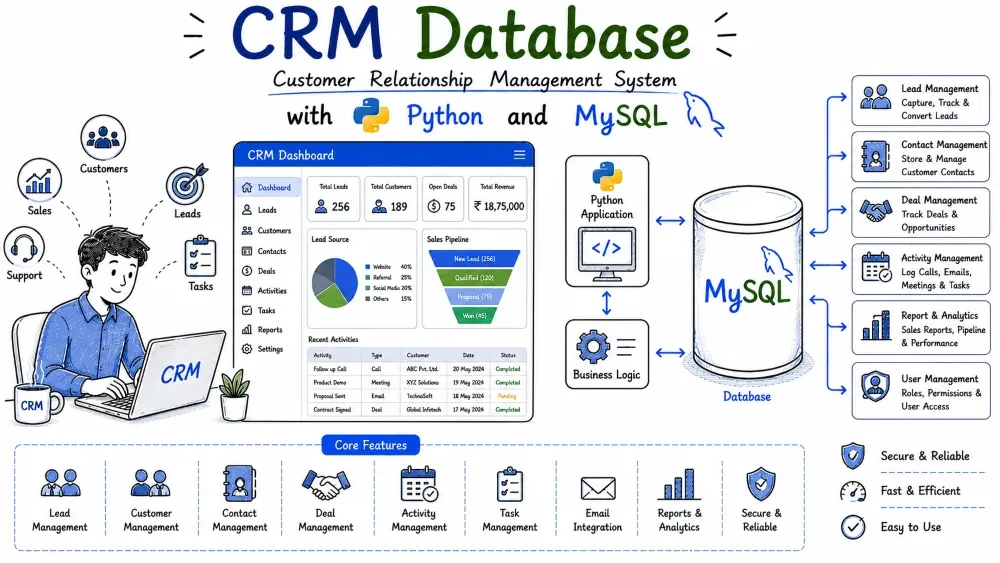
This project is a command-line customer relationship management tool. You keep track of companies, the people who work there, calls and meetings you had with them, deals in the pipeline, and follow-up tasks that need doing. Everything runs from a menu in the terminal.
You will build a normalized schema with several related tables, then write Python functions for the day-to-day actions a sales team performs.
The CRM Database stores companies, contacts, interactions, deals, and tasks in MySQL. A company can have many contacts, each contact can have many interactions, and deals track money moving through sales stages from open to won. Tasks remind the team about follow-ups before they are forgotten.
This is the same kind of structure that powers real sales tools like HubSpot or Zoho CRM, just simplified. You will practice foreign keys, JOIN queries that combine several tables, and aggregate functions like COUNT and SUM to answer questions such as how much revenue is won and which companies are worth the most.
mysql-connector-python package for Python.CREATE TABLE, INSERT, SELECT, UPDATE, and JOIN.try/except.Install the connector package:
pip install mysql-connector-python
Create the database and tables by running the schema file against MySQL. You will be prompted for your MySQL root password:
mysql -u root -p < database.sql
crm-database/
├── database.sql
├── db_connection.py
├── main.py
├── requirements.txt
└── README.md
database.sql creates the crm_db database, all five tables, and inserts sample data.db_connection.py holds one helper function, get_connection(), that opens a connection to the database.main.py contains the menu loop and one function for each business operation.requirements.txt lists the Python package you need to install.README.md gives a short description of the project and how to run it.Five tables: companies, contacts, interactions, deals, and tasks. Contacts point at companies, and interactions, deals, and tasks all point back at either a company or a contact.
CRM data is deeply connected. A contact without a company is useless, and an interaction without a company means nothing to the sales team. Foreign keys keep these relationships valid so you cannot log an interaction for a company that does not exist.
Create a new file called database.sql and write the schema.
DROP DATABASE IF EXISTS crm_db;
CREATE DATABASE crm_db;
USE crm_db;

CREATE TABLE companies (
    company_id INT AUTO_INCREMENT PRIMARY KEY,
    name VARCHAR(150) NOT NULL,
    industry VARCHAR(80) NOT NULL,
    city VARCHAR(80) NOT NULL
);

CREATE TABLE contacts (
    contact_id INT AUTO_INCREMENT PRIMARY KEY,
    company_id INT NOT NULL,
    name VARCHAR(100) NOT NULL,
    email VARCHAR(150) NOT NULL,
    phone VARCHAR(20) NOT NULL,
    FOREIGN KEY (company_id) REFERENCES companies(company_id) ON DELETE CASCADE
);

CREATE TABLE interactions (
    interaction_id INT AUTO_INCREMENT PRIMARY KEY,
    company_id INT NOT NULL,
    contact_id INT NOT NULL,
    type ENUM('call', 'email', 'meeting') NOT NULL,
    notes TEXT,
    interaction_date DATE NOT NULL,
    FOREIGN KEY (company_id) REFERENCES companies(company_id) ON DELETE CASCADE,
    FOREIGN KEY (contact_id) REFERENCES contacts(contact_id) ON DELETE CASCADE
);

CREATE TABLE deals (
    deal_id INT AUTO_INCREMENT PRIMARY KEY,
    company_id INT NOT NULL,
    value DECIMAL(12,2) NOT NULL,
    stage ENUM('open', 'won', 'lost') DEFAULT 'open',
    closed_date DATE NULL,
    FOREIGN KEY (company_id) REFERENCES companies(company_id) ON DELETE CASCADE
);

CREATE TABLE tasks (
    task_id INT AUTO_INCREMENT PRIMARY KEY,
    contact_id INT NOT NULL,
    description VARCHAR(255) NOT NULL,
    due_date DATE NOT NULL,
    status ENUM('pending', 'done') DEFAULT 'pending',
    FOREIGN KEY (contact_id) REFERENCES contacts(contact_id) ON DELETE CASCADE
);
The DROP DATABASE IF EXISTS line makes the file safe to re-run. Every table gets an AUTO_INCREMENT primary key. The FOREIGN KEY lines enforce that contacts belong to real companies and that interactions, deals, and tasks reference rows that exist. ON DELETE CASCADE means that removing a company also removes its contacts, interactions, deals, and the tasks tied to those contacts, so no orphaned rows survive. The ENUM columns keep values controlled: an interaction can only be a call, email, or meeting, and a deal can only be open, won, or lost.
Sample rows for every table so the reports and lists have data to show right away.
Testing a pipeline report or a revenue sum on an empty database shows you nothing. With realistic companies, contacts, deals in different stages, and a few pending tasks, every menu option produces useful output on the first run.
Append these INSERT statements to database.sql.
INSERT INTO companies (name, industry, city) VALUES
('TechNova Solutions', 'Technology', 'Bengaluru'),
('UrbanCart Retail', 'Retail', 'Mumbai'),
('GreenLeaf Foods', 'Food & Beverage', 'Pune'),
('Apex Logistics', 'Logistics', 'Delhi'),
('BrightPath Education', 'Education', 'Hyderabad');

INSERT INTO contacts (company_id, name, email, phone) VALUES
(1, 'Sneha Iyer', 'sneha.iyer@technova.in', '9812345670'),
(1, 'Vikram Rao', 'vikram.rao@technova.in', '9823456781'),
(2, 'Fatima Sheikh', 'fatima.sheikh@urbancart.in', '9834567892'),
(3, 'Arjun Kulkarni', 'arjun.kulkarni@greenleaf.in', '9845678903'),
(4, 'Meera Nair', 'meera.nair@apexlogistics.in', '9856789014'),
(5, 'Rohan Gupta', 'rohan.gupta@brightpath.in', '9867890125');

INSERT INTO interactions (company_id, contact_id, type, notes, interaction_date) VALUES
(1, 1, 'meeting', 'Demo of analytics dashboard, client interested', '2026-07-20'),
(1, 2, 'email', 'Sent pricing proposal', '2026-07-22'),
(2, 3, 'call', 'Discussed bulk order discount', '2026-07-24'),
(3, 4, 'meeting', 'Tasted samples, wants pilot batch', '2026-07-25');

INSERT INTO deals (company_id, value, stage, closed_date) VALUES
(1, 1500000.00, 'open', NULL),
(1, 800000.00, 'won', '2026-07-18'),
(2, 2500000.00, 'open', NULL),
(3, 600000.00, 'won', '2026-07-21'),
(4, 1200000.00, 'lost', '2026-07-10'),
(5, 400000.00, 'open', NULL);

INSERT INTO tasks (contact_id, description, due_date, status) VALUES
(1, 'Send follow-up on analytics pricing', '2026-08-03', 'pending'),
(3, 'Call about bulk order discount', '2026-08-02', 'pending'),
(4, 'Share pilot batch delivery date', '2026-08-05', 'pending'),
(6, 'Schedule product demo for admissions team', '2026-08-01', 'pending'),
(1, 'Collect signed agreement', '2026-07-25', 'done');
The company_id values in contacts match the companies inserted just above them, so contact 1 and 2 both belong to TechNova Solutions. Deals are spread across stages on purpose: two won, one lost, three open. That mix makes the pipeline and revenue reports meaningful. Tasks are linked to contact IDs, and one task is marked done so you can see the status filter working in the open-tasks list.
A small module called db_connection.py with one function that returns a MySQL connection.
Every function in main.py needs a connection. Centralizing it means your password and database name live in exactly one file, and each business function only has to import get_connection() and call it.
Create db_connection.py.
import mysql.connector


def get_connection():
    return mysql.connector.connect(
        host="localhost",
        user="root",
        password="your_password_here",
        database="crm_db"
    )
The function calls mysql.connector.connect() with the connection settings. host is localhost for a local MySQL install. Replace your_password_here with your real MySQL password. The database="crm_db" argument means every query you run through this connection works inside the CRM database without typing its name in each statement.
The main menu loop that keeps offering options until the user quits, plus the simplest operation: adding a company.
The menu is the application's front door, and adding a company is the first step in the CRM workflow: a company must exist before you can add contacts, log interactions, or create deals. This step establishes the pattern every later function copies.
Create main.py. Start with the imports, the menu loop, and add_company().
import mysql.connector
from db_connection import get_connection


def add_company():
    name = input("Company name: ").strip()
    industry = input("Industry: ").strip()
    city = input("City: ").strip()
    conn = get_connection()
    cursor = conn.cursor()
    try:
        query = "INSERT INTO companies (name, industry, city) VALUES (%s, %s, %s)"
        cursor.execute(query, (name, industry, city))
        conn.commit()
        print(f"Company '{name}' added.")
    except mysql.connector.Error as err:
        conn.rollback()
        print("Error:", err)
    finally:
        cursor.close()
        conn.close()


def main():
    while True:
        print("\n--- CRM Database ---")
        print("1. Add company")
        print("2. Add contact")
        print("3. Log interaction")
        print("4. Create deal")
        print("5. Update deal stage")
        print("6. View pipeline")
        print("7. Open tasks")
        print("8. Revenue from won deals")
        print("9. Top 3 companies by deal value")
        print("10. Exit")
        choice = input("Choose an option: ").strip()
        if choice == "1":
            add_company()
        elif choice == "2":
            add_contact()
        elif choice == "3":
            log_interaction()
        elif choice == "4":
            create_deal()
        elif choice == "5":
            update_deal_stage()
        elif choice == "6":
            view_pipeline()
        elif choice == "7":
            open_tasks()
        elif choice == "8":
            revenue_won_deals()
        elif choice == "9":
            top_companies()
        elif choice == "10":
            print("Goodbye.")
            break
        else:
            print("Invalid choice, try again.")


if __name__ == "__main__":
    main()
The query uses %s placeholders and passes values as a tuple. Never paste user input directly into a SQL string; a user could type something that breaks out of your statement. Placeholders let the driver escape the input, which prevents SQL injection. The try/except/finally block commits a successful insert, rolls back on failure, and always closes the cursor and connection. The menu loop reads a number and dispatches to the matching function.
Two functions: add_contact() which attaches a person to an existing company, and log_interaction() which records a call, email, or meeting for a company.
People are the real point of contact in a company, so contacts must be linked to companies. Interactions are the history of your communication with them, and that history drives decisions about which deals to push. Both operations write to a table that carries a foreign key.
Add these two functions to main.py.
def add_contact():
    company_id = int(input("Company ID: "))
    name = input("Contact name: ").strip()
    email = input("Email: ").strip()
    phone = input("Phone: ").strip()
    conn = get_connection()
    cursor = conn.cursor()
    try:
        cursor.execute("SELECT name FROM companies WHERE company_id = %s", (company_id,))
        row = cursor.fetchone()
        if row is None:
            print("Company not found.")
            return
        query = "INSERT INTO contacts (company_id, name, email, phone) VALUES (%s, %s, %s, %s)"
        cursor.execute(query, (company_id, name, email, phone))
        conn.commit()
        print(f"Contact '{name}' added to {row[0]}.")
    except mysql.connector.Error as err:
        conn.rollback()
        print("Error:", err)
    finally:
        cursor.close()
        conn.close()


def log_interaction():
    company_id = int(input("Company ID: "))
    contact_id = int(input("Contact ID: "))
    itype = input("Type (call/email/meeting): ").strip()
    notes = input("Notes: ").strip()
    idate = input("Date (YYYY-MM-DD): ")
    conn = get_connection()
    cursor = conn.cursor()
    try:
        query = ("INSERT INTO interactions "
                 "(company_id, contact_id, type, notes, interaction_date) "
                 "VALUES (%s, %s, %s, %s, %s)")
        cursor.execute(query, (company_id, contact_id, itype, notes, idate))
        conn.commit()
        print("Interaction logged.")
    except mysql.connector.Error as err:
        conn.rollback()
        print("Error:", err)
    finally:
        cursor.close()
        conn.close()
add_contact checks that the company exists before inserting, which turns a confusing foreign key error into a clear message. It also fetches the company name so the confirmation is friendly: "Contact 'Sneha' added to TechNova Solutions." log_interaction takes the company, contact, type, notes, and date, and inserts them with %s placeholders throughout. If the contact_id does not belong to a real contact, the foreign key constraint rejects the insert and the except block reports it.
create_deal() records a new opportunity with a value, and update_deal_stage() moves a deal from open to won or lost and stamps the closed date.
Deals are the money side of the CRM. Without a way to create them and move them through stages, the pipeline report and revenue figures have nothing to compute. Setting closed_date when a deal is won or lost keeps the history accurate.
Add these two functions to main.py.
def create_deal():
    company_id = int(input("Company ID: "))
    value = float(input("Deal value: "))
    conn = get_connection()
    cursor = conn.cursor()
    try:
        query = "INSERT INTO deals (company_id, value) VALUES (%s, %s)"
        cursor.execute(query, (company_id, value))
        conn.commit()
        print("Deal created in 'open' stage.")
    except mysql.connector.Error as err:
        conn.rollback()
        print("Error:", err)
    finally:
        cursor.close()
        conn.close()


def update_deal_stage():
    deal_id = int(input("Deal ID: "))
    new_stage = input("New stage (open/won/lost): ").strip()
    conn = get_connection()
    cursor = conn.cursor()
    try:
        cursor.execute("SELECT stage FROM deals WHERE deal_id = %s", (deal_id,))
        row = cursor.fetchone()
        if row is None:
            print("Deal not found.")
            return
        if new_stage not in ("open", "won", "lost"):
            print("Invalid stage.")
            return
        closed = None
        if new_stage in ("won", "lost"):
            closed = "2026-08-01"
        cursor.execute(
            "UPDATE deals SET stage = %s, closed_date = %s WHERE deal_id = %s",
            (new_stage, closed, deal_id)
        )
        conn.commit()
        print(f"Deal {deal_id} moved to '{new_stage}'.")
    except mysql.connector.Error as err:
        conn.rollback()
        print("Error:", err)
    finally:
        cursor.close()
        conn.close()
create_deal lets the database default the stage to open, so the insert only has to mention the company and value. update_deal_stage validates the new stage in Python before touching the database, and clears or sets the closed date to match. The stage check uses not in, which is cleaner than three separate comparisons. Using %s for the closed date means the parameter can be None, and MySQL stores a proper NULL in the column.
Two reporting functions: view_pipeline() counts deals per stage, and open_tasks() lists follow-up tasks that are still pending, ordered by due date.
Managers need a quick read on the pipeline, and salespeople need to know what must be done today and tomorrow. Both functions use GROUP BY or a WHERE filter to turn raw rows into something actionable.
Add these two functions to main.py.
def view_pipeline():
    conn = get_connection()
    cursor = conn.cursor()
    try:
        cursor.execute(
            "SELECT stage, COUNT(*) FROM deals GROUP BY stage ORDER BY stage"
        )
        rows = cursor.fetchall()
        for r in rows:
            print(f"{r[0]}: {r[1]} deal(s)")
    except mysql.connector.Error as err:
        print("Error:", err)
    finally:
        cursor.close()
        conn.close()


def open_tasks():
    conn = get_connection()
    cursor = conn.cursor()
    try:
        cursor.execute(
            "SELECT t.task_id, c.name, t.description, t.due_date "
            "FROM tasks t "
            "JOIN contacts c ON c.contact_id = t.contact_id "
            "WHERE t.status = 'pending' "
            "ORDER BY t.due_date"
        )
        rows = cursor.fetchall()
        if not rows:
            print("No open tasks.")
        for r in rows:
            print(f"Task {r[0]} for {r[1]}: {r[2]} (due {r[3]})")
    except mysql.connector.Error as err:
        print("Error:", err)
    finally:
        cursor.close()
        conn.close()
view_pipeline groups all deals by stage and counts them, giving the classic funnel numbers: how many open, how many won, how many lost. open_tasks joins tasks to contacts so the list shows who each task belongs to, filters to only pending rows, and orders by due date so the most urgent task appears first. The JOIN is what lets you display a contact name instead of a bare numeric ID.
The two money-focused reports: total revenue from won deals, and the top 3 companies by total deal value. Then the project files requirements.txt and README.md.
Revenue is the ultimate measure of whether the pipeline is working. The top-companies report tells management where to focus attention. These queries are the payoff for all the earlier design work because they combine the tables with aggregate functions.
Add these two functions to main.py, then create the two supporting files.
def revenue_won_deals():
    conn = get_connection()
    cursor = conn.cursor()
    try:
        cursor.execute("SELECT SUM(value) FROM deals WHERE stage = 'won'")
        total = cursor.fetchone()[0]
        if total is None:
            total = 0
        print(f"Total revenue from won deals: Rs {total:,.2f}")
    except mysql.connector.Error as err:
        print("Error:", err)
    finally:
        cursor.close()
        conn.close()


def top_companies():
    conn = get_connection()
    cursor = conn.cursor()
    try:
        cursor.execute(
            "SELECT co.name, COALESCE(SUM(d.value), 0) AS total_value "
            "FROM companies co "
            "LEFT JOIN deals d ON d.company_id = co.company_id "
            "GROUP BY co.company_id, co.name "
            "ORDER BY total_value DESC "
            "LIMIT 3"
        )
        rows = cursor.fetchall()
        for r in rows:
            print(f"{r[0]}: Rs {r[1]:,.2f}")
    except mysql.connector.Error as err:
        print("Error:", err)
    finally:
        cursor.close()
        conn.close()


def main():
    while True:
        print("\n--- CRM Database ---")
        print("1. Add company")
        print("2. Add contact")
        print("3. Log interaction")
        print("4. Create deal")
        print("5. Update deal stage")
        print("6. View pipeline")
        print("7. Open tasks")
        print("8. Revenue from won deals")
        print("9. Top 3 companies by deal value")
        print("10. Exit")
        choice = input("Choose an option: ").strip()
        if choice == "1":
            add_company()
        elif choice == "2":
            add_contact()
        elif choice == "3":
            log_interaction()
        elif choice == "4":
            create_deal()
        elif choice == "5":
            update_deal_stage()
        elif choice == "6":
            view_pipeline()
        elif choice == "7":
            open_tasks()
        elif choice == "8":
            revenue_won_deals()
        elif choice == "9":
            top_companies()
        elif choice == "10":
            print("Goodbye.")
            break
        else:
            print("Invalid choice, try again.")


if __name__ == "__main__":
    main()
revenue_won_deals sums the value column only for deals in the won stage. If there are no won deals, SUM returns NULL, so the if total is None guard converts it to 0 before printing. top_companies uses a LEFT JOIN so a company with no deals still appears with a total of zero, COALESCE guarantees that zero instead of NULL, and ORDER BY ... DESC LIMIT 3 picks the three biggest totals.
Create requirements.txt with one line:
mysql-connector-python
Create a short README.md:
# CRM Database

A CLI application built with Python and MySQL for managing companies,
contacts, interactions, deals, and tasks.

## Setup

1. pip install mysql-connector-python
2. mysql -u root -p < database.sql
3. Edit the password in db_connection.py
4. python main.py
DROP DATABASE IF EXISTS crm_db;
CREATE DATABASE crm_db;
USE crm_db;

CREATE TABLE companies (
    company_id INT AUTO_INCREMENT PRIMARY KEY,
    name VARCHAR(150) NOT NULL,
    industry VARCHAR(80) NOT NULL,
    city VARCHAR(80) NOT NULL
);

CREATE TABLE contacts (
    contact_id INT AUTO_INCREMENT PRIMARY KEY,
    company_id INT NOT NULL,
    name VARCHAR(100) NOT NULL,
    email VARCHAR(150) NOT NULL,
    phone VARCHAR(20) NOT NULL,
    FOREIGN KEY (company_id) REFERENCES companies(company_id) ON DELETE CASCADE
);

CREATE TABLE interactions (
    interaction_id INT AUTO_INCREMENT PRIMARY KEY,
    company_id INT NOT NULL,
    contact_id INT NOT NULL,
    type ENUM('call', 'email', 'meeting') NOT NULL,
    notes TEXT,
    interaction_date DATE NOT NULL,
    FOREIGN KEY (company_id) REFERENCES companies(company_id) ON DELETE CASCADE,
    FOREIGN KEY (contact_id) REFERENCES contacts(contact_id) ON DELETE CASCADE
);

CREATE TABLE deals (
    deal_id INT AUTO_INCREMENT PRIMARY KEY,
    company_id INT NOT NULL,
    value DECIMAL(12,2) NOT NULL,
    stage ENUM('open', 'won', 'lost') DEFAULT 'open',
    closed_date DATE NULL,
    FOREIGN KEY (company_id) REFERENCES companies(company_id) ON DELETE CASCADE
);

CREATE TABLE tasks (
    task_id INT AUTO_INCREMENT PRIMARY KEY,
    contact_id INT NOT NULL,
    description VARCHAR(255) NOT NULL,
    due_date DATE NOT NULL,
    status ENUM('pending', 'done') DEFAULT 'pending',
    FOREIGN KEY (contact_id) REFERENCES contacts(contact_id) ON DELETE CASCADE
);

INSERT INTO companies (name, industry, city) VALUES
('TechNova Solutions', 'Technology', 'Bengaluru'),
('UrbanCart Retail', 'Retail', 'Mumbai'),
('GreenLeaf Foods', 'Food & Beverage', 'Pune'),
('Apex Logistics', 'Logistics', 'Delhi'),
('BrightPath Education', 'Education', 'Hyderabad');

INSERT INTO contacts (company_id, name, email, phone) VALUES
(1, 'Sneha Iyer', 'sneha.iyer@technova.in', '9812345670'),
(1, 'Vikram Rao', 'vikram.rao@technova.in', '9823456781'),
(2, 'Fatima Sheikh', 'fatima.sheikh@urbancart.in', '9834567892'),
(3, 'Arjun Kulkarni', 'arjun.kulkarni@greenleaf.in', '9845678903'),
(4, 'Meera Nair', 'meera.nair@apexlogistics.in', '9856789014'),
(5, 'Rohan Gupta', 'rohan.gupta@brightpath.in', '9867890125');

INSERT INTO interactions (company_id, contact_id, type, notes, interaction_date) VALUES
(1, 1, 'meeting', 'Demo of analytics dashboard, client interested', '2026-07-20'),
(1, 2, 'email', 'Sent pricing proposal', '2026-07-22'),
(2, 3, 'call', 'Discussed bulk order discount', '2026-07-24'),
(3, 4, 'meeting', 'Tasted samples, wants pilot batch', '2026-07-25');

INSERT INTO deals (company_id, value, stage, closed_date) VALUES
(1, 1500000.00, 'open', NULL),
(1, 800000.00, 'won', '2026-07-18'),
(2, 2500000.00, 'open', NULL),
(3, 600000.00, 'won', '2026-07-21'),
(4, 1200000.00, 'lost', '2026-07-10'),
(5, 400000.00, 'open', NULL);

INSERT INTO tasks (contact_id, description, due_date, status) VALUES
(1, 'Send follow-up on analytics pricing', '2026-08-03', 'pending'),
(3, 'Call about bulk order discount', '2026-08-02', 'pending'),
(4, 'Share pilot batch delivery date', '2026-08-05', 'pending'),
(6, 'Schedule product demo for admissions team', '2026-08-01', 'pending'),
(1, 'Collect signed agreement', '2026-07-25', 'done');
import mysql.connector


def get_connection():
    return mysql.connector.connect(
        host="localhost",
        user="root",
        password="your_password_here",
        database="crm_db"
    )
import mysql.connector
from db_connection import get_connection


def add_company():
    name = input("Company name: ").strip()
    industry = input("Industry: ").strip()
    city = input("City: ").strip()
    conn = get_connection()
    cursor = conn.cursor()
    try:
        query = "INSERT INTO companies (name, industry, city) VALUES (%s, %s, %s)"
        cursor.execute(query, (name, industry, city))
        conn.commit()
        print(f"Company '{name}' added.")
    except mysql.connector.Error as err:
        conn.rollback()
        print("Error:", err)
    finally:
        cursor.close()
        conn.close()


def add_contact():
    company_id = int(input("Company ID: "))
    name = input("Contact name: ").strip()
    email = input("Email: ").strip()
    phone = input("Phone: ").strip()
    conn = get_connection()
    cursor = conn.cursor()
    try:
        cursor.execute("SELECT name FROM companies WHERE company_id = %s", (company_id,))
        row = cursor.fetchone()
        if row is None:
            print("Company not found.")
            return
        query = "INSERT INTO contacts (company_id, name, email, phone) VALUES (%s, %s, %s, %s)"
        cursor.execute(query, (company_id, name, email, phone))
        conn.commit()
        print(f"Contact '{name}' added to {row[0]}.")
    except mysql.connector.Error as err:
        conn.rollback()
        print("Error:", err)
    finally:
        cursor.close()
        conn.close()


def log_interaction():
    company_id = int(input("Company ID: "))
    contact_id = int(input("Contact ID: "))
    itype = input("Type (call/email/meeting): ").strip()
    notes = input("Notes: ").strip()
    idate = input("Date (YYYY-MM-DD): ")
    conn = get_connection()
    cursor = conn.cursor()
    try:
        query = ("INSERT INTO interactions "
                 "(company_id, contact_id, type, notes, interaction_date) "
                 "VALUES (%s, %s, %s, %s, %s)")
        cursor.execute(query, (company_id, contact_id, itype, notes, idate))
        conn.commit()
        print("Interaction logged.")
    except mysql.connector.Error as err:
        conn.rollback()
        print("Error:", err)
    finally:
        cursor.close()
        conn.close()


def create_deal():
    company_id = int(input("Company ID: "))
    value = float(input("Deal value: "))
    conn = get_connection()
    cursor = conn.cursor()
    try:
        query = "INSERT INTO deals (company_id, value) VALUES (%s, %s)"
        cursor.execute(query, (company_id, value))
        conn.commit()
        print("Deal created in 'open' stage.")
    except mysql.connector.Error as err:
        conn.rollback()
        print("Error:", err)
    finally:
        cursor.close()
        conn.close()


def update_deal_stage():
    deal_id = int(input("Deal ID: "))
    new_stage = input("New stage (open/won/lost): ").strip()
    conn = get_connection()
    cursor = conn.cursor()
    try:
        cursor.execute("SELECT stage FROM deals WHERE deal_id = %s", (deal_id,))
        row = cursor.fetchone()
        if row is None:
            print("Deal not found.")
            return
        if new_stage not in ("open", "won", "lost"):
            print("Invalid stage.")
            return
        closed = None
        if new_stage in ("won", "lost"):
            closed = "2026-08-01"
        cursor.execute(
            "UPDATE deals SET stage = %s, closed_date = %s WHERE deal_id = %s",
            (new_stage, closed, deal_id)
        )
        conn.commit()
        print(f"Deal {deal_id} moved to '{new_stage}'.")
    except mysql.connector.Error as err:
        conn.rollback()
        print("Error:", err)
    finally:
        cursor.close()
        conn.close()


def view_pipeline():
    conn = get_connection()
    cursor = conn.cursor()
    try:
        cursor.execute(
            "SELECT stage, COUNT(*) FROM deals GROUP BY stage ORDER BY stage"
        )
        rows = cursor.fetchall()
        for r in rows:
            print(f"{r[0]}: {r[1]} deal(s)")
    except mysql.connector.Error as err:
        print("Error:", err)
    finally:
        cursor.close()
        conn.close()


def open_tasks():
    conn = get_connection()
    cursor = conn.cursor()
    try:
        cursor.execute(
            "SELECT t.task_id, c.name, t.description, t.due_date "
            "FROM tasks t "
            "JOIN contacts c ON c.contact_id = t.contact_id "
            "WHERE t.status = 'pending' "
            "ORDER BY t.due_date"
        )
        rows = cursor.fetchall()
        if not rows:
            print("No open tasks.")
        for r in rows:
            print(f"Task {r[0]} for {r[1]}: {r[2]} (due {r[3]})")
    except mysql.connector.Error as err:
        print("Error:", err)
    finally:
        cursor.close()
        conn.close()


def revenue_won_deals():
    conn = get_connection()
    cursor = conn.cursor()
    try:
        cursor.execute("SELECT SUM(value) FROM deals WHERE stage = 'won'")
        total = cursor.fetchone()[0]
        if total is None:
            total = 0
        print(f"Total revenue from won deals: Rs {total:,.2f}")
    except mysql.connector.Error as err:
        print("Error:", err)
    finally:
        cursor.close()
        conn.close()


def top_companies():
    conn = get_connection()
    cursor = conn.cursor()
    try:
        cursor.execute(
            "SELECT co.name, COALESCE(SUM(d.value), 0) AS total_value "
            "FROM companies co "
            "LEFT JOIN deals d ON d.company_id = co.company_id "
            "GROUP BY co.company_id, co.name "
            "ORDER BY total_value DESC "
            "LIMIT 3"
        )
        rows = cursor.fetchall()
        for r in rows:
            print(f"{r[0]}: Rs {r[1]:,.2f}")
    except mysql.connector.Error as err:
        print("Error:", err)
    finally:
        cursor.close()
        conn.close()


def main():
    while True:
        print("\n--- CRM Database ---")
        print("1. Add company")
        print("2. Add contact")
        print("3. Log interaction")
        print("4. Create deal")
        print("5. Update deal stage")
        print("6. View pipeline")
        print("7. Open tasks")
        print("8. Revenue from won deals")
        print("9. Top 3 companies by deal value")
        print("10. Exit")
        choice = input("Choose an option: ").strip()
        if choice == "1":
            add_company()
        elif choice == "2":
            add_contact()
        elif choice == "3":
            log_interaction()
        elif choice == "4":
            create_deal()
        elif choice == "5":
            update_deal_stage()
        elif choice == "6":
            view_pipeline()
        elif choice == "7":
            open_tasks()
        elif choice == "8":
            revenue_won_deals()
        elif choice == "9":
            top_companies()
        elif choice == "10":
            print("Goodbye.")
            break
        else:
            print("Invalid choice, try again.")


if __name__ == "__main__":
    main()
mysql-connector-python
# CRM Database

A CLI application built with Python and MySQL for managing companies,
contacts, interactions, deals, and tasks.

## Setup

1. pip install mysql-connector-python
2. mysql -u root -p < database.sql
3. Edit the password in db_connection.py
4. python main.py
Open a terminal in the project folder and run these commands in order.
Install the connector:
pip install mysql-connector-python
Load the schema and seed data:
mysql -u root -p < database.sql
Start the program:
python main.py
Your first run should look something like this:
--- CRM Database ---
1. Add company
2. Add contact
3. Log interaction
4. Create deal
5. Update deal stage
6. View pipeline
7. Open tasks
8. Revenue from won deals
9. Top 3 companies by deal value
10. Exit
Choose an option: 6
lost: 1 deal(s)
open: 3 deal(s)
won: 2 deal(s)
Test 1 – Add a contact to an existing company
Input
Option 2
Company ID: 2
Contact name: Kabir Malhotra
Email: kabir.malhotra@urbancart.in
Phone: 9876543210
Expected Output
Contact 'Kabir Malhotra' added to UrbanCart Retail.
Explanation
The function looks up company 2 first, confirms it exists, then inserts the contact with that company ID. The confirmation reuses the fetched company name, so the output proves the foreign key pointed at the right record.
Test 2 – Try to add a contact to a company that does not exist
Input
Option 2
Company ID: 99
Contact name: Test Person
Email: test@example.com
Phone: 9000000000
Expected Output
Company not found.
Explanation
The lookup SELECT name FROM companies WHERE company_id = %s returns no row, fetchone() gives None, and the function returns before any insert runs. The guard converts a potential foreign key error into a clear message and avoids wasting a database call.
Test 3 – Move a deal from open to won and check revenue
Input
Option 5
Deal ID: 1
New stage: won
Expected Output
Deal 1 moved to 'won'.
Explanation
Deal 1 was the 15,00,000 INR open deal for TechNova Solutions. After this update, running option 8 should print a total of 29,00,000 INR, because the seed data already had 8,00,000 and 6,00,000 in won deals, and moving deal 1 adds its 15,00,000 on top. The not in check also rejects a typo like win before any update happens.
Test 4 – View the top 3 companies by deal value
Input
Option 9
Expected Output
UrbanCart Retail: Rs 2,500,000.00
TechNova Solutions: Rs 2,300,000.00
Apex Logistics: Rs 1,200,000.00
Explanation
The query sums all deal values per company, including lost deals, then sorts descending and keeps the top three. UrbanCart has one deal worth 25 lakhs, TechNova has 15 plus 8 lakhs, and Apex has 12 lakhs. GreenLeaf and BrightPath fall below the cut.
Problem: ModuleNotFoundError: No module named 'mysql.connector'
Reason: The mysql-connector-python package is not installed, or it was installed for a different Python interpreter.
Solution: Run pip install mysql-connector-python. If that still fails, run python -m pip install mysql-connector-python so the package goes to the exact Python that executes main.py.
Problem: mysql.connector.errors.ProgrammingError: 1146 (42S02): Table 'crm_db.deals' doesn't exist
Reason: The program started before the schema was loaded, or the schema file errored partway.
Solution: Run mysql -u root -p < database.sql and watch the output for errors, then restart the program.
Problem: Data appears to save during the run but is gone after closing the program.
Reason: conn.commit() was not called. MySQL keeps the transaction open until you commit, and closing the connection discards uncommitted work.
Solution: Call conn.commit() after every statement that changes data. Every writing function in this project does it inside the try block.
Problem: mysql.connector.errors.IntegrityError: 1452 (23000): Cannot add or update a child row: a foreign key constraint fails
Reason: You passed a company_id or contact_id that does not exist in the parent table, so the insert violates the foreign key.
Solution: Check the IDs with a quick query like SELECT * FROM companies; before entering them. Many functions in this project already pre-check and print a friendly message.
Problem: ERROR 1050 (42S01): Table 'companies' already exists when re-running the SQL file
Reason: The tables were created by an earlier run, and the schema file does not drop them first.
Solution: Keep DROP DATABASE IF EXISTS crm_db; at the top of the file, as in this tutorial, so each run rebuilds the database cleanly.
Problem: mysql.connector.errors.ProgrammingError: 1045 (28000): Access denied for user 'root'
Reason: The password in db_connection.py does not match your real MySQL password.
Solution: Open db_connection.py and correct the password argument. Consider creating a dedicated MySQL user for the app with a password instead of relying on the root account.
LIKE.closed_date.open deals and prints the total alongside the count.deal_history table that records every stage change with a timestamp, and update it inside the same transaction as the stage update.Save your progress and earn XP for completing tutorials.
Technology
MySQL
Lesson group
Real-World Projects
Progress
100% complete

