Preparing your learning space...
83% through Real-World Projects tutorials
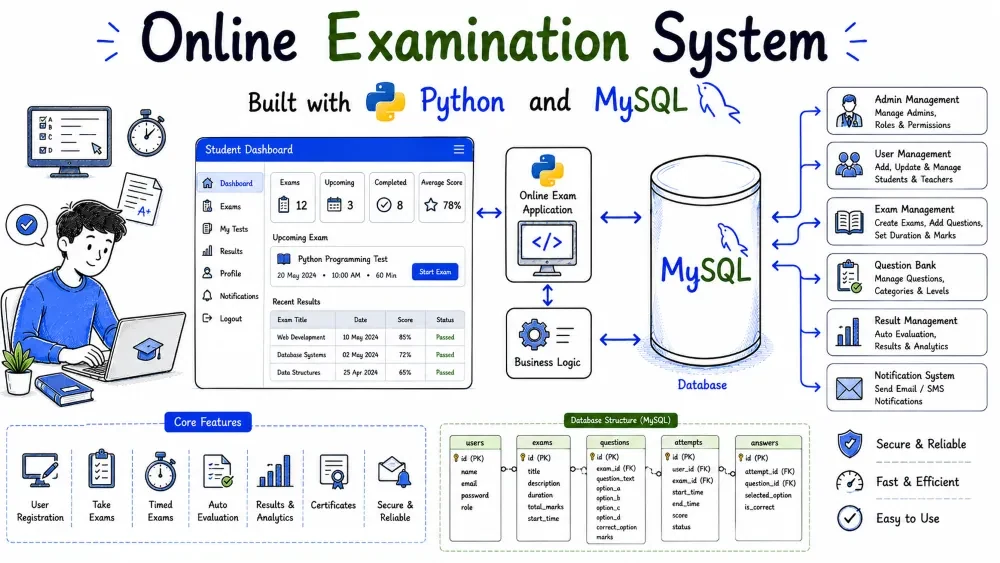
A command-line application that lets a teacher create exams, add multiple-choice questions, and lets students take those exams and see their results. You work through a numbered menu, and the program reads from and writes to a MySQL database.
This tutorial builds the project from the schema to the final report. The centrepiece is take_exam, where the program loops through questions, reads an answer, compares it with the correct one, and saves the score. Pass or fail is decided with a threshold of 40%.
Running a quiz or an exam on paper means printing sheets, marking them by hand, and tracking scores in a register. This project moves that whole workflow into the terminal with a MySQL database underneath.
A teacher creates an exam, adds multiple-choice questions with four options, and stores the correct answer for each. A student then takes the exam: the program shows one question at a time, reads the answer, and compares it with the correct one. The final score is saved, and a pass or fail decision is made using a 40% threshold. Students can view their own results, and anyone can view the rank list for an exam.
What you will learn:
ON DELETE CASCADE so deleting an exam removes its questions and results.%s placeholders.fetchall() and processing them in a loop.mysql-connector-python package, installed once with pip.root).input(), and if.CREATE TABLE, INSERT, SELECT. This project also uses JOIN and ORDER BY.One-time setup before coding:
pip install mysql-connector-pythonmysql -u root -pIf you skip step 1, your first run will fail with ModuleNotFoundError: No module named 'mysql.connector'. That error is covered in Common Errors.
online-examination-system/
|-- database.sql
|-- db_connection.py
|-- main.py
|-- requirements.txt
|-- README.md
database.sql creates the exam_db database, four tables, and seed data including a "Python Basics" exam.db_connection.py contains get_connection(), the connection helper.main.py holds the menu loop and one function per operation.requirements.txt lists the Python package the project depends on.README.md gives quick setup instructions for anyone who downloads the project.All five files sit in the same folder, so main.py can import db_connection without any extra configuration.
Four tables: students, exams, questions, and results.
Each exam belongs to a topic, each question belongs to an exam, and each result links one student to one exam with a score. Foreign keys express these relationships and stop the program from storing broken references.
The relationships look like this:
exams     1 ---- * questions
students  1 ---- * results
exams     1 ---- * results
One exam has many questions; one student has many results; one exam has many results. A result is unique per student and exam, so those two columns get a UNIQUE key. A student takes an exam once, and a second attempt should be rejected rather than overwriting the first.
The questions table stores the four options in four columns plus a one-character correct_answer field holding A, B, C, or D. Storing options as columns is the simplest design for a fixed four-option quiz.
results stores score and total separately, plus a passed flag. Storing both numbers means later reports do not have to recompute percentages, and the flag makes pass or fail checks simple.
The first part of database.sql: the exam_db database and its four tables.
The tables must exist before any data can be inserted. Running this file once gives the program its storage layer, and the Python code only has to work with the tables.
Save this as database.sql.
CREATE DATABASE IF NOT EXISTS exam_db;
USE exam_db;

CREATE TABLE IF NOT EXISTS students (
    id INT AUTO_INCREMENT PRIMARY KEY,
    name VARCHAR(100) NOT NULL,
    email VARCHAR(100) NOT NULL UNIQUE
);

CREATE TABLE IF NOT EXISTS exams (
    id INT AUTO_INCREMENT PRIMARY KEY,
    title VARCHAR(100) NOT NULL,
    duration_minutes INT NOT NULL,
    pass_percentage INT NOT NULL DEFAULT 40
);

CREATE TABLE IF NOT EXISTS questions (
    id INT AUTO_INCREMENT PRIMARY KEY,
    exam_id INT NOT NULL,
    question_text TEXT NOT NULL,
    option_a VARCHAR(255) NOT NULL,
    option_b VARCHAR(255) NOT NULL,
    option_c VARCHAR(255) NOT NULL,
    option_d VARCHAR(255) NOT NULL,
    correct_answer CHAR(1) NOT NULL,
    FOREIGN KEY (exam_id) REFERENCES exams(id) ON DELETE CASCADE
);

CREATE TABLE IF NOT EXISTS results (
    id INT AUTO_INCREMENT PRIMARY KEY,
    student_id INT NOT NULL,
    exam_id INT NOT NULL,
    score INT NOT NULL,
    total INT NOT NULL,
    passed TINYINT(1) NOT NULL,
    UNIQUE KEY (student_id, exam_id),
    FOREIGN KEY (student_id) REFERENCES students(id) ON DELETE CASCADE,
    FOREIGN KEY (exam_id) REFERENCES exams(id) ON DELETE CASCADE
);
CREATE DATABASE IF NOT EXISTS and CREATE TABLE IF NOT EXISTS let you re-run the file safely.
students.email is UNIQUE, so a student is identified by a single email. exams.pass_percentage has a default of 40; new exams can override it, but 40 is the standard used here.
questions.correct_answer is a CHAR(1), one character. The Python code compares the user's answer with this value.
ON DELETE CASCADE on questions.exam_id deletes all questions when their exam is deleted. The two cascades on results do the same for results when a student or exam is removed.
The UNIQUE KEY (student_id, exam_id) on results is the rule that a student can take an exam only once. A second attempt raises a duplicate-key error that the Python code catches.
INSERT statements with a handful of students, a "Python Basics" exam, eight questions, and a few existing results.
Seed data lets you test every feature right away, including the rank list and the view-result option, without taking an exam first.
Append this to database.sql.
INSERT INTO students (name, email) VALUES
('Aarav Verma', 'aarav@student.edu'),
('Meera Iyer', 'meera@student.edu'),
('Kabir Singh', 'kabir@student.edu'),
('Ananya Rao', 'ananya@student.edu'),
('Dev Patel', 'dev@student.edu'),
('Ishaan Gupta', 'ishaan@student.edu');

INSERT INTO exams (title, duration_minutes, pass_percentage) VALUES
('Python Basics', 20, 40);

INSERT INTO questions (exam_id, question_text, option_a, option_b, option_c, option_d, correct_answer) VALUES
(1, 'Which keyword is used to define a function?', 'define', 'func', 'def', 'function', 'C'),
(1, 'What is the output of print(2 ** 3)?', '6', '8', '9', '23', 'B'),
(1, 'Which data type stores True or False?', 'int', 'bool', 'str', 'float', 'B'),
(1, 'Which symbol starts a comment in Python?', '//', '/*', '#', '--', 'C'),
(1, 'Which of these is a list?', '(1, 2)', '[1, 2]', '{1, 2}', '"12"', 'B'),
(1, 'What is the result of len("hello")?', '4', '6', '5', 'hello', 'C'),
(1, 'Which function converts a string to an integer?', 'int()', 'str()', 'float()', 'char()', 'A'),
(1, 'Which statement exits a loop early?', 'continue', 'stop', 'pass', 'break', 'D');

INSERT INTO results (student_id, exam_id, score, total, passed) VALUES
(1, 1, 6, 8, 1),
(2, 1, 4, 8, 1),
(3, 1, 2, 8, 0);
Six students are created. Their ids are 1 through 6, and the Python code looks students up by email.
The exams insert creates one exam, "Python Basics", 20 minutes, 40% pass threshold. Its id is 1.
The eight questions all carry exam_id = 1. Each row stores the question text, four options, and the correct answer letter. Correct answers are deliberately varied (C, B, B, C, B, C, A, D) so a guessed run rarely scores high.
Three students already have results: Aarav scored 6/8 (75%, passed), Meera 4/8 (50%, passed), Kabir 2/8 (25%, failed). These rows make the rank list and view-result features show output immediately. The passed column stores 1 or 0, the MySQL convention for true and false.
db_connection.py, with get_connection() returning a connection to exam_db.
Every menu operation needs a connection. Putting mysql.connector.connect(...) in one place means you change your password or database name in exactly one file, and every other file picks it up.
Save this as db_connection.py.
import mysql.connector

def get_connection():
    return mysql.connector.connect(
        host="localhost",
        user="root",
        password="your_password",
        database="exam_db"
    )
The function returns a live connection. main.py calls it once at startup and passes the connection to every operation.
Replace your_password with the real MySQL password you use. database="exam_db" matches the database created by database.sql, so the code never has to write USE exam_db.
The skeleton of main.py, the menu loop, and the create_exam operation.
Everything starts from the menu. Creating an exam is the natural first feature: before questions or results exist, there must be an exam to attach them to.
Save this as main.py and extend it in the coming steps.
import mysql.connector
import db_connection


def show_menu():
    print("\n=== Online Examination System ===")
    print("1. Create an exam")
    print("2. Add MCQ questions to an exam")
    print("3. Take an exam")
    print("4. View a student's result")
    print("5. Exam rank list")
    print("6. List all questions of an exam")
    print("0. Exit")
    print("==================================")


def create_exam(cursor, conn):
    print("\n--- Create an Exam ---")
    title = input("Exam title: ").strip()
    duration = input("Duration in minutes: ").strip()

    cursor.execute(
        "INSERT INTO exams (title, duration_minutes) VALUES (%s, %s)",
        (title, int(duration))
    )
    conn.commit()
    print(f"Exam '{title}' created with ID {cursor.lastrowid}.")


def main():
    conn = db_connection.get_connection()
    cursor = conn.cursor(dictionary=True)

    while True:
        show_menu()
        choice = input("Enter your choice: ").strip()

        if choice == "1":
            create_exam(cursor, conn)
        elif choice == "0":
            break
        else:
            print("Invalid choice. Try again.")

    cursor.close()
    conn.close()
    print("Goodbye!")


if __name__ == "__main__":
    main()
conn.cursor(dictionary=True) makes rows come back as dictionaries, so code reads exam["title"] instead of exam[0].
The menu loop maps each number to one function. New features are new elif branches.
create_exam inserts a row with %s placeholders, then prints cursor.lastrowid, the id MySQL just assigned. The user needs that id to add questions in the next step.
conn.commit() saves the insert. Without it, the exam disappears when the program ends.
add_questions, which verifies the exam exists and inserts questions one by one in a loop.
An exam is not usable until it has questions. The function must first confirm the exam id is valid, because a question without a real exam would break the foreign key.
Add this function to main.py and wire it to menu option 2.
def add_questions(cursor, conn):
    print("\n--- Add MCQ Questions ---")
    exam_id = input("Exam ID: ").strip()

    cursor.execute("SELECT title FROM exams WHERE id = %s", (exam_id,))
    exam = cursor.fetchone()
    if exam is None:
        print("No exam with that ID.")
        return

    print(f"Adding questions to '{exam['title']}'. Enter an empty question to stop.")
    while True:
        text = input("Question text (Enter to stop): ").strip()
        if text == "":
            break

        option_a = input("Option A: ").strip()
        option_b = input("Option B: ").strip()
        option_c = input("Option C: ").strip()
        option_d = input("Option D: ").strip()
        correct = input("Correct answer (A/B/C/D): ").strip().upper()

        if correct not in ("A", "B", "C", "D"):
            print("Correct answer must be A, B, C, or D. Skipping this question.")
            continue

        cursor.execute(
            "INSERT INTO questions "
            "(exam_id, question_text, option_a, option_b, option_c, option_d, correct_answer) "
            "VALUES (%s, %s, %s, %s, %s, %s, %s)",
            (exam_id, text, option_a, option_b, option_c, option_d, correct)
        )
        conn.commit()
        print("Question saved.")
The exam lookup guards the rest of the function. If the id is wrong, the user hears about it immediately instead of getting a foreign-key error.
The while True loop asks for questions until the user enters an empty question text, then break stops the loop. This is the standard "keep adding until done" pattern.
.upper() normalizes the answer, so typing a and A both work. The if correct not in ("A", "B", "C", "D") check skips a malformed question before touching the database, and continue jumps to the next question.
Every insert uses placeholders for all seven values and commits right away, so each question is saved even if the user stops the loop early.
take_exam, the core of the project. It looks up the student and exam, loads the questions, loops through them reading answers, compares each answer with the correct one, computes the score, decides pass or fail, and saves the result.
This is the workflow an exam system exists for. It also demonstrates the most important transaction in the project: the result must be written only when the whole attempt is finished, and a duplicate attempt must be rolled back cleanly.
Add this function to main.py and wire it to menu option 3.
def take_exam(cursor, conn):
    print("\n--- Take an Exam ---")
    student_email = input("Student email: ").strip()
    exam_id = input("Exam ID: ").strip()

    cursor.execute("SELECT id, name FROM students WHERE email = %s", (student_email,))
    student = cursor.fetchone()
    if student is None:
        print("No student found with that email.")
        return

    cursor.execute("SELECT id, title, pass_percentage FROM exams WHERE id = %s", (exam_id,))
    exam = cursor.fetchone()
    if exam is None:
        print("No exam found with that ID.")
        return

    cursor.execute(
        "SELECT id, question_text, option_a, option_b, option_c, option_d, correct_answer "
        "FROM questions WHERE exam_id = %s ORDER BY id",
        (exam_id,)
    )
    questions = cursor.fetchall()
    if not questions:
        print("This exam has no questions yet.")
        return

    try:
        score = 0
        total = len(questions)

        for i, q in enumerate(questions, 1):
            print(f"\nQuestion {i}: {q['question_text']}")
            print(f"  A) {q['option_a']}")
            print(f"  B) {q['option_b']}")
            print(f"  C) {q['option_c']}")
            print(f"  D) {q['option_d']}")

            answer = input("Your answer (A/B/C/D): ").strip().upper()
            if answer == q["correct_answer"]:
                score += 1

        percentage = (score / total) * 100
        passed = percentage >= exam["pass_percentage"]

        cursor.execute(
            "INSERT INTO results (student_id, exam_id, score, total, passed) "
            "VALUES (%s, %s, %s, %s, %s)",
            (student["id"], exam["id"], score, total, 1 if passed else 0)
        )
        conn.commit()

        print(f"\nYou scored {score} out of {total} ({percentage:.0f}%).")
        print("Result: PASSED" if passed else "Result: FAILED")
    except mysql.connector.errors.IntegrityError:
        conn.rollback()
        print("This student has already taken this exam.")
The function first resolves the student by email and the exam by id, then loads all questions with fetchall(). Fetching the correct_answer column here lets the loop compare answers without a query per question.
The for loop uses enumerate(questions, 1) so the printed number starts at 1. Each question shows its text and four options; the correct answer is never printed.
answer == q["correct_answer"] is the comparison. Both sides are uppercase, and a correct answer adds 1 to score.
The percentage is (score / total) * 100, and passed compares it with the exam's own pass_percentage (40 for the seed exam). The result stores the raw score and total plus the boolean flag, stored as 1 or 0.
Everything runs inside one try. commit() happens only after the entire attempt, and only if the insert succeeds. The except IntegrityError block handles the case where the student already has a result for this exam, thanks to the UNIQUE key, and rolls back so the connection is clean again.
The insert uses the student and exam ids fetched at the start, so the row can never reference something that does not exist.
Three read-only operations: view_result, exam_ranking, and list_questions.
A score is only useful if people can see it. These functions turn the stored results back into readable reports for students and teachers.
Add these functions to main.py and wire them to menu options 4, 5, and 6.
def view_result(cursor, conn):
    print("\n--- View a Student's Result ---")
    student_email = input("Student email: ").strip()

    cursor.execute(
        """SELECT e.title AS exam_title, r.score, r.total, r.passed
           FROM results r
           JOIN students s ON r.student_id = s.id
           JOIN exams e ON r.exam_id = e.id
           WHERE s.email = %s
           ORDER BY e.title""",
        (student_email,)
    )
    rows = cursor.fetchall()

    if not rows:
        print("No results found for that student.")
        return

    for r in rows:
        status = "PASSED" if r["passed"] else "FAILED"
        percent = (r["score"] / r["total"]) * 100
        print(f"{r['exam_title']}: {r['score']}/{r['total']} ({percent:.0f}%) - {status}")


def exam_ranking(cursor, conn):
    print("\n--- Exam Rank List ---")
    exam_id = input("Exam ID: ").strip()

    cursor.execute(
        """SELECT s.name, r.score, r.total, r.passed
           FROM results r
           JOIN students s ON r.student_id = s.id
           WHERE r.exam_id = %s
           ORDER BY r.score DESC, s.name""",
        (exam_id,)
    )
    rows = cursor.fetchall()

    if not rows:
        print("No results yet for this exam.")
        return

    print("Rank  Name             Score    Result")
    for i, r in enumerate(rows, 1):
        status = "PASSED" if r["passed"] else "FAILED"
        print(f"{i:4}  {r['name']:<15} {r['score']}/{r['total']}   {status}")


def list_questions(cursor, conn):
    print("\n--- List Questions of an Exam ---")
    exam_id = input("Exam ID: ").strip()

    cursor.execute(
        """SELECT id, question_text, option_a, option_b, option_c, option_d, correct_answer
           FROM questions
           WHERE exam_id = %s
           ORDER BY id""",
        (exam_id,)
    )
    questions = cursor.fetchall()

    if not questions:
        print("No questions found for this exam.")
        return

    for q in questions:
        print(f"\nQ{q['id']}: {q['question_text']}")
        print(f"  A) {q['option_a']}")
        print(f"  B) {q['option_b']}")
        print(f"  C) {q['option_c']}")
        print(f"  D) {q['option_d']}")
        print(f"  Correct answer: {q['correct_answer']}")
view_result joins results to students and exams, filtering by email. For each result it computes the percentage again from the stored score and total and prints PASSED or FAILED.
exam_ranking joins results to students, orders by score descending, and uses enumerate for the rank numbers. The secondary ORDER BY s.name gives a deterministic order when scores tie.
list_questions prints every question with its options and, unlike the exam screen, also shows the correct answer. This is a review tool for teachers.
All three are read-only, so none of them call commit(). They only run SELECT statements.
The f"{i:4}" and f"{r['name']:<15}" format specs align the columns so the rank table reads cleanly in the terminal.
CREATE DATABASE IF NOT EXISTS exam_db;
USE exam_db;

CREATE TABLE IF NOT EXISTS students (
    id INT AUTO_INCREMENT PRIMARY KEY,
    name VARCHAR(100) NOT NULL,
    email VARCHAR(100) NOT NULL UNIQUE
);

CREATE TABLE IF NOT EXISTS exams (
    id INT AUTO_INCREMENT PRIMARY KEY,
    title VARCHAR(100) NOT NULL,
    duration_minutes INT NOT NULL,
    pass_percentage INT NOT NULL DEFAULT 40
);

CREATE TABLE IF NOT EXISTS questions (
    id INT AUTO_INCREMENT PRIMARY KEY,
    exam_id INT NOT NULL,
    question_text TEXT NOT NULL,
    option_a VARCHAR(255) NOT NULL,
    option_b VARCHAR(255) NOT NULL,
    option_c VARCHAR(255) NOT NULL,
    option_d VARCHAR(255) NOT NULL,
    correct_answer CHAR(1) NOT NULL,
    FOREIGN KEY (exam_id) REFERENCES exams(id) ON DELETE CASCADE
);

CREATE TABLE IF NOT EXISTS results (
    id INT AUTO_INCREMENT PRIMARY KEY,
    student_id INT NOT NULL,
    exam_id INT NOT NULL,
    score INT NOT NULL,
    total INT NOT NULL,
    passed TINYINT(1) NOT NULL,
    UNIQUE KEY (student_id, exam_id),
    FOREIGN KEY (student_id) REFERENCES students(id) ON DELETE CASCADE,
    FOREIGN KEY (exam_id) REFERENCES exams(id) ON DELETE CASCADE
);

INSERT INTO students (name, email) VALUES
('Aarav Verma', 'aarav@student.edu'),
('Meera Iyer', 'meera@student.edu'),
('Kabir Singh', 'kabir@student.edu'),
('Ananya Rao', 'ananya@student.edu'),
('Dev Patel', 'dev@student.edu'),
('Ishaan Gupta', 'ishaan@student.edu');

INSERT INTO exams (title, duration_minutes, pass_percentage) VALUES
('Python Basics', 20, 40);

INSERT INTO questions (exam_id, question_text, option_a, option_b, option_c, option_d, correct_answer) VALUES
(1, 'Which keyword is used to define a function?', 'define', 'func', 'def', 'function', 'C'),
(1, 'What is the output of print(2 ** 3)?', '6', '8', '9', '23', 'B'),
(1, 'Which data type stores True or False?', 'int', 'bool', 'str', 'float', 'B'),
(1, 'Which symbol starts a comment in Python?', '//', '/*', '#', '--', 'C'),
(1, 'Which of these is a list?', '(1, 2)', '[1, 2]', '{1, 2}', '"12"', 'B'),
(1, 'What is the result of len("hello")?', '4', '6', '5', 'hello', 'C'),
(1, 'Which function converts a string to an integer?', 'int()', 'str()', 'float()', 'char()', 'A'),
(1, 'Which statement exits a loop early?', 'continue', 'stop', 'pass', 'break', 'D');

INSERT INTO results (student_id, exam_id, score, total, passed) VALUES
(1, 1, 6, 8, 1),
(2, 1, 4, 8, 1),
(3, 1, 2, 8, 0);
import mysql.connector

def get_connection():
    return mysql.connector.connect(
        host="localhost",
        user="root",
        password="your_password",
        database="exam_db"
    )
import mysql.connector
import db_connection


def show_menu():
    print("\n=== Online Examination System ===")
    print("1. Create an exam")
    print("2. Add MCQ questions to an exam")
    print("3. Take an exam")
    print("4. View a student's result")
    print("5. Exam rank list")
    print("6. List all questions of an exam")
    print("0. Exit")
    print("==================================")


def create_exam(cursor, conn):
    print("\n--- Create an Exam ---")
    title = input("Exam title: ").strip()
    duration = input("Duration in minutes: ").strip()

    cursor.execute(
        "INSERT INTO exams (title, duration_minutes) VALUES (%s, %s)",
        (title, int(duration))
    )
    conn.commit()
    print(f"Exam '{title}' created with ID {cursor.lastrowid}.")


def add_questions(cursor, conn):
    print("\n--- Add MCQ Questions ---")
    exam_id = input("Exam ID: ").strip()

    cursor.execute("SELECT title FROM exams WHERE id = %s", (exam_id,))
    exam = cursor.fetchone()
    if exam is None:
        print("No exam with that ID.")
        return

    print(f"Adding questions to '{exam['title']}'. Enter an empty question to stop.")
    while True:
        text = input("Question text (Enter to stop): ").strip()
        if text == "":
            break

        option_a = input("Option A: ").strip()
        option_b = input("Option B: ").strip()
        option_c = input("Option C: ").strip()
        option_d = input("Option D: ").strip()
        correct = input("Correct answer (A/B/C/D): ").strip().upper()

        if correct not in ("A", "B", "C", "D"):
            print("Correct answer must be A, B, C, or D. Skipping this question.")
            continue

        cursor.execute(
            "INSERT INTO questions "
            "(exam_id, question_text, option_a, option_b, option_c, option_d, correct_answer) "
            "VALUES (%s, %s, %s, %s, %s, %s, %s)",
            (exam_id, text, option_a, option_b, option_c, option_d, correct)
        )
        conn.commit()
        print("Question saved.")


def take_exam(cursor, conn):
    print("\n--- Take an Exam ---")
    student_email = input("Student email: ").strip()
    exam_id = input("Exam ID: ").strip()

    cursor.execute("SELECT id, name FROM students WHERE email = %s", (student_email,))
    student = cursor.fetchone()
    if student is None:
        print("No student found with that email.")
        return

    cursor.execute("SELECT id, title, pass_percentage FROM exams WHERE id = %s", (exam_id,))
    exam = cursor.fetchone()
    if exam is None:
        print("No exam found with that ID.")
        return

    cursor.execute(
        "SELECT id, question_text, option_a, option_b, option_c, option_d, correct_answer "
        "FROM questions WHERE exam_id = %s ORDER BY id",
        (exam_id,)
    )
    questions = cursor.fetchall()
    if not questions:
        print("This exam has no questions yet.")
        return

    try:
        score = 0
        total = len(questions)

        for i, q in enumerate(questions, 1):
            print(f"\nQuestion {i}: {q['question_text']}")
            print(f"  A) {q['option_a']}")
            print(f"  B) {q['option_b']}")
            print(f"  C) {q['option_c']}")
            print(f"  D) {q['option_d']}")

            answer = input("Your answer (A/B/C/D): ").strip().upper()
            if answer == q["correct_answer"]:
                score += 1

        percentage = (score / total) * 100
        passed = percentage >= exam["pass_percentage"]

        cursor.execute(
            "INSERT INTO results (student_id, exam_id, score, total, passed) "
            "VALUES (%s, %s, %s, %s, %s)",
            (student["id"], exam["id"], score, total, 1 if passed else 0)
        )
        conn.commit()

        print(f"\nYou scored {score} out of {total} ({percentage:.0f}%).")
        print("Result: PASSED" if passed else "Result: FAILED")
    except mysql.connector.errors.IntegrityError:
        conn.rollback()
        print("This student has already taken this exam.")


def view_result(cursor, conn):
    print("\n--- View a Student's Result ---")
    student_email = input("Student email: ").strip()

    cursor.execute(
        """SELECT e.title AS exam_title, r.score, r.total, r.passed
           FROM results r
           JOIN students s ON r.student_id = s.id
           JOIN exams e ON r.exam_id = e.id
           WHERE s.email = %s
           ORDER BY e.title""",
        (student_email,)
    )
    rows = cursor.fetchall()

    if not rows:
        print("No results found for that student.")
        return

    for r in rows:
        status = "PASSED" if r["passed"] else "FAILED"
        percent = (r["score"] / r["total"]) * 100
        print(f"{r['exam_title']}: {r['score']}/{r['total']} ({percent:.0f}%) - {status}")


def exam_ranking(cursor, conn):
    print("\n--- Exam Rank List ---")
    exam_id = input("Exam ID: ").strip()

    cursor.execute(
        """SELECT s.name, r.score, r.total, r.passed
           FROM results r
           JOIN students s ON r.student_id = s.id
           WHERE r.exam_id = %s
           ORDER BY r.score DESC, s.name""",
        (exam_id,)
    )
    rows = cursor.fetchall()

    if not rows:
        print("No results yet for this exam.")
        return

    print("Rank  Name             Score    Result")
    for i, r in enumerate(rows, 1):
        status = "PASSED" if r["passed"] else "FAILED"
        print(f"{i:4}  {r['name']:<15} {r['score']}/{r['total']}   {status}")


def list_questions(cursor, conn):
    print("\n--- List Questions of an Exam ---")
    exam_id = input("Exam ID: ").strip()

    cursor.execute(
        """SELECT id, question_text, option_a, option_b, option_c, option_d, correct_answer
           FROM questions
           WHERE exam_id = %s
           ORDER BY id""",
        (exam_id,)
    )
    questions = cursor.fetchall()

    if not questions:
        print("No questions found for this exam.")
        return

    for q in questions:
        print(f"\nQ{q['id']}: {q['question_text']}")
        print(f"  A) {q['option_a']}")
        print(f"  B) {q['option_b']}")
        print(f"  C) {q['option_c']}")
        print(f"  D) {q['option_d']}")
        print(f"  Correct answer: {q['correct_answer']}")


def main():
    conn = db_connection.get_connection()
    cursor = conn.cursor(dictionary=True)

    while True:
        show_menu()
        choice = input("Enter your choice: ").strip()

        if choice == "1":
            create_exam(cursor, conn)
        elif choice == "2":
            add_questions(cursor, conn)
        elif choice == "3":
            take_exam(cursor, conn)
        elif choice == "4":
            view_result(cursor, conn)
        elif choice == "5":
            exam_ranking(cursor, conn)
        elif choice == "6":
            list_questions(cursor, conn)
        elif choice == "0":
            break
        else:
            print("Invalid choice. Try again.")

    cursor.close()
    conn.close()
    print("Goodbye!")


if __name__ == "__main__":
    main()
mysql-connector-python
# Online Examination System

A command-line application for creating exams, adding multiple-choice questions,
and taking exams with pass or fail results, backed by MySQL.

## Setup

1. pip install mysql-connector-python
2. mysql -u root -p < database.sql
3. Open db_connection.py and set your MySQL password.
4. python main.py

## Features

- Create exams and add MCQ questions
- Take an exam and get an instant score
- Pass or fail at 40%
- View a student's results and exam rank lists
pip install mysql-connector-python
This downloads and installs the MySQL driver that the Python code imports.
mysql -u root -p < database.sql
This runs the whole SQL file: it creates exam_db, builds the four tables, and inserts the seed rows. You will be asked for your MySQL password.
python main.py
This starts the menu. On your first run you should see:
=== Online Examination System ===
1. Create an exam
2. Add MCQ questions to an exam
3. Take an exam
4. View a student's result
5. Exam rank list
6. List all questions of an exam
0. Exit
==================================
Enter your choice:
If the menu appears, the connection is working. Choose option 5 and enter exam id 1 to see the seeded rank list: Aarav first with 6/8, then Meera with 4/8, then Kabir with 2/8.
These test cases each start from a fresh database loaded with database.sql. Test 2 builds on test 1, so do not reload the schema between those two. The 0 at the end of each input list exits the program.
Test 1 – Create a new exam
Input:
1
SQL Basics
15
0
Expected Output:
Exam 'SQL Basics' created with ID 2.
Explanation: The insert runs against the exams table, and cursor.lastrowid reports the new id. Because the seed data already has one exam, the new one gets id 2, which is the number the user would enter to add questions to it.
Test 2 – Add a question and list all questions of the new exam
Input:
2
2
Which command reads rows from a table?
SELECT
INSERT
UPDATE
DELETE
A

6
2
0
Expected Output:
Adding questions to 'SQL Basics'. Enter an empty question to stop.
Question saved.

--- List Questions of an Exam ---
Q9: Which command reads rows from a table?
  A) SELECT
  B) INSERT
  C) UPDATE
  D) DELETE
  Correct answer: A
Explanation: The loop stores each question and commits after each one. The blank question text ends the loop. list_questions then fetches all questions for exam 2 ordered by id and prints them with their correct answers, confirming the insert worked. The new question gets id 9 because the seed data already holds questions 1 through 8.
Test 3 – Take the Python Basics exam as a student with no result
Input:
3
ananya@student.edu
1
C
B
A
B
B
C
A
D
0
Expected Output:
You scored 6 out of 8 (75%).
Result: PASSED
Explanation: The loop prints each of the eight questions and reads one answer per question. Ananya answers C, B, A, B, B, C, A, D. Comparing with the stored correct answers (C, B, B, C, B, C, A, D), six match, so the score is 6. 75% is above the exam's 40% threshold, so the result is inserted with passed = 1 and the message prints. Because the insert runs inside a transaction with commit(), the result is now visible in the rank list.
Test 4 – View a student's result
Input:
4
meera@student.edu
0
Expected Output:
Python Basics: 4/8 (50%) - PASSED
Explanation: The query joins results to students and exams, filters by Meera's email, and prints the seeded result from the seed data. The percentage is recomputed in Python from the stored score and total: 4 / 8 gives 50%, which is at least 40%, so the status is PASSED.
Problem:
ModuleNotFoundError: No module named 'mysql.connector'
Reason:
The mysql-connector-python package is not installed, or pip installed it for a different Python installation.
Solution:
Run pip install mysql-connector-python. If that still fails, try python -m pip install mysql-connector-python, which installs the package for the exact Python that will run main.py.
Problem: An exam or question appears to be saved, but it is gone when the program restarts.
Reason:
conn.commit() was never called after INSERT. MySQL keeps the change in an open transaction that is discarded when the connection closes.
Solution:
Call conn.commit() after every write operation. In take_exam, commit only after the whole attempt finishes, and call conn.rollback() in the except block.
Problem:
Cannot add or update a child row: a foreign key constraint fails
Reason:
The program tried to insert a question whose exam_id does not match any exam, or a result whose student or exam id does not exist.
Solution:
Look up the parent row first with SELECT and check that it exists before inserting. This is exactly what the exam is None check in add_questions and the lookups in take_exam do.
Problem:
Duplicate entry ... for key 'student_id' when taking an exam.
Reason:
The student already has a result for that exam, so the UNIQUE KEY (student_id, exam_id) on results rejected the second insert.
Solution:
That is the intended protection. The program catches IntegrityError and prints "This student has already taken this exam." To allow a retake, drop the UNIQUE key and add an UPDATE that replaces the old result.
Problem:
Table 'exam_db.students' already exists when running database.sql a second time.
Reason:
The schema was written without IF NOT EXISTS, or the database was created without IF NOT EXISTS.
Solution:
Use CREATE TABLE IF NOT EXISTS in the schema file. To start from scratch, drop the database first with DROP DATABASE IF EXISTS exam_db; and then re-run the file.
Problem:
1045 (28000): Access denied or 2003: Can't connect to MySQL server on 'localhost'
Reason:
Either the password in db_connection.py does not match the MySQL password (error 1045), or the MySQL server is not running (error 2003).
Solution:
Test the login first with mysql -u root -p. If that works, fix the password in db_connection.py. If the server is down, start the MySQL service: check the Services panel on Windows, or run sudo systemctl start mysql on Linux.
register_student option so new students can be added from the menu instead of with SQL.duration_minutes is up.results table.register_student option that inserts a student by name and email, and catches duplicate emails with IntegrityError.view_exam_info function that shows an exam's title, duration, number of questions, and how many students have taken it.take_exam to shuffle the questions with Python's random.shuffle for each attempt while keeping the score correct.delete_exam option that removes an exam and relies on ON DELETE CASCADE to clean up its questions and results.pass_rate report that shows, for every exam, how many students took it, how many passed, and the pass percentage.Save your progress and earn XP for completing tutorials.
Technology
MySQL
Lesson group
Real-World Projects
Progress
83% complete

