Preparing your learning space...
100% through Conditional Statements tutorials
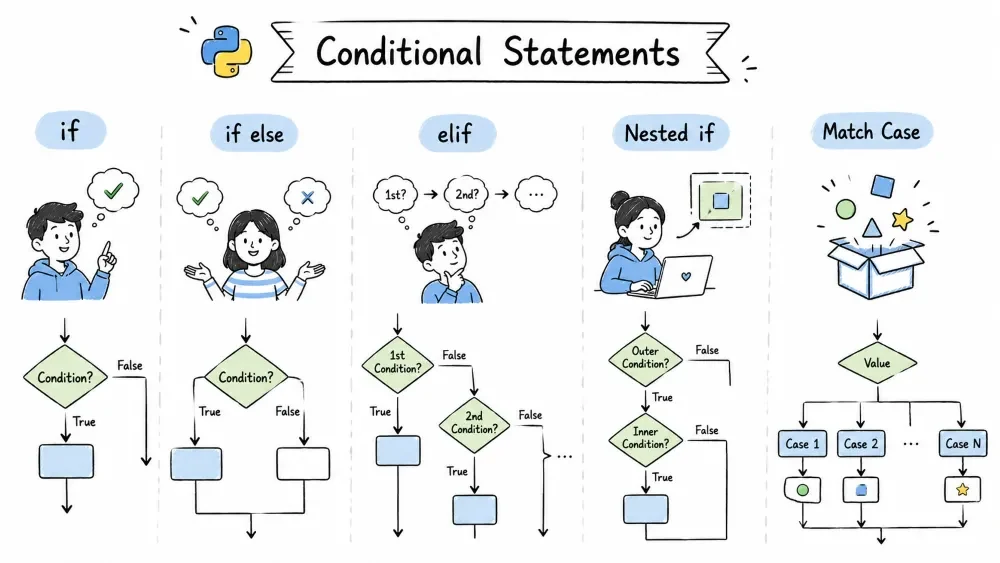
if Statementif else Statementelif Statementif Statementsmatch Case Statement (Python 3.10+)A conditional statement is a piece of code that makes a decision. It checks whether a condition is True or False, and runs different code depending on the result.
Think about how many decisions you make every day. "If it's raining, grab an umbrella. Otherwise, wear sunglasses."
Your code can do the same thing. Give it some data, and let it decide what to do next.
is_raining = True

if is_raining:
    print("Take an umbrella!")   # This one runs
else:
    print("Wear sunglasses!")    # This would run if is_raining were False
That's really all there is to it. Check a condition: if it's True, do one thing. If not, do something else.
Here's something people don't tell you at first. You can put almost anything in an if condition — not just True and False. Python treats every value as either "truthy" or "falsy."
False| Value | Why it is falsy |
|---|---|
False | It's literally False |
None | Means "nothing" |
0 | Zero (int or float) |
"" | Empty string |
[] | Empty list |
{} | Empty dictionary |
() | Empty tuple |
set() | Empty set |
range(0) | Empty range |
True# Falsy examples — these if blocks will NEVER run
if 0:
print("You will never see this")
if "":
print("This won't print either")
if None:
print("Nope, not this one")
# Truthy examples — these WILL run
if 42:
print("Non-zero numbers are truthy") # This runs
if "hello":
print("Non-empty strings are truthy") # This runs
if [1, 2, 3]:
print("Non-empty lists are truthy") # This runs
Experienced developers use this all the time to write cleaner code:
name = input("Enter your name: ")
if name:                     # Same as: if name != ""
    print(f"Hello, {name}!")
else:
    print("You didn't enter a name!")
if name basically means "if name has something in it." An empty string would be falsy, so it falls to else.
if StatementThe if statement runs a block of code only when a given condition is True. If the condition is False, it simply skips that block.
if condition:
    # this code runs only when condition is True
age = 18

if age >= 18:
    print("You can vote!")
    print("Go make your voice heard!")

print("This line always runs.")
Things to remember:
: after the conditionscore = 85
if score >= 90:
print("Grade: A")
if score >= 80:
print("Grade: B") # This runs (85 >= 80)
and, or, not)age = 22
has_ticket = True
if age >= 18 and has_ticket:
print("Welcome to the show!") # This runs
if age < 12 or age > 65:
print("You get a discount!")
if not has_ticket:
print("Please buy a ticket first")
in, not in)fruits = ["apple", "banana", "cherry"]
if "banana" in fruits:
print("We have bananas!") # This runs
user = "admin"
admins = ["alice", "bob", "charlie"]
if user not in admins:
print("Access denied") # This runs
if else StatementThe if else statement gives you two paths — one block of code runs when the condition is True, and a different block runs when the condition is False.
Two paths. Pick one. If the condition is True, the if block runs. If it's False, the else block runs. Never both.
if condition:
    # runs when condition is True
else:
    # runs when condition is False
password = "python123"
user_input = input("Enter password: ")

if user_input == password:
    print("Access granted!")
else:
    print("Access denied!")   # Wrong password, this runs
# Even or odd
number = int(input("Enter a number: "))

if number % 2 == 0:
    print(f"{number} is even")
else:
    print(f"{number} is odd")


# Temperature check
temp = float(input("Enter temperature (C): "))

if temp > 30:
    print("It's hot outside!")
else:
    print("It's pleasant outside.")


# Login check
username = input("Username: ")
if username == "admin":
    print("Welcome, admin!")
else:
    print(f"Welcome, {username}!")
ifs when you should use if else# BAD — both conditions get checked, even though they're opposites
number = 5
if number % 2 == 0:
print("Even")
if number % 2 != 0: # This is an extra check. Totally unnecessary.
print("Odd")
# GOOD — one condition is enough
if number % 2 == 0:
print("Even")
else: # Python already knows it must be odd
print("Odd")
elif StatementThe elif (short for "else if") statement lets you check multiple conditions one after another. Python runs the block of the first condition that is True, and skips the rest.
Sometimes two paths aren't enough. You have 3, 4, or 10 possibilities. That's where elif comes in.
if condition1:
    # runs if condition1 is True
elif condition2:
    # runs if condition1 is False AND condition2 is True
elif condition3:
    # runs if condition1 and condition2 are False AND condition3 is True
else:
    # runs if ALL conditions above are False
Python checks from top to bottom. The first True condition wins — everything below it gets skipped.
score = int(input("Enter your score (0-100): "))

if score >= 90:
    print("Grade: A")
elif score >= 80:
    print("Grade: B")
elif score >= 70:
    print("Grade: C")
elif score >= 60:
    print("Grade: D")
else:
    print("Grade: F")

# If score = 85, it prints "Grade: B" (first True match, stops right there)
light = input("Traffic light color: ").lower()

if light == "green":
    print("Go!")
elif light == "yellow":
    print("Slow down!")
elif light == "red":
    print("Stop!")
else:
    print("Invalid color!")
and/orage = int(input("Enter your age: "))
if age < 0:
print("Invalid age!")
elif age >= 0 and age <= 12:
print("Child")
elif age >= 13 and age <= 19:
print("Teenager")
elif age >= 20 and age <= 64:
print("Adult")
else:
print("Senior")
# WRONG ORDER — the first condition catches everything before the specific one
score = 95

if score >= 60:
    print("Passed")           # This runs, and then the rest is skipped!
elif score >= 90:
    print("Excellent!")       # Never reached!


# CORRECT ORDER — put the most specific condition first
if score >= 90:
    print("Excellent!")       # This runs
elif score >= 60:
    print("Passed")
else:
    print("Failed")
Rule of thumb: Put the most specific (hardest to satisfy) conditions first.
if StatementsA nested if is an if statement placed inside another if (or elif/else) block. The inner condition is only checked if the outer condition is True.
Yes, you can put an if statement inside another if statement. That's called nesting.
Use this when you need to check something only after something else has already passed.
age = 25
has_license = True

if age >= 18:               # Outer condition
    print("Age check passed")

    if has_license:          # Inner condition — checked only if outer is True
        print("You can drive!")
    else:
        print("Get a license first")
else:
    print("Too young to drive")
# ATM withdrawal
pin_correct = True
balance = 5000
amount = 2000

if pin_correct:
    print("PIN verified.")

    if amount <= balance:
        print(f"Withdrawing {amount}...")
        balance -= amount
        print(f"Remaining balance: {balance}")
    else:
        print("Insufficient funds!")
else:
    print("Wrong PIN!")
if inside elifmeal = "dinner"
time_of_day = 20 # 24-hour format
if meal == "breakfast":
if time_of_day < 12:
print("Good morning!")
else:
print("Late breakfast?")
elif meal == "lunch":
if 12 <= time_of_day <= 15:
print("Perfect lunch time!")
else:
print("Having lunch late?")
elif meal == "dinner":
if 18 <= time_of_day <= 22:
print("Enjoy your dinner!")
else:
print("Late dinner!")
andSometimes nesting and and can do the same job. Pick whichever is easier to read.
# Both do the same thing. Pick what makes sense.

# Option A: `and` (flat, great for simple cases)
if age >= 18 and has_license:
    print("You can drive!")

# Option B: nesting (better when the inner check has its own else/elif)
if age >= 18:
    if has_license:
        print("You can drive!")
    else:
        print("You need a license first")
else:
    print("You are too young")
Nesting works well when:
else than the outer oneif/elif/else)The ternary operator (also called conditional expression) is a shorter way to write an if else in a single line. It returns one value if the condition is True and another if it's False.
Python has a shortcut — the ternary operator. It lets you write an if else in a single line.
value_if_true if condition else value_if_false
age = 20
status = "Adult" if age >= 18 else "Minor"
print(status)  # Output: Adult

# Same thing written normally:
if age >= 18:
    status = "Adult"
else:
    status = "Minor"
# Find the larger number
a, b = 10, 20
max_value = a if a > b else b
print(max_value)  # Output: 20

# Conditional print
number = 7
result = "Even" if number % 2 == 0 else "Odd"
print(result)  # Output: Odd

# Nested ternary (use this carefully — it gets messy fast)
score = 85
grade = "A" if score >= 90 else "B" if score >= 80 else "C" if score >= 70 else "D" if score >= 60 else "F"
print(grade)  # Output: B

# Same thing but more readable with parentheses:
grade = ("A" if score >= 90 else
         "B" if score >= 80 else
         "C" if score >= 70 else
         "D" if score >= 60 else
         "F")
| Use it | Avoid it |
|---|---|
| Simple value assignments | Complex logic with many branches |
| It fits cleanly on one line | When readability takes a hit |
| Setting default values | When you need multiple statements |
# GOOD — simple and clear
discount = 0.1 if is_member else 0.0

# BAD — this is a nightmare to read
action = "delete" if user == "admin" and item_exists and not is_locked else "view" if user != "guest" else "login"

# BETTER — complex logic belongs in a normal if else
if user == "admin" and item_exists and not is_locked:
    action = "delete"
elif user != "guest":
    action = "view"
else:
    action = "login"
match Case Statement (Python 3.10+)Python 3.10 introduced match case. If you've used switch in C or Java, it's similar — but more powerful.
match value:
    case pattern1:
        # do something
    case pattern2:
        # do something else
    case _:
        # default — runs if nothing else matched
The underscore _ is the wildcard — it matches anything. Use it as a default case.
command = input("Enter command (start/stop/pause): ").lower()

match command:
    case "start":
        print("Starting...")
    case "stop":
        print("Stopping...")
    case "pause":
        print("Pausing...")
    case _:  # default
        print("Unknown command!")
if elif:if command == "start":
print("Starting...")
elif command == "stop":
print("Stopping...")
elif command == "pause":
print("Pausing...")
else:
print("Unknown command!")
See the difference? match is cleaner and easier to extend.
|day = input("Enter a day name: ").lower()
match day:
case "monday" | "tuesday" | "wednesday" | "thursday" | "friday":
print("Weekday — time to work!")
case "saturday" | "sunday":
print("Weekend — time to relax!")
case _:
print("Not a valid day!")
if guards inside patternsYou can add an extra condition (called a guard) to a pattern:
value = int(input("Enter a number: "))

match value:
    case n if n > 0:
        print(f"{n} is positive")
    case n if n < 0:
        print(f"{n} is negative")
    case 0:
        print("Zero")
    case _:
        print("Not a number")
# Match a list
items = ["apple", "banana", "cherry"]

match items:
    case ["apple", "banana", "cherry"]:
        print("Fruit basket!")
    case ["apple", *rest]:
        print(f"Apple with {rest}")
    case _:
        print("Unknown basket")

# Extract values
point = (3, 5)

match point:
    case (0, 0):
        print("Origin")
    case (0, y):
        print(f"On the Y axis at y={y}")
    case (x, 0):
        print(f"On the X axis at x={x}")
    case (x, y):
        print(f"Point at ({x}, {y})")
    case _:
        print("Not a point")
from dataclasses import dataclass

@dataclass
class Person:
    name: str
    age: int

person = Person("Alice", 30)

match person:
    case Person(name="Alice", age=age):
        print(f"Alice is {age} years old")
    case Person(name=name, age=18):
        print(f"{name} is exactly 18")
    case Person(name=name, age=age):
        print(f"{name} is {age} years old")
match vs if elifUse match | Use if elif |
|---|---|
| Comparing one value against many | Complex conditions with and/or |
| Pattern matching (types, sequences) | Range checks (x > 10 and x < 20) |
| Clean multi-branch logic | When else also needs a condition |
Save your progress and earn XP for completing tutorials.
Technology
Python
Lesson group
Conditional Statements
Progress
100% complete

