Preparing your learning space...
100% through File Handling tutorials
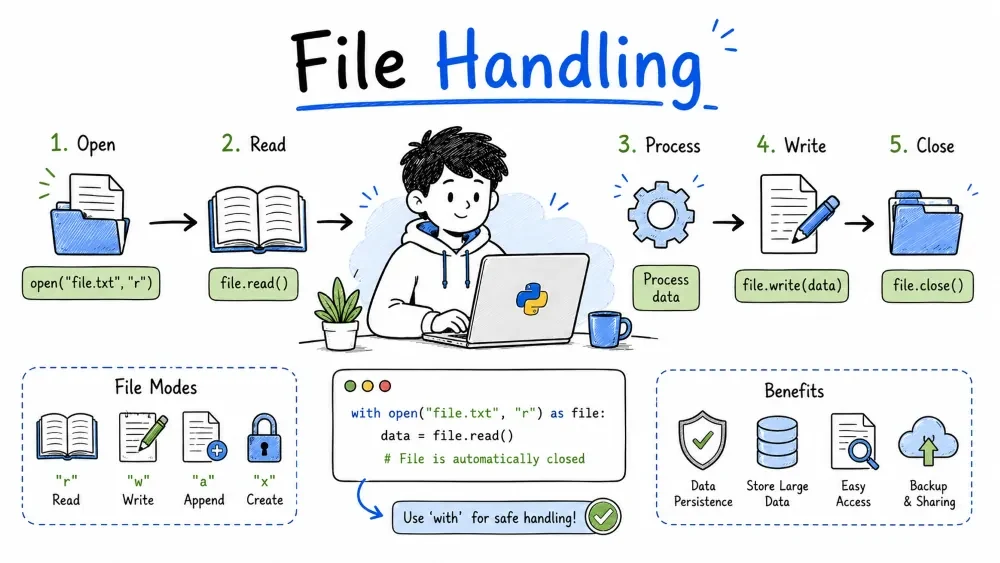
Working with files is essential in almost every program — reading settings, saving user data, processing logs, or exporting results. Python makes file operations straightforward with built-in functions.
with StatementA file is a named location on disk that stores data. Python treats files as streams — you open a connection, read or write data through it, then close it.
Three basic operations: open, read/write, close.
Use the open() function to get a file object.
file = open("example.txt", "r")   # open for reading
# ... work with the file ...
file.close()                       # always close when done
The first argument is the filename, the second is the mode (explained below).
Forgetting to close can cause data loss or file locks. The
withstatement (covered later) handles this automatically.
file = open("data.txt", "r")
content = file.read()
print(content)
file.close()
file = open("data.txt", "r")
for line in file:
    print(line.strip())   # strip removes the newline
file.close()
file = open("data.txt", "r")
lines = file.readlines()   # returns a list of strings
file.close()
read() loads everything into memory at once — fine for small files. For large files, iterate line by line instead.
Writing replaces the entire file. If the file doesn't exist, Python creates it.
file = open("output.txt", "w")
file.write("Hello, World!\n")
file.write("Second line here.\n")
file.close()
After running this, output.txt will contain exactly those two lines. If the file already existed, its old content is gone.
lines = ["Line A\n", "Line B\n", "Line C\n"]
file = open("output.txt", "w")
file.writelines(lines)
file.close()
writelines() does not add newlines automatically — include them yourself.
Appending adds data to the end of an existing file without deleting what's already there.
file = open("log.txt", "a")
file.write("New log entry\n")
file.close()
If log.txt doesn't exist, append mode creates it (same as write mode).
# Create initial file
file = open("log.txt", "w")
file.write("Session started\n")
file.close()

# Append later
file = open("log.txt", "a")
file.write("User logged in\n")
file.write("User logged out\n")
file.close()

# Read to verify
file = open("log.txt", "r")
print(file.read())
file.close()
Output:
Session started
User logged in
User logged out
Relative path: relative to where your script is running
"data.txt" — file in current directory"subfolder/data.txt" — file inside a subfolder"../other/data.txt" — go up one directory, then into otherAbsolute path: full path from the root
"C:\\Users\\Name\\docs\\file.txt""/home/name/docs/file.txt"Python accepts forward slashes even on Windows, so you can write "C:/Users/Name/docs/file.txt" — this avoids escaping issues with backslashes.
os.path moduleimport os
path = os.path.join("folder", "subfolder", "file.txt")
print(path) # folder/subfolder/file.txt on Linux/Mac
# folder\subfolder\file.txt on Windows
print(os.path.exists("test.txt")) # True or False
print(os.path.isfile("test.txt")) # True if it's a file
print(os.path.isdir("mydir")) # True if it's a directory
os.path.join is the safe way to build paths — it uses the correct separator for the current OS.
import os

filename = "notes.txt"

if os.path.exists(filename):
    file = open(filename, "r")
    print(file.read())
    file.close()
else:
    print(f"{filename} does not exist.")
| Mode | Description |
|---|---|
"r" | Read (default). File must exist. |
"w" | Write. Creates file or overwrites existing. |
"a" | Append. Creates file or adds to end of existing. |
"x" | Exclusive creation. Fails if file already exists. |
"r+" | Read and write. File must exist. |
"b" | Binary mode (add to another mode, e.g. "rb", "wb"). |
The with statement closes the file automatically — even if an error occurs.
file = open("data.txt", "r")
data = file.read()
file.close()
with open("data.txt", "r") as file:
    data = file.read()
# file is closed automatically here
This is the recommended way to work with files in Python. No risk of forgetting to close.
with:with open("output.txt", "w") as file:
file.write("Automatically closed.\n")
with:with open("data.txt", "r") as file:
for line in file:
print(line.strip())
A contact list that saves to and loads from a file.
import os

FILE_NAME = "contacts.txt"

def add_contact(name, phone):
    with open(FILE_NAME, "a") as f:
        f.write(f"{name},{phone}\n")
    print(f"Saved {name}.")

def list_contacts():
    if not os.path.exists(FILE_NAME):
        print("No contacts yet.")
        return

    with open(FILE_NAME, "r") as f:
        for line in f:
            name, phone = line.strip().split(",")
            print(f"{name}: {phone}")

# --- Usage ---
add_contact("Alice", "555-0101")
add_contact("Bob",   "555-0202")
list_contacts()
File on disk:
Alice,555-0101
Bob,555-0202
Output:
Saved Alice.
Saved Bob.
Alice: 555-0101
Bob: 555-0202
Save your progress and earn XP for completing tutorials.
Technology
Python
Lesson group
File Handling
Progress
100% complete

