Preparing your learning space...
100% through Functions tutorials
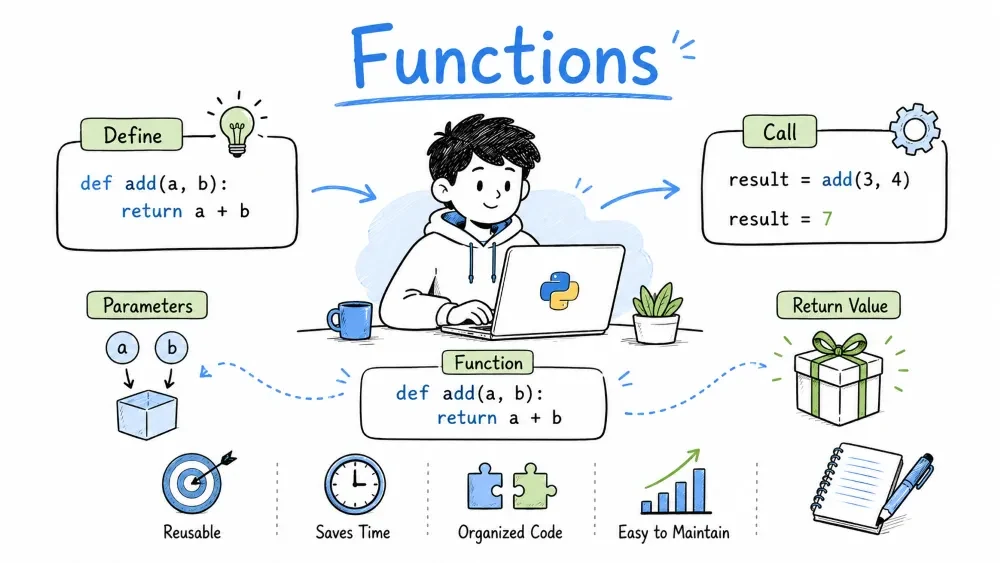
A function is a named block of code that performs a specific task. You write it once and run it whenever you need it by calling its name. This saves you from writing the same code repeatedly.
Use def to create a function, followed by the function name and parentheses.
def greet():
    print("Hello there!")
Call it by using its name with parentheses:
greet() # Hello there!
Functions can call other functions:
def say_hello():
    print("Hello!")

def say_goodbye():
    print("Goodbye!")

def chat():
    say_hello()
    print("How are you?")
    say_goodbye()

chat()
# Hello!
# How are you?
# Goodbye!
Parameters let you pass data into a function. They go inside the parentheses.
def greet(name):
    print(f"Hello, {name}!")

greet("Alice")   # Hello, Alice!
greet("Bob")     # Hello, Bob!
A function can accept more than one parameter.
def introduce(name, age):
    print(f"{name} is {age} years old.")

introduce("Alice", 25)
Position matters — the first argument goes to the first parameter.
Give a parameter a default value. If the caller skips it, the default is used instead.
def greet(name, greeting="Hello"):
    print(f"{greeting}, {name}!")

greet("Alice")        # Hello, Alice!
greet("Bob", "Hey")   # Hey, Bob!
Default parameters must come after non-default ones.
When calling a function, you can name the argument to skip the position rule.
def introduce(name, age, city):
    print(f"{name}, {age}, from {city}")

introduce(city="Tokyo", name="Alice", age=25)
Order doesn't matter with keyword arguments.
*args collects any number of positional arguments into a tuple. Use it when you don't know how many will be passed.
def sum_all(*numbers):
    total = 0
    for n in numbers:
        total += n
    return total

print(sum_all(1, 2, 3))       # 6
print(sum_all(5, 10, 15, 20)) # 50
**kwargs collects extra keyword arguments into a dictionary.
def print_info(**info):
    for key, value in info.items():
        print(f"{key}: {value}")

print_info(name="Alice", age=25, job="Engineer")
# name: Alice
# age: 25
# job: Engineer
A function can send a value back to the caller using return.
def add(a, b):
    return a + b

result = add(3, 5)
print(result)  # 8
Without return, a function returns None.
Return multiple values as a tuple — Python unpacks it automatically.
def get_min_max(numbers):
    return min(numbers), max(numbers)

low, high = get_min_max([4, 7, 2, 9, 1])
print(low)   # 1
print(high)  # 9
Use return to exit a function before reaching the end.
def divide(a, b):
    if b == 0:
        return "Cannot divide by zero"
    return a / b

print(divide(10, 2))  # 5.0
print(divide(10, 0))  # Cannot divide by zero
Scope determines where a variable can be accessed. It depends on where the variable is created.
Variables created inside a function only exist inside that function.
def my_func():
    x = 10
    print(x)

my_func()  # 10
print(x)   # NameError: x is not defined
Variables created outside any function can be read from anywhere.
x = 10

def show():
    print(x)

show()  # 10
To modify a global variable inside a function, use the global keyword.
count = 0

def increment():
    global count
    count += 1

increment()
increment()
print(count)  # 2
Without global, Python creates a new local variable instead.
nonlocal Keywordnonlocal lets you modify a variable from an enclosing (outer) function inside a nested function.
def outer():
    x = 10

    def inner():
        nonlocal x
        x = 20

    inner()
    print(x)  # 20

outer()
You can define a function inside another function. The inner function only exists inside the outer one.
def outer(text):
    def inner():
        print(text)
    inner()

outer("Hello!")  # Hello!
This is useful for helper functions that shouldn't be visible outside their parent.
In Python, functions are objects. You can assign them to variables, pass them to other functions, and return them from functions.
def greet(name):
    return f"Hello, {name}"

my_function = greet
print(my_function("Alice"))  # Hello, Alice!
This is how map, filter, and sorted work — they take a function as an argument.
def square(x):
    return x ** 2

numbers = [1, 2, 3, 4]
result = list(map(square, numbers))
print(result)  # [1, 4, 9, 16]
A lambda is a one-line anonymous function. Use it for simple operations where a full def feels excessive.
double = lambda x: x * 2
print(double(5))  # 10
Syntax: lambda arguments: expression
Lambdas are commonly passed to functions like sorted().
students = [
    {"name": "Alice", "grade": 85},
    {"name": "Bob", "grade": 72},
    {"name": "Charlie", "grade": 90}
]

sorted_students = sorted(students, key=lambda s: s["grade"])
print(sorted_students)
# [{'name': 'Bob', 'grade': 72}, {'name': 'Alice', 'grade': 85}, {'name': 'Charlie', 'grade': 90}]
numbers = [1, 2, 3, 4, 5]

squared = list(map(lambda x: x**2, numbers))
print(squared)  # [1, 4, 9, 16, 25]

evens = list(filter(lambda x: x % 2 == 0, numbers))
print(evens)  # [2, 4]
Don't use lambdas for anything complex — regular functions are clearer.
A docstring is a string right after a function's definition that explains what it does. Write it inside triple quotes.
def add(a, b):
    """Return the sum of two numbers."""
    return a + b
View it with help() or .__doc__:
help(add)     # Shows the docstring
print(add.__doc__)  # Return the sum of two numbers.
For longer explanations, multi-line docstrings are standard:
def calculate(price, tax_rate):
    """
    Calculate total price including tax.

    Arguments:
        price -- the base price
        tax_rate -- tax rate as decimal (e.g. 0.1 for 10%)
    """
    return price * (1 + tax_rate)
Type hints tell the reader (and tools) what type a parameter or return value should be. Python ignores them at runtime, but they make code easier to understand.
def greet(name: str) -> str:
    return f"Hello, {name}"
def add(a: int, b: int) -> int:
    return a + b
Type hints are optional. They help catch bugs when used with a type checker like mypy.
A recursive function calls itself. It's useful for problems that can be broken into smaller, identical steps.
def factorial(n):
    if n == 1:
        return 1
    return n * factorial(n - 1)

print(factorial(5))  # 120
Step by step:
factorial(5) = 5 * factorial(4)
            = 5 * 4 * factorial(3)
            = 5 * 4 * 3 * factorial(2)
            = 5 * 4 * 3 * 2 * factorial(1)
            = 5 * 4 * 3 * 2 * 1
            = 120
Every recursive function needs a base case — a condition where it stops calling itself. Without one, it runs forever (or until Python's recursion limit).
def countdown(n):
    if n == 0:       # base case
        print("Go!")
        return
    print(n)
    countdown(n - 1) # recursive call

countdown(3)
# 3
# 2
# 1
# Go!
def fibonacci(n):
    if n <= 1:
        return n
    return fibonacci(n - 1) + fibonacci(n - 2)

print(fibonacci(7))  # 13
Use it for problems that naturally split into smaller versions of themselves — tree traversal, directory walking, divide-and-conquer algorithms. For simple loops, use a loop instead. Recursion uses more memory and Python's default limit is around 1000 calls.
Even or Odd — Write a function that takes a number and returns "even" or "odd".
Reverse a String — Write a recursive function that reverses a string.
Calculator — Write a function that takes two numbers and an operator (+, -, *, /) and returns the result.
Filter Adults — Given a list of ages, use filter() with a lambda to return only ages 18 and above.
Countdown Timer — Write a recursive function that counts down from n to 1, printing each number.
Save your progress and earn XP for completing tutorials.
Technology
Python
Lesson group
Functions
Progress
100% complete

