Preparing your learning space...
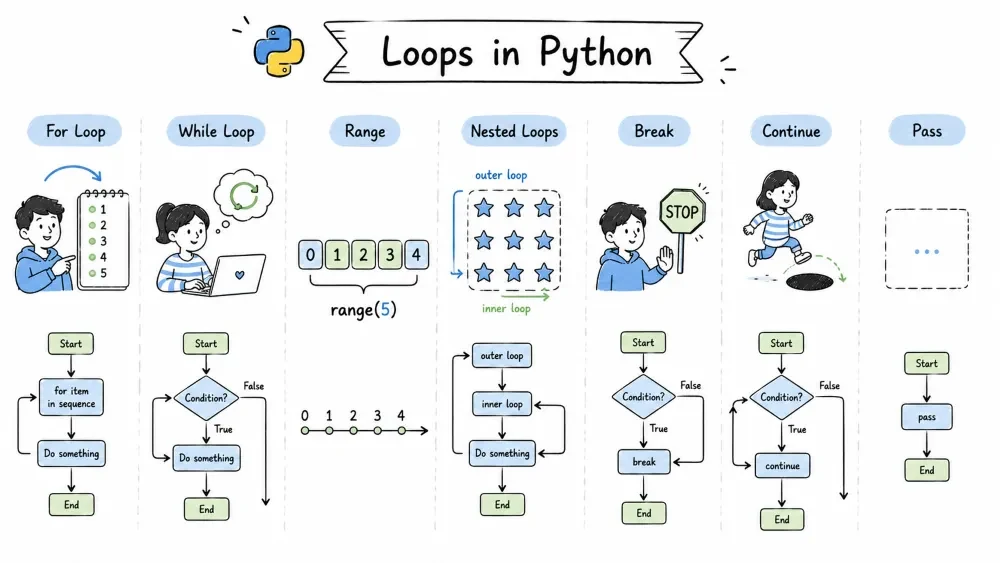
for Loop — Your Everyday Workhorserange() Function — Your Number Buddywhile Loop — Keep Going Until...break — Get Me Out of Here!continue — Skip This One, Move Onpass — Do Nothing (But It's Not Useless!)We're gonna cover everything about loops in Python — for loops, while loops, range(), nested loops, and those three little troublemakers: break, continue, and pass. By the end, you'll actually feel comfortable using them.
Let's jump in.
A loop is a way to repeat a block of code multiple times without writing it over and over. Instead of copy-pasting the same lines 10 times, you put them inside a loop and let Python handle the repetition.
Think of it like this — if you had to print "Hello" 5 times, you could write:
print("Hello")
print("Hello")
print("Hello")
print("Hello")
print("Hello")
Or you could use a loop and write it once:
for i in range(5):
    print("Hello")
Same result, way less typing. That's the whole point of loops — automate repetition.
Loops are everywhere in real code: processing list items, reading files, validating user input, generating patterns, and tons more.
for Loop — Your Everyday WorkhorseDefinition: A for loop is used to iterate over a sequence (list, string, tuple, dictionary) and run a block of code for each item in that sequence.
If you're gonna use ONE loop most of the time, it's this one.
Basic syntax:
for item in something:
    # do something with item
Real example — looping through a list:
fruits = ["apple", "banana", "cherry", "dates"]

for fruit in fruits:
    print(f"I love {fruit}!")
Try it in your editor — it prints each fruit with that message.
Looping through a string (yes, strings are iterable too):
word = "Python"
for letter in word:
    print(letter)
This prints P, y, t, h, o, n — each on a new line.
Looping through a dictionary:
student = {"name": "Alice", "age": 20, "grade": "A"}

for key in student:
    print(f"{key}: {student[key]}")

# Or use .items() for cleaner code
for key, value in student.items():
    print(f"{key}: {value}")
range() Function — Your Number BuddyDefinition: range() is a built-in function that generates a sequence of numbers. It's commonly used with for loops when you need to repeat something a specific number of times.
You'll see range() with for loops ALL the time.
# range(stop) — from 0 to stop-1
for i in range(5):
    print(i)  # 0 1 2 3 4
# range(start, stop)
for i in range(2, 7):
    print(i)  # 2 3 4 5 6
# range(start, stop, step)
for i in range(1, 10, 2):
    print(i)  # 1 3 5 7 9
Pro tip: range() doesn't create a big list in memory — it's lazy. Super efficient when you're looping millions of times.
Putting it together — multiplication table:
for num in range(1, 11):
    print(f"5 * {num} = {5 * num}")
while Loop — Keep Going Until...Definition: A while loop keeps executing a block of code as long as a given condition remains True. Unlike for, you don't need to know how many iterations you'll need in advance.
count = 0
while count < 5:
    print(f"Count is: {count}")
    count += 1  # DON'T forget this or you'll loop forever!
WARNING: If you forget to update the condition variable, your loop runs forever and your program hangs. Trust me, we've ALL done it.
Practical example — guess the number game:
import random

secret = random.randint(1, 10)
guess = None

while guess != secret:
    guess = int(input("Guess a number between 1 and 10: "))

    if guess < secret:
        print("Too low!")
    elif guess > secret:
        print("Too high!")

print("You got it!")
When would you use while over for?
Definition: A nested loop is a loop inside another loop. The inner loop runs completely for every single iteration of the outer loop.
Mind-bending at first, but super useful for grids, tables, and combinations.
# Simple multiplication table
for i in range(1, 4):
    for j in range(1, 4):
        print(f"{i} * {j} = {i*j}", end="  ")
    print()  # new line after inner loop
Output:
1 * 1 = 1  1 * 2 = 2  1 * 3 = 3
2 * 1 = 2  2 * 2 = 4  2 * 3 = 6
3 * 1 = 3  3 * 2 = 6  3 * 3 = 9
Drawing a triangle pattern:
rows = 5
for i in range(1, rows + 1):
    for j in range(i):
        print("*", end="")
    print()
Output:
*
**
***
****
*****
One thing to remember: if your outer loop runs n times and your inner loop runs m times, you're looking at n * m total operations. Nest three or four levels deep and your program will start crawling.
break — Get Me Out of Here!Definition: break is a keyword that immediately terminates the loop, regardless of whether the condition is still true or there are items remaining.
# Find the first negative number
numbers = [5, 12, 8, -3, 20, -1, 7]

for num in numbers:
    if num < 0:
        print(f"Found negative: {num}")
        break  # stops at -3, never reaches 20 or -1
break in a while loop — infinite loop with an exit:
while True:
    command = input("Enter a command (type 'quit' to exit): ")
    if command == "quit":
        print("Goodbye!")
        break
    print(f"Executing: {command}")
This is a really common pattern — an infinite loop while True that you break out of when some condition is met.
Important: break only exits the innermost loop it's in. If you're inside nested loops and call break, it only breaks out of the current inner loop, not the outer one.
continue — Skip This One, Move OnDefinition: continue is a keyword that skips the rest of the current iteration and jumps directly to the next iteration of the loop.
# Print only odd numbers
for i in range(10):
    if i % 2 == 0:  # even
        continue
    print(i)  # 1 3 5 7 9
Real-world-ish example — skip bad data:
orders = [120, -5, 340, None, 200, 0, 500]

for order in orders:
    if not order or order <= 0:  # skip invalid entries
        continue
    print(f"Processing order: ${order}")
Without continue, you'd be writing nested if blocks everywhere. It keeps things flat and readable.
pass — Do Nothing (But It's Not Useless!)Definition: pass is a null statement — it does absolutely nothing. It's used as a placeholder where Python syntax requires a statement but you don't want to execute any code.
for i in range(5):
    pass  # i'll write this later
Where you'll actually use it:
# When you're structuring code first
def process_user_data():
    pass  # TODO: implement this

class FutureFeature:
    pass  # will build this later

# Skipping specific cases in a loop
for item in ["a", "b", "c"]:
    if item == "b":
        pass  # not sure what to do with 'b' yet
    else:
        print(item)
It's not useless — it keeps the syntax valid while you're sketching out your program.
And that's it! Loops are one of those things that feel weird for a week and then become second nature. Start with for + range(), keep while for when things get uncertain, and don't forget break when you need an emergency exit.
Save your progress and earn XP for completing tutorials.
Technology
Python
Lesson group
Loops
Progress
100% complete

