Preparing your learning space...
100% through Operators tutorials
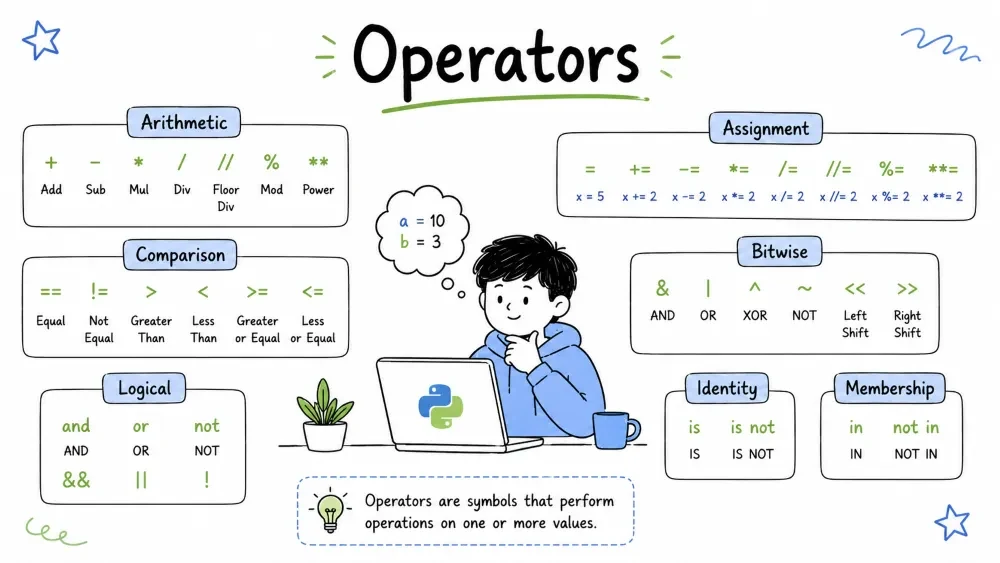
| Section | Time | Difficulty |
|---|---|---|
| What is an Operator? | 2 min | Very Easy |
| 1. Arithmetic Operators | 5 min | Very Easy |
| 2. Assignment Operators | 5 min | Very Easy |
| 3. Comparison Operators | 5 min | Very Easy |
| 4. Logical Operators | 5 min | Easy |
| 5. Membership Operators | 3 min | Very Easy |
| 6. Identity Operators | 5 min | Medium |
| 7. Bitwise Operators | 10 min | Medium |
| Quick Reference | 2 min | - |
| Short Challenge | 5 min | Easy |
| Practice Challenge | 10 min | Medium |
| Operator Precedence | 5 min | Medium |
An operator is a symbol (or a keyword) that tells Python to perform a specific mathematical, relational, or logical operation on one or more values (called operands).
In simple terms: an operator does something with data.
# Here, + is the operator, and 5 and 3 are the operands
result = 5 + 3
print(result)  # Output: 8
Python has several types of operators, each used for different tasks. This tutorial covers all of them with short, practical examples.
Arithmetic operators are used with numeric values to perform common mathematical operations.
| Operator | Name | Example |
|---|---|---|
+ | Addition | a + b |
- | Subtraction | a - b |
* | Multiplication | a * b |
/ | Division | a / b |
// | Floor Division | a // b |
% | Modulus | a % b |
** | Exponentiation | a ** b |
+)Definition: Adds two operands together. Also used to join (concatenate) strings.
a = 10
b = 5
result = a + b
print(result)  # Output: 15

# Strings also support +
print("Hello " + "World")  # Output: Hello World
-)Definition: Subtracts the right operand from the left operand.
a = 10
b = 3
result = a - b
print(result)  # Output: 7

# Negative result
print(5 - 10)  # Output: -5
*)Definition: Multiplies two operands. Also repeats strings N times.
a = 6
b = 7
result = a * b
print(result)  # Output: 42

# String repetition with *
print("Ha" * 3)  # Output: HaHaHa
/)Definition: Divides the left operand by the right operand. Always returns a float.
a = 10
b = 3
result = a / b
print(result)  # Output: 3.3333333333333335

# Even if the result is a whole number
print(10 / 2)  # Output: 5.0 (float, not int)
//)Definition: Divides and rounds down to the nearest integer.
a = 10
b = 3
result = a // b
print(result)  # Output: 3 (3.33 rounds down)

# Negative numbers round even more negative
print(-10 // 3)  # Output: -4
%)Definition: Returns the remainder after division.
a = 10
b = 3
result = a % b
print(result)  # Output: 1 (10 / 3 = 3 remainder 1)

# Check if a number is even or odd
number = 7
if number % 2 == 0:
    print("Even")
else:
    print("Odd")  # Output: Odd
**)Definition: Raises the left operand to the power of the right operand.
a = 2
b = 5
result = a ** b
print(result)  # Output: 32 (2^5 = 2x2x2x2x2)

# Square root using exponent
print(16 ** 0.5)  # Output: 4.0
Assignment operators are used to assign values to variables.
| Operator | Example | Same As |
|---|---|---|
= | x = 5 | x = 5 |
+= | x += 3 | x = x + 3 |
-= | x -= 3 | x = x - 3 |
*= | x *= 3 | x = x * 3 |
/= | x /= 3 | x = x / 3 |
//= | x //= 3 | x = x // 3 |
%= | x %= 3 | x = x % 3 |
**= | x **= 3 | x = x ** 3 |
=)Definition: Assigns a value to a variable.
x = 10
name = "Alice"
is_valid = True

# Multiple assignment
a, b, c = 1, 2, 3
print(a, b, c)  # Output: 1 2 3

# Assign same value to multiple variables
p = q = r = 0
print(p, q, r)  # Output: 0 0 0
+=)Definition: Adds the right operand to the left operand and stores the result in the left variable.
score = 10
score += 5    # score = score + 5
print(score)  # Output: 15

# Useful in loops
total = 0
for i in range(1, 6):
    total += i
print(total)  # Output: 15 (1+2+3+4+5)
-=)Definition: Subtracts the right operand from the left operand and stores the result.
health = 100
health -= 20    # health = health - 20
print(health)   # Output: 80

# Countdown
count = 5
while count > 0:
    print(count, end=" ")
    count -= 1
# Output: 5 4 3 2 1
*=)Definition: Multiplies the left operand by the right operand and stores the result.
value = 2
value *= 10    # value = value * 10
print(value)   # Output: 20

# Doubling
num = 1
num *= 2
num *= 2
num *= 2
print(num)  # Output: 8
/=)Definition: Divides the left operand by the right operand and stores the result (always float).
value = 10
value /= 4     # value = value / 4
print(value)   # Output: 2.5

x = 15
x /= 3
print(x)  # Output: 5.0 (always float)
//=)Definition: Floor divides the left operand by the right operand and stores the result.
value = 10
value //= 3    # value = value // 3
print(value)   # Output: 3

x = 25
x //= 4
print(x)  # Output: 6
%=)Definition: Takes the modulus of the left operand by the right operand and stores the result.
value = 10
value %= 3      # value = value % 3
print(value)    # Output: 1

# Keep number in range
index = 0
index = (index + 1) % 3  # cycles 0->1->2->0
print(index)  # Output: 1
**=)Definition: Raises the left operand to the power of the right operand and stores the result.
value = 2
value **= 5    # value = value ** 5
print(value)   # Output: 32

x = 3
x **= 3
print(x)  # Output: 27
Comparison operators compare two values and return a boolean (
TrueorFalse).
| Operator | Name | Example |
|---|---|---|
== | Equal to | a == b |
!= | Not equal to | a != b |
> | Greater than | a > b |
< | Less than | a < b |
>= | Greater than or equal | a >= b |
<= | Less than or equal | a <= b |
==)Definition: Checks if two values are equal. Returns True if they are, False otherwise.
a = 5
b = 5
print(a == b)  # Output: True

# Comparing different types
print(5 == "5")  # Output: False (int vs string)

# Check user input
password = "python123"
if user_input == password:
    print("Access granted")
!=)Definition: Checks if two values are not equal. Returns True if they are different.
a = 5
b = 3
print(a != b)  # Output: True

# Validate selection
choice = "exit"
if choice != "quit":
    print("Continue running")
>)Definition: Checks if the left value is greater than the right value.
age = 18
print(age > 18)  # Output: False (18 is not greater than 18)

# Real world use
temperature = 30
if temperature > 25:
    print("It's hot today!")
<)Definition: Checks if the left value is less than the right value.
price = 49
print(price < 50)  # Output: True

budget = 100
item_cost = 120
if item_cost < budget:
    print("You can buy it!")
else:
    print("Too expensive!")  # This runs
>=)Definition: Checks if the left value is greater than or equal to the right value.
age = 18
print(age >= 18)  # Output: True (18 is >= 18)

# Check eligibility
marks = 75
passing = 40
if marks >= passing:
    print("Passed!")  # This runs
<=)Definition: Checks if the left value is less than or equal to the right value.
speed = 60
print(speed <= 60)  # Output: True

# Check limit
speed_limit = 80
current_speed = 75
if current_speed <= speed_limit:
    print("All good, safe speed!")
Logical operators combine conditional statements.
| Operator | Description | Example |
|---|---|---|
and | True if both statements are true | a > 5 and b < 10 |
or | True if at least one statement is true | a > 5 or b < 10 |
not | Reverses the result -- true becomes false and vice versa | not(a > 5) |
and)Definition: Returns True only if BOTH conditions are True.
age = 25
has_license = True

if age >= 18 and has_license:
    print("You can drive!")  # This runs

# Another example
x = 10
print(x > 5 and x < 20)  # Output: True
print(x > 15 and x < 20) # Output: False
or)Definition: Returns True if AT LEAST ONE condition is True.
is_admin = False
is_editor = True

if is_admin or is_editor:
    print("You can edit this page")  # This runs

# Another example
day = "Saturday"
if day == "Saturday" or day == "Sunday":
    print("Weekend!")  # This runs
not)Definition: Reverses the boolean value -- True becomes False and False becomes True.
is_raining = False

if not is_raining:
    print("Let's go outside!")  # This runs

# Another example
door_locked = True
if not door_locked:
    print("Door is open")
else:
    print("Door is locked")  # This runs

# Double NOT
print(not not True)  # Output: True
# Combining logical operators
age = 22
has_ticket = True
is_vip = False

if (age >= 18 and has_ticket) or is_vip:
    print("Welcome to the show!")  # This runs

# Short-circuit evaluation
def get_true():
    print("get_true called")
    return True

def get_false():
    print("get_false called")
    return False

print(get_false() and get_true())  # get_true() is NEVER called
print(get_true() or get_false())   # get_false() is NEVER called
Membership operators test if a sequence contains a value.
| Operator | Description | Example |
|---|---|---|
in | True if value exists in the sequence | "a" in "apple" |
not in | True if value does NOT exist | "z" not in "apple" |
in)Definition: Returns True if a value exists inside a sequence (string, list, tuple, dictionary).
fruits = ["apple", "banana", "cherry"]
print("banana" in fruits)  # Output: True
print("grape" in fruits)   # Output: False

# Works with strings
text = "Hello, World!"
print("World" in text)  # Output: True
print("Python" in text) # Output: False

# Works with dictionaries (checks keys)
student = {"name": "Alice", "grade": "A"}
print("name" in student)    # Output: True
print("Alice" in student)   # Output: False (checks keys, not values)
not in)Definition: Returns True if a value does NOT exist in a sequence.
banned_users = ["user123", "spam_account"]
current_user = "new_user"

if current_user not in banned_users:
    print("Welcome!")  # This runs

# Check for vowels
word = "sky"
vowels = "aeiou"
has_vowel = False

for char in word:
    if char in vowels:
        has_vowel = True
        break

print(has_vowel)  # Output: False

# Practical use
email = "user@example.com"
if "@" not in email:
    print("Invalid email!")
else:
    print("Valid email")  # This runs
Identity operators compare the memory location of two objects.
| Operator | Description | Example |
|---|---|---|
is | True if both variables point to the same object | a is b |
is not | True if variables point to different objects | a is not b |
is)Definition: Returns True if both variables reference the exact same object in memory.
a = [1, 2, 3]
b = [1, 2, 3]
c = a

print(a is c)  # Output: True (same object)
print(a is b)  # Output: False (different objects, even though values match)

# Small integers (-5 to 256) are cached in Python
x = 100
y = 100
print(x is y)  # Output: True (cached)

# None checks
value = None
if value is None:
    print("No value set")  # This runs

# Use is for singletons, not ==
print(True is True)   # Output: True
print(False is False) # Output: True
is not)Definition: Returns True if variables point to different objects in memory.
a = [1, 2, 3]
b = [1, 2, 3]

print(a is not b)  # Output: True (different objects)

# Common pattern
result = get_data()  # hypothetical function
if result is not None:
    print("Data received")
else:
    print("No data")

# Compare with !=
list1 = [1, 2]
list2 = [1, 2]
list3 = list1

print(list1 is not list2)  # Output: True (different objects)
print(list1 is not list3)  # Output: False (same object)
print(list1 != list2)      # Output: False (values are same)
# IS checks identity (same object), == checks equality (same value)
a = [1, 2, 3]
b = [1, 2, 3]
c = a

print(a == b)  # Output: True (values are equal)
print(a is b)  # Output: False (different objects)
print(a is c)  # Output: True (same object)

# Use IS for None, True, False
x = None
if x is None:      # Correct
    pass
if x == None:      # Works but not preferred
    pass
Bitwise operators perform operations on binary representations of integers.
| Operator | Name | Description | Example |
|---|---|---|---|
& | AND | Sets bit if both bits are 1 | a & b |
| ` | ` | OR | Sets bit if at least one bit is 1 |
^ | XOR | Sets bit if bits are different | a ^ b |
~ | NOT | Inverts all bits | ~a |
<< | Left Shift | Shifts bits left by N | a << 2 |
>> | Right Shift | Shifts bits right by N | a >> 2 |
&)Definition: For each bit, returns 1 if BOTH bits are 1, otherwise 0.
a = 5   # 0b0101
b = 3   # 0b0011
result = a & b   # 0b0001
print(result)    # Output: 1

# Check if a number is odd
num = 7
if num & 1:
    print("Odd")  # This runs (last bit is 1)
else:
    print("Even")

# Clear lowest bit
x = 6   # 0b0110 -> 0b0110 & 0b1110 = 0b0110
x = 7   # 0b0111 -> 0b0111 & 0b1110 = 0b0110
print(x & ~1)  # Output: 6
|)Definition: For each bit, returns 1 if AT LEAST ONE bit is 1.
a = 5   # 0b0101
b = 3   # 0b0011
result = a | b   # 0b0111
print(result)    # Output: 7

# Setting specific bit flags
READ = 1    # 0b001
WRITE = 2   # 0b010
EXEC = 4    # 0b100

permissions = READ | WRITE  # 0b011 = 3
print(permissions)  # Output: 3

# Check if write permission is set
if permissions & WRITE:
    print("Can write")  # This runs
^)Definition: For each bit, returns 1 if the bits are DIFFERENT.
a = 5   # 0b0101
b = 3   # 0b0011
result = a ^ b   # 0b0110
print(result)    # Output: 6

# Swap two numbers without a temporary variable
x = 5
y = 3
x = x ^ y   # x = 5 ^ 3 = 6
y = x ^ y   # y = 6 ^ 3 = 5
x = x ^ y   # x = 6 ^ 5 = 3
print(x, y)  # Output: 3 5

# XOR trick -- finding the non-repeating element
nums = [1, 2, 3, 2, 1]
unique = 0
for n in nums:
    unique ^= n
print(unique)  # Output: 3
~)Definition: Inverts all bits -- turns 0 to 1 and 1 to 0. Formula: ~x = -(x+1).
a = 5   # 0b0101
result = ~a
print(result)  # Output: -6 (because ~5 = -(5+1) = -6)

# Understanding: ~x is the same as -x-1
print(~10)   # Output: -11
print(~(-3)) # Output: 2
print(~0)    # Output: -1
<<)Definition: Shifts bits to the left by N positions. Fills with 0. Same as multiplying by 2^N.
a = 3    # 0b0011
result = a << 2   # 0b1100
print(result)  # Output: 12 (3 x 2^2 = 3 x 4 = 12)

# Quick multiply by power of 2
print(1 << 10)  # Output: 1024 (2^10)
print(5 << 3)   # Output: 40 (5 x 2^3 = 5 x 8 = 40)
>>)Definition: Shifts bits to the right by N positions. Same as floor-dividing by 2^N.
a = 16   # 0b10000
result = a >> 2   # 0b00100
print(result)  # Output: 4 (16 / 2^2 = 16 / 4 = 4)

# Quick divide by power of 2
print(100 >> 1)  # Output: 50
print(100 >> 2)  # Output: 25
print(100 >> 3)  # Output: 12 (floor division)

# Extract byte from integer
value = 0xAABB
low_byte = value & 0xFF           # 0xBB
high_byte = (value >> 8) & 0xFF   # 0xAA
print(hex(low_byte))   # Output: 0xbb
print(hex(high_byte))  # Output: 0xaa
| Category | Operators |
|---|---|
| Arithmetic | + - * / // % ** |
| Assignment | = += -= *= /= //= %= **= &= ` |
| Comparison | == != > < >= <= |
| Logical | and or not |
| Membership | in not in |
| Identity | is is not |
| Bitwise | & ` |
# Guess which operator fits in place of "??" to get the output shown

# Challenge 1
a = 8
b = 3
print(a ?? b)  # Output: 2
# Which operator?  (Hint: remainder)

# Challenge 2
x = 5
x ??= 2
print(x)       # Output: 25
# Which operator?

# Challenge 3
age = 20
has_id = True
if age ?? 18 ?? has_id:
    print("Allowed")  # This runs
# Which two operators?

# Challenge 4
text = "hello world"
print("code" ?? text)  # Output: True
# Which operator?

# Challenge 5
a = 12  # 0b1100
b = 10  # 0b1010
print(a ?? b)  # Output: 8 (0b1000)
print(a ?? b)  # Output: 14 (0b1110)
# Which two operators?

---
| # | Operator | Reason |
|---|---|---|
| 1 | % | 8 % 3 = 2 (remainder) |
| 2 | ** | 5 ** 2 = 25 (exponent) |
| 3 | >= and and | age >= 18 and has_id |
| 4 | not in | "code" not in "hello world" -> True |
| 5 | & then ` | ` |
# Try to figure out the output before running
x = 10
y = 3

# Arithmetic
print(x + y)   # ?
print(x // y)  # ?
print(x ** y)  # ?

# Assignment
z = x
z += y
print(z)       # ?

# Comparison
print(x > y)   # ?
print(x == 10) # ?

# Logical
print(x > 5 and y < 5)  # ?
print(not (x == 10))     # ?

# Membership
fruits = ["apple", "banana"]
print("mango" in fruits)   # ?
print("apple" not in fruits)  # ?

# Identity
a = [1, 2]
b = [1, 2]
print(a is b)    # ?
print(a == b)    # ?

# Bitwise
print(x & y)     # ?
print(x | y)     # ?
print(x >> 1)    # ?
When multiple operators appear in one expression, Python follows a fixed priority order. Higher precedence operators are evaluated first.
| Precedence | Operators | Description |
|---|---|---|
| 1 (Highest) | ** | Exponentiation |
| 2 | ~ +x -x | Bitwise NOT, Unary plus/minus |
| 3 | * / // % | Multiplication, Division, Floor Division, Modulus |
| 4 | + - | Addition, Subtraction |
| 5 | << >> | Bitwise shifts |
| 6 | & | Bitwise AND |
| 7 | ^ | Bitwise XOR |
| 8 | ` | ` |
| 9 | == != > < >= <= is in | Comparisons, Identity, Membership |
| 10 | not | Logical NOT |
| 11 | and | Logical AND |
| 12 (Lowest) | or | Logical OR |
# Example -- what is the result?
result = 5 + 3 * 2
print(result)  # Output: 11 (not 16!)
# Because * has higher precedence than +, so 3*2 = 6, then 5+6 = 11

# Use parentheses to change the order
result = (5 + 3) * 2
print(result)  # Output: 16

# Mixed example
x = 10 + 2 ** 3 * 3
# Step 1: 2 ** 3 = 8
# Step 2: 8 * 3 = 24
# Step 3: 10 + 24 = 34
print(x)  # Output: 34

# Logical precedence
print(True or False and False)   # Output: True  (and evaluated first)
print((True or False) and False) # Output: False (parentheses change it)
Save your progress and earn XP for completing tutorials.
Technology
Python
Lesson group
Operators
Progress
100% complete

