Preparing your learning space...
100% through Account Security tutorials
By the end of this tutorial, you will be able to:
HttpOnly, Secure, SameSite).| Property | Value |
|---|---|
| Difficulty | Beginner to Intermediate |
| Prerequisites | Password Security (Tutorial 1), MFA (Tutorial 2) |
| Hands-on Exercises | Inspecting Cookies + User-Agent String Analysis |
| Tools Covered | Browser DevTools, IP Geolocation Lookup, Google Session Auditor |
Proactive Security: A security approach focused on continuous session monitoring and preemptive configuration audits to detect and resolve vulnerabilities before an actual exploit occurs.
Most computer users apply a Reactive Security model: they only change their behavior after an account has been compromised, money has been stolen, or personal information has been leaked.
Proactive Security means monitoring your account status and configuration to detect intruders before they can act. This tutorial covers session monitoring and login alert analysis.
Session & Cookie Management: The cryptographic mechanism where servers generate dynamic session IDs, stored in browser cookies, to maintain user state without re-entering credentials.
When you enter your username and password, the server verifies them and generates a unique string of characters called a Session ID. The server sends this ID to your browser, which stores it as a Cookie.
Session ID: A unique, random string generated by the server upon successful authentication to track the state of a specific logged-in user.
Cookie: A small block of data created by a web server and stored by the user's browser, used to identify the user's device and pass state information back to the server.
[ Browser ] ----------------- Sends Username/Password -----------------> [ Server ]
[ Browser ] <----------- Sends Session ID Cookie (e.g., "SESS9921") ---- [ Server ]
[ Browser ] -- Sends "SESS9921" Cookie automatically on next page ---> [ Server ]
Every time you click a new page or refresh, your browser automatically attaches this cookie to the request. This tells the server you are already logged in so you don't have to type your password on every click.
Because cookies are valuable targets, browsers use flags to protect them:
HttpOnly Flag:
HttpOnlyFlag: A security flag that restricts access to the cookie from client-side APIs (such as JavaScript'sdocument.cookie), preventing cookie-theft via Cross-Site Scripting (XSS) attacks.
Secure Flag:
SecureFlag: A security flag directing the browser to transmit the cookie only over encrypted connections (HTTPS), protecting it from packet-sniffing on the network.
SameSite Flag:
SameSiteFlag: A security flag that controls whether cookies are sent along with requests initiated by third-party websites, defending against Cross-Site Request Forgery (CSRF).
Session Hijacking: The interception and unauthorized reuse of active session identifiers to bypass login credentials and MFA protection completely.
If an attacker steals your session cookie, they can paste it into their own browser. This is called Session Hijacking or Cookie Theft.
Bypasses MFA: The server thinks the attacker is you because they have your session ID. The server has already approved the login, so it does not ask the attacker for a password or 2FA code.
InfoStealer Malware:
InfoStealer: A class of malicious software designed specifically to harvest sensitive credentials, browser cookies, cryptowallet data, and autofill logs from an infected device.
Modern malware (like RedLine Stealer or Lumma) targets browser profile folders, extracts active cookies, and sends them to hackers.
Hacker steals Cookie database ---> Imports Cookie into browser ---> Accesses account without MFA
Session Metadata: Technical identifiers (IP, location, device name, activity stamps) linked to a session that allow users to identify suspicious access.
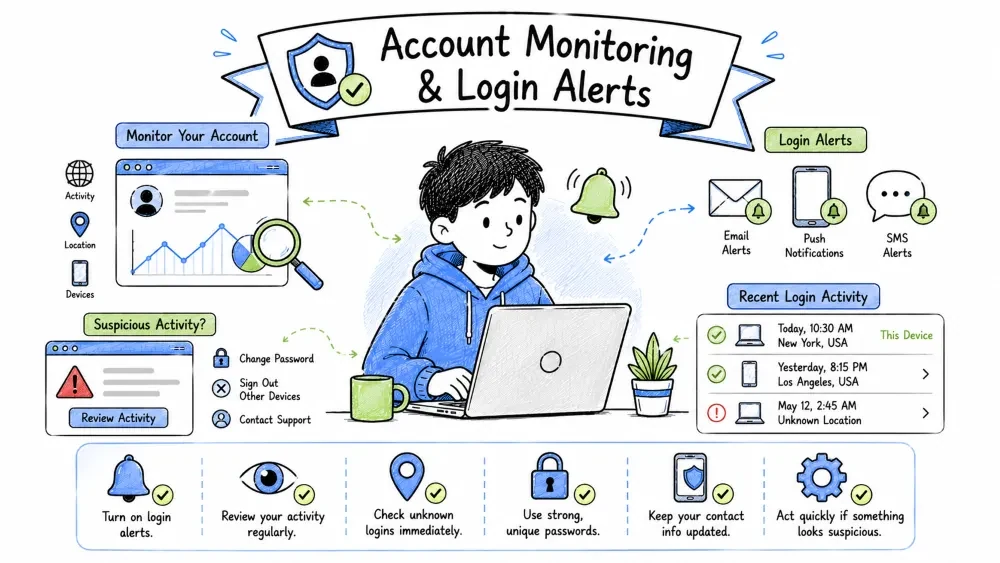
To detect session hijacking, review your active session list on your accounts (e.g., Google's "Your Devices" page or Meta's "Where You're Logged In").
Check the following parameters:
IP Address: A unique numerical label assigned to each device connected to a computer network that uses the Internet Protocol for communication.
Estimated Geolocation: The process of determining the physical geographic location of a device by looking up its public IP address in a specialized database (like MaxMind GeoIP).
Last Active Time: The timestamp recording when the device last communicated with the authentication server.
Device/Browser Type: The specific operating system and browser version detected by the server during access (obtained from the User-Agent string).
User-Agent String: A standardized string of metadata sent by client browsers that identifies operating systems, render engines, and client browser versions to the host server.
A User-Agent string is a line of text sent by your browser to the web server. It describes your operating system, browser type, and engine version.
Rendering Engine: The software component responsible for parsing HTML/CSS and displaying the webpage (e.g.,
AppleWebKitorGecko).
Platform/OS: The operating system identifier and architecture (e.g.,
Windows NT 10.0; Win64; x64orMacintosh; Intel Mac OS X).
Client/Browser: The specific browser software and version number (e.g.,
Chrome/120.0.0.0).
Mozilla/5.0 (Windows NT 10.0; Win64; x64) AppleWebKit/537.36 (KHTML, like Gecko) Chrome/120.0.0.0 Safari/537.36
Windows NT 10.0: Indicates the client machine runs Windows 10 or 11.Win64; x64: Indicates a 64-bit operating system architecture.Chrome/120.0.0.0: Indicates the user is using Google Chrome version 120.AppleWebKit & Safari: Legacy compatibility indicators present in most browser user-agents.[!WARNING] If your only computer runs Windows and you see a device session using a Mac OS X user-agent (
Macintosh; Intel Mac OS X 10_15_7), someone else has accessed your account.
Login Alert: A real-time automated security alert triggered by a platform when a user sign-in matches an unrecognized system profile.
A Login Alert is a security notification sent when a platform detects a sign-in with unusual parameters, such as:
Login Attempt Detected
         |
         v
Check Session Profile (IP, Location, User-Agent)
         |
         +---> Profile Matches History ---> Allow Access (No Alert)
         |
         +---> Profile Unrecognized  ---> Allow Access + Send Security Alert Email
Network Routing Mismatches: Legitimate shifts in IP address locations (VPN routing, ISP gateway changes) that simulate intrusion signatures.
Verify alerts before acting, as some network routing technologies can trigger false positives:
Virtual Private Network (VPN): A service that encrypts internet traffic and routes it through a secure server in another location, masking the user's actual IP address and location.
Dynamic IP Routing: A network practice where Internet Service Providers (ISPs) periodically assign different temporary IP addresses to client devices from a shared pool, rather than using a static IP.
VPNs mask your location by routing traffic through remote servers. If you connect to a server in Frankfurt, Germany, login alerts will show a login from Frankfurt.
Mobile operators dynamically route mobile internet traffic through centralized regional gateways.
Incident Response: A sequence of active steps (containment, credential resets, audits) executed immediately following a verified account security breach.
If you find an unauthorized device or receive a valid login alert, execute this checklist:
[ ] 1. Revoke the Session: Go to your device settings, click on the suspicious session, and select Sign Out or Terminate. This invalidates the session cookie.[ ] 2. Change the Password: Update the account password to a new, unique passphrase.[ ] 3. Secure the Email Account: If hackers access your recovery email, they can reset your passwords. Change your email password and enable MFA on the recovery account.[ ] 4. Save Critical Data: Take screenshots of the intruder's IP address, device type, and login location from the alert email or device logs for your records.Persistence Auditing: Inspection of access endpoints, such as app permissions and email forwarders, to remove backup entry routes established by attackers.
Sophisticated hackers establish backup access points to maintain persistence even after you change your password:
Persistence: The systematic techniques used by adversaries to maintain access to a target system or account even after credentials have been reset or the system has rebooted.
Email Forwarding Rules: Automated mail filters configured in email clients that forward incoming messages meeting specific criteria to an external email address.
Hands-On Exercises: Practical activities designed to guide you through Developer Tools cookie inspections and User-Agent audits.
session_id, SID, or JSESSIONID).HttpOnly and Secure columns have checkmarks.https://www.whatismybrowser.com/detect/what-is-my-user-agent/Save your progress and earn XP for completing tutorials.
Technology
Cyber Security & Networking
Lesson group
Account Security
Progress
100% complete

