Preparing your learning space...
67% through Account Security tutorials
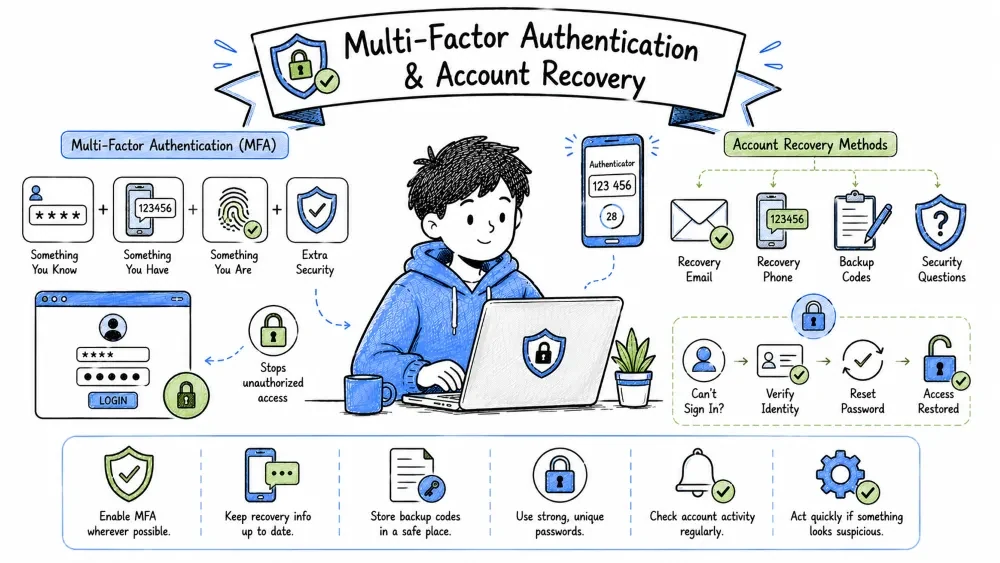
By the end of this tutorial, you will be able to:
Single-Factor Security: An authentication setup that relies on only a single credential (such as a password), creating a single point of failure that is vulnerable to theft or guessing.
If you protect your online accounts using only a password, you are relying on Single-Factor Security (Something You Know).
Even if your password is a 30-character passphrase, it can be compromised if:
Multi-Factor Authentication (MFA) introduces a second layer of defense. Even if an attacker gets your password, they are blocked because they cannot replicate the physical possession or biometric factor required to complete the login.
Authentication Factors: The three traditional categories of credentials used to verify identity: Knowledge (something you know), Possession (something you have), and Inherence (something you are).
To build true MFA, you must combine factors from different categories. If you use two items from the same category, you do not have MFA.
       AUTHENTICATION FACTORS
       +------------------------------------+
       |  1. KNOWLEDGE: Something You Know  | ---> Password, PIN, Passphrase
       +------------------------------------+
       |  2. POSSESSION: Something You Have | ---> Smartphone, YubiKey, Token
       +------------------------------------+
       |  3. INHERENCE: Something You Are   | ---> Fingerprint, Face ID, Iris
       +------------------------------------+
Time-Based One-Time Password (TOTP): A security standard that generates a temporary 6-digit code by applying an HMAC hash algorithm to a shared secret key and the current Unix timestamp.
Most authenticator apps use TOTP (Time-based One-Time Password), which is an open internet standard (RFC 6238).
Shared Secret Key: A unique, random cryptographic key shared securely between the server and the authenticator app during setup, used as the seed for generating codes.
Unix Epoch Time: A system for tracking time by counting the number of seconds elapsed since 00:00:00 UTC on January 1, 1970, which serves as a universal counter for TOTP synchronization.
HMAC: A specific type of message authentication code involving a cryptographic hash function and a secret cryptographic key, ensuring code integrity and authenticity.
Because the system time is synchronized worldwide, both your phone and the server compute the exact same number at any given second, without ever needing to communicate with each other over the network.
Hardware Security Key: A physical token that authenticates users utilizing public-key cryptography and enforces site URL verification, making it immune to credential phishing attacks.
Standard TOTP is secure, but it can still be defeated by Adversary-in-the-Middle (AiTM) Phishing. If you log into a fake page, the phishing server will ask for your 6-digit TOTP code and forward it to the real website instantly.
To block this, the security industry created FIDO2 / WebAuthn hardware keys.
Public-Key Cryptography: A cryptographic system that uses pairs of keys: public keys (which can be shared openly with anyone) and private keys (which are kept strictly secret by the owner).
Challenge-Response: An authentication protocol where a server presents a challenge (a random cryptographic puzzle) and the client must sign it using a private key to prove ownership.
Origin Verification: A browser-enforced security check that verifies the exact protocol, domain name, and port of the website requesting authentication to block spoofed sites.
[ Browser (on phishing page) ] <---> [ Hardware Key ]
              |
              v
     Domain Verification:
     Phishing URL does not match registered URL.
     Hardware Key refuses to sign challenge!
github.com).g1thub.com instead of github.com, the key stops.Because the private key never leaves the physical USB device, and origin checks are enforced by hardware, FIDO2 keys are 100% phishing-resistant.
Out-of-Band Delivery Risks: The vulnerabilities associated with sending validation codes through networks (cellular or standard email) that can be intercepted or diverted.
Many services default to SMS or Email codes because they require no user setup. However, these are the least secure 2FA methods:
IMSI Catcher (Stingray):
IMSI Catcher: A cellular eavesdropping device that mimics a legitimate cell tower, forcing nearby mobile devices to connect to it and allowing the operator to intercept SMS traffic.
SS7 Vulnerabilities:
SS7 Vulnerabilities: Security flaws within the Signalling System No. 7 global telecommunications protocol suite that allow attackers to intercept calls and silently redirect text messages.
No Encryption: SMS is sent in plaintext over cellular networks and can be intercepted using IMSI catchers (Stingrays) or routing exploits (SS7 vulnerabilities).
Phishing Susceptibility: Attackers can build phishing boxes that request and capture SMS codes.
SIM Swapping: The cell carrier can be tricked into porting your phone number to a hacker's SIM card.
SIM Swapping: A social engineering exploit where an attacker ports a victim's phone number to a hacker-controlled SIM card to hijack incoming OTPs.
Here is how a hacker hijacks your phone number to bypass SMS 2FA:
Step 1: Hacker collects your Name, Address, & DOB (via breaches).
Step 2: Hacker calls your carrier: "I lost my SIM card, activate this new one."
Step 3: Hacker answers basic identity checks using leaked data.
Step 4: Carrier employee links your phone number to the hacker's SIM card.
Step 5: Your phone loses service. Hacker intercepts all SMS recovery codes.
Disable SMS 2FA: Switch accounts to TOTP apps or security keys.
Carrier PIN/Passcode:
Carrier PIN/Passcode: A secondary security passcode configured with a mobile provider that must be verified before any changes (like SIM replacements or transfers) can be made to the account.
Call your mobile operator and request a high-security lock passcode. This requires a specific numeric PIN to be spoken over the phone before any SIM card modifications can occur.
Port-Out Freeze:
Port-Out Freeze: A carrier-level security lock that completely blocks the transfer of a phone number to another network provider unless the customer undergoes strict in-person identity verification.
Request a port-out freeze, which stops your number from being moved to another carrier without in-person ID verification.
The Recovery Dilemma: The security trade-off between creating rigid login verification pathways and offering accessible backup routes to prevent lockout.
If your account is secure, recovering it will be difficult. If your recovery options are easy, a hacker can exploit them to break in.
You must design a balanced account recovery plan to avoid getting locked out when you lose your devices.
Backup Codes: Single-use, static strings of characters generated during 2FA configuration to serve as secondary recovery credentials if primary keys are unavailable.
Backup codes are your safety net. They bypass MFA checks when you don't have your phone or key.
Security Questions: A legacy password-reset mechanism relying on personal history answers, deprecated due to their susceptibility to OSINT profiling.
Many websites require you to set up Security Questions (e.g., "What is your mother's maiden name?" or "What was the name of your first school?") as an alternative recovery method.
Answers to these questions are static, easily discoverable through public records, OSINT (Open Source Intelligence), or social engineering (like those "First car, first concert" quizzes people answer on Facebook).
OSINT: The practice of legally collecting, analyzing, and synthesizing information gathered from publicly available, open sources (such as public databases, search engines, and social media profiles) to compile profiles on individuals.
Hacker searching your Facebook profile:
- Find mother's name -> Maiden name found.
- Find high school name -> Answer to school question found.
Result: Hacker bypasses your password and recovers your account.
You do not have to tell the truth. Your security answers should be random strings or passphrases that you store in your Password Manager.
Rocky (Easy to guess/find)blue-guitar-ocean-carpet (Random passphrase)Secure 2FA App Configuration: The step-by-step installation and backup procedure needed to establish an open-source, encrypted authenticator database.
Unlike Google Authenticator, which historically did not support encrypted local exports, Aegis Authenticator (Android) and Raivo OTP or Tofu (iOS) are privacy-focused, open-source apps that give you complete control over your keys.
Here is how to set up Aegis:
Download Aegis Authenticator from the Google Play Store or F-Droid.
.json) to an external USB drive. If your phone breaks, you can import this file into a new Aegis app, type your vault password, and recover all your 2FA accounts instantly.Hands-On Exercises: Practical activities designed to help you configure carrier pins and safely generate backup codes.
Save your progress and earn XP for completing tutorials.
Technology
Cyber Security & Networking
Lesson group
Account Security
Progress
67% complete

