Preparing your learning space...
33% through Account Security tutorials
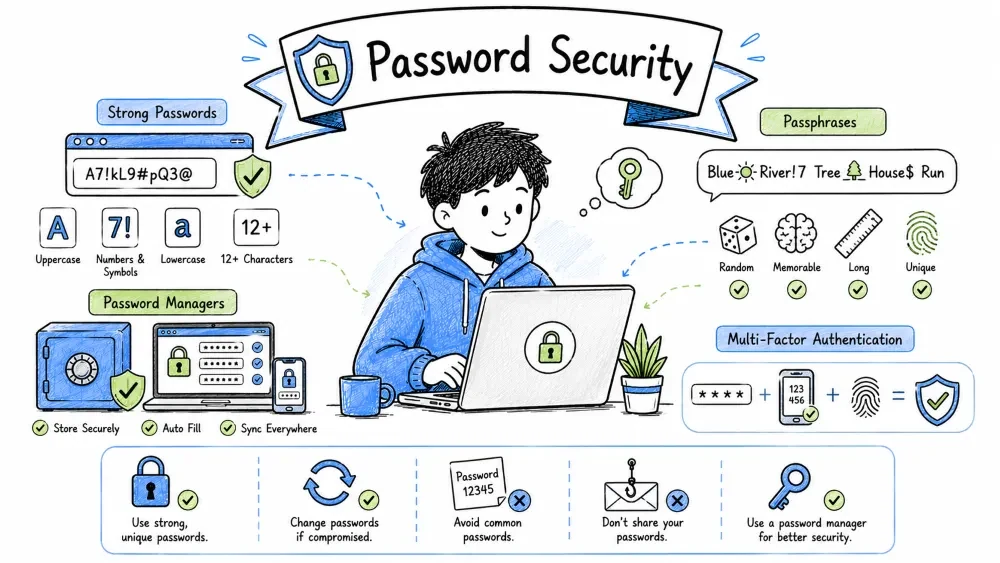
By the end of this tutorial, you will be able to:
| Property | Value |
|---|---|
| Difficulty | Beginner to Intermediate |
| Prerequisites | Cyber Security Basics (Category 1) |
| Hands-on Exercises | Rolling a Diceware Passphrase + Bitwarden Vault Setup |
| Tools Covered | Bitwarden, KeePassXC, 1Password, EFF Diceware |
Authentication: The security process of verifying the identity of a user, device, or system before granting access to specific accounts or resources.
Whenever you interact with a computer system, you undergo three processes:
john_doe).Passwords are the oldest and most widely used authentication method. They belong to the Knowledge Factor ("Something you know"). Unfortunately, because they are digital assets, passwords can be stolen in bulk from database breaches, guessed by fast computers, or leaked due to bad habits.
Hashing & Salting: Cryptographic operations that convert plaintext passwords into unique one-way hash values, augmented with random strings (salts) to secure database records against mass decryption.
To understand password security, you must understand how websites store your credentials on their servers.
Plaintext Storage: The practice of storing credentials in an unencrypted, human-readable text format, making them immediately accessible to anyone who accesses the database.
If a website stores your password exactly as you typed it, it is stored in plaintext.
MySecretPassword1!, anyone with database access (system administrators, database managers, or hackers who break in) can read it directly.Password Hashing: The process of using a cryptographic hash function to convert a plaintext password into a fixed-length string of characters (a hash), which is mathematically infeasible to reverse.
Secure websites never store your actual password. Instead, they run your password through a Cryptographic Hash Function and store the resulting fixed-length string (the hash).
[ User Input Password ] ---> [ Hash Function ] ---> [ Stored Hash Value ]
"MySecretPassword"      --->      SHA-256     ---> "5e884898da28047151..."
Password Salting: The security practice of appending a unique, random string of characters (a salt) to a password before hashing it, ensuring that identical passwords result in completely different hashes.
If two users choose the same password (e.g., 123456), their hashes will be identical. Hackers can exploit this by pre-computing hashes for millions of common passwords (called a Rainbow Table) and comparing them to a stolen database to crack thousands of passwords instantly.
To prevent this, databases use Salting. A salt is a unique, random string of characters added to each user's password before it is hashed.
User A: Password ("hello") + Salt ("xyz789") ---> Hash Value A ("8a76d8b...")
User B: Password ("hello") + Salt ("abc123") ---> Hash Value B ("2e9b10c...")
Even though User A and User B have the exact same password, their stored hashes are completely different because their salts are different. This forces hackers to crack each password individually, taking much longer.
Password Cracking: The systematic recovery of passwords from stored hashes or transmission payloads using dictionary databases, heuristic rules, and raw computation.
Hackers use automated programs to scan databases and guess passwords. Here is a breakdown of their primary concepts and tools:
Online Attack:
Online Attack: A credential-cracking attempt where the attacker submits login requests directly to the target system's active network port or authentication API, subject to rate limiting and account locking.
The hacker tries to log in on the actual website (e.g., trying to log in at gmail.com). Websites block this by locking the account after 5 wrong attempts or adding CAPTCHAs.
Offline Attack:
Offline Attack: A cracking method where an attacker obtains the encrypted/hashed credential database from a system breach and runs guessing algorithms locally on their own hardware, completely bypassing network locks or speed limits.
The hacker steals the hashed database from a website breach. They copy it to their own high-powered computers and run password cracking software (like Hashcat or John the Ripper) locally. They can guess trillions of passwords per second because there is no server to block them.
Graphics Processing Unit (GPU): A specialized electronic circuit designed to rapidly manipulate and alter memory to accelerate parallel computations. Hackers leverage the massive parallel-processing power of GPUs to run password cracking software.
Modern graphics cards (GPUs) are designed to perform simple math calculations on millions of pixels simultaneously. Hackers use these same GPUs to hash guesses.
Brute-Force Attack: A trial-and-error cracking method where an automated program generates and submits every possible character combination sequentially until the correct one is found.
Dictionary Attack: A hacking technique that attempts to defeat authentication by testing a precompiled database of words, phrases, and commonly leaked credentials.
Hybrid/Rules-Based Attack: An advanced dictionary attack where rules are applied to words (e.g., character substitution like
eto3, or appending years/symbols) to simulate common human password habits.
Credential Stuffing: An automated attack where hackers use lists of compromised username/password pairs leaked from previous data breaches to gain unauthorized access to accounts on other services.
Passphrase: A credential composed of multiple random words, designed to maximize length and security while remaining easy to remember.
For decades, we were told to create complex passwords:
Complex Password:
Complex Password: A relatively short credential that meets complexity criteria (mixing uppercase, lowercase, numbers, and special characters) but is often highly predictable and hard for humans to remember.
Tr0ub4dour&3This contains numbers, symbols, uppercase, and lowercase letters. However, it is only 12 characters long. A computer program running dictionary rule-based modifications can crack this in hours. Furthermore, humans cannot remember this without writing it down.
The NIST (National Institute of Standards and Technology) guidelines now promote Passphrases:
NIST (National Institute of Standards and Technology): The physical sciences laboratory and non-regulatory agency of the U.S. Department of Commerce that publishes cybersecurity standards and credential guidelines (such as SP 800-63B).
correct horse battery stapleThis passphrase is 28 characters long. Although it consists only of simple lowercase dictionary words, its extreme length makes it cryptographically superior to the complex password, while being significantly easier for a human to visualize and remember.
       EASY TO REMEMBER      |       HARD TO REMEMBER
      ------------------     |      ------------------
       correct-horse-        |         Tr0ub4dour&3
       battery-staple        |
                             |
       Cracking Time:        |        Cracking Time:
      Millennia (20+ chars)  |        Hours (12 chars)
Password Entropy: A mathematical measurement of the uncertainty and computational complexity of a password, expressed in bits.
To understand why length beats complexity, we use Information Entropy, which measures how many guess attempts a hacker would need to exhaust all possibilities.
Entropy ($E$) in bits is calculated as: $$E = N \times \log_2(L)$$
Where:
Password Length ($N$): The total count of characters, symbols, and spaces that compose a password.
Character Pool Size ($L$): The total number of unique characters in the character set from which the password characters are chosen (e.g., 26 for lowercase letters).
0-9): $L = 10$a-z): $L = 26$a-z, A-Z): $L = 52$a-z, A-Z, 0-9): $L = 62$Let's calculate two passwords:
Pa$$w0rd!purple monkey yellow carpetDiceware: A method for generating high-entropy passphrases by using physical dice rolls to select random words from a standardized index sheet.
Diceware is a system for generating cryptographically secure, random passphrases. It uses physical dice to select words from a special wordlist.
Diceware Wordlist: A standardized database containing exactly 7,776 words (matching the $6^5$ combinations of rolling five six-sided dice), designed to maximize passphrase randomness and memory recall.
                    HOW DICEWARE WORKS
+-------------------------------------------------------+
|  1. Roll a standard 6-sided die 5 times.              |
|     Example: You roll a 5, then 2, 4, 3, 1.           |
|                                                       |
|  2. Combine these digits into a 5-digit number.       |
|     Result: 52431                                     |
|                                                       |
|  3. Find this number in the Diceware Wordlist.        |
|     52431 -> "metal"                                  |
|                                                       |
|  4. Repeat this process 4 or 5 times to make a list:  |
|     "metal-truck-winter-jungle-sky"                   |
+-------------------------------------------------------+
Computers are terrible at generating true randomness. They use algorithms that make "pseudo-random" numbers, which can sometimes be predicted. Rolling physical dice relies on physical chaos, which is truly random.
Password Manager: A software application that acts as a secure database vault to generate, encrypt, store, and auto-input credentials across operating systems.
Using unique, 100-bit passphrases for 80 accounts is impossible for a human to manage. This leads to Password Fatigue, causing users to reuse passwords.
Password Fatigue: The cognitive overload experienced by users who must manage multiple complex login credentials, which often leads to dangerous behaviors like reusing passwords across services.
A Password Manager is an encrypted software application designed to generate and store secure credentials.
The database (vault) containing your passwords is encrypted using AES-256 (Advanced Encryption Standard).
AES-256: A symmetric-key encryption standard adopted by the U.S. government that uses a 256-bit key size, widely recognized as mathematically secure against brute-force attacks.
Zero-Knowledge Architecture: A security system design in which data is encrypted and decrypted locally on the client's device, ensuring that the service provider's servers never possess the keys or plaintext data.
Password Vault Architectures: The system design variations (e.g., local storage, cloud synchronization) that define how vaults protect and sync credentials.
When selecting a manager, evaluate their architecture, security audits, and hosting options:
Cloud-Based Manager: A password manager that stores encrypted vaults in a secure cloud database, allowing seamless cross-device synchronization and web access.
Local-Only Manager: A password manager that stores the encrypted vault file solely on the local device's filesystem, minimizing network attack surfaces.
Self-Hostable Manager: A password manager architecture that allows users to deploy and run their own backend synchronization server (e.g., hosting Bitwarden/Vaultwarden locally or on a private VPS), retaining full custody of data.
| Manager | Host Type | Open Source? | Price | Key Features |
|---|---|---|---|---|
| Bitwarden | Cloud-based / Self-hostable | Yes | Free (Basic), $10/year (Premium) | Local encryption, cloud sync, audited code, supports hardware keys. |
| 1Password | Cloud-based | No (Proprietary) | ~$36/year | Secret Key (second local key), great UX, Travel Mode. |
| KeePassXC | Local-only (Offline) | Yes | Free | Runs completely offline, no cloud leak risks, stored in .kdbx file. |
Vault Setup: The sequence of registration, application installation, and initialization required to deploy a new password manager.
Here is a guide to initializing a vault using Bitwarden:
https://bitwarden.com/ (Always verify the URL).Create a master password that is a 4-to-5 word Diceware passphrase.
jungle-winter-brick-oceanhttps://accounts.google.com), your username, and click the Generate Password button to create a random 20-character password.Master Password Security: Practical actions and settings to protect the single key that decrypts your entire password vault database.
Your Master Password secures everything. Protect it with these measures:
.json or .csv format) once every few months and save it on a secure offline flash drive.Password Hygiene: Practical guidelines and habits designed to maintain strong credential protection and prevent common security errors.
[!NOTE] Myth: My password is secure because I change it every month.
Fact: Frequently changing passwords often leads users to make minor, predictable changes (e.g.,Winter2026!toSpring2026!). NIST guidelines advise changing passwords only if there is evidence of a breach.
[!NOTE] Myth: Web browsers (Chrome, Edge, Safari) are the best place to save passwords.
Fact: Browser password storage is less secure than dedicated password managers. If malware infects your computer, it can easily extract saved credentials from browser storage profiles.
Hands-On Exercises: Practical activities designed to help you generate passphrases, calculate entropy, and manage password vaults.
If you don't have physical dice, you can use the EFF's website, but using real dice is best for absolute security:
2-5-1-4-3).25143.word1-word2-word3-word4.Calculate the entropy for the following passwords using $E = N \times \log_2(L)$:
MyCatLeo! (Lowercase, Uppercase, Symbol. Pool $L = 95$, Length $N = 9$)monkey-guitar-brick-ocean (Lowercase, Hyphen. Pool $L = 27$, Length $N = 26$)Check your math:
Save your progress and earn XP for completing tutorials.
Technology
Cyber Security & Networking
Lesson group
Account Security
Progress
33% complete

