Preparing your learning space...
33% through Computer Networking tutorials
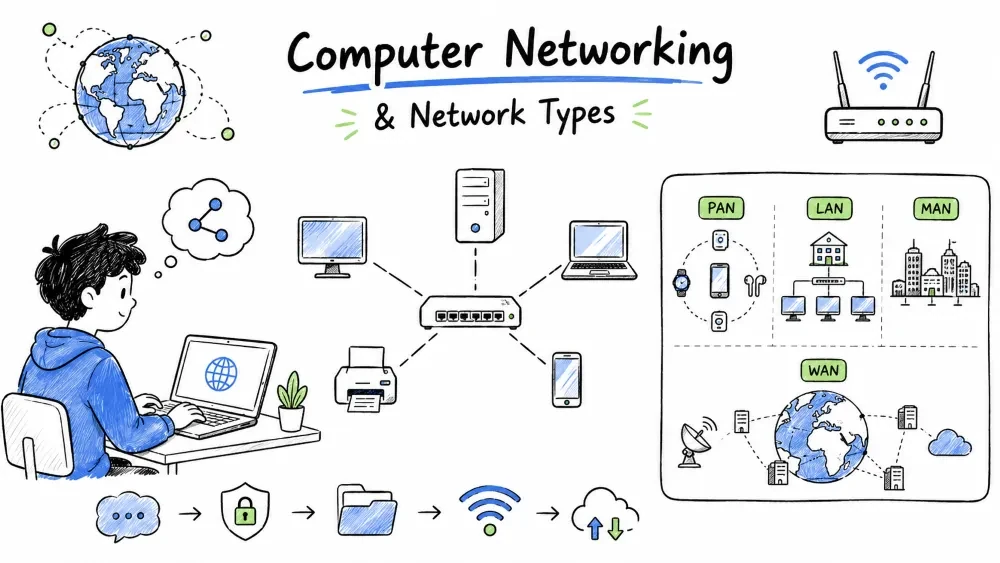
Computer Networking is the practice of connecting two or more computing devices together to share data, resources, and communicate with each other.
┌─────────┐         ┌─────────┐
│  PC 1   │◄───────►│  PC 2   │
└─────────┘         └─────────┘
      ▲                   ▲
      │     Network       │
      ▼                   ▼
┌─────────┐         ┌─────────┐
│ Printer │         │ Server  │
└─────────┘         └─────────┘
| Purpose | Description |
|---|---|
| File Sharing | Share documents, photos, videos between devices |
| Resource Sharing | Share printers, scanners, internet connection |
| Communication | Email, instant messaging, video conferencing |
| Cost Reduction | One printer/internet connection used by many |
| Centralized Management | Manage data and security from one place |
| Collaboration | Multiple users work on the same project |
┌─────────────────────────────────────────────────────┐
│               NETWORK REQUIREMENTS                  │
├─────────────────────────────────────────────────────┤
│                                                     │
│  1. Two or more devices (computers, phones, etc.)   │
│  2. Transmission Media (cables or wireless)         │
│  3. Network Devices (router, switch, modem)         │
│  4. Protocols (rules for communication - TCP/IP)    │
│  5. NIC (Network Interface Card in each device)     │
│                                                     │
└─────────────────────────────────────────────────────┘
Network Components are the hardware and software elements that work together to build a computer network. These include end devices (nodes), intermediary devices (switches, routers), transmission media (cables, wireless), and protocols that govern communication.
┌───────────────────────────────────────────────────────────┐
│                  NETWORK COMPONENTS                       │
├───────────────┬───────────────────────────────────────────┤
│   Component   │                  Role                     │
├───────────────┼───────────────────────────────────────────┤
│  Nodes        │ End devices like PCs, laptops, printers   │
│  NIC          │ Network card — allows device to connect   │
│  Switch       │ Connects devices within the same network  │
│  Router       │ Connects different networks + internet    │
│  Cables/WiFi  │ Medium to carry data signals              │
│  Protocols    │ Rules like TCP/IP, HTTP, FTP              │
└───────────────┴───────────────────────────────────────────┘
Types of Networks by Size refers to classifying computer networks based on their geographical coverage area — from a few meters (personal) to thousands of kilometers (worldwide). The four main categories are PAN, LAN, MAN, and WAN.
Networks are categorized based on their geographical span:
                    NETWORK TYPES BY SIZE

        ┌─────────────────────────────────────────────┐
        │                                             │
        │   PAN ◄── 10 meters      (Personal)         │
        │   LAN ◄── 1 km           (Building)         │
        │   MAN ◄── 100 km         (City)             │
        │   WAN ◄── Unlimited      (World)            │
        │                                             │
        └─────────────────────────────────────────────┘

        ◄────── Increasing Size & Cost ──────────────►
PAN (Personal Area Network) is the smallest type of computer network designed for communication between devices within the range of an individual person, typically up to 10 meters. It is used to connect personal devices like smartphones, laptops, tablets, and wearables.
         ◄── 10 meters ──►

   ┌──────┐    Bluetooth    ┌──────┐
   │ Phone │◄──────────────►│Laptop│
   └──────┘                 └──────┘
       ▲                         ▲
       │ USB/WiFi Direct         │ Bluetooth
       ▼                         ▼
   ┌──────┐                 ┌──────────┐
   │Tablet│                 │Smartwatch│
   └──────┘                 └──────────┘
| Aspect | Detail |
|---|---|
| Range | Up to 10 meters |
| Speed | 1–24 Mbps (Bluetooth) |
| Technology | Bluetooth, USB, WiFi Direct, IR |
| Ownership | Personal — belongs to one person |
| Example | Phone connected to smartwatch, Bluetooth headset, laptop tethering from phone |
Real-life examples:
LAN (Local Area Network) is a computer network that connects devices within a limited geographical area such as a home, office building, school, or college campus. It offers high speed and low latency, making it the most common type of network for local connectivity.
┌─────────────── LAN (Office / Building) ────────────────┐
│                                                        │
│  ┌──────┐   ┌──────┐   ┌──────┐   ┌──────┐             │
│  │ PC 1 │   │ PC 2 │   │ PC 3 │   │ PC 4 │             │
│  └──┬───┘   └──┬───┘   └──┬───┘   └──┬───┘             │
│     │          │          │          │                 │
│     └──────────┼──────────┼──────────┘                 │
│                │         │                             │
│          ┌─────┴─────────┴─────┐                       │
│          │       Switch        │────► Internet         │
│          └─────────┬───────────┘                       │
│                    │                                   │
│          ┌─────────┴───────────┐                       │
│          │      Printer        │                       │
│          └─────────────────────┘                       │
└────────────────────────────────────────────────────────┘
| Aspect | Detail |
|---|---|
| Range | Up to 1 km (typically a building or campus) |
| Speed | 100 Mbps – 10 Gbps |
| Technology | Ethernet (Cat5e/Cat6 cables), WiFi |
| Ownership | Private — owned by an organization |
| Example | Office network, school lab, home WiFi |
Characteristics of LAN:
MAN (Metropolitan Area Network) is a computer network that spans across a city or a large metropolitan area, typically ranging from 10 to 100 kilometers. It connects multiple LANs within a city to provide high-speed connectivity for organizations like banks, government offices, and ISPs.
┌────────────────── MAN (City) ────────────────────────┐
│                                                      │
│   ┌──────────┐     Fiber / Microwave    ┌──────────┐ │
│   │ Branch A │◄────────────────────────►│ Branch B │ │
│   │ (North)  │                          │ (South)  │ │
│   └──────────┘                          └──────────┘ │
│         ▲                                    ▲       │
│         │                                    │       │
│         ▼                                    ▼       │
│   ┌──────────┐                          ┌──────────┐ │
│   │ Branch C │◄────────────────────────►│ Branch D │ │
│   │ (East)   │                          │ (West)   │ │
│   └──────────┘                          └──────────┘ │
│                                                      │
└──────────────────────────────────────────────────────┘
| Aspect | Detail |
|---|---|
| Range | 10–100 km (a city or metropolitan area) |
| Speed | 100 Mbps – 1 Gbps |
| Technology | Fiber optic, Microwave, Leased lines |
| Ownership | ISP or large organization |
| Example | Bank branches in a city, city-wide CCTV network |
Common uses of MAN:
WAN (Wide Area Network) is a computer network that covers a large geographical area — ranging from hundreds to thousands of kilometers — often spanning countries or continents. The Internet itself is the largest example of a WAN. WANs connect multiple LANs and MANs across long distances.
┌────────────────── WAN (Worldwide) ───────────────────┐
│                                                      │
│    ┌─────────┐              ┌─────────┐              │
│    │  New    │◄────────────►│ London  │              │
│    │  York   │              │         │              │
│    └────┬────┘              └────┬────┘              │
│         │                       │                    │
│         │  Undersea Cables /   │                     │
│         │  Satellite            │                    │
│         │                       │                    │
│    ┌────┴────┐             ┌───┴─────┐               │
│    │  Tokyo  │◄───────────►│  Dubai  │               │
│    └─────────┘             └─────────┘               │
│                                                      │
└──────────────────────────────────────────────────────┘
| Aspect | Detail |
|---|---|
| Range | Unlimited — worldwide |
| Speed | 1 Mbps – 1 Gbps (varies by connection type) |
| Technology | Fiber optic undersea cables, Satellite, Leased lines, MPLS |
| Ownership | Multiple ISPs and Telcos jointly |
| Example | The Internet itself, multinational company networks |
Characteristics of WAN:
| Feature | PAN | LAN | MAN | WAN |
|---|---|---|---|---|
| Area Covered | 10 meters | 1 km | 100 km | Unlimited |
| Speed | 1–24 Mbps | 100Mbps–10Gbps | 100Mbps–1Gbps | 1Mbps–1Gbps |
| Cost | Very Low | Low | High | Very High |
| Ownership | Personal | Organization | ISP / Org. | Multiple ISPs |
| Latency | < 1 ms | 1–10 ms | 10–50 ms | 50–500 ms |
| Setup | Simple | Simple | Complex | Very Complex |
| Maintenance | None | IT Team | ISP | Multiple Teams |
| Example | Bluetooth | Office Network | City WiFi | Internet |
Network Architecture refers to the structural design and organizational model of a computer network — how devices are arranged, how they communicate, and how resources are managed. The two main types are Client-Server Architecture and Peer-to-Peer Architecture.
Network architecture defines how devices are organized and how they communicate. Two main types:
Client-Server Architecture is a network model where a centralized server provides resources, services, and data to multiple client devices. Clients request services (like file access, web pages, or email), and the server processes those requests and delivers responses.
In Client-Server, there is a central server that provides resources/services, and clients that request those services.
                    ┌─────────────┐
                    │   SERVER    │
                    │  (Central)  │
                    └──────┬──────┘
                           │
            ┌──────────────┼──────────────┐
            │              │              │
      ┌─────┴─────┐  ┌────┴─────┐  ┌────┴─────┐
      │  Client 1 │  │ Client 2 │  │ Client 3 │
      │  (PC)     │  │ (Laptop) │  │ (Mac)    │
      └───────────┘  └──────────┘  └──────────┘
| Aspect | Detail |
|---|---|
| Server | Central computer that stores data and provides services |
| Client | End-user devices that request services from the server |
| Who manages? | Server is managed by a dedicated administrator |
| Examples | Web server + browser, Email server + Outlook, Database server + app |
| Security | High — centralized control over access |
| Cost | Higher — requires powerful server hardware |
Advantages:
Disadvantages:
Real-life example: When you open google.com, your browser (client) sends a request to Google's web server, which responds with the webpage.
Peer-to-Peer (P2P) Architecture is a decentralized network model where each device (called a peer) acts as both a client and a server. There is no central server — every peer shares its own resources directly with other peers and can request resources from them.
In Peer-to-Peer, every device acts as both client and server. There is no central server.
        ┌──────────┐               ┌──────────┐
        │  Peer 1  │◄─────────────►│  Peer 2  │
        │  (PC)    │               │  (PC)    │
        └──────────┘               └──────────┘
              ▲                         ▲
              │                         │
              ▼                         ▼
        ┌──────────┐               ┌──────────┐
        │  Peer 3  │◄─────────────►│  Peer 4  │
        │ (Laptop) │               │  (Mac)   │
        └──────────┘               └──────────┘
| Aspect | Detail |
|---|---|
| No central server | Every peer shares its own resources |
| Each peer | Acts as both client (requesting) and server (providing) |
| Who manages? | Each user manages their own device |
| Examples | Torrent file sharing, Windows Workgroup, HomeGroup |
| Security | Low — each device manages its own security |
| Cost | Low — no dedicated server hardware needed |
Advantages:
Disadvantages:
Real-life example: BitTorrent — when you download a file, you also upload parts of it to others. Each user is both a client and a server.
| Feature | Client-Server | Peer-to-Peer |
|---|---|---|
| Central Server | Yes | No |
| Management | Centralized | Decentralized |
| Cost | High (server + IT staff) | Low (no server needed) |
| Security | High | Low |
| Scalability | High (add clients easily) | Limited (max ~10 peers) |
| Single Point of Failure | Yes (server) | No |
| Performance | Server can become bottleneck | Distributed workload |
| Data Backup | Easy (centralized) | Difficult (distributed) |
| Best For | Large networks (100+ users) | Small networks (<10 users) |
| CCNA Focus | Primary focus | Basic understanding only |
When to use which?
Small Office (5-10 people)  ───►  Peer-to-Peer (Simple, cheap)
School/College (100+ users) ───►  Client-Server (Managed, secure)
Multinational Company       ───►  Client-Server (Centralized control)
Home Network (2-3 devices)  ───►  Peer-to-Peer (No server needed)
Read each scenario below and identify which network type (PAN, LAN, MAN, or WAN) is being described:
| # | Scenario | Your Answer |
|---|---|---|
| a | A bank connects its 50 computers within a single office building using Ethernet switches | |
| b | A multinational company connects its offices in New York, London, and Tokyo using leased fiber optic lines | |
| c | A person connects their smartwatch to their smartphone via Bluetooth to receive notifications | |
| d | A city government connects all its surveillance cameras across different neighborhoods using fiber optic cables |
A new school wants to set up a computer lab with 60 computers. The IT administrator needs to decide between Client-Server and Peer-to-Peer architecture.
Your task: Write a short recommendation (3-4 sentences) explaining which architecture the school should choose and why. Consider factors like security, management, cost, and scalability in your answer.
Save your progress and earn XP for completing tutorials.
Technology
Cyber Security & Networking
Lesson group
Computer Networking
Progress
33% complete

