Preparing your learning space...
100% through Cyber Security Basics tutorials
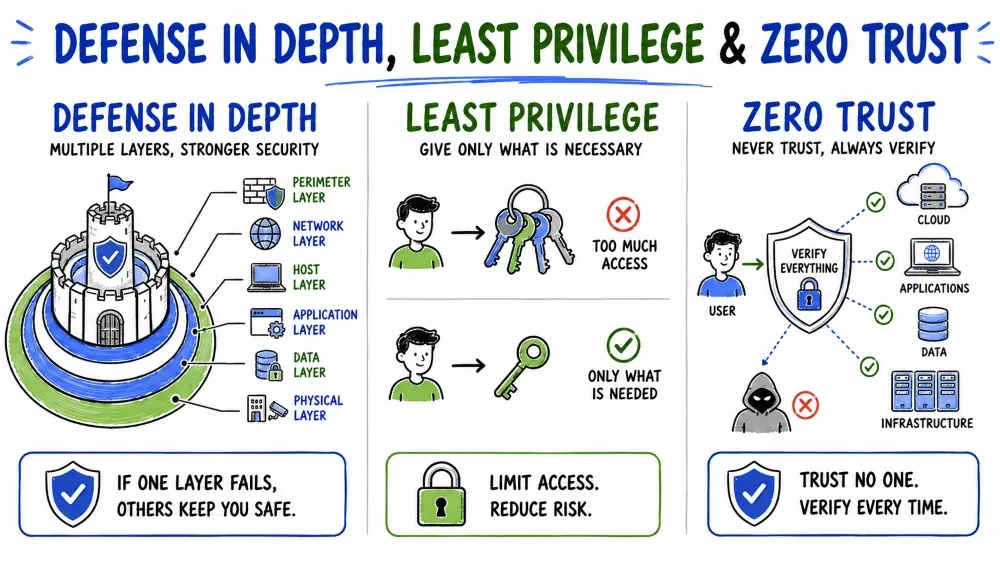
Defense in Depth (also called Layered Security) is a security strategy that uses multiple independent layers of defense to protect assets. If one layer fails, another layer is there to stop or slow down the attack.
"Don't put all your eggs in one basket." "Hope for the best, prepare for the worst."
Instead of relying on a single security measure (like just a password), you create multiple barriers that an attacker must break through.
Think of a medieval castle's defenses — there's never just ONE protection:
| Layer | Castle Analogy | Cyber Analogy |
|---|---|---|
| Layer 1 | Moat around the castle (blocks approach) | Firewall (blocks unauthorized traffic) |
| Layer 2 | Thick stone walls (can't break through easily) | Network segmentation (can't move freely) |
| Layer 3 | Drawbridge (controlled entry) | Access control (who can enter) |
| Layer 4 | Guards at the gate (verify identity) | Authentication (verify users) |
| Layer 5 | Inner locks on doors (restrict movement) | Encryption (data can't be read if stolen) |
| Layer 6 | Treasure in a locked chest (extra protection) | Multi-factor authentication |
| Layer 7 | Guards patrolling inside (watch for intruders) | Monitoring & detection |
If attackers cross the moat, they still face the walls. If they get through the walls, guards stop them. If they bypass guards, they face locked doors. Each layer buys time and increases the chance of stopping the attacker.
| Scenario | Single Layer | What Happens |
|---|---|---|
| Only firewall | Firewall misconfiguration | Complete network exposure |
| Only password | Password is stolen | Account immediately compromised |
| Only antivirus | New malware (zero-day) | No protection available |
| Only backup | Backups are also encrypted by ransomware | Complete data loss |
Defense in Depth is often compared to an onion — many layers protecting the core (your data):
                    ┌──────────────────────────┐
                    │        PHYSICAL          │
                    │  ┌────────────────────┐  │
                    │  │       NETWORK      │  │
                    │  │  ┌──────────────┐  │  │
                    │  │  │   ENDPOINT   │  │  │
                    │  │  │  ┌────────┐  │  │  │
                    │  │  │  │  APP   │  │  │  │
                    │  │  │  │ ┌────┐ │  │  │  │
                    │  │  │  │ │DATA│ │  │  │  │
                    │  │  │  │ └────┘ │  │  │  │
                    │  │  │  └────────┘  │  │  │
                    │  │  └──────────────┘  │  │
                    │  └────────────────────┘  │
                    └──────────────────────────┘
| Layer | What It Protects | Controls | Attack It Stops |
|---|---|---|---|
| 1. Physical | Hardware, facilities | Locks, cameras, guards, biometrics, server room access | Physical theft, unauthorized access |
| 2. Network | Data in transit | Firewalls, IDS/IPS, VPN, network segmentation, DDoS protection | Network attacks, data interception |
| 3. Endpoint | Devices (laptops, phones, servers) | Antivirus, EDR, device encryption, patch management | Malware, ransomware, device compromise |
| 4. Application | Software and apps | Secure coding, WAF, input validation, code review | SQL injection, XSS, app-level attacks |
| 5. Data | Information itself | Encryption (at rest + transit), DLP, access controls, classification | Data theft, data leakage |
| 6. Identity | User accounts | MFA, SSO, IAM, PAM, RBAC, JIT access | Account takeover, credential theft |
| 7. Administrative | Policies and people | Security training, policies, audits, background checks | Human error, insider threats |
The Cyber Kill Chain describes the stages of an attack. Defense in depth can stop attacks at ANY stage:
| Kill Chain Stage | What Attacker Does | Defense in Depth Layer That Stops It |
|---|---|---|
| 1. Reconnaissance | Scans for vulnerabilities | Firewall blocks scans, IDS detects scanning |
| 2. Weaponization | Creates exploit | Application controls block malicious files |
| 3. Delivery | Sends phishing email | Email filter blocks phishing, training helps user identify it |
| 4. Exploitation | Runs exploit code | Antivirus/EDR blocks execution |
| 5. Installation | Installs backdoor | Least privilege prevents installation |
| 6. Command & Control | Connects to attacker server | Network segmentation blocks outbound C2 traffic |
| 7. Actions on Objective | Steals or encrypts data | Data encryption + DLP prevents data theft |
Step 1: IDENTIFY CRITICAL ASSETS
        └── What data/systems must be protected at all costs?
                ↓
Step 2: MAP THE ATTACK SURFACE
        └── How can attackers reach those assets?
                ↓
Step 3: IMPLEMENT CONTROLS AT EACH LAYER
        └── Physical → Network → Endpoint → App → Data → Identity → Admin
                ↓
Step 4: TEST EACH LAYER INDEPENDENTLY
        └── Verify each layer works even if others fail
                ↓
Step 5: MONITOR AND IMPROVE CONTINUOUSLY
        └── Add/update layers based on new threats
| Layer | Control | What It Prevents |
|---|---|---|
| Perimeter | Next-gen firewall | Blocks known malicious traffic |
| Network | IDS/IPS | Detects and blocks suspicious patterns |
| Endpoint | Antivirus + EDR | Blocks malware execution |
| Access | Strong passwords + MFA | Prevents unauthorized login |
| Data | Full-disk encryption | Data unreadable if device stolen |
| People | Security awareness training | Reduces successful phishing |
| Recovery | Daily backups + DR plan | Recovers from ransomware |
| Layer | Control |
|---|---|
| Login | Password + MFA (biometric) |
| Session | Auto-timeout after 2 minutes of inactivity |
| Transaction | OTP verification for transfers over ₹10,000 |
| Device | Only trusted devices can access |
| Monitoring | Real-time fraud detection (unusual location/amount) |
| Backend | Database encryption + strict API authentication |
| Compliance | Regular third-party security audits |
The Target Breach (2013) — A famous example of defense in depth failure:
| Layer | What Went Wrong |
|---|---|
| Network Segmentation | ❌ HVAC vendor network was connected to payment system |
| Endpoint Security | ❌ Malware detection was in place but not configured to alert |
| Monitoring | ❌ IDS detected the attack but no one responded |
| Access Control | ❌ Vendor had excessive network access |
| Response | ❌ No incident response process triggered |
Result: 40 million credit card numbers stolen. $18.5 million settlement.
Lesson: All layers must be properly configured AND monitored. Having a control that's not monitored is the same as having no control.
Least Privilege (also called Principle of Least Privilege or PoLP) means giving users and systems only the minimum access they need to do their job — nothing more, nothing less.
"Give someone just enough access to do their work — and not a single permission more."
| Role | Access Needed | Least Privilege Applied | Risk if Violated |
|---|---|---|---|
| Guest | Their room + lobby | ✅ Only their room key works for their room | Guest could access other rooms |
| Housekeeping | All rooms during day | ✅ Key works only 9 AM - 5 PM | After-hours theft |
| Manager | All rooms + offices | ✅ Only floors they oversee | Manager could access CEO safe |
| IT Staff | Server room (if needed) | ✅ Access granted per ticket | IT could access HR records |
| Chef | Kitchen + storage | ✅ Only kitchen-related areas | Chef could access guest rooms |
| Statistic | Source |
|---|---|
| 74% of data breaches involve privileged account abuse | Forrester |
| 53% of companies have over 1,000 sensitive files accessible to ALL employees | Varonis |
| 66% of organizations have over 10,000 sensitive files open to everyone | Varonis |
| Average cost of insider threat: $15.38 million | Ponemon Institute |
| Practice | Description | Implementation |
|---|---|---|
| Role-Based Access Control (RBAC) | Assign permissions based on job role | Create roles: Employee, Manager, HR, Admin |
| Just-In-Time (JIT) Access | Grant elevated access only when needed | Request admin rights for 2 hours to install software |
| Regular Access Audits | Review who has what access | Quarterly review of all privileged accounts |
| Remove Inactive Accounts | Delete accounts of former employees | Automated account deprovisioning on termination |
| Separation of Duties | No one person controls a process end-to-end | Person who requests payment ≠ person who approves it |
| Password Vaulting | Store privileged passwords securely | CyberArk, Thycotic, Azure Key Vault |
| Session Recording | Record privileged user sessions | Record what admins do with elevated access |
Guest      User        Power User     Admin         Super Admin
  │          │              │            │                │
  │          │              │            │                │
  ▼          ▼              ▼            ▼                ▼
Read-Only   Own Data  Department+     System-Wide    Complete
(Public)    + Basic   Reports+Edit    Access+Config  Unrestricted

          ◄──── Least Privilege Goal: Keep everyone LEFT ◄────
| Mistake | Example | Why It's Dangerous | Solution |
|---|---|---|---|
| Giving everyone admin rights | All employees are local admins on their laptops | Any malware has full system access | Remove admin rights; use standard user accounts |
| Never removing old access | Former employee's account still active | Ex-employee (or their stolen credentials) can access systems | Automatic account deactivation on termination |
| Overly permissive defaults | New hire gets same permissions as manager | New employee has access to data they shouldn't see | Start with ZERO permissions; grant only what's needed |
| Shared accounts | Everyone uses "admin" password | Can't identify who made changes | Unique accounts for each user |
| Permission creep | Employee changes roles, keeps old permissions | Eventually has access to everything | Review permissions when changing roles |
| Role | Should Access | Should NOT Access | Why |
|---|---|---|---|
| Junior Employee | Department shared folder | HR records, executive files, source code | Doesn't need it for their work |
| Manager | Department + reports | CEO's private files, salary data | Reporting chain only needs their level |
| HR Staff | Employee records, payroll | Source code repository, financials | HR handles people, not code |
| IT Admin | Server config, network settings | Employee personal files, medical records | IT needs to maintain systems, not read personal data |
| Sales Staff | CRM, sales materials | Engineering specs, legal documents | Sales sells what's built, doesn't build it |
| User | Production DB | Staging DB | Development DB | Least Privilege? |
|---|---|---|---|---|
| Prod DBA | Full access | Read-only | Read-only | ✅ Yes |
| Developer | Read-only (via JIT) | Read-write | Read-write | ✅ Yes (JIT for prod) |
| Support | Read customers (name, email) | None | None | ✅ Yes (limited columns) |
| QA Tester | None | Read-only | Read-write | ✅ Yes |
| Intern | None | None | Read-only | ✅ Yes |
| CEO | View dashboards (aggregate) | None | None | ✅ Yes (no raw data) |
Developer needs to fix production issue:

1. Developer creates access request (ticket #12345)
2. Manager approves the request
3. JIT system grants admin access for 2 hours
4. Developer fixes the issue
5. After 2 hours, access is AUTOMATICALLY revoked
6. All actions during the session are recorded and logged

BENEFIT: Developer didn't have permanent admin access — only 2 hours.
Zero Trust is a security model based on the principle: "Never trust, always verify."
In traditional security, everything inside the network was considered "trusted." Zero Trust assumes that no one and nothing is trusted by default — whether inside or outside the network.
| Year | Milestone |
|---|---|
| 2010 | John Kindervag (Forrester) introduces Zero Trust concept |
| 2014 | Google publishes BeyondCorp — their Zero Trust implementation |
| 2020 | NIST publishes SP 800-207 — Zero Trust Architecture standard |
| 2021 | US Executive Order mandates Zero Trust for federal agencies |
"Trust no one. Verify everything."
| Traditional Assumption | Reality Today |
|---|---|
| "Users are in the office" | Remote work, BYOD, hybrid work |
| "Devices are company-owned" | Personal devices, mobile, IoT |
| "Data is in the data center" | Cloud, SaaS, multi-cloud |
| "Network perimeter exists" | No clear perimeter anymore |
| "Insiders are trustworthy" | Insider threats exist |
┌──────────────────────────────────────────────────────────────┐
│                       ZERO TRUST                             │
│  "Never trust, always verify"                                │
├─────────────────────┬─────────────────────┬──────────────────┤
│    VERIFY EXPLICITLY│   LEAST PRIVILEGE   │   ASSUME BREACH  │
├─────────────────────┼─────────────────────┼──────────────────┤
│ Always authenticate │ Give minimum access │ Assume attackers │
│ and authorize based │ needed, time-limited│ are already inside│
│ on ALL data points: │ JIT permissions,    │ → Micro-segment  │
│ → Identity         │ RBAC, risk-based    │ → Encrypt all    │
│ → Device health    │ policies           │ → Monitor all    │
│ → Location         │                     │ → Continuous     │
│ → Data sensitivity │                     │   validation     │
│ → Risk level       │                     │                  │
└─────────────────────┴─────────────────────┴──────────────────┘
Every access request must be fully authenticated and authorized based on:
| Data Point | What It Checks | Example |
|---|---|---|
| User Identity | Who is the user? | username + password + MFA |
| Device Health | Is the device secure? | Antivirus up to date? OS patched? |
| Location | Where is the request from? | Office vs coffee shop vs foreign country |
| Time | Is this a normal time? | 3 PM vs 3 AM |
| Data Sensitivity | What data is being accessed? | Public file vs customer PII |
| Risk Score | Combined risk of all factors | Low risk → standard access; High risk → block |
Give only the minimum access needed (same principle we learned above!):
Assume attackers are already inside your network. Design accordingly:
| Practice | Why |
|---|---|
| Micro-segmentation | If one segment is breached, attacker can't move laterally |
| Encrypt all data | Even if data is stolen, it's unreadable |
| Continuous monitoring | Detect breach as early as possible |
| End-to-end encryption | Data protected everywhere |
| Constant validation | Don't trust once, re-verify continuously |
                    ┌─────────────────────────────┐
                    │     ZERO TRUST POLICY        │
                    │        ENGINE                │
                    └──────────┬──────────────────┘
                               │
┌──────────┐    ┌──────────────┴──────────────┐    ┌──────────┐
│          │    │                              │    │          │
│  USER    ├───►│  VERIFY EVERY REQUEST        ├───►│ RESOURCE │
│  (Who)   │    │  - Authenticate              │    │ (Data)   │
│          │    │  - Authorize                 │    │          │
├──────────┤    │  - Inspect                  │    ├──────────┤
│  DEVICE  │    │  - Monitor                   │    │  APP     │
│  (What)  │    │                              │    │  API     │
├──────────┤    └──────────────────────────────┘    ├──────────┤
│  NETWORK │                                         │ SERVICE  │
│  (Where) │                                         └──────────┘
└──────────┘
| Component | Function | Examples |
|---|---|---|
| Identity Provider (IdP) | Manages user identities and authentication | Azure AD, Okta, Google Workspace |
| Device Management | Ensures devices meet security requirements | Intune, Jamf, Workspace ONE |
| Policy Engine | Makes access decisions based on policies | Custom rules, AI-based scoring |
| Micro-segmentation | Divides network into small isolated zones | NSX, Azure Virtual Network |
| Encryption | Protects data everywhere | TLS, IPsec, disk encryption |
| Monitoring & Analytics | Detects anomalies continuously | SIEM, UEBA, XDR |
Access Request: Employee wants to access HR database from home

Policy Engine Checks:
├── Identity: Is this really the employee? (MFA passed? ✅)
├── Device: Is the device compliant? (AV up to date? ✅)
├── Location: Is home a trusted location? (Yes, in policy ✅)
├── Time: Is 2:30 PM normal? (Yes, business hours ✅)
├── Data: Is HR database sensitive? (Yes, classified as "confidential")
└── Risk Score: Low (all checks passed)

DECISION: ACCESS ALLOWED — but only:
├── Read-only (not edit/delete)
├── Session lasts max 4 hours
├── All actions logged
└── Requires re-authentication if idle > 15 min
| Aspect | Traditional (Castle-and-Moat) | Zero Trust | Why It Matters |
|---|---|---|---|
| Trust | Trusted inside, untrusted outside | No implicit trust anywhere | Insiders can be threats too |
| Perimeter | Strong perimeter defense | No single perimeter | Remote work = no clear perimeter |
| Authentication | Once at entry | Every single request | Session hijacking is prevented |
| Access | Broad internal access | Least privilege | Limits blast radius of breach |
| Network | Flat network | Micro-segmented | Prevents lateral movement |
| Devices | Company-managed only | BYOD with compliance checks | Supports modern workforce |
| Data | Protected at perimeter | Encrypted everywhere | Data protected even if perimeter breached |
| Visibility | Limited | Full visibility | Faster detection of anomalies |
| Response | Reactive (after breach) | Proactive (continuous verification) | Prevents breach, not just responds |
Traditional:
   [Internet] ─── [Firewall] ─── [Trusted Internal Network] ─── [Data]
                                    │ Everyone inside is trusted
                                    ▼
                            Breach happens easily

Zero Trust:
   [Internet] ─── [Verify] ─── [Verify] ─── [Verify] ─── [Data]
                     │          │          │
                     ▼          ▼          ▼
                   Every access is verified, regardless of location
NIST defines Zero Trust through 7 pillars (expanding the original 3):
| Pillar | Focus | Key Requirement |
|---|---|---|
| 1. Identity | Users and accounts | MFA, RBAC, continuous authentication |
| 2. Device | Endpoints | Device compliance, health checks |
| 3. Network | Connectivity | Micro-segmentation, encryption |
| 4. Data | Information assets | Classification, encryption, DLP |
| 5. Applications | Software and workloads | Secure access, vulnerability management |
| 6. Automation | Orchestration | Automated policy enforcement, response |
| 7. Analytics | Visibility | Continuous monitoring, UEBA, threat intelligence |
| Level | Stage | Characteristics |
|---|---|---|
| 0 | Traditional | VPN-based access, flat network, no MFA |
| 1 | Initial | Basic MFA, beginning network segmentation |
| 2 | Advanced | JIT access, device compliance checks, micro-segmentation |
| 3 | Optimal | Fully automated policy engine, continuous verification, AI-based analytics |
┌──────────────────────────────────────────────────────────────┐
│                    DEFENSE IN DEPTH                          │
│  (Multiple layers of security covering everything)           │
│                                                              │
│  ┌────────────────────────────────────────────────────────┐  │
│  │              LEAST PRIVILEGE                           │  │
│  │  (Every layer gives minimum access needed)             │  │
│  │                                                        │  │
│  │  ┌──────────────────────────────────────────────────┐  │  │
│  │  │               ZERO TRUST                         │  │  │
│  │  │  (No trust anywhere — verify everything)         │  │  │
│  │  │  ┌────────────────────────────────────────────┐  │  │  │
│  │  │  │    THE GOAL:                               │  │  │  │
│  │  │  │    Maximum security with                   │  │  │  │
│  │  │  │    minimum risk                            │  │  │  │
│  │  │  └────────────────────────────────────────────┘  │  │  │
│  │  └──────────────────────────────────────────────────┘  │  │
│  └────────────────────────────────────────────────────────┘  │
└──────────────────────────────────────────────────────────────┘
| Concept | Supported By | How |
|---|---|---|
| Defense in Depth | Least Privilege | Each layer grants minimal access, so even if one layer fails, others limit damage |
| Defense in Depth | Zero Trust | Every layer verifies before granting access, consistent with Zero Trust's "never trust" |
| Least Privilege | Zero Trust | Zero Trust enforces least privilege through continuous verification and JIT access |
| Zero Trust | Defense in Depth | Zero Trust is itself a layered approach — identity + device + network + data |
Company X implements all three:
Defense in Depth:
- Firewall → Endpoint security → MFA → Encryption → Backups
Least Privilege:
- Employees have standard user accounts
- Admin access requires JIT request and approval
- Quarterly access reviews remove stale permissions
Zero Trust:
- Every access request is verified regardless of location
- Network is micro-segmented
- All data is encrypted
- Continuous monitoring for anomalies
Result: Even if a phishing attack succeeds, the compromised account has minimal access, can't move laterally, and the activity is detected immediately.
SCENARIO: A company of 200 employees shifts to remote work.

BEFORE (Traditional Security):
├── Employees on company network with VPN access
├── Flat network — once on VPN, can reach everything
├── Single password authentication
├── No device checks
├── Broad access for everyone
└── Limited monitoring

AFTER (Defense in Depth + Least Privilege + Zero Trust):

LAYER 1 - IDENTITY:
├── MFA required for ALL access
├── SSO for all applications
└── Risk-based authentication (unusual location = extra verification)

LAYER 2 - DEVICE:
├── Devices must be company-managed (Intune)
├── Antivirus must be active and up to date
├── Disk encryption required (BitLocker/FileVault)
└── Non-compliant devices blocked from accessing data

LAYER 3 - NETWORK:
├── No direct VPN access to entire network
├── Micro-segmentation: each app in its own segment
├── All traffic encrypted (TLS 1.3)
└── Internet break-out (no backhauling through HQ)

LAYER 4 - ACCESS (Least Privilege):
├── Each employee has role-based access to only their apps
├── IT team has JIT admin access (request + approval)
├── Sensitive data requires additional approval
└── All access is time-limited and logged

LAYER 5 - DATA:
├── All data encrypted at rest (AES-256)
├── DLP policies prevent unauthorized sharing
├── Sensitive data classification applied
└── Watermarking on confidential documents

LAYER 6 - MONITORING:
├── 24/7 SIEM monitoring
├── User behavior analytics (UEBA)
├── Automated alerts for suspicious activity
└── Monthly security reports to management

LAYER 7 - RECOVERY:
├── Daily automated backups (3-2-1 rule)
├── Documented incident response plan
├── Regular tabletop exercises
└── Cyber insurance for residual risk

RESULT:
├── Even if an employee's laptop is stolen → encrypted, useless
├── Even if password is phished → MFA blocks access
├── Even if an account is compromised → limited to specific app
├── Even if malware infects one device → can't spread laterally
└── Even if data is stolen → encrypted and unusable
Save your progress and earn XP for completing tutorials.
Technology
Cyber Security & Networking
Lesson group
Cyber Security Basics
Progress
100% complete

