Preparing your learning space...
83% through Cyber Security Basics tutorials
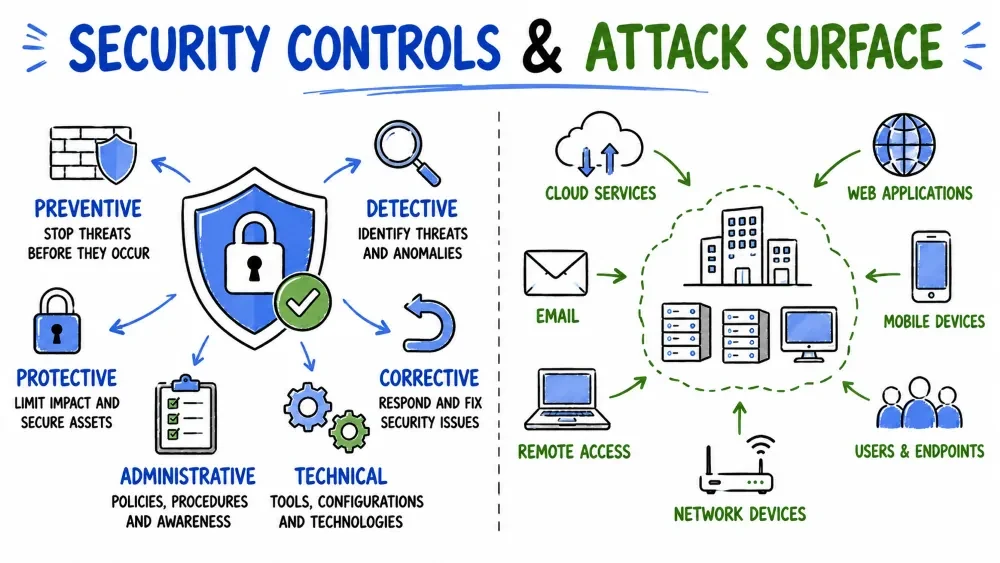
Security controls are safeguards or countermeasures designed to protect assets, detect threats, and respond to incidents. They are the practical implementation of security principles.
Security Controls = Actions, devices, or procedures that reduce security risks.
Without controls, every system would be completely exposed:
| Without Controls | Result |
|---|---|
| No firewall | Anyone can access the network |
| No access controls | Anyone can see any data |
| No monitoring | No one knows when a breach occurs |
| No backups | Data loss = permanent |
| No training | Employees are easy phishing targets |
Think of security controls like the safety features of a car:
| Car Safety Feature | Type | Security Equivalent |
|---|---|---|
| Seatbelt | Preventive | Access control |
| Dashboard warning light | Detective | Intrusion Detection |
| Airbag | Corrective | Incident Response |
| Speed bump on road | Deterrent | Warning banners |
| Spare tire | Compensating | Backup system |
Security controls are categorized by when and how they act in relation to an incident:
| Control Type | Purpose | Timing | Analogy |
|---|---|---|---|
| Preventive | Stop attacks before they happen | Before | Lock on the door |
| Detective | Find attacks in progress or after | During/After | Security camera |
| Corrective | Fix damage after an attack | After | Repair crew |
| Deterrent | Discourage attackers from trying | Before | Security sign in yard |
| Compensating | Alternative when primary control fails | Varies | Backup lock |
Before Attack ──────► During Attack ──────► After Attack
      │                      │                      │
      ▼                      ▼                      ▼
┌────────────┐       ┌────────────┐        ┌────────────┐
│ Preventive │       │ Detective  │        │ Corrective │
│ Deterrent  │       │            │        │            │
└────────────┘       └────────────┘        └────────────┘
Preventive controls stop security incidents before they happen — they are your first line of defense.
Attacker tries to enter → Preventive Control blocks → Attacker fails
                              │
                              ▼
                     (No incident occurs)
| Control | Category | How It Prevents | Real-World Implementation |
|---|---|---|---|
| Firewall | Network | Blocks unauthorized traffic | Cisco ASA, pfSense, Windows Firewall |
| Antivirus | Endpoint | Blocks malware execution | Windows Defender, Kaspersky |
| Strong Passwords | Access | Makes guessing/cracking infeasible | Password policy (12+ chars, complexity) |
| MFA | Authentication | Blocks even with stolen password | Google Authenticator, YubiKey |
| Encryption | Data | Data unreadable if stolen | BitLocker (full disk), HTTPS |
| Access Controls | Authorization | Only authorized users get in | Active Directory, RBAC |
| Patch Management | System | Fixes vulnerabilities before exploitation | WSUS, SCCM, automatic updates |
| Email Filtering | Network | Blocks phishing/malware emails | Microsoft Defender for Office 365 |
| Content Filtering | Network | Blocks malicious websites | Web proxy, DNS filtering |
| Static Code Analysis | Development | Finds bugs before deployment | SonarQube, ESLint security rules |
A company implements:
- Firewall blocks known malicious IPs
- Email filter catches a phishing email with malware
- Antivirus on the endpoint blocks the malware if it somehow arrives
- Least privilege access means even if malware runs, it can't spread
The attack is stopped at multiple levels — defense in depth.
Detective controls identify and alert about security incidents as they happen or after they occur — they help you find attacks.
Incident occurs → Detective Control detects → Alert sent to security team
                                                  │
                                                  ▼
                                         Investigation begins
| Control | Category | How It Detects | Example Product/Tool |
|---|---|---|---|
| IDS (Intrusion Detection System) | Network | Monitors network traffic for suspicious patterns | Snort, Suricata |
| SIEM | Centralized | Aggregates and analyzes logs from all systems | Splunk, ELK Stack, Azure Sentinel |
| File Integrity Monitoring | System | Detects unauthorized file changes | Tripwire, OSSEC |
| Audit Logs | System | Records all user and system activity | Windows Event Log, syslog |
| Endpoint Detection & Response (EDR) | Endpoint | Detects advanced threats on endpoints | CrowdStrike, Defender for Endpoint |
| Network Monitoring | Network | Analyzes network traffic patterns | Wireshark, NetFlow |
| Honeypots | Network | Decoy systems that trap attackers | Honeyd, T-Pot |
| User Behavior Analytics | User | Detects unusual user behavior | UEBA tools |
Time  Scenario                                       Control Used
│
├─ 2:00 AM  Attacker scans company network           IDS detects port scan
├─ 2:05 AM  Attacker tries to log in via SSH         IDS detects brute force
├─ 2:10 AM  Attacker successfully logs in            Audit log records login
├─ 2:15 AM  Attacker downloads customer data         SIEM correlates events
├─ 2:16 AM  Alert sent to security team              SIEM generates alert
└─ 2:20 AM  Security team investigates               Incident response begins
Corrective controls fix damage and restore normal operations after an incident — they help you recover.
Incident occurs → Damage done → Corrective Control activates → Recovery complete
| Control | How It Corrects | Key Metric | Example |
|---|---|---|---|
| Backup and Restore | Recovers data from backups | Recovery Time Objective (RTO) | Daily backups to cloud |
| Incident Response Plan | Step-by-step response procedure | Mean Time to Respond (MTTR) | NIST IR framework |
| Patch Deployment | Fixes the exploited vulnerability | Patch deployment time | Emergency patching within 24hrs |
| System Reimaging | Wipes and restores compromised systems | System rebuild time | PXE boot, disk cloning |
| Disaster Recovery Plan | Restores full operations | Recovery Point Objective (RPO) | Failover to secondary site |
| Business Continuity Plan | Keeps business running during crisis | Maximum Tolerable Downtime | Alternate work locations |
3 ── Create 3 copies of your data
2 ── Store on 2 different types of media
1 ── Keep 1 copy off-site (or in the cloud)

Example:
├── Copy 1: Original data on your computer
├── Copy 2: External hard drive backup
└── Copy 3: Cloud backup (off-site)
The Attack: Ransomware encrypts all files on a company's server.
Corrective Controls Activated:
- Incident Response Plan guides the team through steps
- Backup system restores files from last night's backup
- Patch deployment fixes the vulnerability that allowed the attack
- Business Continuity ensures employees can work while systems restore
Result: Business resumes normal operations within 4 hours.
Deterrent controls discourage attackers from attempting an attack in the first place — they work on psychology.
Deterrent controls don't physically stop attacks — they make attackers think twice:
Attacker considers attack → Sees deterrent → "Not worth the risk" → Moves on
| Control | How It Deters | Psychological Effect |
|---|---|---|
| Warning Banners | "Unauthorized access is prohibited" | Fear of legal consequences |
| Visible Security Cameras | Criminals avoid being recorded | Fear of being identified |
| Security Guards | Visible presence at entrance | Fear of confrontation |
| Posted Security Policies | Clear rules and consequences | Fear of punishment |
| Audit Notice | "All activity is logged" | Fear of being caught |
| Fencing and Barriers | Physical obstacles | Perceived difficulty |
| Regular Security Audits | Known monitoring schedule | Fear of discovery |
A company displays this banner at login:
"WARNING: This system is for authorized users only. All activities are monitored and logged. Unauthorized access will be prosecuted to the fullest extent of the law."
This alone stops many casual attackers and insider threats.
Compensating controls are alternative safeguards used when the primary control is not feasible, too expensive, or technically impossible.
| Scenario | Primary Control (Ideal) | Compensating Control (Alternative) |
|---|---|---|
| No budget for smart card system | Smart card + reader | Strong password + MFA |
| Can't afford dedicated SOC | 24/7 Security Operations Center | Managed Security Service Provider (MSSP) |
| Legacy system can't be patched | Apply vendor patch | Network segmentation + strict firewall rules |
| No budget for enterprise SIEM | Enterprise SIEM (Splunk) | Open-source tools (ELK) + manual review |
| Cloud can't have physical firewall | Hardware firewall | Cloud-native firewall (AWS Security Groups) |
A compensating control must be at least as effective as the primary control it replaces.
If the compensating control is weaker, it doesn't truly compensate — it creates a false sense of security.
A small business of 10 employees needs security but has no IT budget:
Primary Control (Ideal): Enterprise SIEM, dedicated SOC team, hardware firewall Compensating Controls:
- Free antivirus (Windows Defender) instead of enterprise EDR
- Cloud-based email filtering instead of on-premise
- Free password manager instead of enterprise SSO
- Owner performs manual log reviews weekly
Result: Not as strong as enterprise security, but significantly better than nothing.
Security controls can also be categorized by how they are implemented:
Tangible, physical barriers that protect assets.
| Control | Purpose | Bypass Method |
|---|---|---|
| Locks and doors | Prevent physical access | Lock picking, social engineering |
| Security cameras | Monitor physical areas | Camera blind spots |
| Biometric scanners | Control entry | Spoofing fingerprints |
| Server room locks | Protect hardware | Tailgating behind authorized person |
| Fences and barriers | Perimeter security | Climbing, cutting |
| Security guards | Human monitoring | Distraction, bribery |
| ID badges | Identify authorized personnel | Fake badges |
Software, hardware, and data-based solutions.
| Control | Purpose | Common Implementation |
|---|---|---|
| Firewalls | Block unauthorized network traffic | pfSense, Windows Firewall, cloud security groups |
| Encryption | Protect data confidentiality | AES-256, TLS 1.3, HTTPS |
| Antivirus/EDR | Stop malware | Windows Defender, CrowdStrike |
| MFA | Verify identities | Authenticator app, SMS, biometrics |
| IDS/IPS | Detect/prevent network attacks | Snort, Suricata |
| SIEM | Centralized security monitoring | Splunk, ELK Stack, Sentinel |
| DLP (Data Loss Prevention) | Prevent data leakage | Microsoft DLP, Digital Guardian |
Policies, procedures, training, and management.
| Control | Purpose | How It Works |
|---|---|---|
| Security Policies | Define rules and expectations | Written documents everyone must follow |
| Security Awareness Training | Educate employees on threats | Regular training sessions, phishing simulations |
| Background Checks | Vet employees before hiring | Criminal record check, reference verification |
| Incident Response Plan | Guide response procedures | Documented step-by-step playbooks |
| Acceptable Use Policy | Define proper system usage | What employees can/cannot do with company devices |
| Access Review Process | Regularly audit permissions | Quarterly review of who has access to what |
| Vendor Risk Management | Assess third-party security | Security questionnaires, audits |
| Type | Physical | Technical | Administrative |
|---|---|---|---|
| Large Enterprise | Data center with biometric locks, 24/7 guards | Enterprise SIEM, EDR on all endpoints, network segmentation | Dedicated security team, annual training, regular audits |
| Small Business | Locked server room, basic alarm system | Antivirus, firewall, cloud security basics | Written password policy, basic employee training |
| Individual | Lock your laptop at home | Free antivirus, MFA on accounts | Common sense, staying informed |
The NIST SP 800-53 is one of the most widely used security control frameworks. It organizes controls into families:
| Control Family | ID | Description | Examples |
|---|---|---|---|
| Access Control | AC | Manage who can access what | AC-1: Access Control Policy |
| Awareness & Training | AT | Train people on security | AT-2: Security Awareness Training |
| Audit & Accountability | AU | Log and monitor activity | AU-2: Audit Events |
| Configuration Management | CM | Manage system configurations | CM-6: Configuration Settings |
| Contingency Planning | CP | Prepare for disruptions | CP-2: Contingency Plan |
| Incident Response | IR | Handle security incidents | IR-4: Incident Handling |
| Risk Assessment | RA | Identify and assess risks | RA-3: Risk Assessment |
| System & Communications Protection | SC | Protect systems and communications | SC-8: Transmission Confidentiality |
Stage 1: IDENTIFY
         └── What controls do we need? (Risk assessment)
                ↓
Stage 2: SELECT
         └── Choose appropriate controls (NIST, ISO 27001)
                ↓
Stage 3: IMPLEMENT
         └── Deploy the controls (technical + procedural)
                ↓
Stage 4: TEST
         └── Verify controls work as intended
                ↓
Stage 5: MONITOR
         └── Continuously assess effectiveness
                ↓
         (Return to Stage 1 — continuous improvement)
| Stage | Activity |
|---|---|
| Identify | Risk assessment shows no network protection |
| Select | Choose a next-gen firewall with IPS capabilities |
| Implement | Purchase, install, configure firewall rules |
| Test | Try to bypass firewall — verify it blocks threats |
| Monitor | Daily log review, monthly rule review, annual upgrade |
Attack Surface is the total sum of all possible entry points (attack vectors) where an attacker can try to access, extract, or damage a system.
Think of your house:
- Attack Surface = All doors + windows + vents + garage + pet door + skylight
- Security Controls = Locks, alarms, bars, security cameras
The more openings you have, the harder it is to secure them all.
| Term | Definition | Example |
|---|---|---|
| Attack Surface | ALL possible entry points | All doors, windows, vents |
| Attack Vector | A SPECIFIC method of attack | Phishing email |
| Attack Path | A SPECIFIC route through the surface | Open WiFi → weak password → database |
All internet-facing systems, software, and network services.
| Component | Examples | Risk Level |
|---|---|---|
| Websites & Web Apps | Login pages, contact forms, search bars | High (publicly accessible) |
| APIs | REST APIs, GraphQL, third-party integrations | High (data access) |
| Network Ports | Open ports (22-SSH, 80-HTTP, 443-HTTPS, 3306-MySQL) | Varies |
| Cloud Services | AWS S3 buckets, Azure Blob, cloud databases | High (misconfiguration common) |
| Email Systems | Email servers, employee inboxes | High (phishing target) |
| Mobile Apps | iOS/Android applications | Medium |
| IoT Devices | Smart cameras, smart thermostats, sensors | Medium (often insecure) |
| DNS | Domain Name System records | Medium (spoofing risk) |
All physical access points to systems and data.
| Component | Examples | Risk Level |
|---|---|---|
| Endpoints | Laptops, desktops, smartphones, tablets | High (portable, lost) |
| Removable Media | USB drives, external hard drives, SD cards | High (easy to lose/steal) |
| Buildings | Server rooms, offices, wiring closets | Medium |
| Network Hardware | Routers, switches, cables, patch panels | Medium |
| Printers/Copiers | Multi-function printers (store data on hard drives) | Low-Medium |
Human vulnerabilities that can be exploited.
| Component | Examples | Why Vulnerable |
|---|---|---|
| Employees | Can be tricked by phishing, pretexting | Lack of training, busy, helpful |
| Executives | Target for CEO fraud, whaling | High access, public profiles |
| IT Staff | Target for tech support impersonation | System access makes them high-value |
| Contractors | Third-party with limited oversight | Less invested in company culture |
| Customers | Can be targeted with scams | Trust in your brand |
| Organization Type | Digital | Physical | Social Engineering |
|---|---|---|---|
| Large Enterprise | Thousands of servers, hundreds of apps | Multiple data centers, 10,000+ devices | 10,000+ employees to train |
| SMB (Small Business) | 1-10 servers, website, email | Single office, 10-50 devices | 10-50 employees, less training |
| Individual | Personal accounts, 1-2 devices | 1 laptop, 1 phone | Yourself and family |
Step 1: MAP all assets (inventory)
Step 2: IDENTIFY all entry points for each asset
Step 3: CLASSIFY entry points by risk (likelihood × impact)
Step 4: PRIORITIZE which to secure first
Step 5: MONITOR for new entry points
| Question | Yes/No | Risk if "No" |
|---|---|---|
| Are all unused ports closed? | High | |
| Are all unused services disabled? | High | |
| Is remote access restricted? | High | |
| Is MFA enabled on all external access? | Critical | |
| Are all systems patched? | High | |
| Is employee security training regular? | High | |
| Are third-party APIs reviewed? | Medium | |
| Is the network segmented? | Medium | |
| Is sensitive data encrypted? | Critical |
| Strategy | How It Helps | Effort | Impact |
|---|---|---|---|
| Remove Unused Services | Eliminate unnecessary entry points | Low | High |
| Close Unused Ports | Block network access points | Low | High |
| Patch Vulnerabilities | Remove known weaknesses | Medium | Very High |
| Disable Unnecessary Features | Reduce functionality that can be exploited | Low | Medium |
| Network Segmentation | Divide network into secure zones | High | Very High |
| Minimize Code | Less code = fewer bugs | Medium | High |
| Least Privilege | Limit who can reach what | Medium | High |
| Application Allowlisting | Only approved apps can run | Medium | High |
| Reduce User Privileges | Users run with minimum rights | Medium | High |
| Remove Default Accounts | Eliminate known credentials | Low | High |
Microsoft Defender for Endpoint has built-in ASR rules:
| Rule | What it Blocks |
|---|---|
| Block Office apps from creating executable content | Prevents macros from dropping malware |
| Block credential stealing from LSASS | Blocks Mimikatz-style attacks |
| Block executable content from email | Prevents malware from email |
| Block child processes from Office apps | Stops "Word launching PowerShell" attacks |
| Block untrusted programs from running | Only approved apps can execute |
Every feature you add is a potential vulnerability. Every line of code is a potential bug. Every open port is a potential entry.
Good security = saying "no" to unnecessary features.
ATTACK SURFACE (All potential entry points)
         │
         ▼
SECURITY CONTROLS (Protection at each entry point)
         │
         ├── Less Attack Surface = Fewer entry points to protect
         ├── Stronger Controls = Better protection per entry point
         └── GOAL: Minimize BOTH for maximum security
Security Level = (Strength of Controls) ÷ (Size of Attack Surface)

Best case: Strong controls + Small attack surface = Very Secure
Worst case: Weak controls + Large attack surface = Very Vulnerable
| Scenario | Attack Surface | Controls | Security Level |
|---|---|---|---|
| Banking app | Small (few entry points) | Very Strong | Very High |
| Legacy web app | Large (many features) | Weak | Very Low |
| New startup | Medium | Strong | Medium-High |
| Government system | Very Large | Very Strong | Medium (due to size) |
| Entry Point | Attack Surface | Security Control | Risk Level |
|---|---|---|---|
| Login page | Anyone can attempt login | Strong password + MFA + rate limiting + CAPTCHA | Low |
| Contact form | Can submit malicious input | Input sanitization + CSRF token + rate limiting | Low |
| API endpoint | Can be abused | API key authentication + rate limiting + logging | Medium |
| Database | Can be accessed (if compromised) | Firewall + encryption at rest + RBAC | Low |
| Open port 22 (SSH) | Direct server access | Key-only auth + disable root login + fail2ban | Low |
| File upload | Can upload malicious files | File type validation + scan + sandbox | Medium |
| Search bar | SQL injection risk | Parameterized queries + input validation | Low |
A small e-commerce website was hacked. Let's analyze why:

ATTACK SURFACE ANALYSIS:
├── Website with customer login (login page = entry point)
├── Search functionality (search bar = entry point)
├── Open port 22 for SSH (server = entry point)
├── Third-party payment API (API = entry point)
├── Admin panel at /admin (admin login = entry point)
└── Customer support email (email = social engineering)

WHAT WENT WRONG:
├── No rate limiting on login (weak control)
├── Open port 22 exposed to internet (unnecessary attack surface)
├── Old version of WordPress (known vulnerability)
└── No employee security training (social engineering risk)

ROOT CAUSE:
└── Large attack surface + weak controls = Breach inevitable

FIXES APPLIED:
├── Reduced attack surface → Disabled SSH external access
├── Strengthened controls → Added rate limiting, updated WordPress
├── Added WAF → Blocks common attack patterns
└── Employee training → Reduced phishing risk
| Entry Point | Attack Surface | Control | Finding |
|---|---|---|---|
| Guest WiFi | Network access | Separate from internal network | ✅ Secure |
| Employee laptops | Physical + network | Full-disk encryption + antivirus | ❌ No encryption on 3 laptops |
| Company email | Phishing target | Email filtering + training | ✅ Training done quarterly |
| Server room | Physical access | Biometric lock + camera | ❌ Camera not working |
| USB ports | Data exfiltration | Disabled via group policy | ✅ All disabled |
YOUR HOME ATTACK SURFACE:
├── WiFi router (port 80, 443 open by default)
├── Smart TV (connected to internet)
├── Smartphone (apps with various permissions)
├── Laptop (browsing, emails, online banking)
├── IoT devices (smart bulb, smart speaker)
└── Social media accounts (personal information)

YOUR CONTROLS:
├── Strong WiFi password + WPA3
├── Regular software updates on laptop
├── MFA on email and banking
├── Antivirus installed
└── Not reusing passwords

QUESTIONS TO ASK YOURSELF:
├── Are all unnecessary services disabled on your router?
├── Do you have a guest network for IoT devices?
├── Are you backing up your data?
├── Do you click links in unknown emails?
└── Do you use a password manager?
Save your progress and earn XP for completing tutorials.
Technology
Cyber Security & Networking
Lesson group
Cyber Security Basics
Progress
83% complete

