Preparing your learning space...
20% through Digital Safety tutorials
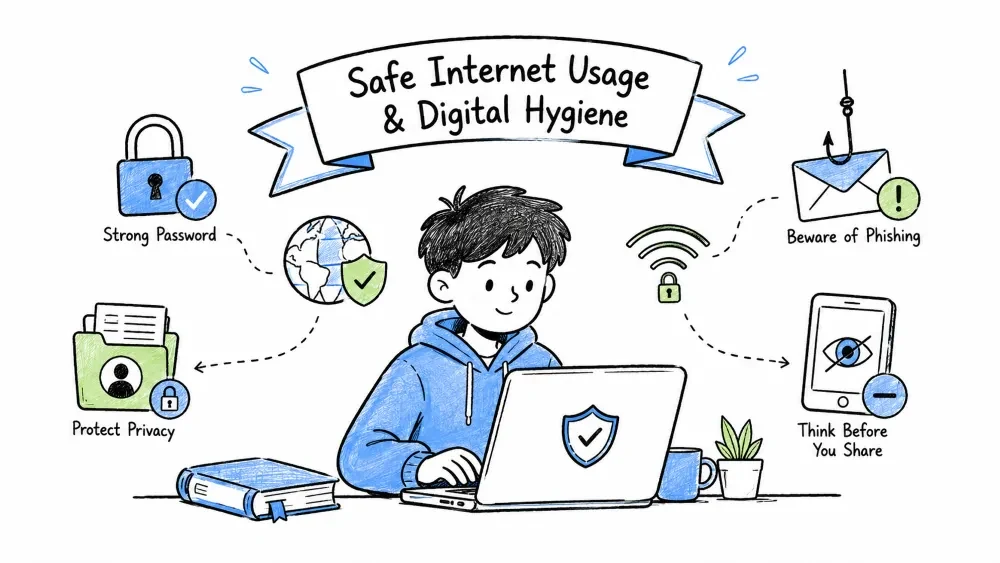
By the end of this tutorial, you will be able to:
Safe Internet Usage: Adopting behaviors and tools that protect your personal information, devices, accounts, and digital reputation from online threats.
Safe internet usage means adopting behaviors and tools that protect your:
CIA Triad: The three core principles of information security — Confidentiality (limiting access), Integrity (preventing unauthorized changes), and Availability (ensuring access when needed) — applied to personal digital safety.
| Principle | Personal Application |
|---|---|
| Confidentiality | Only you and trusted parties access your data |
| Integrity | Your data isn't altered without your knowledge |
| Availability | You can access your accounts and data when needed |
Digital Hygiene: Routine practices (daily, weekly, monthly, quarterly) that maintain the health and security of your digital life — like brushing teeth for your online presence.
- Lock screen when stepping away (Win+L / Cmd+Ctrl+Q)
- Verify sender before clicking links in emails/messages
- Use unique passwords for each important account
- Log out of sensitive accounts on shared devices
- Close unused browser tabs (reduces tracking surface)
- Review browser extensions — remove unused ones
- Check "Have I Been Pwned" for email breaches
- Clear browser cache/cookies for privacy
- Update software with pending security patches
- Review app permissions on phone (location, microphone, contacts)
- Audit saved passwords in password manager
- Review 2FA methods — prefer authenticator apps over SMS
- Check connected apps/integrations on Google/Microsoft/Apple accounts
- Review privacy settings on social media platforms
- Backup important data (3-2-1 rule: 3 copies, 2 media types, 1 offsite)
- Scan devices with reputable antivirus/anti-malware
- Rotate master password for password manager
- Review and update recovery email/phone for critical accounts
- Audit digital footprint — search your name, remove outdated info
- Check credit report for unauthorized activity
- Review subscription services — cancel unused ones
- Test backup restoration process
Security Tools Stack: The layered set of software tools (password manager, 2FA, browser extensions, VPN, DNS) that work together to protect your digital identity and data.
Password Manager: Software that generates, stores, and auto-fills unique complex passwords for every account, protected by one master password — the single most important security tool.
| Tool | Best For | Cost |
|---|---|---|
| Bitwarden | Open-source, cross-platform, free tier excellent | Free / $10/yr |
| 1Password | Family sharing, polished UX, travel mode | $36/yr |
| KeePassXC | Local-only, offline, advanced users | Free |
Two-Factor Authentication (2FA): A second verification step (something you have: authenticator app, hardware key, or something you are: biometric) beyond your password, preventing account takeover even if passwords are stolen.
Priority Order (Most → Least Secure):
1. Hardware Keys (YubiKey, Titan) — Phishing-proof
2. Authenticator Apps (Authy, Google Auth, Microsoft Auth, Aegis)
3. Push Notifications (Duo, Microsoft Authenticator)
4. Email Codes — Better than nothing
5. SMS/Voice — Vulnerable to SIM swapping
Browser Hardening: Configuring browser settings and installing privacy extensions to reduce tracking, block malicious scripts, enforce HTTPS, and minimize data leakage — turning your browser into a privacy shield.
Essential Extensions:
- uBlock Origin — Ad/tracker blocking (not "uBlock")
- Privacy Badger — Learning-based tracker blocking
- HTTPS Everywhere — Force HTTPS (built into modern browsers)
- Cookie AutoDelete — Auto-clean cookies on tab close
- Decentraleyes — Local CDN emulation (privacy)

Browser Settings:
- Block third-party cookies
- Send "Do Not Track" request
- Disable autocomplete for passwords (use password manager instead)
- Enable "Enhanced Protection" / "Strict" tracking prevention
Threat Recognition: The ability to identify common attack patterns (social engineering tactics, malware delivery methods) before they succeed — your human firewall.
Threat Recognition: The ability to identify common attack patterns (social engineering tactics, malware delivery methods) before they succeed — your human firewall.
Social Engineering: Manipulating people into divulging confidential information or performing actions that compromise security by exploiting human psychology (urgency, authority, fear, greed).
Social Engineering: Manipulating people into divulging confidential information or performing actions that compromise security by exploiting human psychology (urgency, authority, fear, greed). | Tactic | Example | Defense | |--------|---------|---------| | Urgency | "Act now or account closes!" | Pause, verify independently | | Authority | "IT department needs your password" | Legitimate IT never asks for passwords | | Fear | "Your computer has a virus!" | Don't call numbers in pop-ups | | Curiosity | "You won't believe this video!" | Don't click unknown links | | Greed | "Claim your $1000 reward!" | If too good to be true, it is |
Malware Delivery Vector: The method or pathway attackers use to get malicious software onto your device (email attachments, malicious links, infected USBs, compromised websites, fake apps).
Malware Delivery Vector: The method or pathway attackers use to get malicious software onto your device (email attachments, malicious links, infected USBs, compromised websites, fake apps).
Email Attachments (.exe, .zip, .scr, .pdf with scripts)
Malicious Links (phishing, drive-by downloads)
Infected USB Drives (autorun, disguised files)
Compromised Websites (malvertising, watering hole)
Fake Apps (sideloaded APKs, fake updates)
Security Checklist: A structured, repeatable audit template covering accounts, devices, network, privacy, and emergency prep — used monthly/quarterly to verify your security posture hasn't drifted.
Personal Security Checklist: A structured, recurring audit template covering accounts, devices, network, privacy, and emergency preparedness — your quarterly digital health check-up.
# MY DIGITAL HYGIENE CHECKLIST — [MONTH/YEAR]

## Account Security
- [ ] Password manager: All critical accounts have unique 16+ char passwords
- [ ] 2FA enabled on: Email Banking Social Work Cloud Shopping
- [ ] Recovery methods updated (email/phone) for top 10 accounts
- [ ] No password reuse across important accounts

## Device Security
- [ ] OS updated to latest version
- [ ] Antivirus active + recent scan clean
- [ ] Disk encryption enabled (BitLocker/FileVault/LUKS)
- [ ] Screen lock: PIN/biometric + auto-lock < 5 min
- [ ] Find My Device / tracking enabled

## Network Security
- [ ] Home WiFi: WPA3/WPA2-AES, strong passphrase, guest network
- [ ] Router firmware updated, admin password changed
- [ ] VPN used on public WiFi (Mullvad, Proton, IVPN recommended)
- [ ] DNS set to privacy-respecting (NextDNS, Quad9, Cloudflare 1.1.1.1)

## Privacy & Data
- [ ] Browser: uBlock Origin + Privacy Badger + Cookie AutoDelete
- [ ] Search engine: DuckDuckGo / Startpage / Brave Search
- [ ] Social media: Privacy settings reviewed, old posts audited
- [ ] Data broker opt-outs submitted (Incogni, DeleteMe, or manual)
- [ ] Backups: 3-2-1 verified this month

## Emergency Prep
- [ ] Recovery codes printed/stored offline for critical accounts
- [ ] Emergency contact knows how to access password manager
- [ ] Identity theft response plan documented
- [ ] Credit freeze active at major bureaus (Equifax, Experian, TransUnion)

---
Next Review Date: ___________    Signature: ___________
Practice Exercise: A realistic scenario to apply the concepts learned — analyze the threat, identify red flags, and determine the correct response.
Scenario: You receive an email: "Your Netflix account will be suspended in 24 hours due to payment failure. Click here to update billing."
Analyze using the framework above:
Red Flags: Urgency (24 hours), fear (account suspension), generic greeting, suspicious link.
Action: Don't click. Go directly to netflix.com in browser (not email link). Check account status there.
Verification: Log in at netflix.com directly → Account → Billing Details. Or call Netflix support from official website.
Save your progress and earn XP for completing tutorials.
Technology
Cyber Security & Networking
Lesson group
Digital Safety
Progress
20% complete

