Preparing your learning space...
50% through IP Address Classification tutorials
Topics: IPv4 | IPv6 | Classes | Public IP | Private IP | Loopback | APIPA | Static IP | Dynamic IP | CIDR
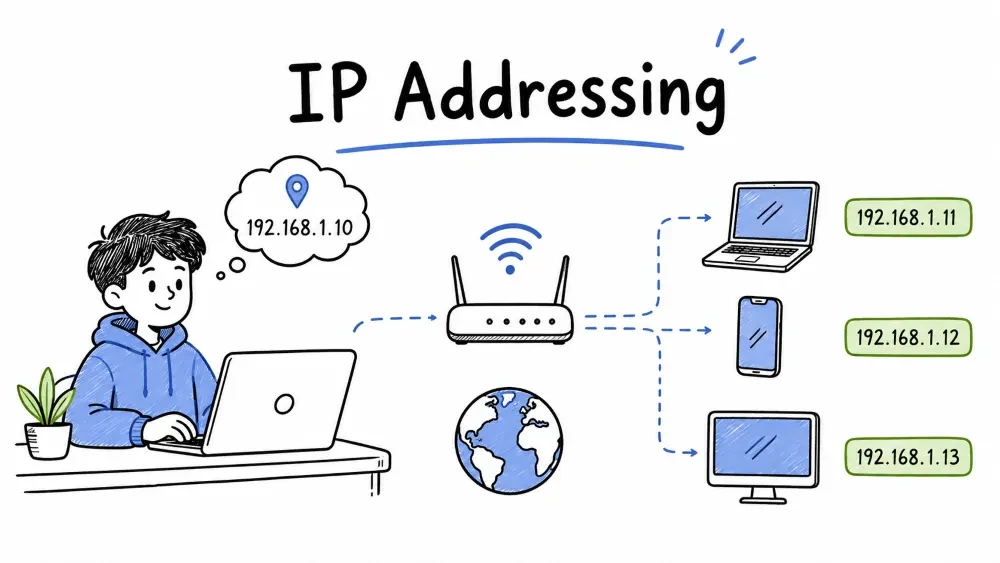
An IP Address (Internet Protocol Address) is a unique numeric identifier assigned to every device connected to a network that uses the Internet Protocol. It serves two functions:
| Function | Analogy |
|---|---|
| Identification | Like your name — identifies your device |
| Location | Like your home address — tells the network where to find you |
Two standards for IP addressing — IPv4 (32-bit, current) and IPv6 (128-bit, next generation).
| Version | Bit Size | Address Count | Status |
|---|---|---|---|
| IPv4 | 32 bits | ~4.3 billion | Current standard, but exhausted |
| IPv6 | 128 bits | ~340 undecillion | Next generation, growing adoption |
A 32-bit addressing system using dotted-decimal format (4 octets, each 0–255) to uniquely identify devices on a network.
Four 8-bit octets separated by dots, written in decimal (0–255 per octet).
An IPv4 address is a 32-bit number written as 4 decimal octets separated by dots:
192 . 168 . 1 . 10
 │     │    │   └── 4th octet (8 bits → 0–255)
 │     │    └────── 3rd octet (8 bits → 0–255)
 │     └─────────── 2nd octet (8 bits → 0–255)
 └───────────────── 1st octet (8 bits → 0–255)
Total: 32 bits = 4 bytes = 4,294,967,296 possible addresses.
Computers process IPs in binary. Each octet is 8 bits:
Bit position:  128  64  32  16   8   4   2   1
Binary:          1   0   1   0   1   0   0   0  = 168
                 0   0   0   0   1   0   1   0  =  10
Decimal → Binary: Subtract the largest power of 2 each time.
168 → 128 (1), 40 left → 64 (0), 40 → 32 (1), 8 left → 16 (0),
      8 → 8 (1), 0 left → 4 (0), 2 (0), 1 (0)
Result: 10101000
Binary → Decimal: Add up positions where bit = 1.
10101000 → 128 + 32 + 8 = 168
The 8 most common binary values used in subnet masking.
| Decimal | Binary |
|---|---|
| 255 | 11111111 |
| 128 | 10000000 |
| 192 | 11000000 |
| 224 | 11100000 |
| 240 | 11110000 |
| 248 | 11111000 |
| 252 | 11111100 |
| 254 | 11111110 |
The original IP allocation system (now obsolete) that divided IPv4 addresses into fixed-size classes based on the first few bits.
The first octet value determines the class — 1–126 = A, 128–191 = B, 192–223 = C, 224–239 = D, 240–255 = E.
Look at the first octet (first 8 bits):
| Class | First Bits | First Octet Range | Default Mask | CIDR |
|---|---|---|---|---|
| A | 0 | 1–126 | 255.0.0.0 | /8 |
| B | 10 | 128–191 | 255.255.0.0 | /16 |
| C | 110 | 192–223 | 255.255.255.0 | /24 |
| D | 1110 | 224–239 | Multicast | — |
| E | 1111 | 240–255 | Experimental | — |
Note: 127.x.x.x is reserved for loopback, not part of Class A.
Network.Host.Host.Host — 126 networks with 16 million hosts each, used by ISPs and large enterprises.
Structure:  Network . Host . Host . Host
Networks:   126
Hosts/net:  2²⁴ − 2 = 16,777,214
Used by:    ISPs, tech giants, AWS/Azure/GCP VPCs
Example:    10.0.0.1 → network = 10, host = 0.0.1
Network.Network.Host.Host — 16,384 networks with 65,534 hosts each, used by medium-large organizations.
Structure:  Network . Network . Host . Host
Networks:   2¹⁴ = 16,384
Hosts/net:  2¹⁶ − 2 = 65,534
Used by:    Medium-large organizations, universities
Example:    172.16.0.1 → network = 172.16, host = 0.1
Network.Network.Network.Host — 2 million networks with 254 hosts each, used by small organizations and home networks.
Structure:  Network . Network . Network . Host
Networks:   2²¹ = 2,097,152
Hosts/net:  2⁸ − 2 = 254
Used by:    Small organizations, home networks
Example:    192.168.1.10 → network = 192.168.1, host = 10
Not for host addressing — used for multicast (one-to-many communication).
Used for multicast (one-to-many), not host addressing:
224.0.0.1 — All hosts on subnet224.0.0.5 — All OSPF routers224.0.0.251 — mDNS (Bonjour/AirPrint)Reserved for experimental / research use only.
A quick reference comparing the three main classes by size, capacity, and typical use.
| Feature | Class A | Class B | Class C |
|---|---|---|---|
| Hosts per network | 16,777,214 | 65,534 | 254 |
| Number of networks | 126 | 16,384 | 2,097,152 |
| Typical use | ISPs, giants | Mid-large orgs | Small orgs, homes |
A modern IP addressing system (1993) that replaces rigid classes with flexible prefix lengths to prevent address waste.
CIDR solved the problem of wasted IP addresses by allowing any prefix length instead of being locked into /8, /16, /24.
The classful system was wasteful. A company needing 300 hosts had only two options:
Class C (/24):  254 hosts  → Too small
Class B (/16):  65,534 hosts → 65,234 wasted!
CIDR (pronounced "cider") replaced classes in 1993. It allows any prefix length, not just /8, /16, /24.
Written as IP/Prefix (e.g., 192.168.1.0/24) — the number after / counts the network bits.
192.168.1.0 / 24
              │
              └── Number of bits reserved for the network
The /24 is shorthand for subnet mask 255.255.255.0. The number after / simply counts how many leading 1s are in the mask.
Convert CIDR to mask by writing N consecutive 1s followed by (32-N) zeros, then convert each 8-bit group to decimal.
/24 = 24 ones + 8 zeros → 11111111.11111111.11111111.00000000 → 255.255.255.0
/28 = 28 ones + 4 zeros → 11111111.11111111.11111111.11110000 → 255.255.255.240
/22 = 22 ones + 10 zeros → 11111111.11111111.11111100.00000000 → 255.255.252.0
Count the binary 1s in the mask — each 255 = 8 bits, then add the bits from the remaining octet.
255.255.255.0   →  24 ones → /24
255.255.255.240 →  28 ones → /28
255.255.252.0   →  22 ones → /22
The 7 most common CIDR values — memorize these for subnetting.
| CIDR | Subnet Mask | Total IPs | Usable Hosts |
|---|---|---|---|
| /24 | 255.255.255.0 | 256 | 254 |
| /25 | 255.255.255.128 | 128 | 126 |
| /26 | 255.255.255.192 | 64 | 62 |
| /27 | 255.255.255.224 | 32 | 30 |
| /28 | 255.255.255.240 | 16 | 14 |
| /29 | 255.255.255.248 | 8 | 6 |
| /30 | 255.255.255.252 | 4 | 2 |
CIDR vs Classful: With CIDR, that company needing 300 hosts can use
/23(510 addresses) — no waste.
Public IPs are globally unique and routable on the internet; Private IPs (RFC 1918) are reused internally and require NAT to reach the internet.
A globally unique IP address routable on the public internet, assigned by IANA through ISPs.
Examples: 8.8.8.8 (Google DNS), 1.1.1.1 (Cloudflare), 4.2.2.2
IP addresses reserved for internal use — not routable on the internet and can be reused across different private networks.
192.168.1.x ≠ your neighbor's)Three blocks reserved by RFC 1918 — 10.0.0.0/8, 172.16.0.0/12, and 192.168.0.0/16 — covering Class A, B, and C sizes.
| Range | CIDR | Class | Hosts | Use Case |
|---|---|---|---|---|
10.0.0.0 – 10.255.255.255 | /8 | A | 16,777,214 | Large enterprises, AWS VPCs |
172.16.0.0 – 172.31.255.255 | /12 | B | 1,048,574 | Medium orgs, cloud VPCs |
192.168.0.0 – 192.168.255.255 | /16 | C | 65,534 | Home/small office networks |
NAT translates private IPs to a public IP so multiple devices can share one internet connection.
Laptop (192.168.1.10) ──→ Router ──→ Internet (203.0.113.50)
        (private)              ↑ NAT translates private → public
The router keeps a mapping table so response packets find their way back to the correct device.
A special IP address used by a device to send network traffic to itself — data never leaves the machine.
A loopback address sends traffic to the device itself — the data never leaves the machine. It's handled entirely by the OS network stack.
Range 127.0.0.0/8, standard address 127.0.0.1, also known as "localhost."
127.0.0.0/8127.0.0.1ping 127.0.0.1 → Tests your TCP/IP stack (software loopback)
Does NOT test your network cable or NIC
Loopback is used for testing TCP/IP, running local development servers, and security isolation.
| Use | Why |
|---|---|
| Testing | ping 127.0.0.1 confirms TCP/IP is installed and working |
| Local dev | http://localhost:3000 for running web apps locally |
| Security | Services bound to 127.0.0.1 are local-only, not network-accessible |
| Blocking sites | Map unwanted domains to 127.0.0.1 in the hosts file |
The IPv6 equivalent of 127.0.0.1 — address ::1/128.
::1/128Standard port numbers used with localhost for common development services.
Port 80:     http://localhost
Port 443:    https://localhost
Port 3000:   React / Node.js dev server
Port 3306:   MySQL
Port 5432:   PostgreSQL
A fallback feature that auto-assigns a link-local IP (169.254.x.x) when a device cannot reach a DHCP server.
APIPA is a fallback feature (Windows and other OSes). When a device is set to use DHCP but no DHCP server responds, it auto-assigns itself a link-local IP.
169.254.0.1 – 169.254.255.254 with /16 mask, limited to the local subnet only.
Range:  169.254.0.1 – 169.254.255.254
Mask:   255.255.0.0 (/16)
Limit:  Link-local only — never routed, no internet access
The boot sequence — DHCP Discover gets no response → device assigns itself an APIPA address.
Device boots → needs IP → DHCP Discover → no response → APIPA: 169.254.x.x
                                                        └── Internet broken
A troubleshooting guide — common causes and what to check when your device shows an APIPA address.
 Possible causes:
   • Router / DHCP server is down
   • Network cable unplugged
   • Wi-Fi disconnected / wrong password
   • Faulty network adapter

 Check first:
   1. Is the router powered on?
   2. Is the cable plugged in?
   3. Restart the network adapter
Static IPs are manually configured and never change; Dynamic IPs are automatically assigned by DHCP and may change over time.
A fixed IP address manually configured on a device — predictable but requires manual management.
Manually configured — never changes.
Example config:
  IP:        192.168.1.100
  Mask:      255.255.255.0
  Gateway:   192.168.1.1
| Pros | Cons |
|---|---|
| Predictable — always the same | Manual setup per device |
| Good for servers, printers | Risk of IP conflicts |
| Stable remote access (VPN/RDP) | Management overhead |
An IP address automatically assigned by a DHCP server — no configuration needed but the IP may change.
Automatically assigned by a DHCP server — may change over time.
| Pros | Cons |
|---|---|
| Zero configuration on devices | IP can change unexpectedly |
| Efficient IP reuse | Bad for hosting any service |
| Central management |
A 4-step process — Discover, Offer, Request, Acknowledge — by which a device obtains an IP from a DHCP server.
Client                     DHCP Server
  │                              │
  │── DISCOVER (Anyone there?) ──→│
  │←── OFFER (Use 192.168.1.10) ──│
  │── REQUEST (I'll take it!) ──→│
  │←── ACK (Confirmed!) ─────────│
  │                              │
  IP: 192.168.1.10  Lease: 24 hours
A DHCP server setting that always assigns the same IP to a specific device (by MAC address) — combines static stability with dynamic ease.
A DHCP reservation ties a specific IP to a device's MAC address on the DHCP server:
Printer (MAC: AA:BB:CC:00:11:22) → always gets 192.168.1.50
A guide to choosing static vs dynamic IP based on the device's role and requirements.
| Scenario | Best Choice |
|---|---|
| Home laptop | Dynamic |
| Web server | Static |
| Office printer | Static or DHCP Reservation |
| Guest Wi-Fi | Dynamic |
| Security camera | Static or DHCP Reservation |
The next-generation IP protocol using 128-bit addresses (written in hex) to solve IPv4 address exhaustion.
IPv4 has ~4.3 billion addresses — exhausted in 2011. IPv6 provides 340 undecillion addresses (2¹²⁸).
128 bits → 8 groups of 16 bits each, written in hexadecimal and separated by colons.
128 bits → 8 groups of 16 bits, written in hexadecimal, colon-separated

Full:    2001:0db8:85a3:0000:0000:8a2e:0370:7334
         │      │      │      │      │      │      │      │
         └──1───┘ └──2───┘ └──3───┘ └──4───┘ └──5───┘ └──6───┘ └──7───┘ └──8───┘
         Each group = 16 bits = 4 hex digits
Two rules to shorten IPv6 addresses — omit leading zeros, and replace one contiguous zero-run with ::.
Rule 1 — Omit leading zeros in any group:
2001:0db8:0000:0000:0000:8a2e:0370:7334
→ 2001:db8:0:0:0:8a2e:370:7334
Rule 2 — Replace one contiguous run of zero-groups with :: (use only once):
→ 2001:db8::8a2e:370:7334
More examples:
Full:     2001:0000:0000:0000:0000:0000:0000:0001
Short:    2001::1

Full:     fe80:0000:0000:0000:0213:72ff:fe9a:a5b0
Short:    fe80::213:72ff:fe9a:a5b0
Five main types — Global Unicast (internet), Unique Local (private), Link-Local (subnet), Loopback (localhost), Multicast (one-to-many).
| Type | Prefix | Purpose | Analogy to IPv4 |
|---|---|---|---|
| Global Unicast | 2000::/3 | Public internet routing | Public IP |
| Unique Local | fc00::/7 | Private network | Private IP |
| Link-Local | fe80::/10 | Local subnet only | APIPA |
| Loopback | ::1/128 | Localhost | 127.0.0.1 |
| Multicast | ff00::/8 | One-to-many | Class D |
No broadcast in IPv6 — multicast replaces it.
Side-by-side comparison of key differences between IPv4 and IPv6.
| Feature | IPv4 | IPv6 |
|---|---|---|
| Address size | 32 bits | 128 bits |
| Format | Dotted-decimal | Hex colon |
| Count | ~4.3 billion | ~340 undecillion |
| NAT? | Usually yes | Not needed |
| Broadcast? | Yes | No (multicast) |
| Auto-config | DHCP | SLAAC or DHCPv6 |
| Loopback | 127.0.0.1 | ::1 |
Running both IPv4 and IPv6 simultaneously — the OS tries IPv6 first and falls back to IPv4.
Most modern networks run IPv4 + IPv6 simultaneously. Your OS tries IPv6 first, falls back to IPv4.
A complete list of reserved IPv4 ranges and their purposes.
| Address Range | Purpose |
|---|---|
0.0.0.0/8 | Default route / "this network" |
10.0.0.0/8 | Private (Class A) |
127.0.0.0/8 | Loopback |
169.254.0.0/16 | APIPA / Link-Local |
172.16.0.0/12 | Private (Class B) |
192.168.0.0/16 | Private (Class C) |
224.0.0.0/4 | Multicast (Class D) |
240.0.0.0/4 | Reserved (Class E) |
255.255.255.255 | Limited broadcast |
Quick reference to identify IP class by the first octet value.
| First Octet | Class |
|---|---|
| 1–126 | A |
| 128–191 | B |
| 192–223 | C |
| 224–239 | D (multicast) |
| 240–255 | E (experimental) |
Save your progress and earn XP for completing tutorials.
1 questions · Pass with 70%+
1Convert /28 to a subnet mask:
Technology
Cyber Security & Networking
Lesson group
IP Address Classification
Progress
50% complete

