Preparing your learning space...
100% through OSI Model tutorials
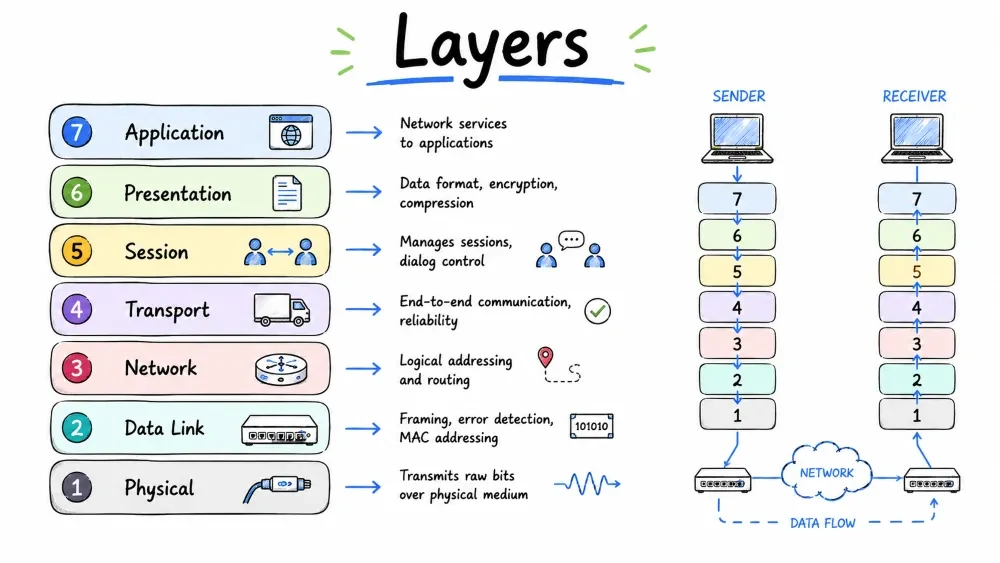
Layer 1 of the OSI model — transmits raw bits (0s and 1s) over physical media like cables, fiber, or wireless signals.
The lowest OSI layer responsible for transmitting raw bits (0s and 1s) over a physical medium like cables or wireless signals.
The Physical Layer is Layer 1 — it deals with the physical connection and transmission of raw bits over a communication channel.
Key responsibility: Convert digital bits into electrical, optical, or radio signals and transmit them.
The Physical Layer has NO understanding of data — it only handles raw bits.
The physical pathways for data transmission — copper cables, fiber optics, and wireless radio frequencies.
The most widely used network cable — four twisted pairs of copper wires reduce electromagnetic interference.
| Category | Max Speed | Max Length | Usage |
|---|---|---|---|
| Cat5e | 1 Gbps | 100m | Home networks |
| Cat6 | 10 Gbps | 55m / 100m | Offices |
| Cat6a | 10 Gbps | 100m | Enterprise |
| Cat8 | 25-40 Gbps | 30m | Data centers |
Connector: RJ-45
Uses light pulses through a glass core — faster, more secure, longer distance.
| Type | Core | Distance | Speed |
|---|---|---|---|
| Single-Mode | ~9 µm | 40+ km | 100 Gbps+ |
| Multi-Mode | 50-62.5 µm | 550m | 10-100 Gbps |
Data transmission using electromagnetic waves — Wi-Fi, Bluetooth, and cellular networks without physical cables.
| Standard | Speed | Range |
|---|---|---|
| Wi-Fi 6 | 9.6 Gbps | ~30m |
| Bluetooth | 3 Mbps | ~10m |
| 5G | 20 Gbps | Km range |
Hardware devices (Hub, Repeater, Modem) and physical arrangements (Star, Bus, Mesh, Ring) of network components.
Devices: Hub (repeats signal to all ports), Repeater (amplifies weak signal), Modem (digital ↔ analog)
Topologies: Star (most common — easy to manage), Bus (cheap but fragile), Mesh (fault-tolerant, expensive), Ring (predictable)
The direction of data flow between devices — one-way, one-at-a-time, or simultaneous communication.
| Mode | Direction | Example |
|---|---|---|
| Simplex | One direction | Keyboard → Computer |
| Half-Duplex | Both ways, one at a time | Walkie-talkie |
| Full-Duplex | Both simultaneously | Phone call |
Layer 2 of the OSI model — organizes raw bits into structured frames, adds hardware (MAC) addresses, and detects transmission errors.
The Data Link Layer takes raw bits from L1 and organizes them into frames, adds hardware addressing (MAC), and performs error detection.
Sublayers: LLC (interfaces with L3) and MAC (physical addressing & media access)
The Layer 2 PDU format and hardware addressing system — frames carry data with MAC source/destination addresses.
The detailed format of an Ethernet frame — preamble, MAC addresses, EtherType, payload, and CRC trailer.
┌────────┬────────┬──────────┬──────────┬──────────┬──────────┬──────────┐
│Preamble│  SFD   │ Dest MAC │ Src MAC  │ EtherType│ Payload  │   FCS    │
│7 bytes │ 1 byte │ 6 bytes  │ 6 bytes  │ 2 bytes  │46-1500 B │ 4 bytes  │
└────────┴────────┴──────────┴──────────┴──────────┴──────────┴──────────┘
A unique 48-bit hardware address burned into every NIC.
00:1A:2B:3C:4D:5E (6 hex pairs)FF:FF:FF:FF:FF:FF (to all devices)| MAC Address | IP Address | |
|---|---|---|
| Layer | L2 | L3 |
| Length | 48 bits | 32/128 bits |
| Assignment | Burned in NIC | Assigned by network |
A comparison between the unintelligent hub (repeats to all) and the intelligent switch (forwards by MAC address).
| Feature | Hub (L1) | Switch (L2) |
|---|---|---|
| Intelligence | None — repeats to all ports | Learns MAC addresses |
| Collision domain | One shared | One per port |
| Today? | Obsolete | Standard |
Switch forwards frames based on MAC addresses — sends data only to the correct port.
A mathematical checksum (Cyclic Redundancy Check) appended to frames — the receiver recalculates it to detect corruption.
Cyclic Redundancy Check — a mathematical checksum appended to each frame. Receiver recalculates it; if mismatch → frame discarded.
Rules determining which device transmits when multiple devices share the same communication medium.
| Method | Where | How it works |
|---|---|---|
| CSMA/CD | Wired Ethernet | Listen → Transmit → Collision? → Retry |
| CSMA/CA | Wi-Fi | Request to Send → Clear to Send → Transmit |
Address Resolution Protocol — maps IP addresses (L3) to MAC addresses (L2).
[PC-A] "Who has 192.168.1.5?" → Broadcast
[PC-B] "I have 192.168.1.5" → Reply with MAC
Layer 3 of the OSI model — handles logical IP addressing, routing packets across networks, and path selection.
Layer 3 — responsible for end-to-end delivery of packets across multiple networks using logical IP addresses and routing.
| Function | Description |
|---|---|
| Logical Addressing | IP addresses (IPv4 / IPv6) |
| Routing | Finding the best path across networks |
| Fragmentation | Splitting large packets to fit MTU |
| Error Reporting | ICMP (ping, traceroute) |
A 32-bit logical address assigned to each device — used for identification and location on networks.
IPv4 = 32 bits, written in dotted decimal: 192.168.1.10
IP ranges reserved for internal networks — cannot be routed directly on the public internet.
| Range | CIDR |
|---|---|
10.0.0.0 – 10.255.255.255 | /8 |
172.16.0.0 – 172.31.255.255 | /12 |
192.168.0.0 – 192.168.255.255 | /16 |
Special: 127.0.0.1 = Loopback (localhost)
Separates IP into network and host portions.
IP:     192.168.1.10
Mask:   255.255.255.0  (/24)
Network Address: 192.168.1.0
Broadcast:       192.168.1.255
Usable Hosts:    254
| CIDR | Usable Hosts |
|---|---|
| /24 | 254 |
| /25 | 126 |
| /26 | 62 |
| /27 | 30 |
| /28 | 14 |
| /29 | 6 |
| /30 | 2 |
Formula: Usable Hosts = 2^(32 - CIDR) - 2
The PDU at Layer 3 — contains source/destination IP, TTL, protocol, and payload.
Key fields: TTL (prevents loops), Protocol (6=TCP, 17=UDP, 1=ICMP), Source/Dest IP
The router's IP on the local network — packets destined for other networks go here first.
Your PC: 192.168.1.10/24 → Gateway: 192.168.1.1 → Internet
Choosing the best path from source to destination.
| Protocol | Type | Metric | Best for |
|---|---|---|---|
| OSPF | Link State | Cost (bandwidth) | Enterprise |
| BGP | Path Vector | Path attributes | Internet backbone |
| RIP | Distance Vector | Hop count (max 15) | Small networks |
A Layer 3 device that connects networks and forwards packets by IP address.
| Device | Layer | Forwards by |
|---|---|---|
| Router | L3 | IP Address |
| Switch | L2 | MAC Address |
| Hub | L1 | Nothing (repeats all) |
Allows many private IPs to share one public IP.
| Type | Description |
|---|---|
| PAT (NAT Overload) | Many → one (different ports) — most common |
| Static NAT | One → one (1:1) |
Used for diagnostics — ping sends Echo Request, receives Echo Reply.
$ ping 8.8.8.8 → Reply: time=12ms TTL=117
128-bit addressing — solves IPv4 exhaustion (340 undecillion addresses).
| Feature | IPv4 | IPv6 |
|---|---|---|
| Bits | 32 | 128 |
| Notation | Dotted decimal | Hex with colons |
| NAT needed? | Yes | No |
Layer 4 of the OSI model — provides reliable (TCP) or fast (UDP) end-to-end data delivery between applications using port numbers.
Layer 4 — provides end-to-end communication between applications using ports, with TCP for reliability and UDP for speed.
Reliable, connection-oriented — guarantees data delivery through handshakes and acknowledgments.
The three-step connection process (SYN, SYN-ACK, ACK) that establishes a reliable TCP connection before data transfer.
[Client] ──SYN──► [Server]  "Can we talk?"
[Client] ◄─SYN-ACK── [Server]  "Sure!"
[Client] ──ACK──► [Server]  "Great!"
                  ║ DATA TRANSFER ║
Prevents fast sender from overwhelming slow receiver — receiver controls the window size.
Algorithms that prevent network congestion by adjusting transmission rate — Slow Start, Congestion Avoidance, and Fast Recovery.
| Phase | Behavior |
|---|---|
| Slow Start | Doubles window every RTT |
| Congestion Avoidance | Linear increase |
| Fast Recovery | After loss, reduce window by half |
Lightweight, connectionless — no handshake, no ACK, no retransmission. Just send and forget.
Header: Only 8 bytes (vs TCP's 20+)
Use when: Speed matters more than reliability — VoIP, live streaming, gaming, DNS, DHCP
A side-by-side comparison — TCP is reliable and connection-oriented, while UDP is faster but provides no guarantees.
| Feature | TCP | UDP |
|---|---|---|
| Connection | Connection-oriented | Connectionless |
| Reliability | Guaranteed (ACK+retransmit) | Best-effort |
| Header | 20-60 bytes | 8 bytes |
| Use case | Web, email, file transfer | Streaming, DNS, gaming |
A port number (0-65535) identifies a specific application on a device.
| Range | Type |
|---|---|
| 0-1023 | Well-Known (HTTP=80, HTTPS=443, SSH=22) |
| 1024-49151 | Registered |
| 49152-65535 | Ephemeral |
Essential port numbers every networking professional should know — from web (80, 443) to remote access (22, 3389).
| Port | Protocol | Service |
|---|---|---|
| 20, 21 | FTP | File Transfer |
| 22 | SSH | Secure Remote Access |
| 25 | SMTP | Email Sending |
| 53 | DNS | Name Resolution |
| 80 | HTTP | Web |
| 443 | HTTPS | Secure Web |
| 3389 | RDP | Remote Desktop |
The combination where L3 meets L4 — e.g., 192.168.1.10:443 uniquely identifies a connection.
Layers 5, 6, and 7 of the OSI model — handle session management, data encryption/compression, and user-facing application protocols.
Manages dialogues between applications — establishes, maintains, and terminates sessions.
| Function | Example |
|---|---|
| Session Establishment | Logging into a website |
| Session Maintenance | Session timeout / refresh token |
| Synchronization | File download resume |
| Dialog Control | Full/half-duplex |
Protocols: NetBIOS, RPC, PPTP, SOCKS
In practice: Session management is handled within Application Layer protocols (HTTP cookies, TLS).
The translator — handles encryption, compression, and data format conversion.
| Function | Example |
|---|---|
| Encryption | TLS/SSL (AES, RSA) |
| Compression | JPEG, MPEG, GZIP |
| Data Translation | ASCII ↔ EBCDIC, Big ↔ Little Endian |
Formats: SSL/TLS, JPEG, MPEG, MIME, ASCII, Unicode
The topmost layer — provides network services to applications via protocols.
Note: The Application Layer is NOT the app itself (Chrome). It's the protocols the app uses (HTTP).
| Protocol | Port | Function | Transport |
|---|---|---|---|
| HTTP | 80 | Web browsing | TCP |
| HTTPS | 443 | Secure web | TCP |
| DNS | 53 | Name resolution | UDP |
| DHCP | 67/68 | Auto IP assignment | UDP |
| FTP | 20/21 | File transfer | TCP |
| SMTP | 25 | Sending email | TCP |
| POP3 | 110 | Receiving email | TCP |
| IMAP | 143 | Email sync | TCP |
| SSH | 22 | Secure remote | TCP |
Foundation of the web — HTTP transfers hypertext, HTTPS adds TLS encryption.
HTTP Methods: GET (retrieve), POST (submit), PUT (update), DELETE (remove)
Status Codes: 200 OK, 301 Moved, 401 Unauthorized, 403 Forbidden, 404 Not Found, 500 Server Error
Translates domain names → IP addresses (e.g., google.com → 142.250.80.46).
Records: A (IPv4), AAAA (IPv6), CNAME (alias), MX (mail), TXT (verification)
Automatically assigns IP addresses via DORA: Discover → Offer → Request → Ack
Transfers files using control (21) and data (20) connections.
Security: FTP sends passwords in plaintext! Use SFTP (SSH-based) instead.
The three protocols powering email — SMTP sends messages, POP3 downloads them, and IMAP syncs across devices.
| Protocol | Function |
|---|---|
| SMTP (25/587) | Sending email |
| POP3 (110) | Receiving (download & delete) |
| IMAP (143) | Receiving (server storage, sync) |
Encrypted remote access — secure replacement for Telnet.
| Protocol | Port | Encrypted? |
|---|---|---|
| Telnet | 23 | ❌ |
| SSH | 22 | ✅ |
| RDP | 3389 | ✅ |
How "Hello" travels from top to bottom and back up on the receiving device.
[SENDER]                                [RECEIVER]
Application: "Hello"
    ↓                                           ↑
Presentation: Encrypt, compress                 ↑
    ↓                                           ↑
Session: Establish session                      ↑
    ↓                                           ↑
Transport: Add TCP header [Segment]             ↑
    ↓                                           ↑
Network: Add IP header [Packet]                 ↑
    ↓                                           ↑
Data Link: Add MAC header + FCS [Frame]         ↑
    ↓                                           ↑
Physical: Convert to bits                       ↑
    │                                           │
    ════════ NETWORK ════════                   │
    │                                           │
Physical: Receive bits ────────────────────────►│
    ↑                                           │
Data Link: Check CRC, strip MAC           ◄─────│
    ↑                                           │
Network: Check IP, strip IP header        ◄─────│
    ↑                                           │
Transport: Check TCP, strip TCP header    ◄─────│
    ↑                                           │
Session: Manage session                   ◄─────│
    ↑                                           │
Presentation: Decrypt, decompress         ◄─────│
    ↑                                           │
Application: "Hello" ✓ ───────────────────────►│
Security threats and defenses mapped to each OSI layer — from physical tampering (L1) to web application attacks (L7).
| Layer | Attack | Defense |
|---|---|---|
| L1 | Wiretapping, Signal Jamming, Physical Access | Fiber, Locks, CCTV |
| L2 | MAC Spoofing, ARP Spoofing, MAC Flooding | Port Security, DAI, 802.1X |
| L3 | IP Spoofing, DDoS, Smurf Attack | ACLs, Ingress Filtering |
| L4 | SYN Flood, Port Scan, TCP Hijacking | Firewall, SYN Cookies |
| L5 | Session Hijacking | HTTP-only cookies, TLS |
| L6 | SSL Stripping, Downgrade Attack | HSTS, Disable old TLS |
| L7 | SQL Injection, XSS, Phishing | WAF, CSP, Parameterized Queries |
Defense in depth: A firewall at L4 won't stop an L7 SQL injection. Secure ALL layers.
A complete reference cheat sheet for all 7 OSI layers — names, PDUs, devices, protocols, and mnemonics for quick recall.
┌─────────────────────────────────────────────────────────────┐
│               ALL OSI LAYERS — CHEAT SHEET                  │
├──────┬────────────┬────────────┬─────────────┬──────────────┤
│ L#   │ NAME       │ PDU        │ KEY DEVICE  │ KEY PROTOCOLS│
├──────┼────────────┼────────────┼─────────────┼──────────────┤
│  7   │ Application│ Data       │ N/A (App)   │ HTTP, DNS,   │
│      │            │            │             │ FTP, SMTP    │
│  6   │ Presentat. │ Data       │ N/A (App)   │ TLS, JPEG,   │
│      │            │            │             │ ASCII        │
│  5   │ Session    │ Data       │ N/A (App)   │ NetBIOS, RPC │
│  4   │ Transport  │ Segment    │ Firewall*   │ TCP, UDP     │
│  3   │ Network    │ Packet     │ Router      │ IP, ICMP     │
│  2   │ Data Link  │ Frame      │ Switch      │ Ethernet,ARP │
│  1   │ Physical   │ Bits       │ Hub, Cable  │ -            │
└──────┴────────────┴────────────┴─────────────┴──────────────┘

Mnemonics:  Top→Bottom: All People Seem To Need Data Processing
           Bottom→Top: Please Do Not Throw Sausage Pizza Away
Review questions covering all 7 OSI layers — from physical media to application protocols and cybersecurity.
Save your progress and earn XP for completing tutorials.
Technology
Cyber Security & Networking
Lesson group
OSI Model
Progress
100% complete

